
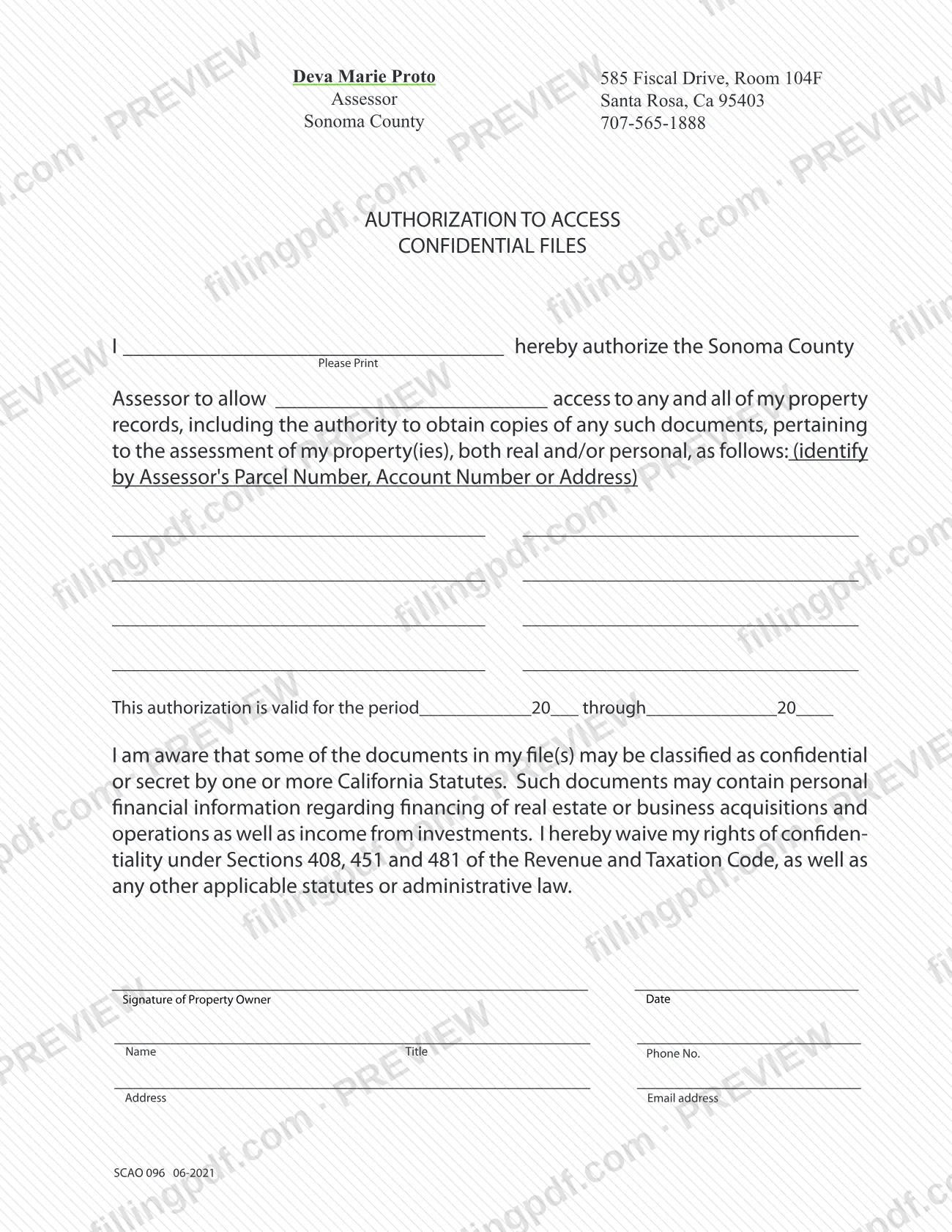
Form SCAO 096, Authorization to Access Confidential Files, is the Sonoma County Assessor's form for letting someone else see and copy the assessment records on your property. It is one of the documents connected to Sonoma County property tax assessment: the owner names the person, lists the properties, sets the dates and waives confidentiality rights under the California Revenue and Taxation Code. On FillingPDF you can fill out the form online and download or print the completed PDF; the original is published by the county at the official URL below.
Last updated
What is SCAO 096?
Authorization to Access Confidential Files (Form SCAO 096) is a Sonoma County Assessor form in which a property owner authorizes the Assessor to allow a named person access to the owner's property records, including the authority to obtain copies, about the assessment of the properties listed on the form.
The form is issued by the Sonoma County Assessor, part of the County Clerk-Recorder-Assessor's office, which is responsible for property assessments and for determining eligibility for property tax exemptions and exclusions. The authorization covers real and/or personal property that you identify by Assessor's Parcel Number, Account Number or Address, and it is valid only for the period you write on the form.
The form warns that some documents in your files may be classified as confidential or secret under California statutes. Such documents may contain personal financial information about financing of real estate or business acquisitions and operations, as well as income from investments. By signing, you waive your rights of confidentiality under Sections 408, 451 and 481 of the Revenue and Taxation Code, as well as any other applicable statutes or administrative law.
The form only grants access. It has no lines for property values, exemptions or appeals. The revision printed on it is SCAO 096 06-2021.
Who needs to file SCAO 096?
The main group is property owners in Sonoma County who want the Assessor to let another person access their assessment records and obtain copies. The form is signed by the property owner, on the line labeled Signature of Property Owner.
Use it when:
- the records you want to share concern the assessment of your real property, your personal property, or both;
- you can identify each property by Assessor's Parcel Number, Account Number or Address;
- you accept the waiver of confidentiality rights under Sections 408, 451 and 481 of the Revenue and Taxation Code and any other applicable statutes or administrative law.
The person you authorize is written in the blank after "allow" in the first paragraph. The form has room for eight property identifiers. It does not describe a separate role for an agent or attorney signing in the owner's place, and it has a signature line for the property owner only. For questions about who may sign for an owner or an entity, call the Assessor's office at 707-565-1888.
You do not need this form to view your own records; it exists to extend access to someone you name.
When to file SCAO 096
Complete Form SCAO 096 when you decide to give another person access to your assessment records at the Sonoma County Assessor. The form prints no filing deadline. Instead, the authorization is valid only for the period you enter in the sentence "This authorization is valid for the period ____ 20__ through ____ 20__", so set the start and end dates to cover the time the person needs access. A new form is needed for dates outside that period or for properties you did not list. The form states no processing time; contact the Assessor's office at 707-565-1888 for questions.
How to fill out SCAO 096
Print your name as owner
In the first line after "I", print your name. The form says "Please Print", so write it legibly.
Name the person you authorize
In the blank after "allow", write the name of the person who will have access to your property records and the authority to obtain copies.
List the properties covered
In the eight spaces under "as follows", identify each property by Assessor's Parcel Number, Account Number or Address. The authorization covers real and/or personal property pertaining to its assessment.
Enter the validity period
Complete "This authorization is valid for the period ____ 20__ through ____ 20__" with the start and end month and year.
Read the confidentiality waiver
Read the paragraph on confidential or secret documents. Signing waives your rights of confidentiality under Sections 408, 451 and 481 of the Revenue and Taxation Code and other applicable statutes or administrative law.
Sign and date the form
Sign on the line labeled Signature of Property Owner and enter the date beside it.
Enter name, title and phone number
On the next line, write your Name, Title and Phone No. in the spaces provided.
Enter address and email
On the last line, write your Address and Email address.
Review and download the PDF
Check the authorized person, properties, dates and signature. Download or print the completed PDF from FillingPDF and deliver it as described under How to submit.
How to submit SCAO 096
The form itself names no submission channel. It prints the Assessor's office block at the top: Sonoma County Assessor, 585 Fiscal Drive, Room 104F, Santa Rosa, CA 95403, telephone 707-565-1888. Call that number to confirm how the office accepts the signed authorization (in person, by mail or another way) before you send it.
Before you deliver it, check that the owner has signed and dated the form, that the authorized person is named, that each property is identified and that the validity dates are filled in. Keep a copy for your records.
The Assessor's office is part of the Sonoma County Clerk-Recorder-Assessor office, whose page is at https://sonomacounty.ca.gov/administrative-support-and-fiscal-services/clerk-recorder-assessor. FillingPDF lets you fill out and download the PDF; submission follows the agency's channels.
Common mistakes to avoid
- Leaving the blank after "allow" empty, so the form does not say who is authorized to access your records.
- Listing no properties, or listing one without an Assessor's Parcel Number, Account Number or Address; the authorization covers the properties identified on the form.
- Skipping the validity dates ("____ 20__ through ____ 20__"), which leaves the authorization period undefined.
- Signing without reading the waiver: it waives your confidentiality rights under Sections 408, 451 and 481 of the Revenue and Taxation Code and other applicable statutes.
- Submitting the form unsigned or undated; the signature line is labeled Signature of Property Owner and has a date line.
- Ignoring the "Please Print" instruction and writing a name that cannot be read.
- Leaving out the signer's name, title, phone number, address or email address on the lines at the bottom.
- Assuming the form covers properties you did not list; it applies to the parcels, accounts or addresses you identify.
Frequently asked questions
What is Form SCAO 096?
Form SCAO 096, Authorization to Access Confidential Files, is a Sonoma County Assessor form. The property owner uses it to authorize a named person to access, and obtain copies of, records about the assessment of the properties listed on the form.
Is Form SCAO 096 part of Sonoma County property tax assessment?
It relates to the Assessor's assessment records, which are behind Sonoma County property tax. The form only grants record access to someone you name; it has no lines for values, exemptions or payments and states no effect on a tax amount.
Who signs the Authorization to Access Confidential Files?
The property owner signs, on the line labeled Signature of Property Owner, and dates it. The form also asks for the signer's name, title, phone number, address and email address. It prints no separate signature line for an agent.
What rights do I waive by signing SCAO 096?
You waive your rights of confidentiality under Sections 408, 451 and 481 of the Revenue and Taxation Code, and any other applicable statutes or administrative law. The form notes that file documents may contain personal financial information, such as financing and investment income.
How long is the authorization valid?
For the period you write on the form, in the sentence beginning "This authorization is valid for the period". You enter the start and end month and year. The form prints no standard duration.
Can I fill out Form SCAO 096 online?
Yes. You can fill out the PDF online on FillingPDF and download or print it. FillingPDF is an independent service and does not send the form to the Sonoma County Assessor; you deliver it yourself.
Where do I send the completed authorization?
The form names no channel. It prints the Assessor's address, 585 Fiscal Drive, Room 104F, Santa Rosa, CA 95403, and phone 707-565-1888. Call that number to confirm how the office accepts the signed form.
How many properties can I list on the form?
The form has eight lines for properties, in two columns of four. Identify each by Assessor's Parcel Number, Account Number or Address, and cover real and/or personal property. Use a new form for properties that do not fit.
Ready to fill out SCAO 096?
Fill out SCAO 096 now