
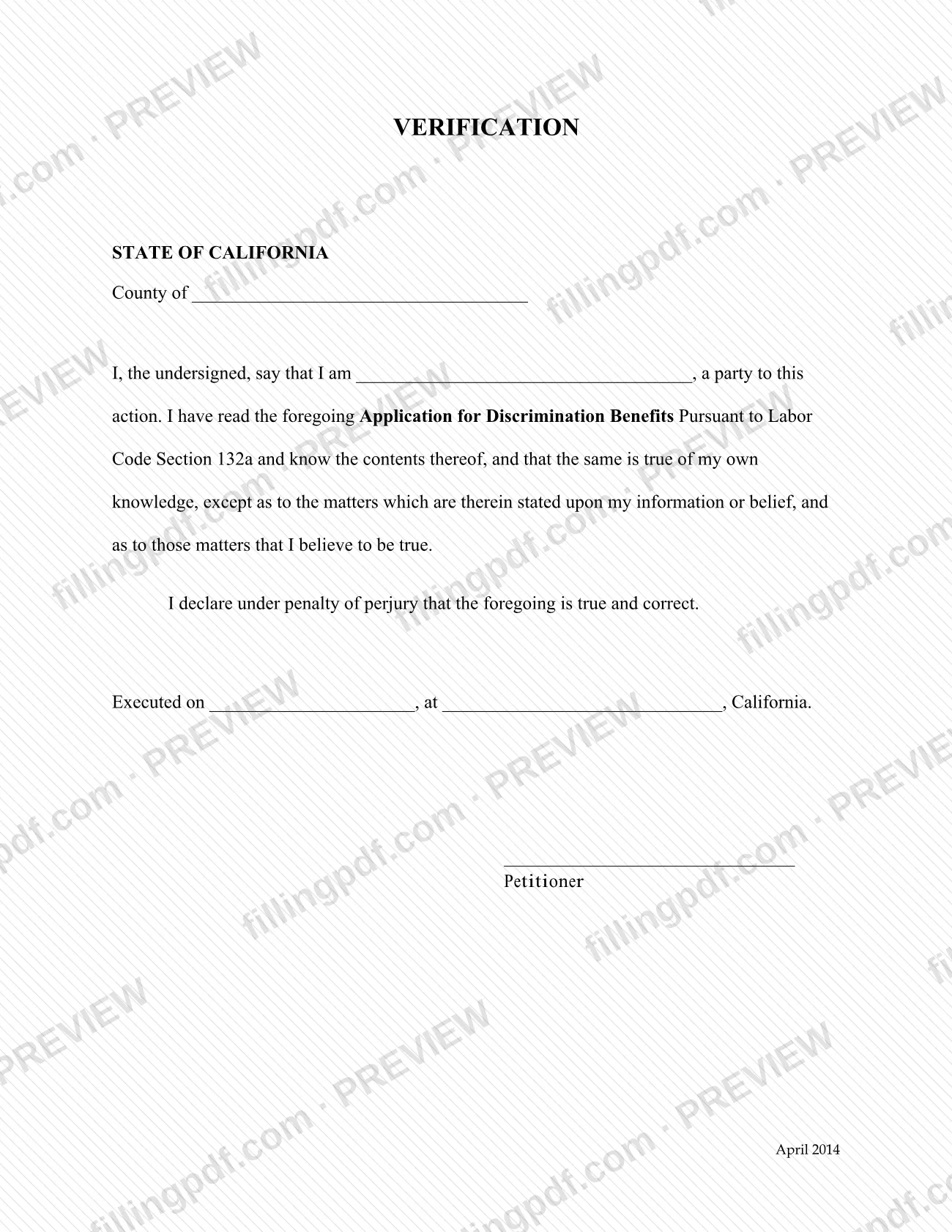
The Verification form for the Application for Discrimination Benefits Pursuant to Labor Code Section 132a is a one-page declaration published by the California Division of Workers’ Compensation (DWC). In it, the petitioner states that they have read the application and that its contents are true. You use it together with that application, not on its own. On this page you can fill out the form online on FillingPDF and download or print the completed PDF; the agency publishes the original PDF at dir.ca.gov.
Last updated
What is Verification Form: Labor Code 132a Discrimination Benefits?
The Verification is a one-page California Division of Workers’ Compensation (DWC) form in which the petitioner declares, under penalty of perjury, that they have read the Application for Discrimination Benefits Pursuant to Labor Code Section 132a and that its contents are true.
The text is a fixed statement with blanks. The signer says they are a party to the action, that they have read “the foregoing” application and know its contents, and that the contents are true of their own knowledge. The one exception is any matter stated in the application upon information or belief; for those matters the signer says they believe them to be true. The form then adds the declaration that the foregoing is true and correct, made under penalty of perjury.
The form has blanks for the county, the signer’s capacity as a party, the date it was executed and the place in California where it was signed. It ends with a signature line labeled Petitioner. The revision printed on it is April 2014.
The Verification does not make the claim itself. The application is a separate document, and this form only confirms it. The DWC lists many other forms on its forms page; this one is tied to the Labor Code Section 132a application by its own wording.
Who needs to file Verification Form: Labor Code 132a Discrimination Benefits?
The petitioner who signs the Application for Discrimination Benefits Pursuant to Labor Code Section 132a completes this Verification. The form’s signature line is labeled Petitioner, and its opening sentence has the signer state their capacity as “a party to this action”.
- Use it only with the application it names. The text refers to “the foregoing Application for Discrimination Benefits Pursuant to Labor Code Section 132a”, so it does not verify any other DWC form.
- The signer must have read the application first. The declaration says they have read it and know its contents.
- The form does not say that anyone other than the petitioner may sign it, and it has no space for a representative.
If you are unsure whether the Verification applies to your case, the DWC invites questions at [email protected].
When to file Verification Form: Labor Code 132a Discrimination Benefits
You complete the Verification when you complete the Application for Discrimination Benefits Pursuant to Labor Code Section 132a, because the form states that the signer has read “the foregoing” application. It is signed after the application is final, and the date goes in the Executed on blank.
No separate due date is printed on the Verification, so it travels with the application and is not filed on a schedule of its own. For any deadline that applies to the application, check the DWC’s materials for that application or write to [email protected].
How to fill out Verification Form: Labor Code 132a Discrimination Benefits
Download the current PDF
Open the form, which carries the April 2014 revision date. The page lets you fill it out online.
Enter the county
On the line after “County of”, write the county where you are signing.
State your capacity
In “I, the undersigned, say that I am ____”, enter your capacity as a party to the action.
Read the declaration
Check that you have read the Application for Discrimination Benefits Pursuant to Labor Code Section 132a and that it is true of your own knowledge, except matters stated on information or belief.
Enter the date executed
On the “Executed on” line, enter the date you sign the form.
Enter the place of signing
After “at”, write the city or place in California where you sign; “California” is already printed.
Sign as Petitioner
Sign on the line above the word Petitioner. The signature is made under penalty of perjury.
Review and download the completed PDF
Check the county, capacity, date and place, then download or print the completed PDF from FillingPDF and attach it to the application as described under How to submit.
How to submit Verification Form: Labor Code 132a Discrimination Benefits
The Verification is submitted together with the application it verifies. The form prints no separate address, portal, fee or appointment rule of its own.
- With the application: attach the signed Verification to the Application for Discrimination Benefits Pursuant to Labor Code Section 132a and send both through the channel that applies to the application.
- Where to get the form: the DWC publishes it at https://www.dir.ca.gov/dwc/FORMS/ApplicationDiscriminationBenefits_132(A)-Verification.pdf. Its forms page, https://www.dir.ca.gov/dwc/forms.html, recommends downloading fillable forms to your desktop.
- Questions: the DWC forms page gives [email protected] for comments and questions.
FillingPDF lets you fill out and download the PDF; submission follows the agency’s channels.
Common mistakes to avoid
- Signing the Verification before reading the Application for Discrimination Benefits Pursuant to Labor Code Section 132a; the form declares that you have read it and know its contents.
- Leaving the county blank under “STATE OF CALIFORNIA”.
- Leaving the capacity blank in “I, the undersigned, say that I am ____, a party to this action”.
- Omitting the date or the place in California from the “Executed on ____, at ____, California” line.
- Leaving the Petitioner signature line unsigned; the declaration is made under penalty of perjury.
- Using the Verification with a document other than the Labor Code Section 132a application it names.
- Treating information stated only upon information or belief as personal knowledge; the form separates the two.
Frequently asked questions
What is the verification form for a Labor Code 132a application?
It is a one-page DWC declaration in which the petitioner states, under penalty of perjury, that they have read the Application for Discrimination Benefits Pursuant to Labor Code Section 132a and that its contents are true. It confirms the application and does not replace it.
Who signs the Verification?
The petitioner signs it. The signature line is labeled Petitioner, and the first sentence has the signer give their capacity as a party to the action. The form has no separate space for a representative to sign.
Do I fill in the county on the Verification?
Yes. The form has a blank after “County of” under “STATE OF CALIFORNIA”, along with blanks for your capacity, the date you executed it and the place in California where you signed. Complete each one before signing.
What does “information or belief” mean on the Verification?
The form says the application is true of your own knowledge, except for matters stated in it upon information or belief. For those matters you declare that you believe them to be true. The form gives no further definition.
Where do I send the Verification?
The Verification has no address of its own. It verifies “the foregoing” Application for Discrimination Benefits Pursuant to Labor Code Section 132a, so you attach it to that application and send both together. For questions, the DWC forms page lists [email protected].
Can I fill out the verification form online?
Yes. You can fill out the PDF online on FillingPDF and download or print it. FillingPDF is an independent service and does not file the form; you send it to the DWC through the channels that apply to the application.
Is there a deadline to file the Verification?
No separate due date is printed on the form. You sign it when the application is complete and send it with that application. For deadlines that apply to the application itself, check DWC materials or write to [email protected].
Ready to fill out Verification Form: Labor Code 132a Discrimination Benefits?
Fill out Verification Form: Labor Code 132a Discrimination Benefits now