
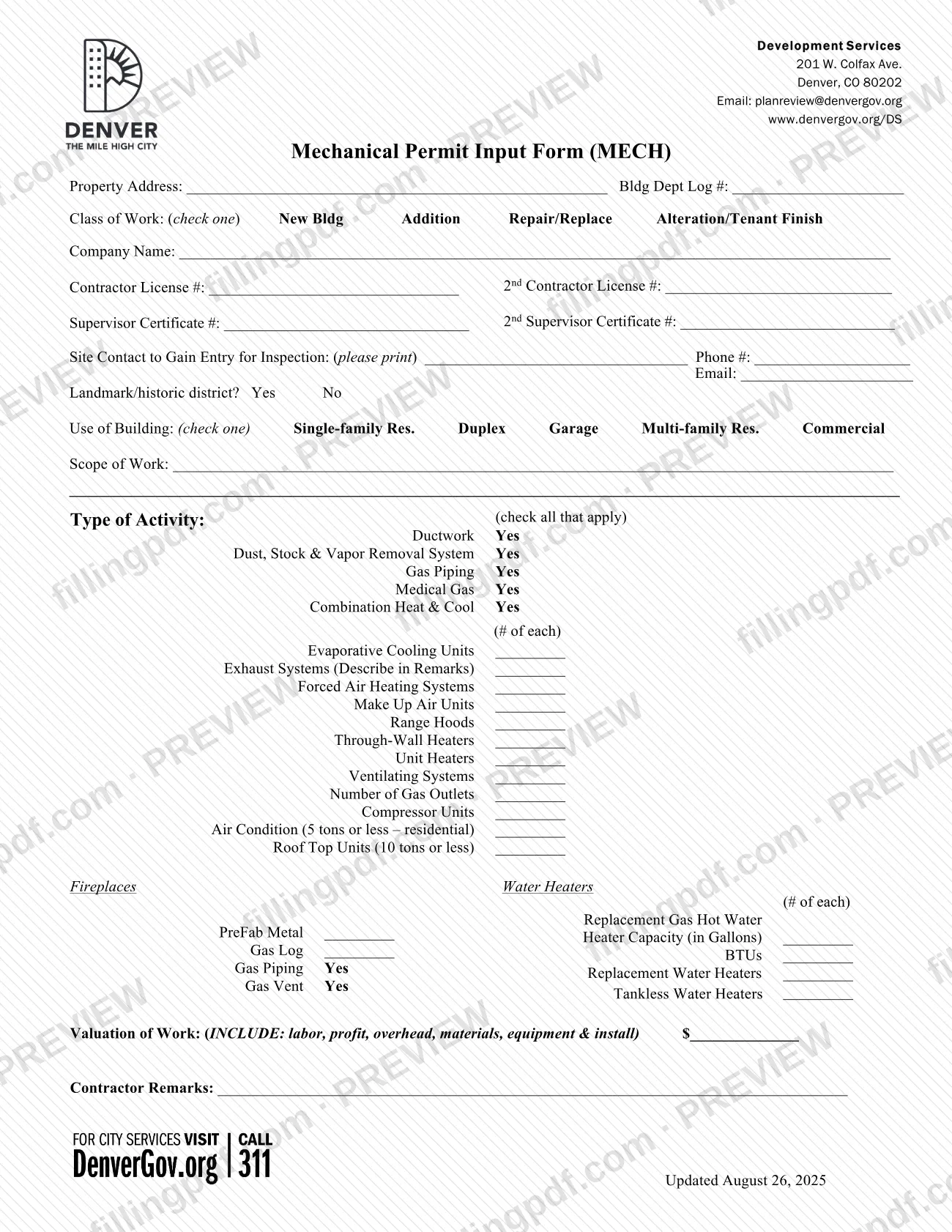
The Application for a mechanical permit is a City and County of Denver Planning and Development form, headed Mechanical Permit Input Form (MECH), on which a contractor describes mechanical work at a property: class of work, building use, type of activity, equipment counts and valuation. It is one of the documents behind a Denver permit for mechanical work, whether the work qualifies for a quick permit or goes through Building Log review. On this page you can fill out the form online on FillingPDF and download or print the completed PDF; Denver publishes the original PDF and runs the permit process in its e-permits portal.
Last updated
What is MECH?
The Application for a mechanical permit is the City and County of Denver Planning and Development form, headed Mechanical Permit Input Form (MECH), on which a contractor identifies a property and lists the mechanical work, equipment counts and valuation for a permit.
The form is issued by Development Services, 201 W. Colfax Ave., Denver, CO 80202. It records the property address and the Bldg Dept Log #, the class of work, the contractor's license and supervisor certificate numbers, a site contact for inspections, whether the property is in a landmark or historic district, the use of the building, a scope of work, the type of activity with the number of each unit, the valuation of the work and contractor remarks.
Denver's Quick Permits page explains where the mechanical permit fits. Quick permits are trade-specific permits issued without plan review, but most projects cannot be permitted that way. The same page lists the Application for a mechanical permit among the items to upload with a Building Log application for certain commercial and multifamily equipment that no longer qualifies for a quick permit.
Denver publishes separate applications for other trades, such as the Application for a boiler and commercial A/C permit and the Application for a plumbing permit. This form covers mechanical work only.
Who needs to file MECH?
The form is written for contractors who apply for a Denver mechanical permit: it asks for the company name, contractor license numbers, supervisor certificate numbers and contractor remarks.
Work that Denver lists as allowed under a mechanical quick permit includes:
- Single-family and duplex structures and garages: residential A/C, compressor units, ductwork, evaporative cooling units, exhaust systems, fireplaces, forced air heating systems, gas piping, make-up air units, range hoods, roof-top units of 10 tons or less, through-wall heaters, unit heaters, ventilating systems and water heaters.
- Multifamily and commercial structures: ductwork, evaporative cooling units, exhaust systems, fireplaces, forced air heating systems, make-up air units, rooftop units, unit heaters and ventilating systems, with replacement equipment of 300MBH or less in the same location.
Quick permits cannot cover repair or replacement of equipment the system was not designed for, replacements that are not 1 for 1 or need other upgrades, or equipment over 300MBH (except a like-for-like emergency replacement of one unit). Those projects go through a Building Log application with plans signed and stamped by a licensed design professional or professional engineer.
For single-family, duplex and IRC townhome projects with the class of work New Building or Addition, an issued Residential Construction Permit is required to complete the quick permit application. A trade contractor asks the general contractor for that permit number.
When to file MECH
Complete the form when you apply for a mechanical permit for a Denver property. It carries no separate due date of its own.
For residential quick permits covered by the Residential Construction Permit rule, timing depends on that permit. If it has already been issued, the quick permit application can be completed and the permit is issued immediately. If not, the general contractor must add their license to the Residential Construction permit and pay for it first; the quick permit application then becomes available and can likely be issued the same day.
Since March 1, 2023, new or replacement gas-fired and certain other equipment in commercial and multifamily buildings cannot use a quick permit and goes through a Building Log application instead. If plans change after a permit is issued, submit modified drawings as a new Building Log application in e-permits.
Documents you need
- Residential Construction Permit number (format YYYY-RESCON-XXXXXXX): needed to complete a quick permit application for single-family, duplex and IRC townhome projects with class of work New Building or Addition.
- Plans signed and stamped by a licensed design professional or professional engineer: required with a Building Log application for mechanical work that cannot be permitted as a quick permit.
- Electrification Feasibility Report: one option for a gas-fired water heater, air conditioning unit, gas-fired furnace or gas-fired roof-top unit in a commercial or multifamily building that must use a Building Log application.
- Gas leak testing of all piping connected to the gas meter, per Denver Energy Code Section C503.3.3, item 3 (space heating equipment): another option for the same commercial and multifamily equipment.
- A report signed and stamped by a licensed design professional or professional engineer showing the equipment is correctly sized per Denver Energy Code Section C403.3.1: a third option for that equipment.
- Completed Landmark quick review application and checklist: required in e-permits for quick permits involving exterior work on an individual landmark or a building in a historic district.
- Photo of the building from the street, and photos of the exterior area of work: also required for landmark or historic district exterior work.
- Cut sheet or product information for the proposed mechanical unit(s): also required for landmark or historic district exterior work.
How to fill out MECH
Enter property address and log number
Write the Property Address at the top of the form and the Bldg Dept Log # where the form asks for it.
Check one Class of Work
Check New Bldg, Addition, Repair/Replace or Alteration/Tenant Finish. Class of Work refers to the entire project, so New Bldg means the whole building is new construction.
Enter contractor and supervisor details
Fill in the Company Name, Contractor License # and Supervisor Certificate #. Use the 2nd license and 2nd certificate lines only if a second one applies.
Add the site contact
Print the name of the person who can give entry for inspection, with a phone number and email.
Mark landmark status and building use
Answer Yes or No to Landmark/historic district? and check one Use of Building: Single-family Res., Duplex, Garage, Multi-family Res. or Commercial.
Describe the scope of work
Write a short description of the mechanical work on the Scope of Work lines.
Check activities and enter counts
Under Type of Activity, check all that apply, such as Ductwork or Gas Piping. Enter the number of each unit, such as Forced Air Heating Systems, Range Hoods or Roof Top Units (10 tons or less); describe exhaust systems in Contractor Remarks.
Complete fireplace and water heater entries
Enter counts for PreFab Metal and Gas Log fireplaces, and check Gas Piping and Gas Vent if they apply. For water heaters, enter replacement gas hot water heater capacity in gallons, BTUs, replacement water heaters and tankless water heaters.
Enter the valuation of work
Enter the total value of the work, including labor, profit, overhead, materials, equipment and installation.
Add contractor remarks
Use Contractor Remarks for anything the form tells you to describe there, such as exhaust systems, or other details about the job.
Review and download the completed PDF
Check each entry against the property, license and certificate numbers. Download or print the completed PDF from FillingPDF, then apply through the channels described under How to submit.
How to submit MECH
Denver takes mechanical permit applications through its e-permits portal; Development Services answers questions by email, phone and appointment.
- E-permits, quick permit: sign in, go to Apply for a Permit under the Development Services section and select the appropriate trade permit under Quick Permits. Quick permits for exterior work on a landmark or in a historic district also need the Landmark materials listed under Required documents.
- E-permits, Building Log: for mechanical work that cannot be a quick permit, select the Building Log application and upload the plans or the Application for a mechanical permit with the supporting item the Quick Permits page lists for your equipment.
- Questions: email [email protected], call 720-865-2720, or make an appointment to go in person. The form lists Development Services at 201 W. Colfax Ave., Denver, CO 80202, and www.denvergov.org/DS.
More detail is on the Quick Permits page. FillingPDF lets you fill out and download the PDF; submission follows the channels above.
Common mistakes to avoid
- Selecting New Bldg for new equipment in an existing building; Denver says not to, and Class of Work describes the entire project, not only the trade work.
- Starting a quick permit application for a single-family, duplex or IRC townhome New Building or Addition without an issued Residential Construction Permit.
- Applying for a quick permit for work Denver says it cannot cover, such as replacement that is not 1 for 1, equipment not designed for the system, or single units over 300MBH.
- Using a quick permit for new or replacement gas-fired equipment in commercial or multifamily buildings after March 1, 2023, instead of a Building Log application.
- Skipping Landmark Preservation review for exterior work on a landmark or in a historic district, or answering the Landmark/historic district question incorrectly.
- Checking more than one box for Class of Work or Use of Building, which the form says to check only once.
- Leaving labor, profit, overhead, materials, equipment and installation out of the Valuation of Work.
- Building something different from the approved plans without submitting modified drawings; a modified permit is required.
- Making false statements on the application; Denver may revoke a quick permit issued on that basis.
Frequently asked questions
What is the Application for a mechanical permit in Denver?
It is a City and County of Denver Planning and Development form, headed Mechanical Permit Input Form (MECH), where a contractor lists the property, class of work, equipment counts and valuation of mechanical work. It supports a mechanical permit applied for through Denver's e-permits portal.
Where do I apply for a Denver permit for mechanical work?
Apply in Denver's e-permits portal: sign in and choose Apply for a Permit under the Development Services section, then select the trade permit under Quick Permits. Work that cannot be a quick permit goes through a Building Log application in e-permits.
Can I get a mechanical permit in Denver without plan review?
Sometimes. Quick permits are issued without plan review for specific work, such as residential A/C, ductwork or gas piping in single-family and duplex structures. Most projects cannot be permitted this way, and Denver may revoke a quick permit issued on false statements.
Do I need a Residential Construction Permit for a mechanical quick permit?
Only for single-family, duplex and IRC townhome projects with class of work New Building or Addition. Alteration/Tenant Finish and Repair/Replace do not require one. Trade contractors can get the permit number from the general contractor.
Which Class of Work should I check on the form?
Check the one that describes the entire project. New Bldg is for entirely new construction; Addition adds floor area, stories or height; Alteration/Tenant Finish is for renovation or adding equipment to an existing building; Repair/Replace is for equipment replacement or repair only.
What is required to replace gas-fired equipment in a commercial building?
Since March 1, 2023, these projects use a Building Log application instead of a quick permit. You upload the Application for a mechanical permit plus an Electrification Feasibility Report, gas leak testing, or a stamped report on equipment sizing, as the Quick Permits page lists.
How long does a Denver mechanical quick permit take?
For residential projects covered by the Residential Construction Permit rule, the permit is issued immediately if that permit has already been issued. If not, the quick permit can likely be issued the same day once the general contractor pays for it.
Does a landmark or historic district building need extra review?
Yes, for exterior work. Landmark Preservation must review quick permits involving exterior work on an individual landmark or a building in a historic district, and e-permits asks for a Landmark quick review application, photos and a cut sheet.
Can I fill out the Denver mechanical permit application online?
You can fill out the PDF online on FillingPDF and download or print it. FillingPDF is independent of the City and County of Denver and does not submit the form; you apply through the e-permits portal or the other Denver channels.
Ready to fill out MECH?
Fill out MECH now