
The Claim for Refund is the City and County of Denver form for requesting a refund of overpaid Denver sales, use, lodger's, occupational privilege, telecommunications business and facilities development admissions taxes. It is one of several Denver tax documents, but it is not a Denver property tax form: the taxes it covers are the ones printed at the top of the page. Licensed businesses and unlicensed purchasers or employees each use their own section. On FillingPDF you can fill out the form online and download or print the completed PDF; the original PDF is published by the City and County of Denver.
Last updated
What is Claim for Refund – Denver, CO?
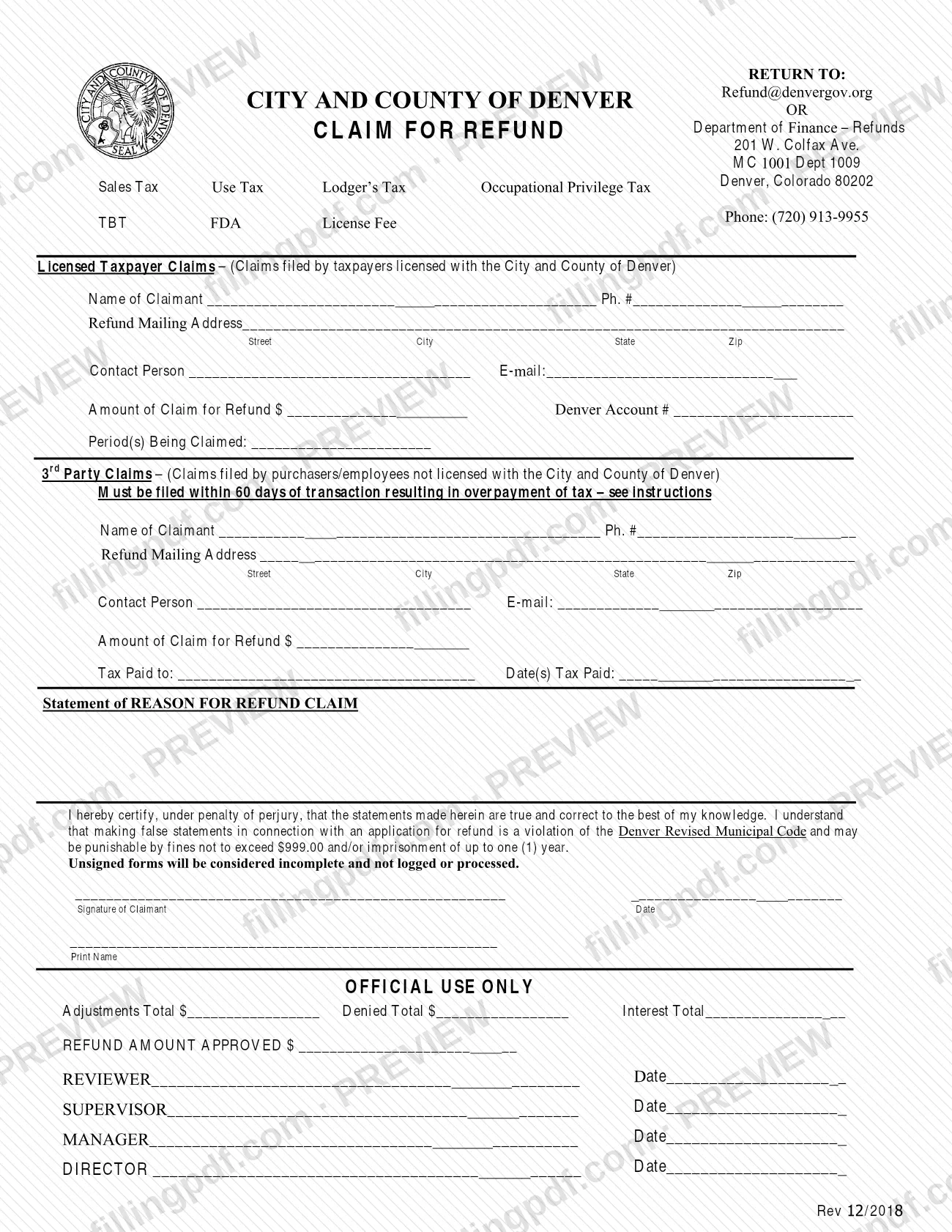
Claim for Refund is the City and County of Denver form used to request a refund of overpaid Denver sales, use, lodger's, occupational privilege (OPT), telecommunications business (TBT) and facilities development admissions (FDA) taxes.
The form carries the Denver Department of Finance – Refunds return address and has two claimant sections. Licensed Taxpayer Claims are filed by taxpayers licensed with the City and County of Denver and ask for the Denver account number and the period or periods claimed. 3rd Party Claims are filed by purchasers or employees who are not licensed with the city and ask who the tax was paid to and on what dates.
Both sections ask for the claimant's name, phone number, refund mailing address, contact person, email and the amount of the claim. A Statement of REASON FOR REFUND CLAIM block follows, with a certification under penalty of perjury and a signature line. The "Official Use Only" block at the bottom is for city reviewers.
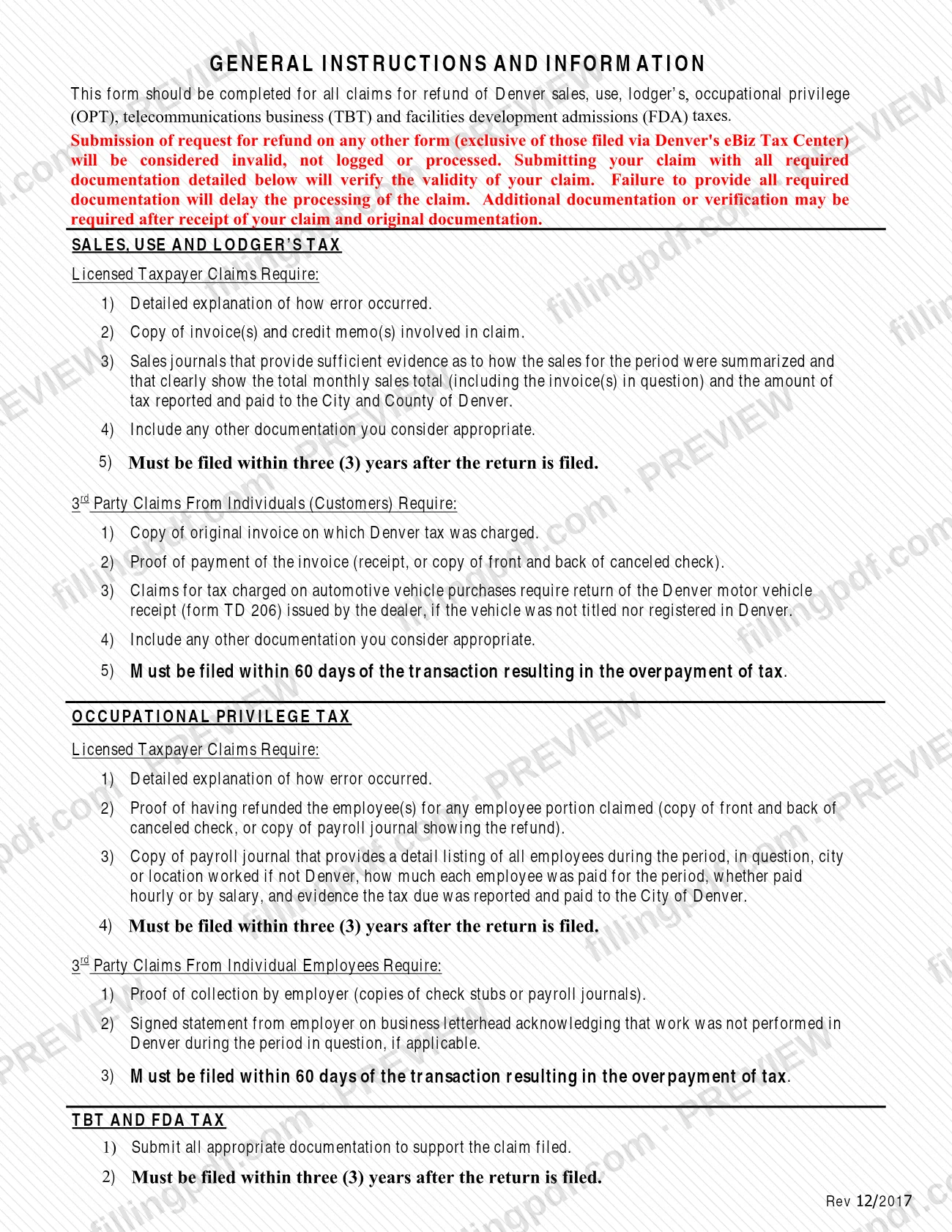
The printed general instructions state that Denver requires this form for all refund claims for these taxes. A request made on any other form is invalid and is not logged or processed, except claims filed through Denver's eBiz Tax Center. The form covers only the taxes listed on it; it does not cover Denver property tax.
Who needs to file Claim for Refund – Denver, CO?
Two groups use the form, each in its own section.
- Licensed taxpayers: businesses licensed with the City and County of Denver that overpaid sales, use, lodger's, OPT, TBT or FDA tax complete the Licensed Taxpayer Claims section, including their Denver account number.
- Third parties: purchasers (customers) who were charged Denver tax, and employees who had OPT collected by an employer, complete the 3rd Party Claims section. The form describes these as claims filed by purchasers or employees not licensed with the city.
Denver's business tax FAQ also says an employee who works for more than one Denver employer owes the Employee OPT only once. Where more than one employer withheld it, a Claim for Refund may be submitted.
Do not use another form for these taxes: the instructions say a refund request on any other form is invalid, apart from claims made through the eBiz Tax Center. The form does not cover Denver property tax.
When to file Claim for Refund – Denver, CO
File after you find an overpayment, within the period that applies to your type of claim.
- Licensed taxpayer claims for sales, use and lodger's tax, and for OPT: within three (3) years after the return is filed.
- TBT and FDA tax claims: within three (3) years after the return is filed.
- 3rd party claims from customers and from individual employees: within 60 days of the transaction resulting in the overpayment of tax.
Denver's business tax FAQ mentions a three-year period for a purchaser's claim, but the form's own instructions and its 3rd Party Claims heading say 60 days. Follow the form, and call the Refunds office at (720) 913-9955 if you are unsure. Documents missing from the claim delay processing, and the city may ask for more documentation or verification after it receives the claim. The form sets no processing time.
Documents you need
- Licensed sales, use or lodger's tax claims: a detailed explanation of how the error occurred.
- Licensed sales, use or lodger's tax claims: a copy of the invoice(s) and credit memo(s) involved in the claim.
- Licensed sales, use or lodger's tax claims: sales journals showing how the period's sales were summarized, the total monthly sales (including the invoices in question) and the tax reported and paid to Denver.
- Customer (3rd party) sales, use or lodger's tax claims: a copy of the original invoice on which Denver tax was charged.
- Customer (3rd party) claims: proof of payment of the invoice, either a receipt or a copy of the front and back of the canceled check.
- Customer claims for tax on an automotive vehicle purchase: the Denver motor vehicle receipt (form TD 206) issued by the dealer, returned if the vehicle was not titled or registered in Denver.
- Licensed OPT claims: a detailed explanation of how the error occurred.
- Licensed OPT claims for an employee portion: proof of having refunded the employees, either a copy of the front and back of the canceled check or a payroll journal showing the refund.
- Licensed OPT claims: a payroll journal listing all employees for the period, the city or location worked if not Denver, each employee's pay, whether hourly or salaried, and evidence the tax was reported and paid to Denver.
- Employee (3rd party) OPT claims: proof of collection by the employer, such as copies of check stubs or payroll journals.
- Employee OPT claims, if applicable: a signed statement from the employer on business letterhead acknowledging the work was not performed in Denver during the period.
- TBT and FDA tax claims: all appropriate documentation supporting the claim.
How to fill out Claim for Refund – Denver, CO
Mark the type of tax
At the top, check the tax the claim is about: Sales Tax, Use Tax, Lodger's Tax, Occupational Privilege Tax, TBT, FDA or License Fee.
Choose your claimant section
Complete Licensed Taxpayer Claims if you are licensed with the City and County of Denver. Complete 3rd Party Claims if you are a purchaser or employee who is not licensed.
Enter claimant name and phone
Write the name of the claimant and the phone number in the Name of Claimant and Ph. # fields of your section.
Enter the refund mailing address
Fill in the Refund Mailing Address as street, city, state and ZIP code.
Add contact person and email
Enter the Contact Person and the E-mail address the city should use for questions about the claim.
Enter the amount of the claim
Write the amount you are asking to have refunded in Amount of Claim for Refund.
Enter account and period details
Licensed taxpayers enter the Denver Account # and the Period(s) Being Claimed. 3rd party claimants enter Tax Paid to and Date(s) Tax Paid.
Write the reason for the claim
Use the Statement of REASON FOR REFUND CLAIM area to explain why you overpaid. The general instructions ask licensed taxpayers for a detailed explanation of how the error occurred.
Sign, date and print your name
Sign and date the certification under penalty of perjury and print your name. Leave the OFFICIAL USE ONLY block blank.
Review, download and assemble
Check the entries against your invoices or payroll records, then download or print the completed PDF from FillingPDF. Attach the documents required for your tax type and submit through one of the channels under How to submit.
How to submit Claim for Refund – Denver, CO
You can return the signed form by email, by mail, or through Denver's eBiz Tax Center.
- Email: send it to [email protected].
- Mail: City and County of Denver, Department of Finance – Refunds, 201 W. Colfax Ave., MC 1001 Dept 1009, Denver, Colorado 80202.
- eBiz Tax Center: the form excepts claims filed through Denver's eBiz Tax Center, and the city's business tax FAQ says a business can make a claim through its eBiz Taxpayer portal. The portal is at https://www.denvergov.org/ebiztax.
Send all required documentation with the claim. Unsigned forms are treated as incomplete and are not logged or processed. Questions go to the Refunds office at (720) 913-9955. FillingPDF lets you fill out and download the PDF; submission follows the channels above.
Common mistakes to avoid
- Submitting the claim without a signature; the form states unsigned forms are incomplete and are not logged or processed.
- Requesting a refund of these Denver taxes on a letter or another form; the instructions say such requests are invalid, except claims filed through the eBiz Tax Center.
- Sending the claim without all the required documentation, which delays processing.
- Filing a 3rd party claim more than 60 days after the transaction that caused the overpayment.
- Filing a licensed taxpayer, TBT or FDA claim more than three years after the return was filed.
- Completing the 3rd Party Claims section as a licensed business, or the Licensed Taxpayer section as a customer or employee.
- Filing a licensed OPT claim for an employee portion without proof that the employees were refunded.
- Claiming tax charged on a vehicle purchase without the Denver motor vehicle receipt (form TD 206) when the vehicle was not titled or registered in Denver.
- Writing in the Official Use Only block, which is for city reviewers.
Frequently asked questions
What is the Denver Claim for Refund form used for?
It is used to claim a refund of overpaid Denver sales, use, lodger's, occupational privilege (OPT), telecommunications business (TBT) and facilities development admissions (FDA) taxes. The city's instructions say all such claims are to be made on this form, except those filed through the eBiz Tax Center.
Is this a Denver property tax refund form?
No. The form covers only sales, use, lodger's, OPT, TBT and FDA taxes, which are the taxes printed on it. Denver's business tax FAQ describes property tax as a separate tax payable to the County Treasurer, so this form is not the way to request a property tax refund.
How long do I have to file a Denver Claim for Refund?
Licensed taxpayers have three years after the return was filed, for sales, use, lodger's, OPT, TBT and FDA claims. Third party claims from customers or employees must be filed within 60 days of the transaction that caused the overpayment.
Where do I send the Denver Claim for Refund?
Email it to [email protected], or mail it to Department of Finance – Refunds, 201 W. Colfax Ave., MC 1001 Dept 1009, Denver, Colorado 80202. Claims can also be made through Denver's eBiz Tax Center. The Refunds phone number is (720) 913-9955.
What documents do I need to attach to a Denver refund claim?
It depends on the tax and the claimant. Licensed businesses need an explanation of the error and supporting invoices, credit memos, sales journals or payroll records. Customers need the original invoice and proof of payment. Employees need proof the employer collected the tax. TBT and FDA claims need supporting documentation.
What is the difference between Licensed Taxpayer and 3rd Party claims?
Licensed Taxpayer Claims are filed by taxpayers licensed with the City and County of Denver and ask for a Denver account number and period. 3rd Party Claims are filed by purchasers or employees who are not licensed and ask for who the tax was paid to and the dates paid.
What happens if I do not sign the Claim for Refund?
The city treats it as incomplete and does not log or process it. The form requires the claimant's signature, date and printed name under a certification, made under penalty of perjury, that the statements are true and correct.
Can I fill out the Denver Claim for Refund online?
You can fill out the PDF online on FillingPDF and download or print it. FillingPDF does not send the claim to the city and is not affiliated with it; you submit the completed form by email, mail or through the eBiz Tax Center.
Ready to fill out Claim for Refund – Denver, CO?
Fill out Claim for Refund – Denver, CO now