
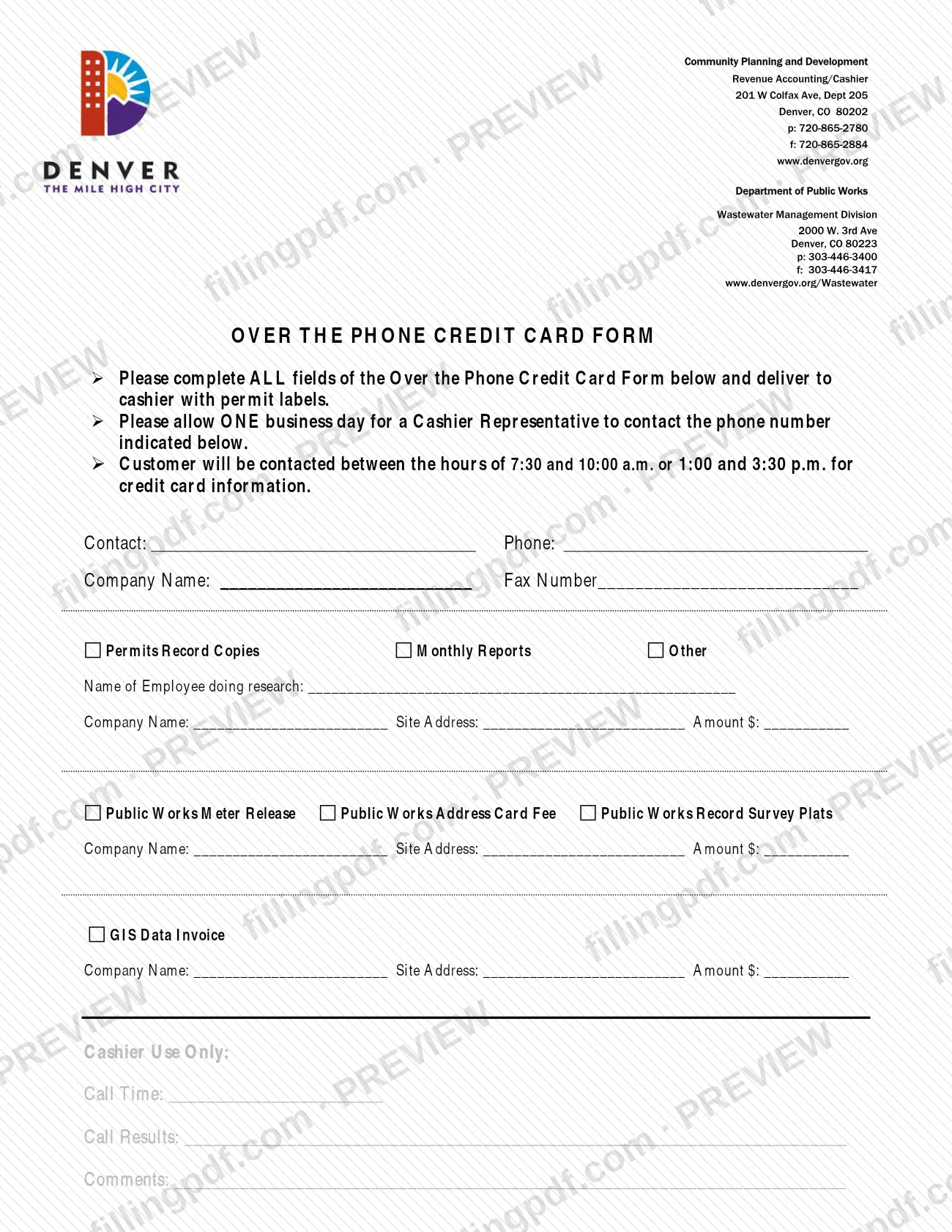
Credit Card Auth FormCPDWMD is a credit card authorization form that City and County of Denver Planning and Development publishes among its right-of-way (ROW) permit documents. The agency's Document Center page tells customers to download its credit card processing form to set up a credit card payment account for permit fees, and it lists Visa, Mastercard and Discover as the cards it accepts. It is one of the forms people look for around a Denver permit, but it is a payment form, not a permit application. On this page you can fill out the form online on FillingPDF and download or print the completed PDF; the original PDF is published by the City and County of Denver.
Last updated
What is Credit Card Auth FormCPDWMD – Denver, CO?
Credit Card Auth FormCPDWMD is the credit card authorization form that City and County of Denver Planning and Development publishes among its right-of-way (ROW) permit documents, used to set up a credit card payment account for permit fees.
Denver's Document Center page ties credit card payments to this kind of account. It says the City accepts Visa, Mastercard and Discover, as well as cash and personal checks at the counter, and that to set up a credit card payment account you download the credit card processing form. The same page places the fees under Permit Fees: Building and Land Development.
The form is a payment document, not a permit application. The permits the Document Center page lists as available for online application and payment are:
- Street Occupancy and construction in the right of way
- Addressing
- Street Furniture (TCR)
- Vending Cart
Since January 1, 2019, all right-of-way street cut, street occupancy and ROW construction permits must be submitted online through E-Permits. There you register for an account, add your contractor's license, check permit status and pay fees online.
Who needs to file Credit Card Auth FormCPDWMD – Denver, CO?
Customers who pay Denver permit fees by credit card and want a credit card payment account set up with Planning and Development use this form. The agency's page directs them to download the credit card processing form for that purpose.
Points to keep in mind:
- The page names three accepted cards: Visa, Mastercard and Discover.
- Cash and personal checks are listed as accepted at the counter; the page mentions no account setup for those payments.
- Contractors and applicants for right-of-way street cut, street occupancy and ROW construction permits submit those permits online through E-Permits. This form is a payment item and does not replace the permit application.
If you only need to apply for one of the online permits (Street Occupancy, Addressing, Street Furniture (TCR) or Vending Cart), start from the E-Permits process described on the Document Center page.
When to file Credit Card Auth FormCPDWMD – Denver, CO
Use this form when you want to set up a credit card payment account for Denver permit fees. The agency's page sets no separate deadline for it, and it does not tie the form to a permit due date.
The permit side has its own timing rule: effective January 1, 2019, all right-of-way street cut, street occupancy and ROW construction permits must be submitted online through E-Permits, where fees can also be paid online. Complete the payment setup before the point at which you need to pay fees by card.
How to fill out Credit Card Auth FormCPDWMD – Denver, CO
Open the fillable PDF
Open Credit Card Auth FormCPDWMD on this page. It is the form the City and County of Denver publishes among its right-of-way permit documents.
Confirm what the account is for
The agency page describes the form as the way to set up a credit card payment account for permit fees, including Building and Land Development fees.
Enter the cardholder information
Type the information the form asks for about the cardholder, exactly as it appears on the card.
Enter the card details
Use a Visa, Mastercard or Discover card, the three cards the agency page lists as accepted.
Complete the remaining entries
Fill in any other entries the form prints, and leave blank anything the form assigns to the agency.
Review and download the completed PDF
Check every entry against the card, then download or print the completed PDF from FillingPDF and return it to Planning and Development as the agency directs.
How to submit Credit Card Auth FormCPDWMD – Denver, CO
The Document Center page does not give a mailing address, portal or appointment rule for returning this form, so ask the agency where to return it before you send it. Related channels the page does name:
- At the counter: the City accepts Visa, Mastercard and Discover, as well as cash and personal checks.
- Online through E-Permits: register for an account, add your contractor's license, check permit status and pay fees online.
- Problems with E-Permits: report them to [email protected].
A fee applies to permits; the agency page gives no amounts here, so ask Planning and Development for current fees. FillingPDF lets you fill out and download the PDF; submission follows the agency's channels.
Common mistakes to avoid
- Treating this form as a permit application; the agency page presents it as the way to set up a credit card payment account for permit fees.
- Planning to pay with a card other than Visa, Mastercard or Discover, the three the agency page lists.
- Sending a paper application for a right-of-way street cut, street occupancy or ROW construction permit when, since January 1, 2019, these must be submitted online through E-Permits.
- Reporting E-Permits problems anywhere other than [email protected], the address the page gives for issues.
- Assuming a card account is required for counter payments; the page lists cash and personal checks as accepted at the counter.
Frequently asked questions
What is Credit Card Auth FormCPDWMD used for?
It is a City and County of Denver Planning and Development form for setting up a credit card payment account for permit fees. The agency's Document Center page tells customers to download the credit card processing form to set up such an account.
Is this form a Denver permit application?
No. It is a payment form. Denver permits such as Street Occupancy, Addressing, Street Furniture (TCR) and Vending Cart are applied for and paid online, and right-of-way street cut, street occupancy and ROW construction permits must go through E-Permits.
Which credit cards does Denver accept for permit fees?
Visa, Mastercard and Discover. The agency's page also says cash and personal checks are accepted at the counter, so a card is not the only way to pay.
Do I have to apply for a Denver right-of-way permit online?
Yes for right-of-way street cut, street occupancy and ROW construction permits: effective January 1, 2019, they must be submitted online through E-Permits. You register for an account, add your contractor's license, check permit status and pay fees online.
Who do I contact about problems with E-Permits?
The agency page says to report any issues to [email protected]. That address is for E-Permits problems; the page gives no separate contact for this form.
Can I fill out the Denver credit card auth form online?
Yes. You can fill out the PDF online on FillingPDF and download or print it. FillingPDF is independent of the City and County of Denver and does not submit the form or process payments; you return it through the agency's channels.
Can I pay Denver permit fees without setting up a credit card account?
Yes, the agency page lists cash and personal checks as accepted at the counter. A credit card payment account is set up by downloading the credit card processing form; fee amounts come from Planning and Development.
Ready to fill out Credit Card Auth FormCPDWMD – Denver, CO?
Fill out Credit Card Auth FormCPDWMD – Denver, CO now