
The E-Permits-User-Guide is the City and County of Denver's walkthrough of its ePermit system, Accela Citizen Access (ACA). It shows public users how to register an account, log in, create a Conveyance or Fire application, pay fees and receive the issued permit. It is one of the Denver permit resources published by the city; it is a guide, not an application form. On this page you can view and download the official PDF, while the applications themselves are submitted in the ePermit system.
Last updated
What is E-Permits-User-Guide – Denver, CO?
The E-Permits-User-Guide is the City and County of Denver's step-by-step PDF for Accela Citizen Access (ACA), the e-permit system that members of the public use to submit applications, track their progress and monitor permit activity and renewals.
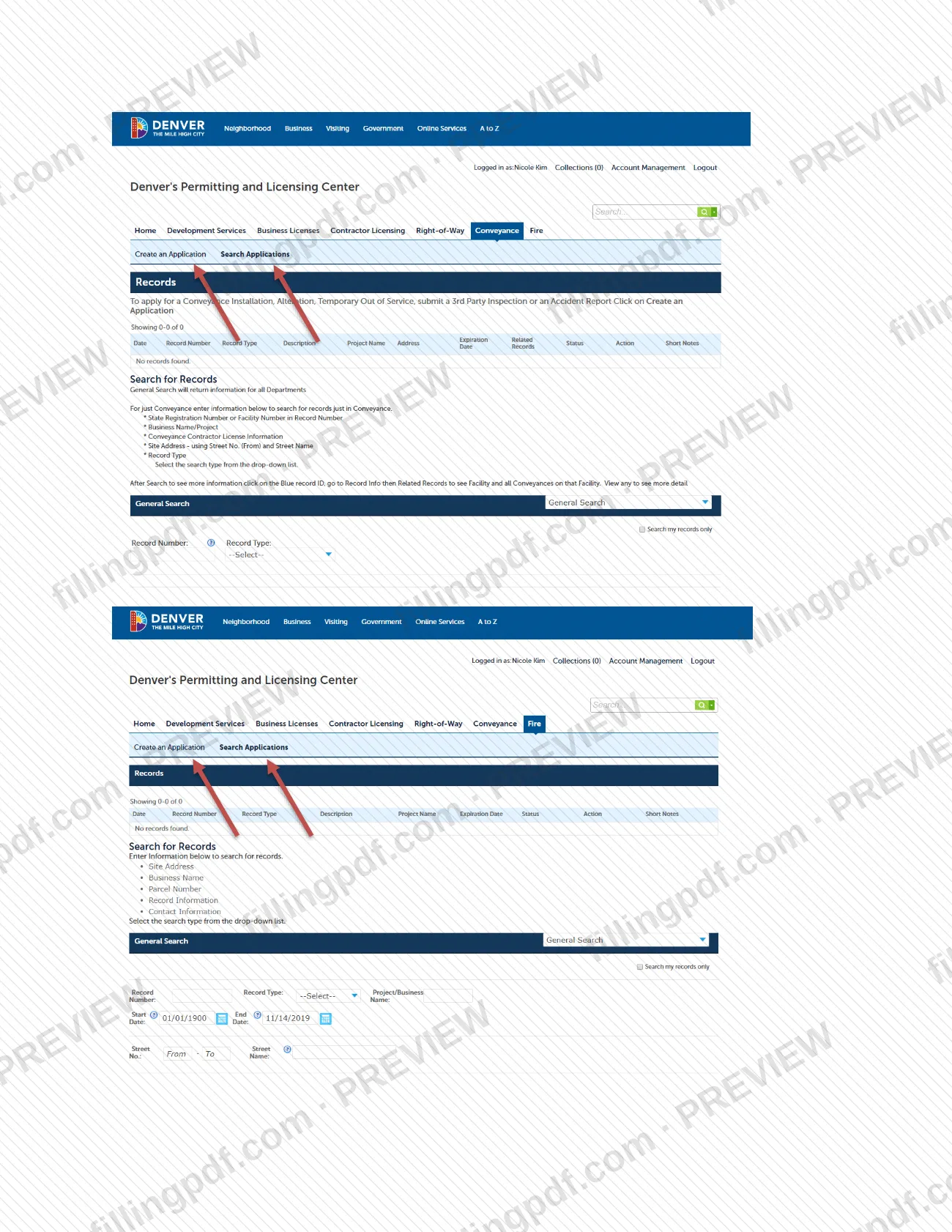
The guide is not a form with lines to complete. It describes the path through the online system: registering an account, logging in, choosing Conveyance or Fire, using Search Applications or Create an Application, accepting the disclaimer, expanding the list of application types, reviewing each information section and choosing Submit the Application. It then explains what follows: a Record Number issued on submission, email notices of status changes, additional documentation and fees due, payment, and an emailed copy of the permit that must be posted on site.
Its companion page, the Fire Safety Operational Permit Application Process, lists the operational permit types available online: Hazmat, Flammables, Marijuana, Special Events, Same Day, High Piled Storage (including Tire Storage) and Conditional Operational (including Firewatch). Operational permits are issued for processes and materials.
The guide covers Conveyance and Fire applications only. Fire construction permits, which are required by IFCA 105.7, and permits for new construction or installation of life safety systems go through plan review at Development Services instead.
Who needs to file E-Permits-User-Guide – Denver, CO?
Public users who want to submit an application, track it or monitor permit activity and renewals in Denver's ePermit system use this guide. Everyone must first register for an account in Accela Citizen Access; the guide starts there.
- Conveyance applicants: after logging in, choose Conveyance.
- Fire applicants: after logging in, choose Fire (or FIRE in the top right-hand corner, per the Fire Safety Operational Permit page). Marijuana occupancies must use the Marijuana Operational Permit type.
- Returning users: if you already have an account, skip registration and log in; Search Applications shows applications already associated with your account.
Who should look elsewhere: anyone who needs a Fire Construction Permit (required by IFCA 105.7) should submit through Development Services, not through the operational permit types described here. The city does not accept walk-in operational permit applications at this time.
When to file E-Permits-User-Guide – Denver, CO
The guide sets no deadline of its own: use it whenever you need to register for the ePermit system or submit a Conveyance or Fire application. Registration comes first, because a public user cannot access e-permits without an account.
After you submit, applications other than Same Day are reviewed and you are notified by email of status changes, additional documentation required and fees due. The Fire Safety Operational Permit page says permits are reviewed in the order received. Operational permits must be renewed every year, with fees assessed at issuance and at renewal; you are notified by email, with instructions, for permits accepted for renewal. When fees are paid and the permit is ready, a copy is emailed to you and must be posted on site.
How to fill out E-Permits-User-Guide – Denver, CO
Register for an account
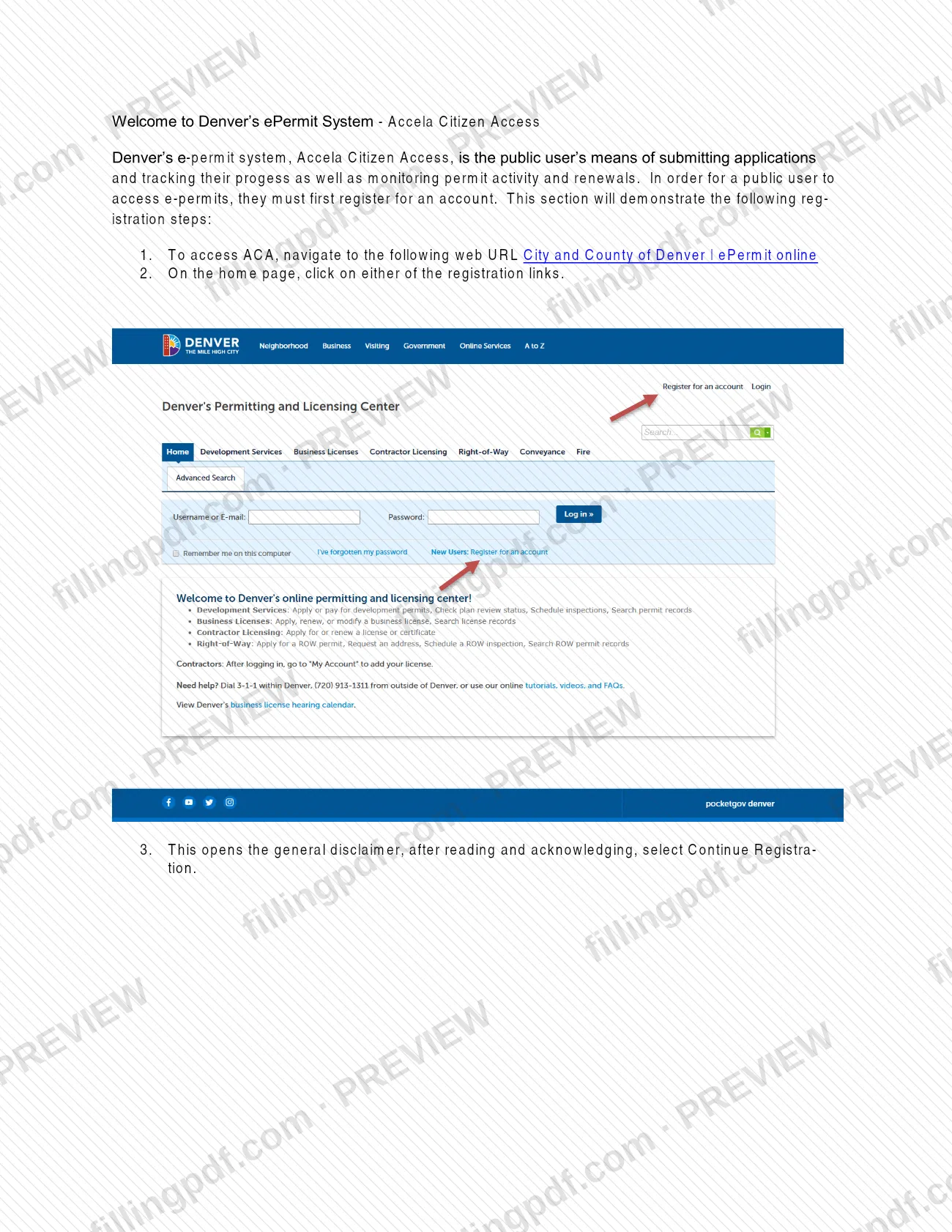
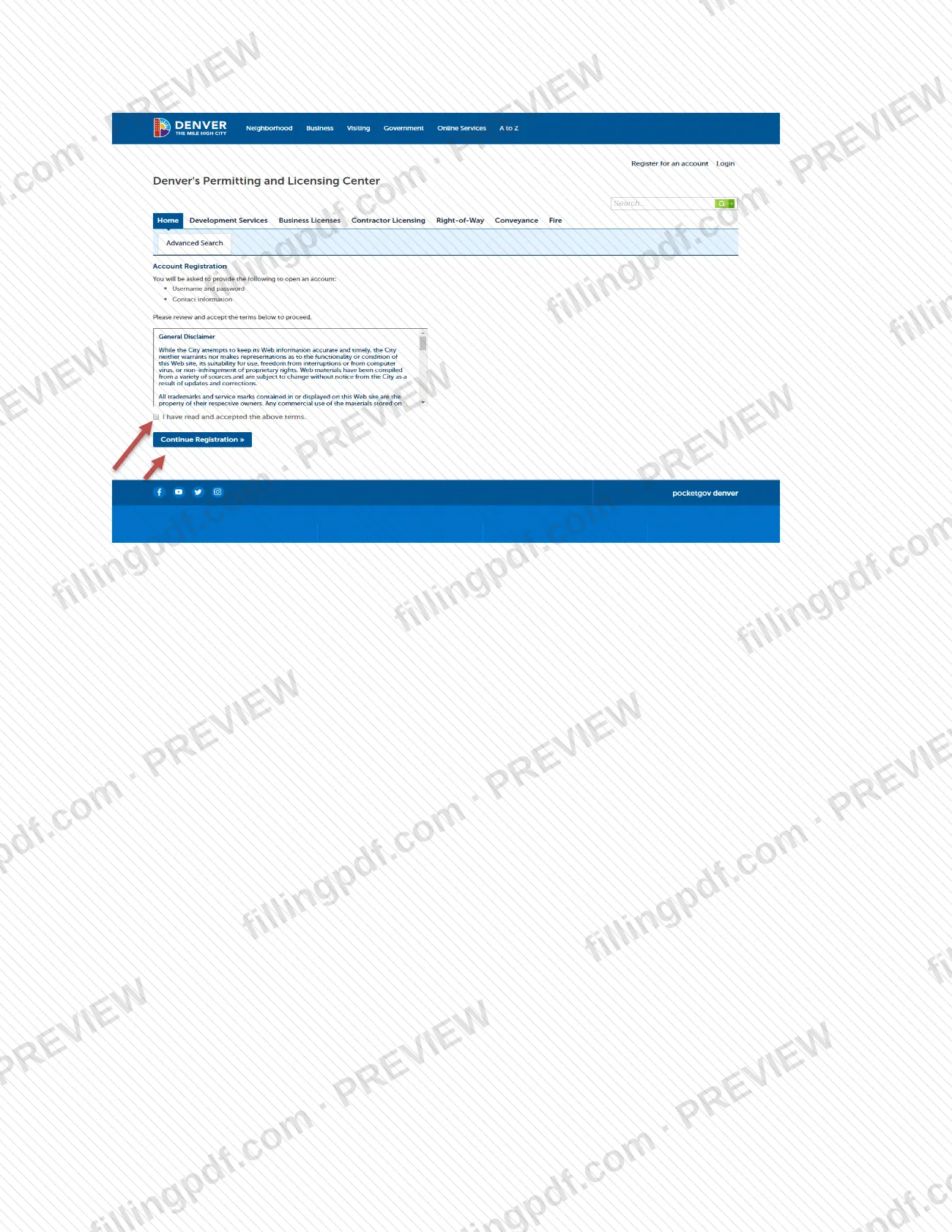
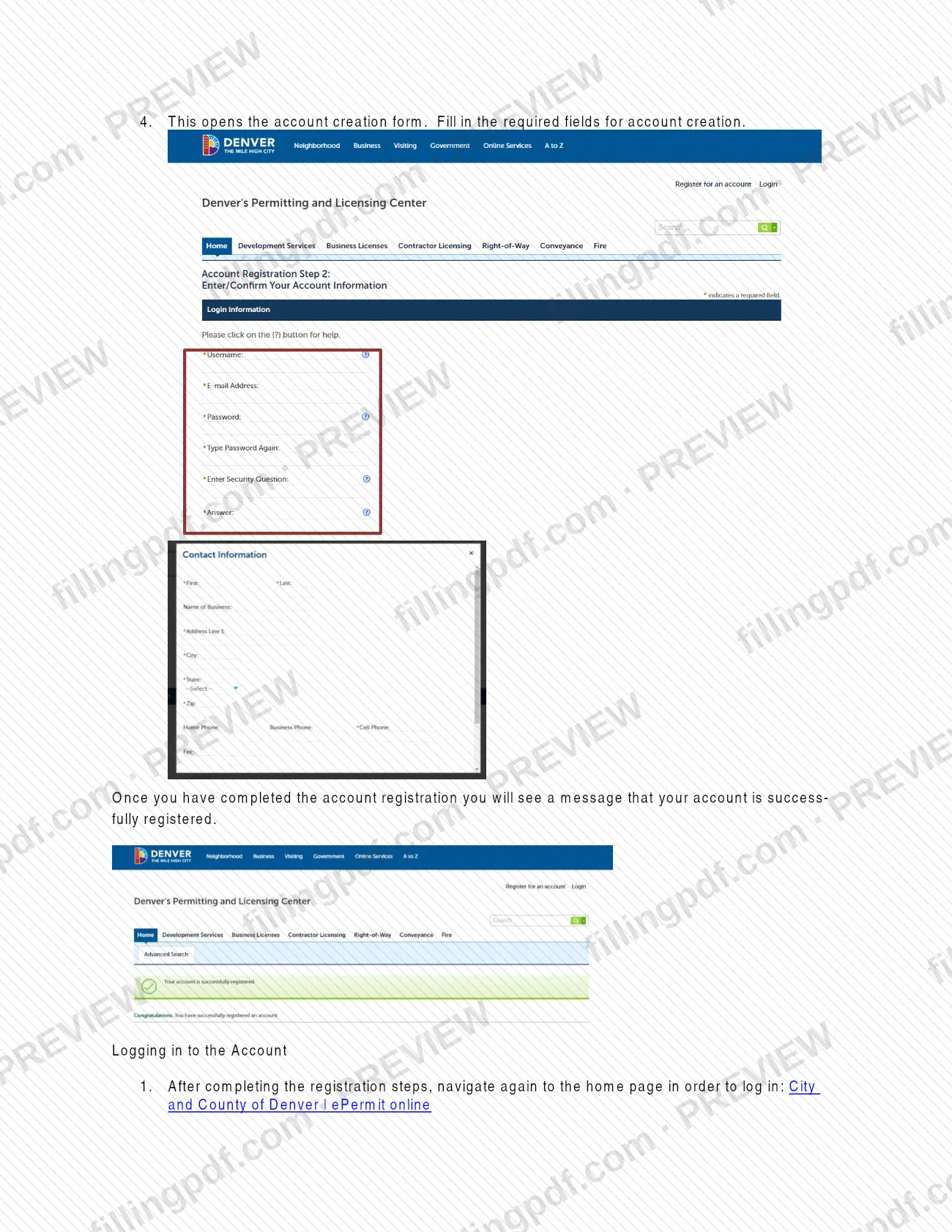
Go to the City and County of Denver ePermit online page, click a registration link, read and acknowledge the disclaimer, select Continue Registration and fill in the required account fields.
Log in and choose a category
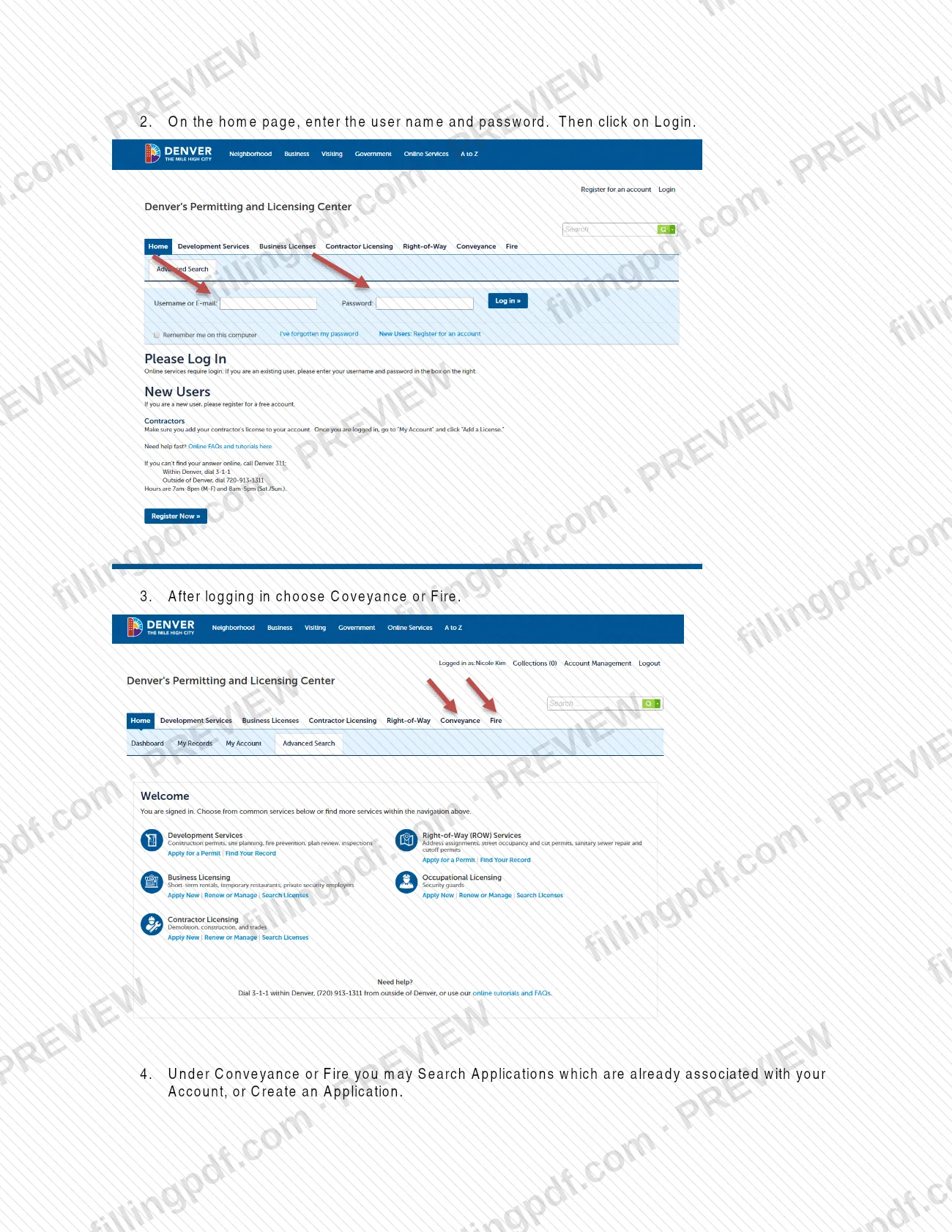
Return to the home page, enter your user name and password and click Login. Choose Conveyance or Fire.
Create or search an application
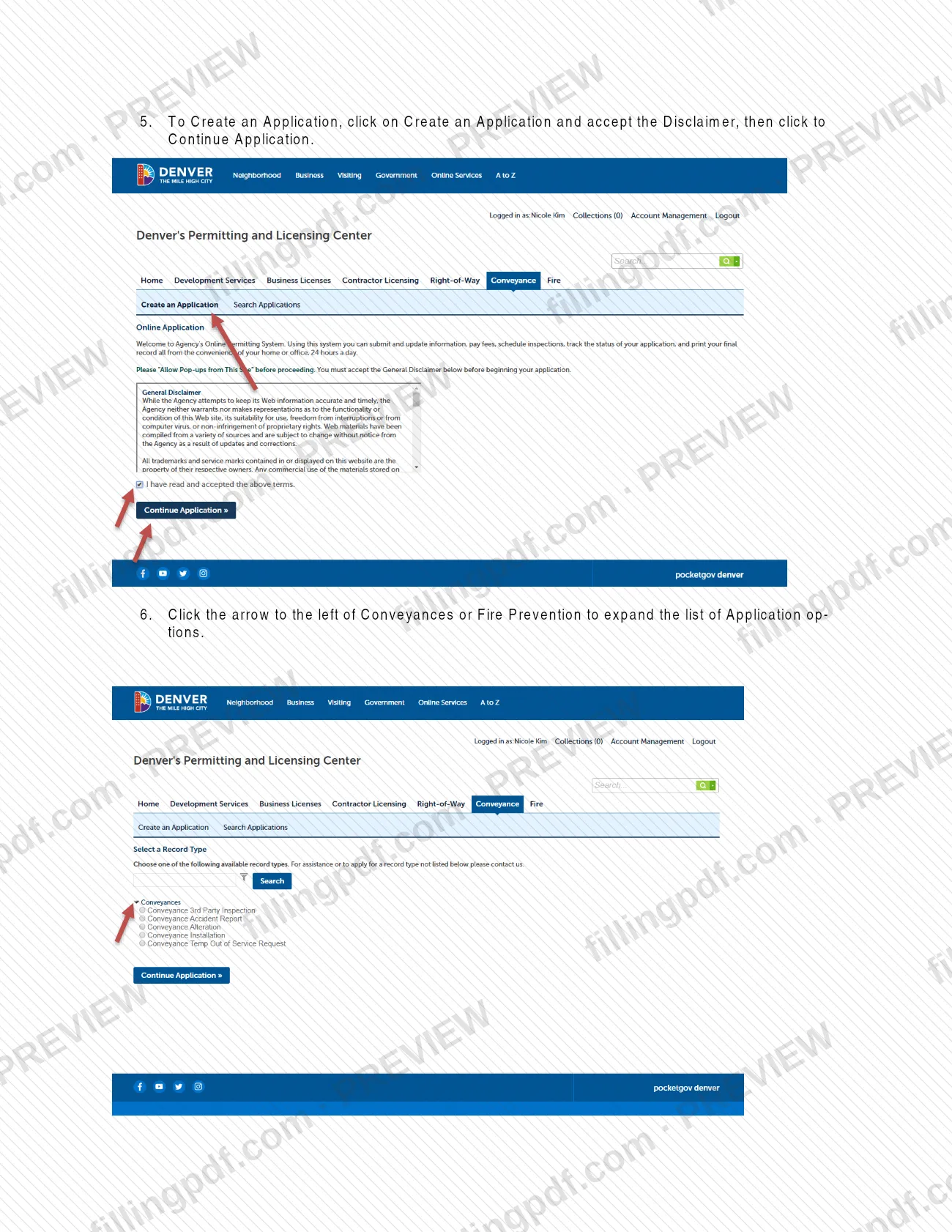
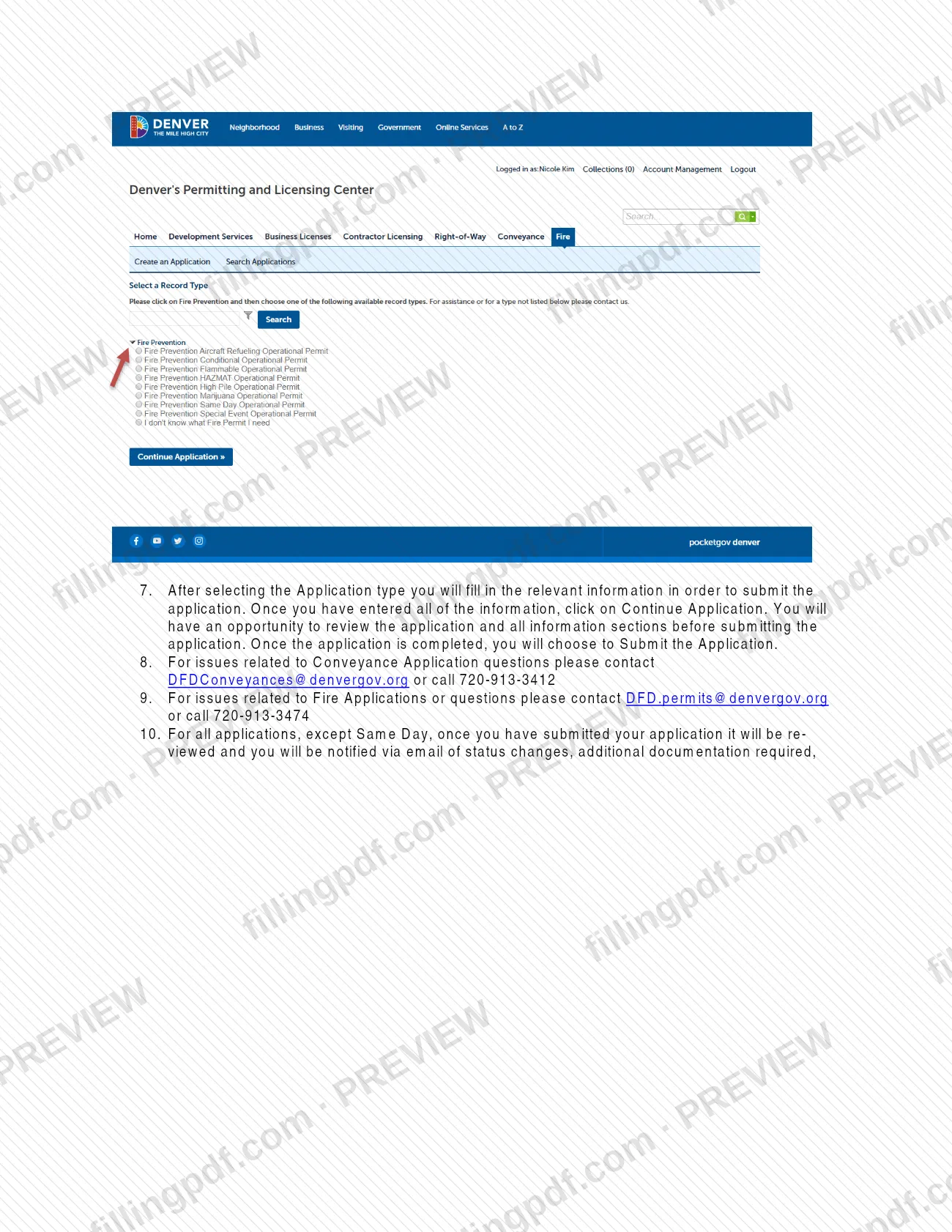
Use Search Applications for applications already on your account, or click Create an Application, accept the disclaimer and click Continue Application. Expand Conveyances or Fire Prevention to see the application types.
Enter information and submit
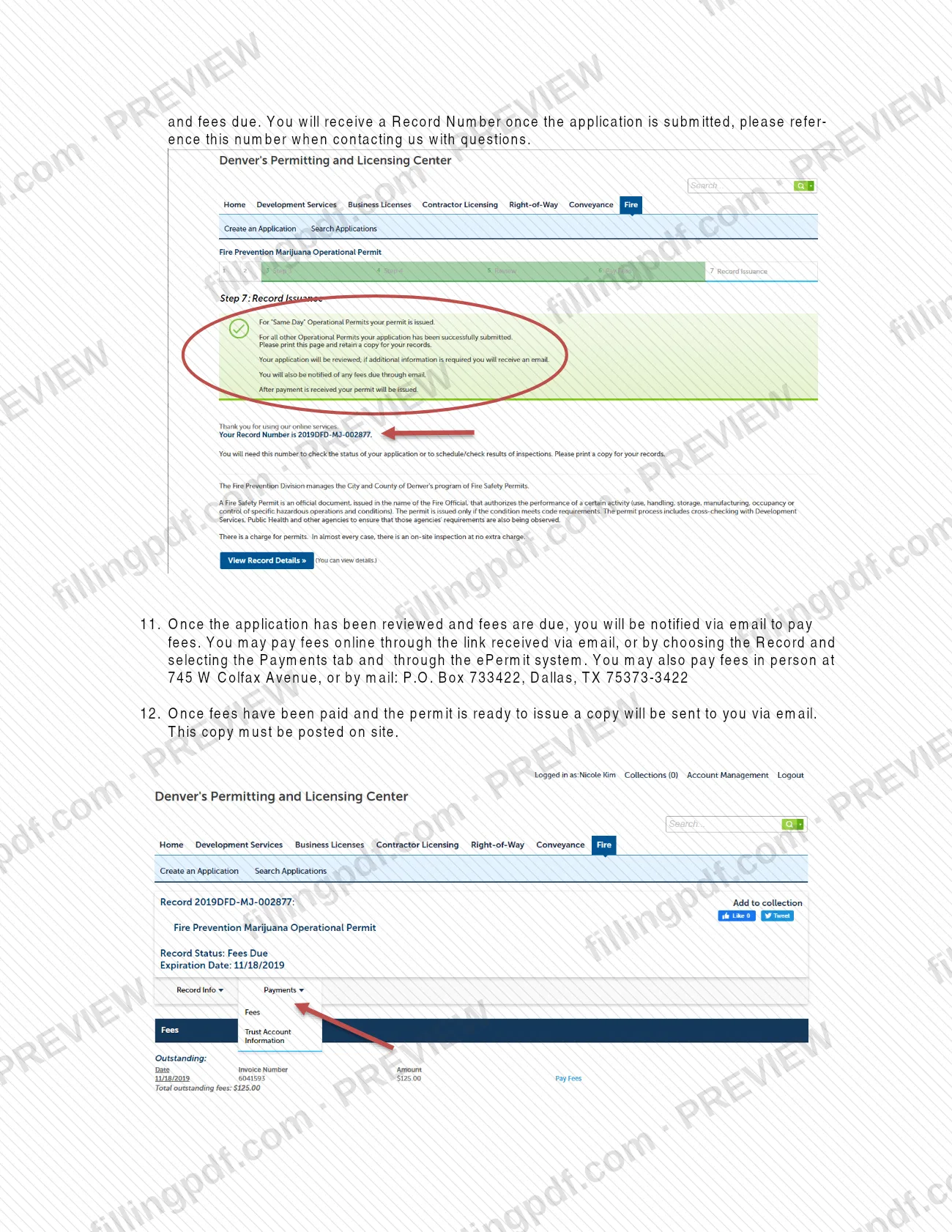
Select the application type, fill in the relevant information and click Continue Application. Review every section, then choose Submit the Application and note your Record Number.
Pay fees when notified
After review, an email tells you fees are due. Pay online through the emailed link or the Record's Payments tab, in person at 745 W Colfax Avenue, or by mail to P.O. Box 733422, Dallas, TX 75373-3422.
Post and keep your permit
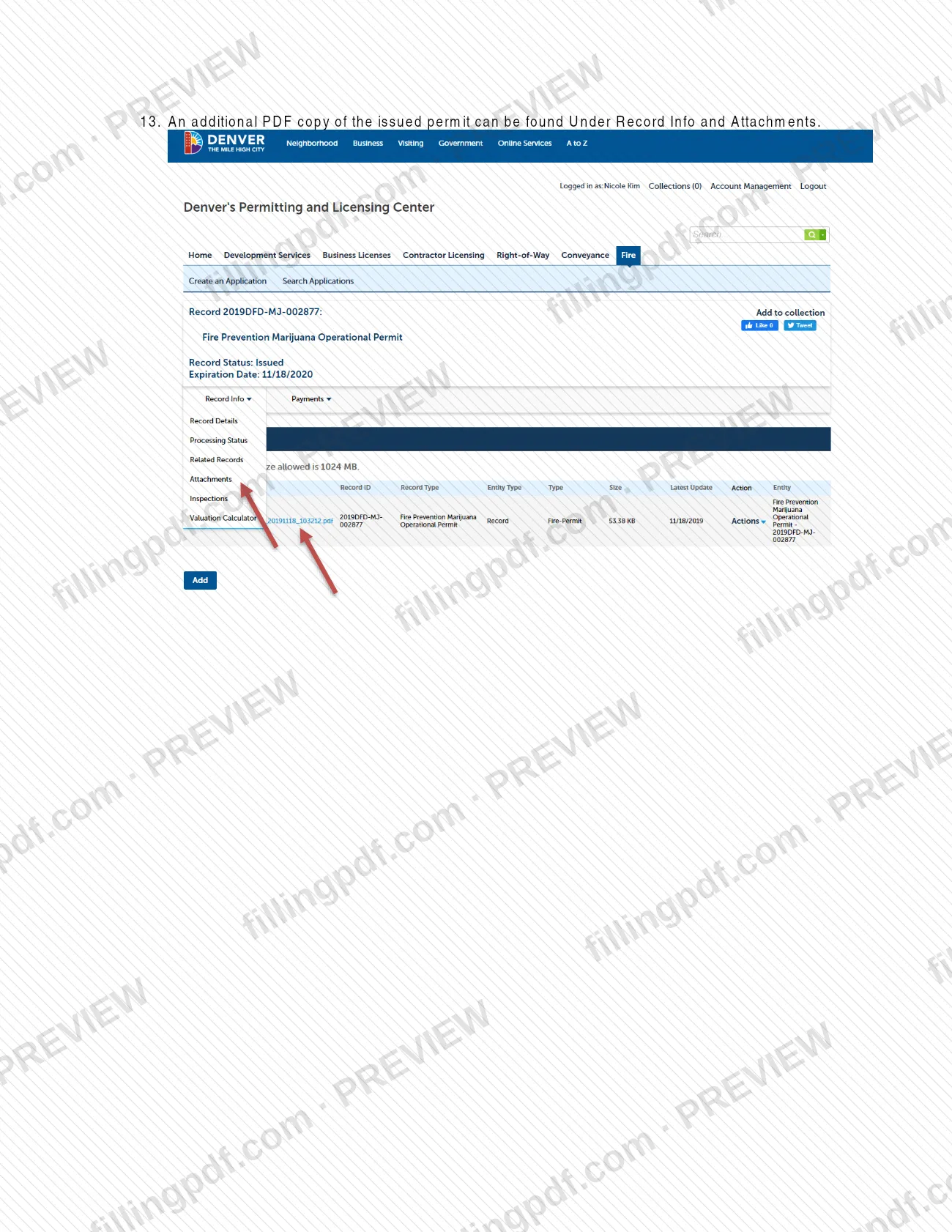
Once fees are paid, the permit copy is emailed to you and must be posted on site. Another PDF copy is under Record Info and Attachments.
How to submit E-Permits-User-Guide – Denver, CO
Applications are submitted online through the ePermit system, Accela Citizen Access. Only fees can be paid by other channels.
- Online application: register on the ePermit home page, log in, choose Conveyance or Fire, select Create an Application, accept the disclaimer, pick the application type, review and choose Submit the Application. Keep the Record Number you receive.
- Online payment: when fees are due you get an email with a payment link; you can also open the Record and select the Payments tab.
- In person (fees): 745 W Colfax Avenue.
- By mail (fees): P.O. Box 733422, Dallas, TX 75373-3422.
Operational permits are issued only through the ePermit system, and walk-in applications are not accepted at this time. Questions: Conveyance, [email protected] or 720-913-3412; Fire, [email protected] or 720-913-3474. If the electronic permission feature fails, try another web browser and enable pop-up windows. FillingPDF lets you view and download the official PDF; submission follows the city's channels above.
Common mistakes to avoid
- Trying to apply before registering: a public user must create an account in Accela Citizen Access before accessing e-permits.
- Submitting a Fire Construction Permit (IFCA 105.7) as an operational permit; those go through Development Services.
- Choosing another operational permit type for a marijuana occupancy instead of the Marijuana Operational Permit.
- Going to the office to apply: walk-in operational permit applications are not accepted at this time.
- Mailing an application to P.O. Box 733422 in Dallas; that address is for paying fees, not for submitting applications.
- Not posting the issued permit on site, although the emailed copy must be posted.
- Contacting the city without the Record Number you receive on submission, which the guide asks you to reference.
- Letting an operational permit lapse; operational permits must be renewed every year.
Frequently asked questions
What is the Denver E-Permits-User-Guide?
It is a City and County of Denver PDF that walks public users through Accela Citizen Access, the ePermit system: registering, logging in, creating Conveyance or Fire applications, paying fees and receiving the permit. It is a guide, not a form to complete.
How do I register for Denver's ePermit system?
On the ePermit home page, click a registration link, read and acknowledge the disclaimer, select Continue Registration and fill in the required fields of the account creation form. A message confirms when your account is registered; you then log in from the home page.
Can I get a Denver building permit with this guide?
No. The guide covers Conveyance and Fire applications in Accela Citizen Access. Fire construction permits (IFCA 105.7) and permits for new construction or installation of life safety systems are issued after plan review through Development Services.
How do I pay fees for a Denver ePermit application?
After review you get an email saying fees are due. Pay online through the emailed link or the Payments tab of your Record, in person at 745 W Colfax Avenue, or by mail to P.O. Box 733422, Dallas, TX 75373-3422. A fee amount is not listed in the guide.
Who do I contact with questions about my application?
For Conveyance applications, email [email protected] or call 720-913-3412. For Fire applications, email [email protected] or call 720-913-3474. Give the Record Number you received when you submitted the application.
Do Denver operational permits need to be renewed?
Yes. The Fire Safety Operational Permit page says operational permits must be renewed every year, with fees assessed at issuance and renewal. You are notified by email, with instructions, for permits accepted for renewal.
Can I apply for an operational permit in person?
No. Operational permits are issued through the ePermit system, and the city does not accept walk-in permit applications at this time. In person and by mail are available for paying fees only.
Does FillingPDF submit my Denver permit application?
No. FillingPDF is an independent service, not connected to the City and County of Denver. It lets you view and download the official guide PDF; you apply, pay and track your permit in the city's ePermit system.
Ready to fill out E-Permits-User-Guide – Denver, CO?
Fill out E-Permits-User-Guide – Denver, CO now