
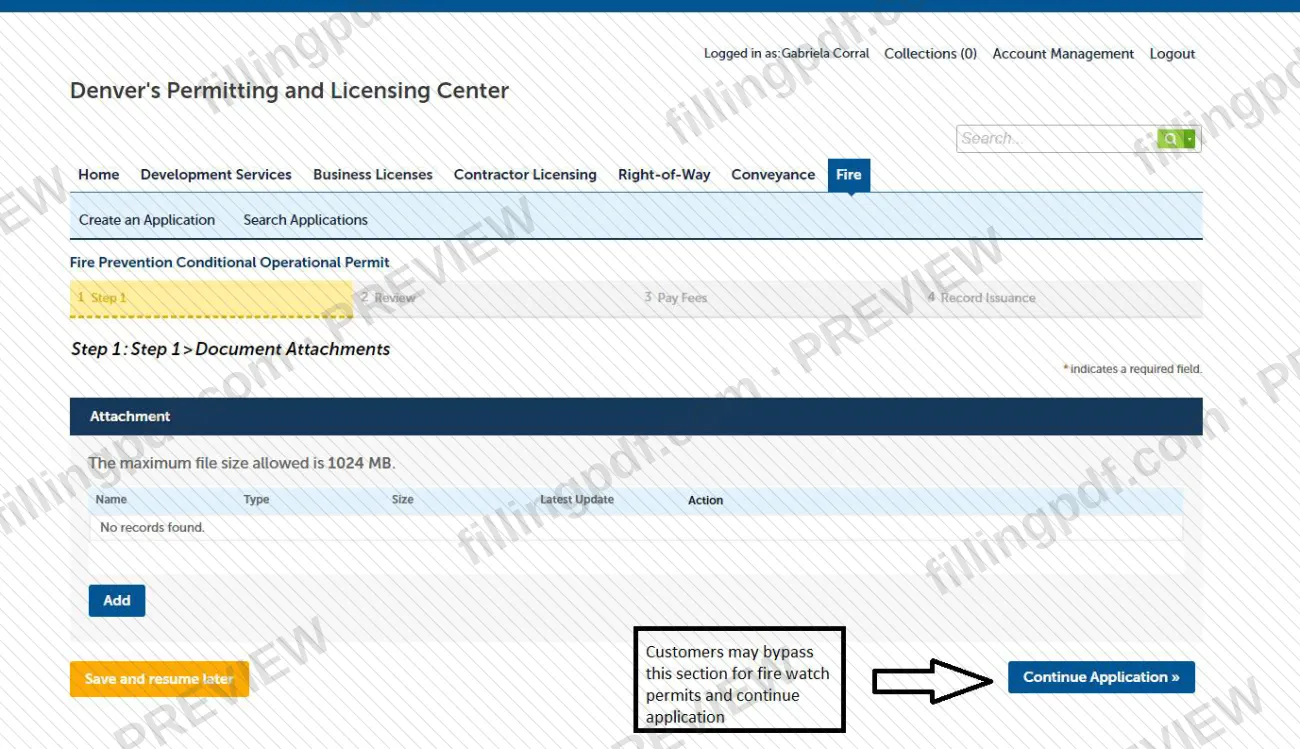
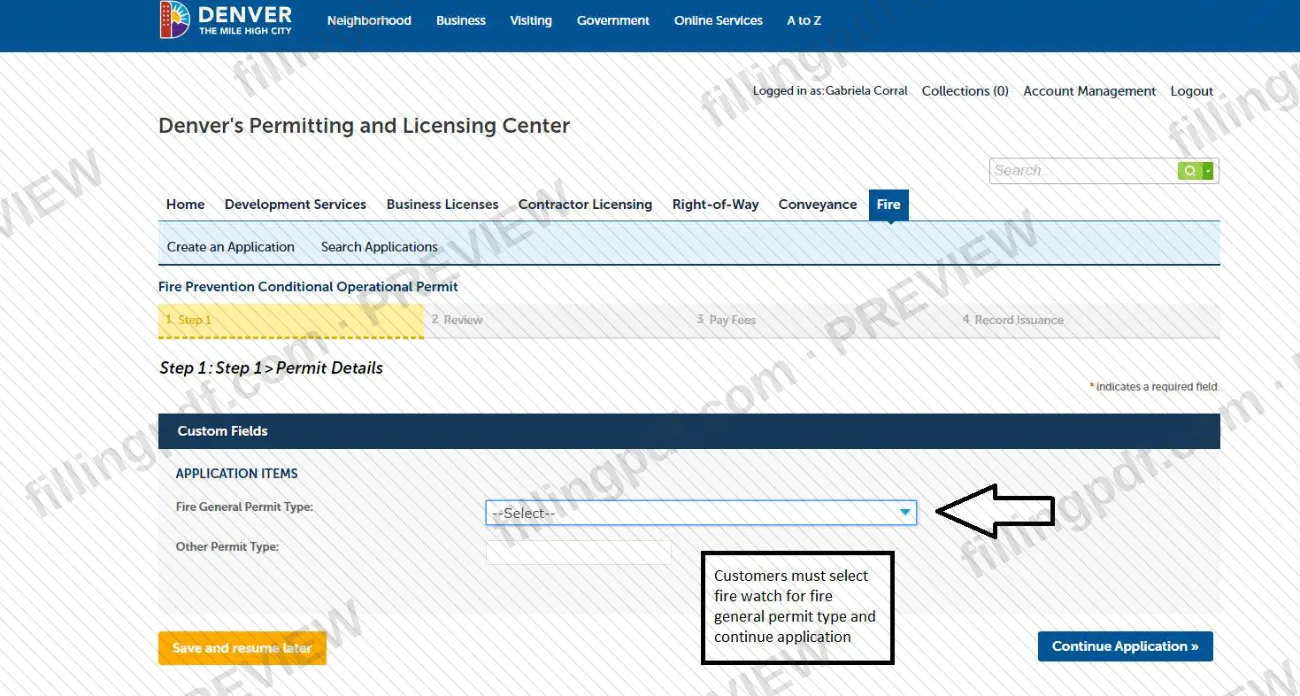
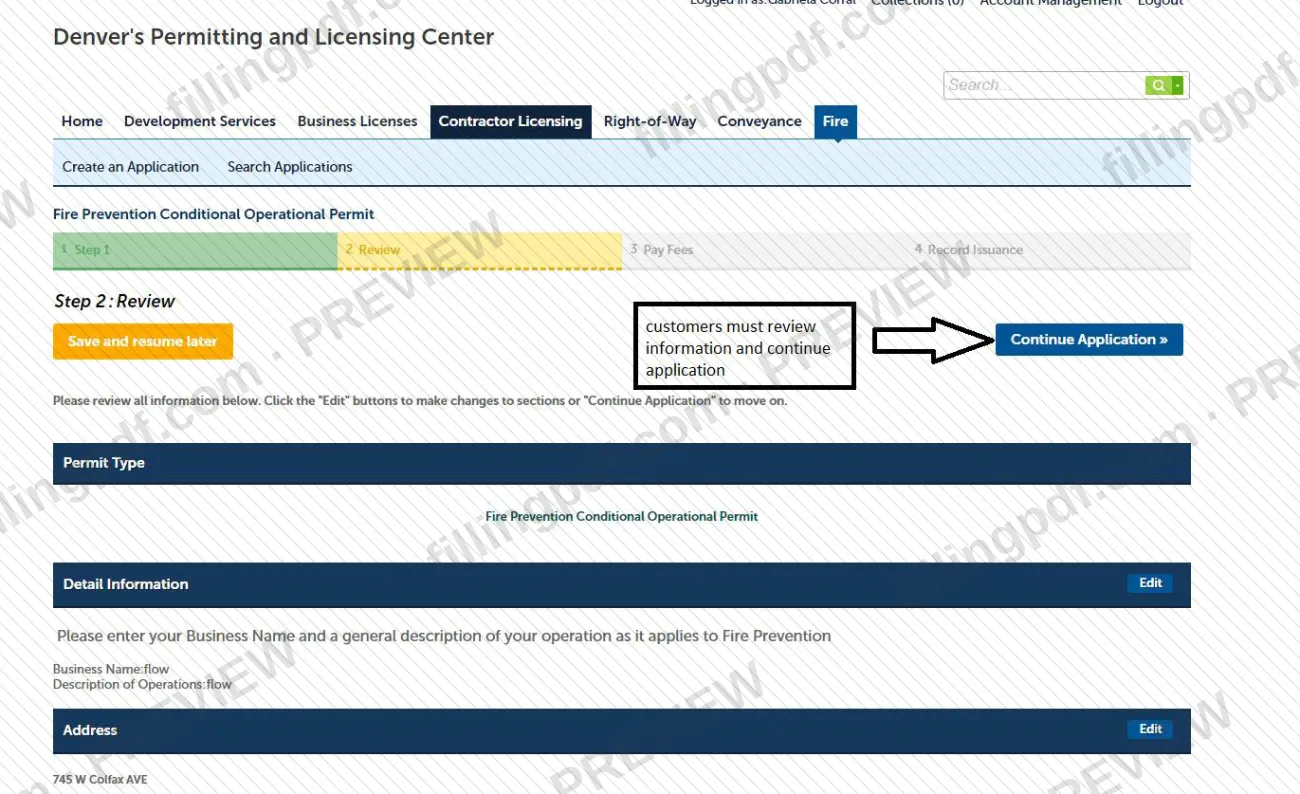
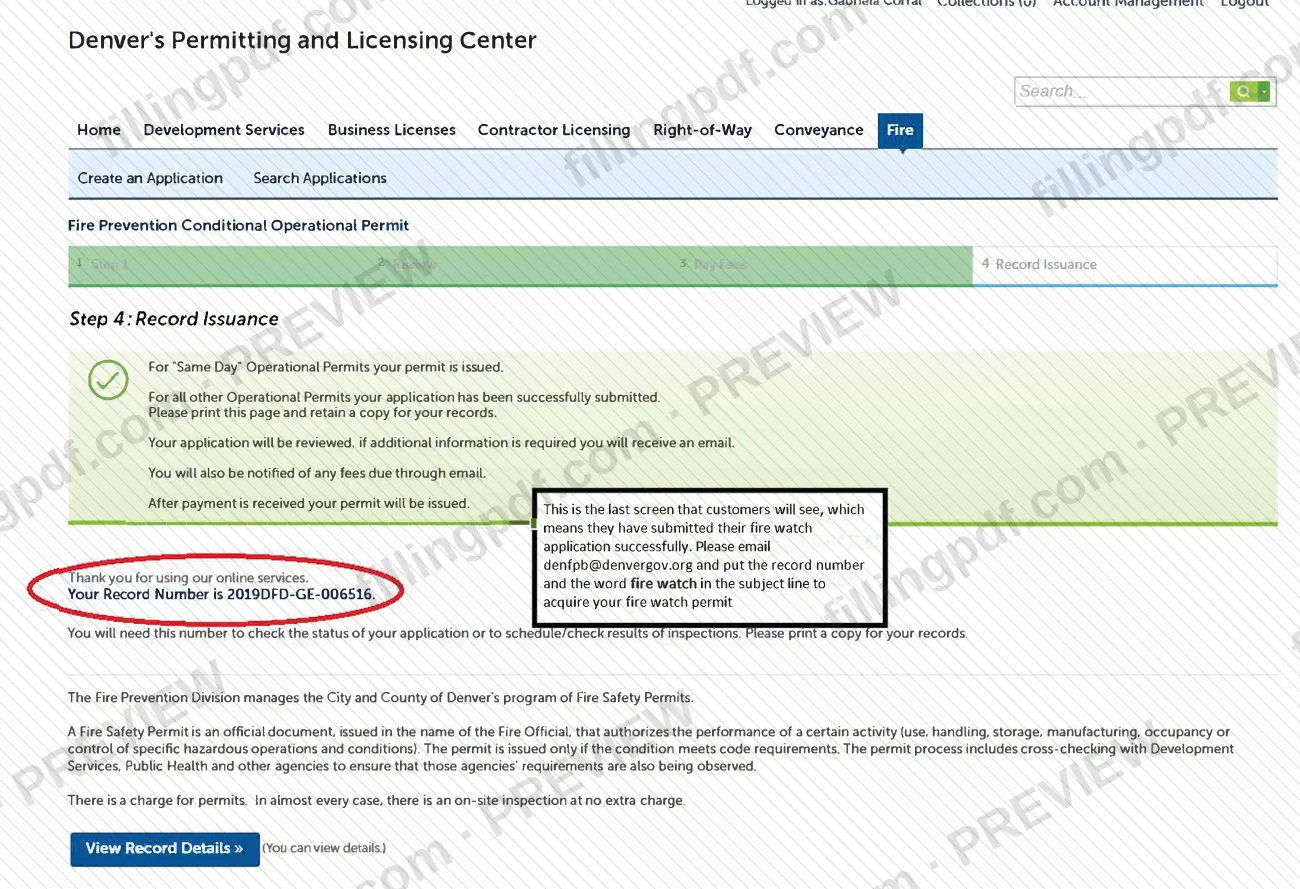
The Fire Watch Permit Application Guide is a City and County of Denver PDF that shows, screen by screen, how to apply for a fire watch permit in the city's online permitting system. It is one of the Denver permit documents tied to the Fire Prevention Division's fire safety permits, and it opens with a warning: a Fire Prevention Officer must approve the request before you start an application. On this page you can fill out the form online on FillingPDF and download or print the completed PDF; the application itself is made in the city's e-permit system, and the original guide is published by the city.
Last updated
What is Fire Watch Permit Application Guide – Denver, CO?
The Fire Watch Permit Application Guide is a City and County of Denver document that explains how to apply online for a fire watch permit, which is handled as a Conditional Operational permit (including Firewatch) in Denver's Accela Citizen Access e-permit system.
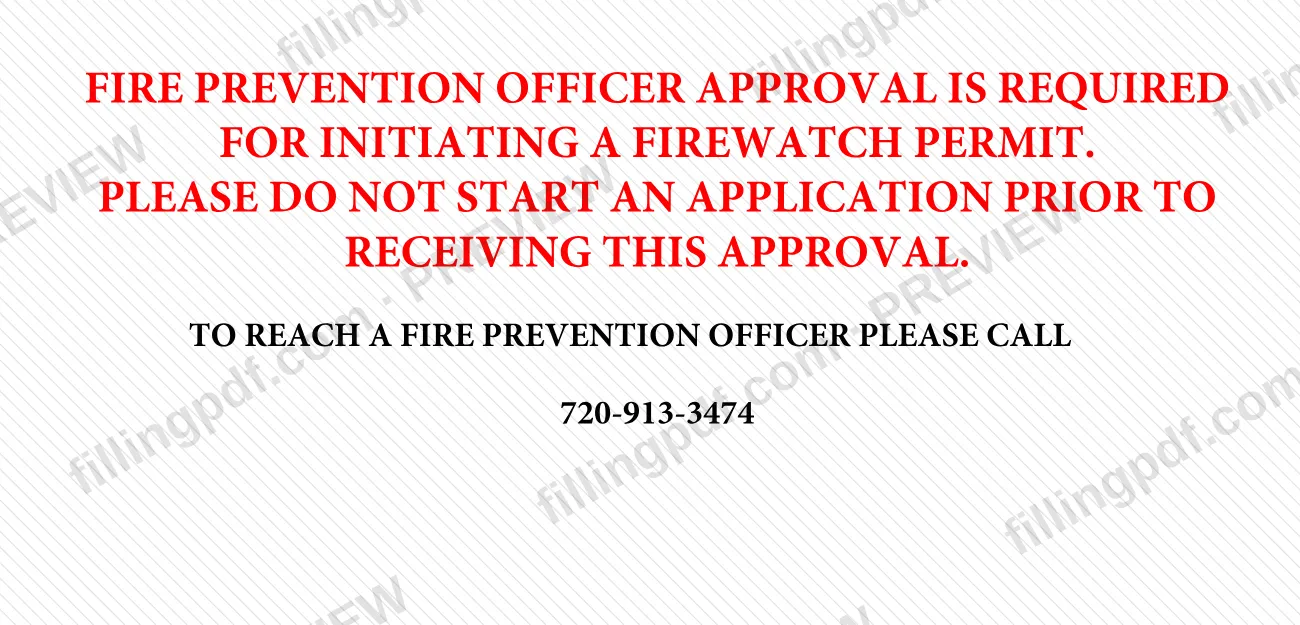
The guide reproduces the screens an applicant sees and annotates them: the general disclaimer, the address search, the Detailed Information screen where you enter a business name and a description of operations, and the final Record Issuance screen that shows your record number. Its first page states that Fire Prevention Officer approval is required before a fire watch permit is initiated and asks applicants not to start an application before receiving it.
A fire watch permit belongs to the Fire Prevention Division's program of Fire Safety Permits. The city describes a Fire Safety Permit as an official document issued in the name of the Fire Official that authorizes a specific activity, and says it is issued only if the condition meets code requirements. A charge applies to permits.
This guide is not a building permit application. Fire Construction Permits, required by IFCA 105.7, are submitted through Development Services, and permits for new construction or installation of life safety systems are issued after plan review there.
Who needs to file Fire Watch Permit Application Guide – Denver, CO?
Anyone who needs a fire watch permit from the City and County of Denver and has been approved by a Fire Prevention Officer to start the application. The guide says plainly not to begin an application before that approval; a Fire Prevention Officer can be reached at 720-913-3474.
Other conditions from the city's materials:
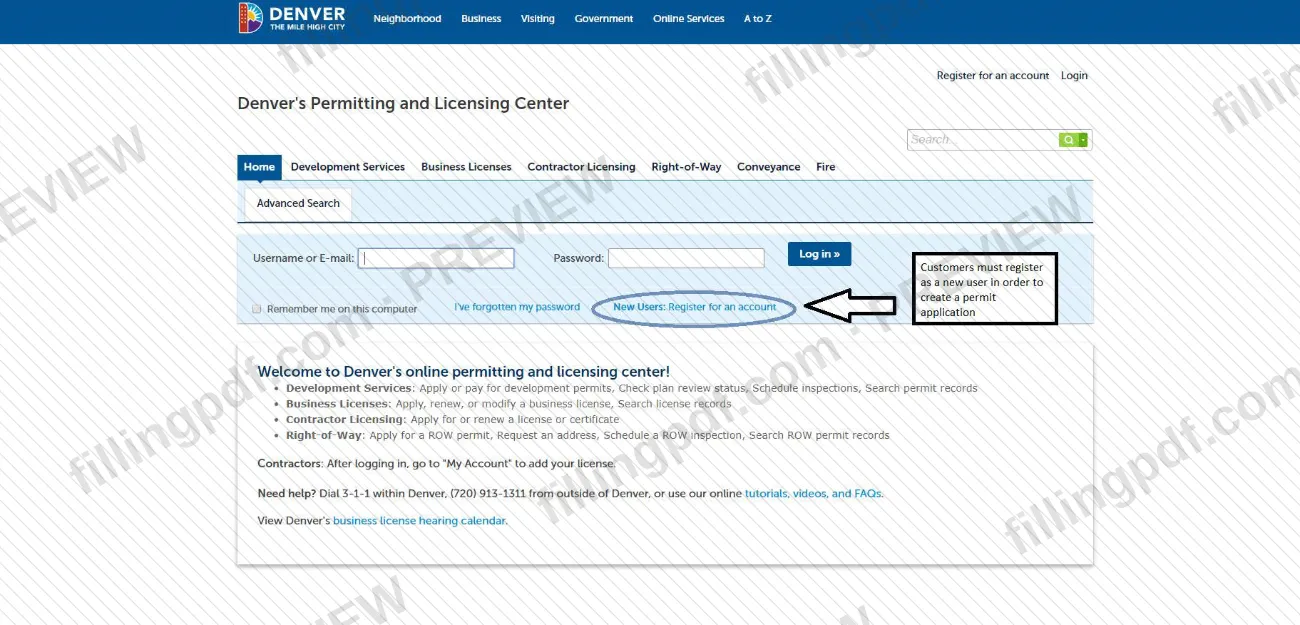
- You need an account in Accela Citizen Access, Denver's e-permit system, to submit an application. If you do not have one, you register from the home page.
- Choose the Operational Permit type that fits your occupancy. The fire watch permit falls under Conditional Operational (including Firewatch).
- Marijuana occupancies use the Marijuana Operational Permit instead.
- Fire Construction Permits (IFCA 105.7) are not applied for this way; they go through Development Services.
The guide does not describe anyone applying on another person's behalf.
When to file Fire Watch Permit Application Guide – Denver, CO
Start only after a Fire Prevention Officer has approved the fire watch permit; the guide asks you not to begin an application before receiving that approval. The guide sets no calendar deadline of its own.
Once you submit, permits are reviewed in the order received. If more information is needed you receive an email, and you are told by email of any fees due. The permit is issued after payment is received.
Operational permits in general must be renewed every year, with fees assessed at issuance and renewal; the city emails renewal instructions for permits accepted for renewal.
Documents you need
- Approval from a Fire Prevention Officer, obtained before you start the application (phone 720-913-3474); the guide says not to begin without it.
How to fill out Fire Watch Permit Application Guide – Denver, CO
Get Fire Prevention Officer approval
Call 720-913-3474 to reach a Fire Prevention Officer and obtain approval before you begin. The guide asks that no application be started before this approval.
Register or log in to Accela
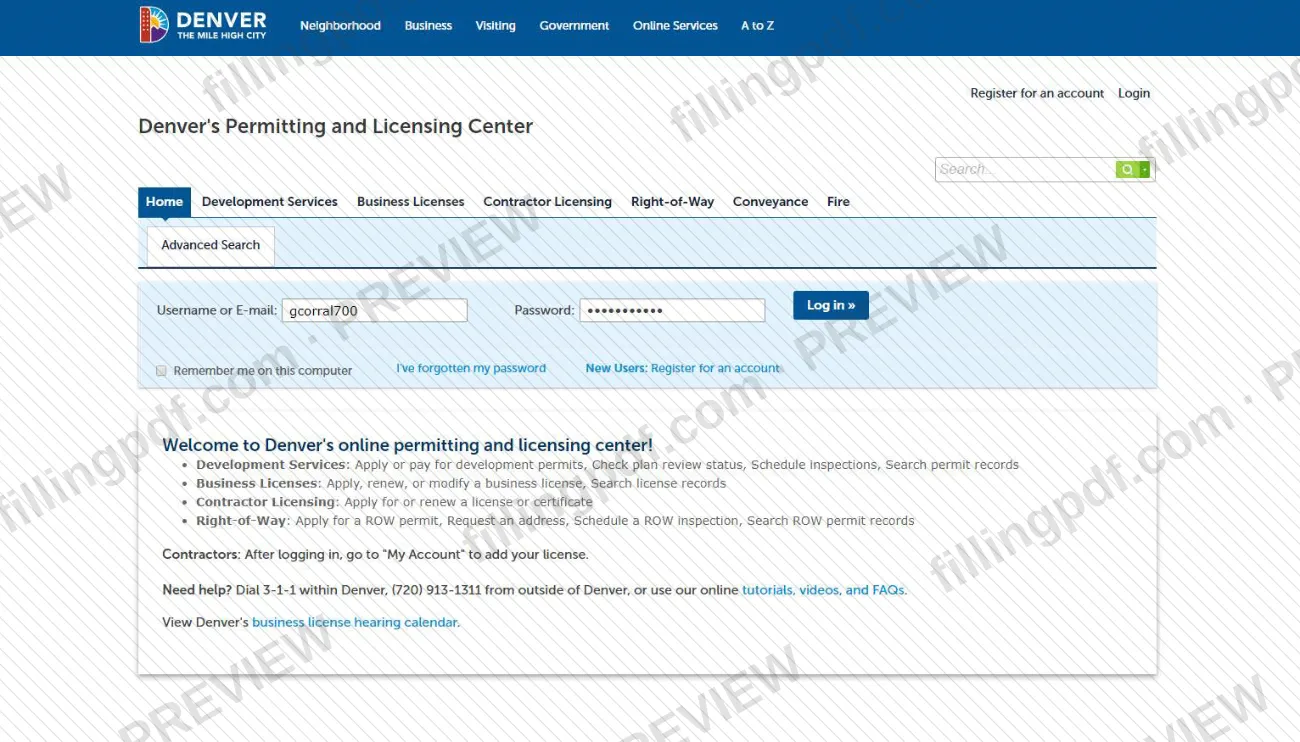
Use Accela Citizen Access, Denver's e-permit system. If you have no account, click Register for an account on the home page, and allow pop-ups in your browser.
Open FIRE and create an application
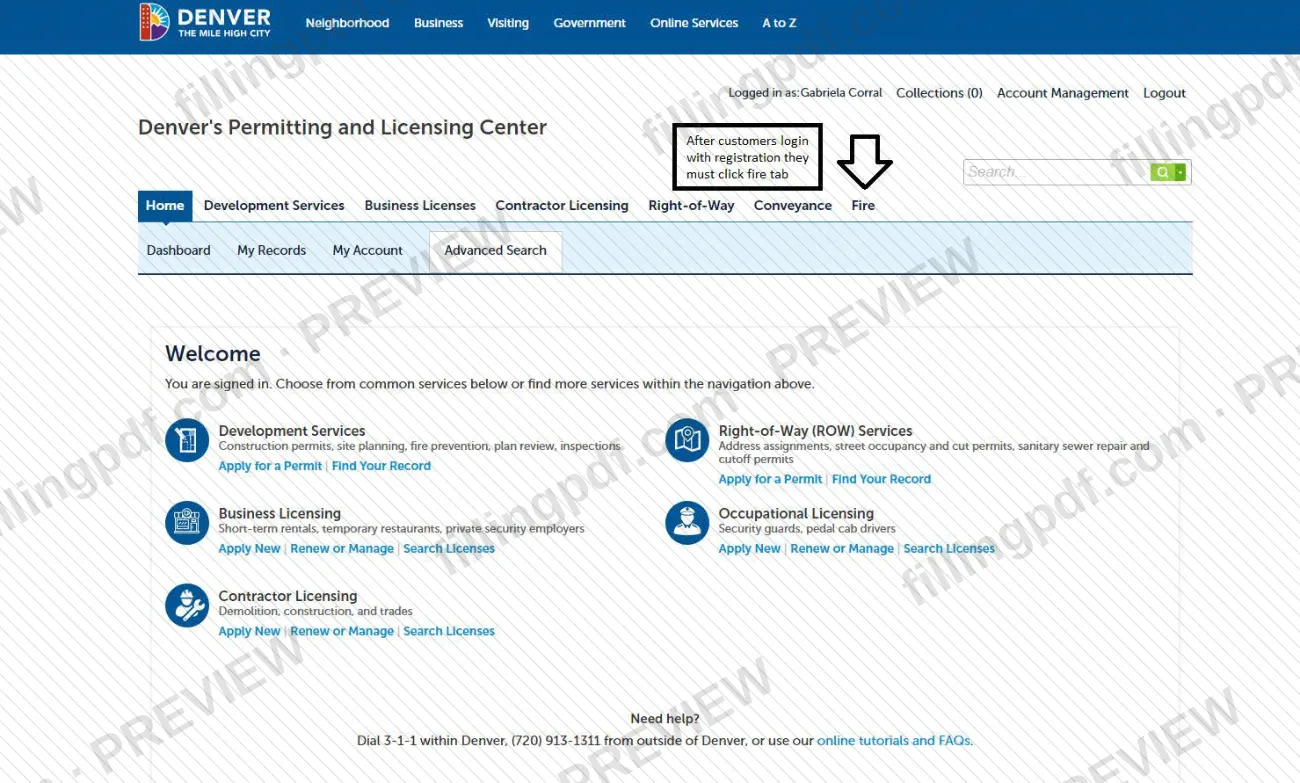
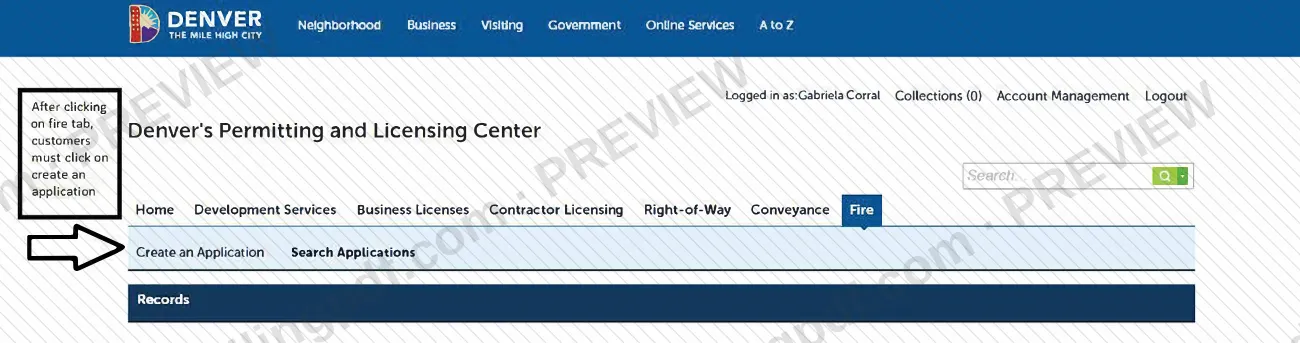
After logging in, click FIRE in the top right corner, then choose Create an Application. Use Search Applications to return to one already in progress.
Accept the general disclaimer
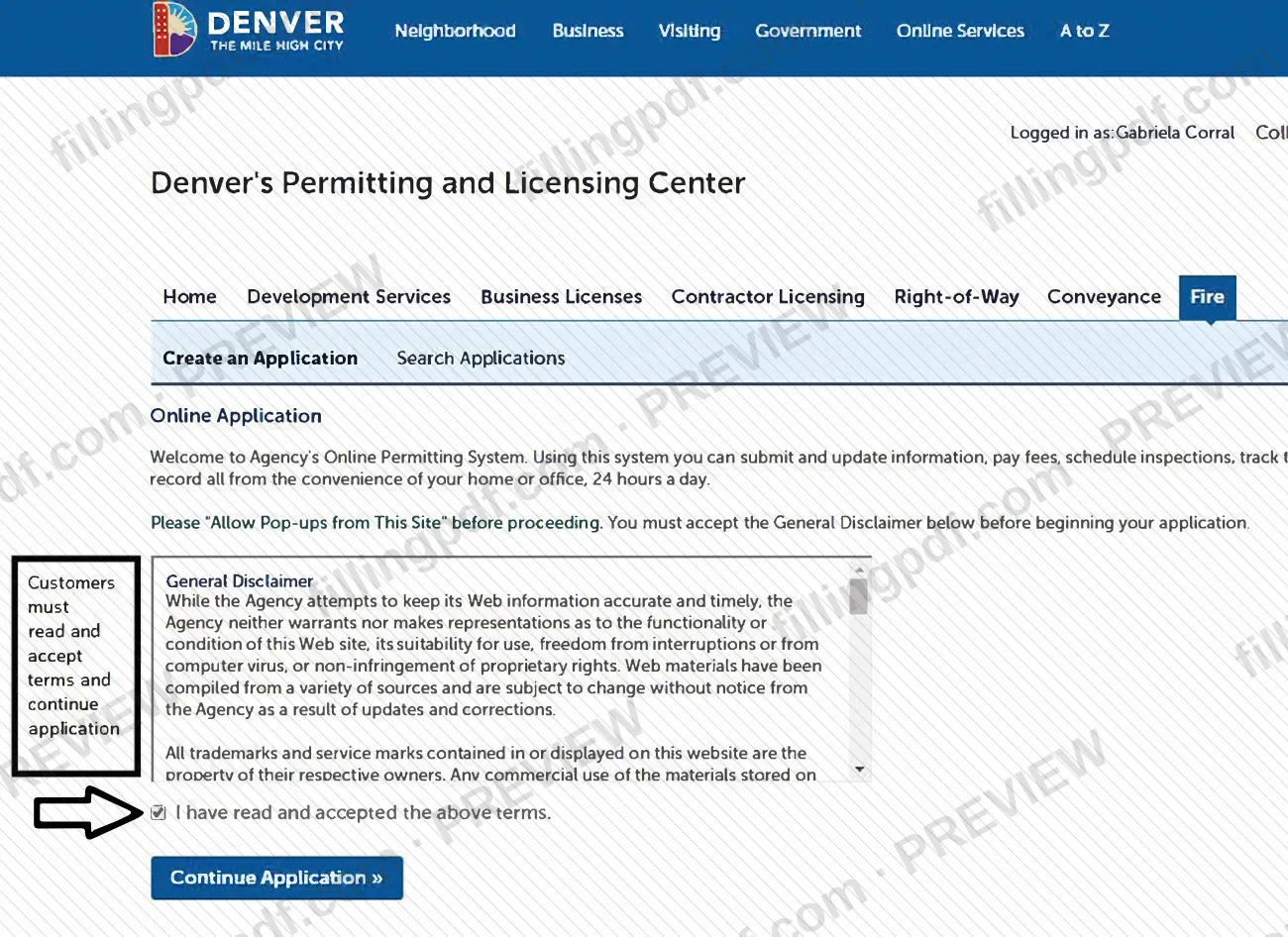
Read the Customers General Disclaimer, check I have read and accepted the above terms and click Continue Application.
Choose the permit type
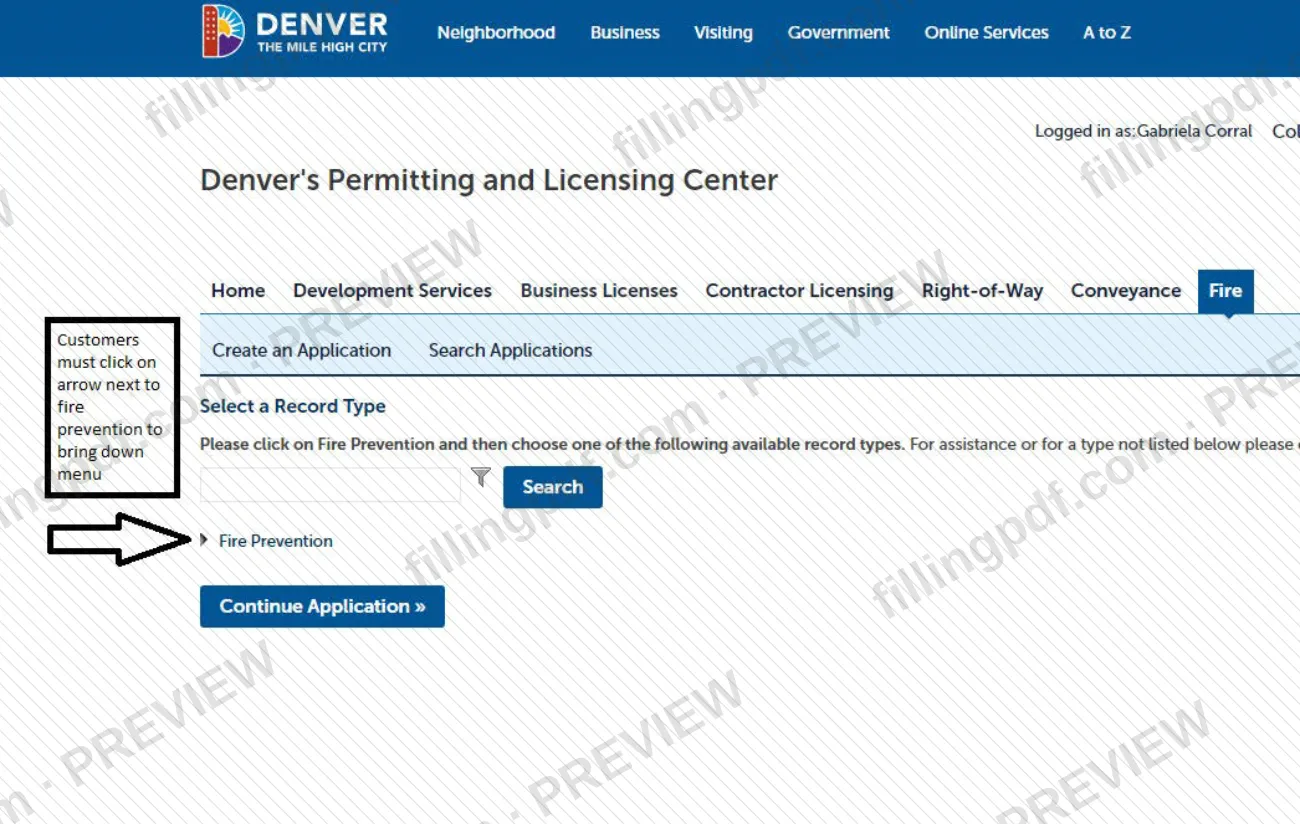
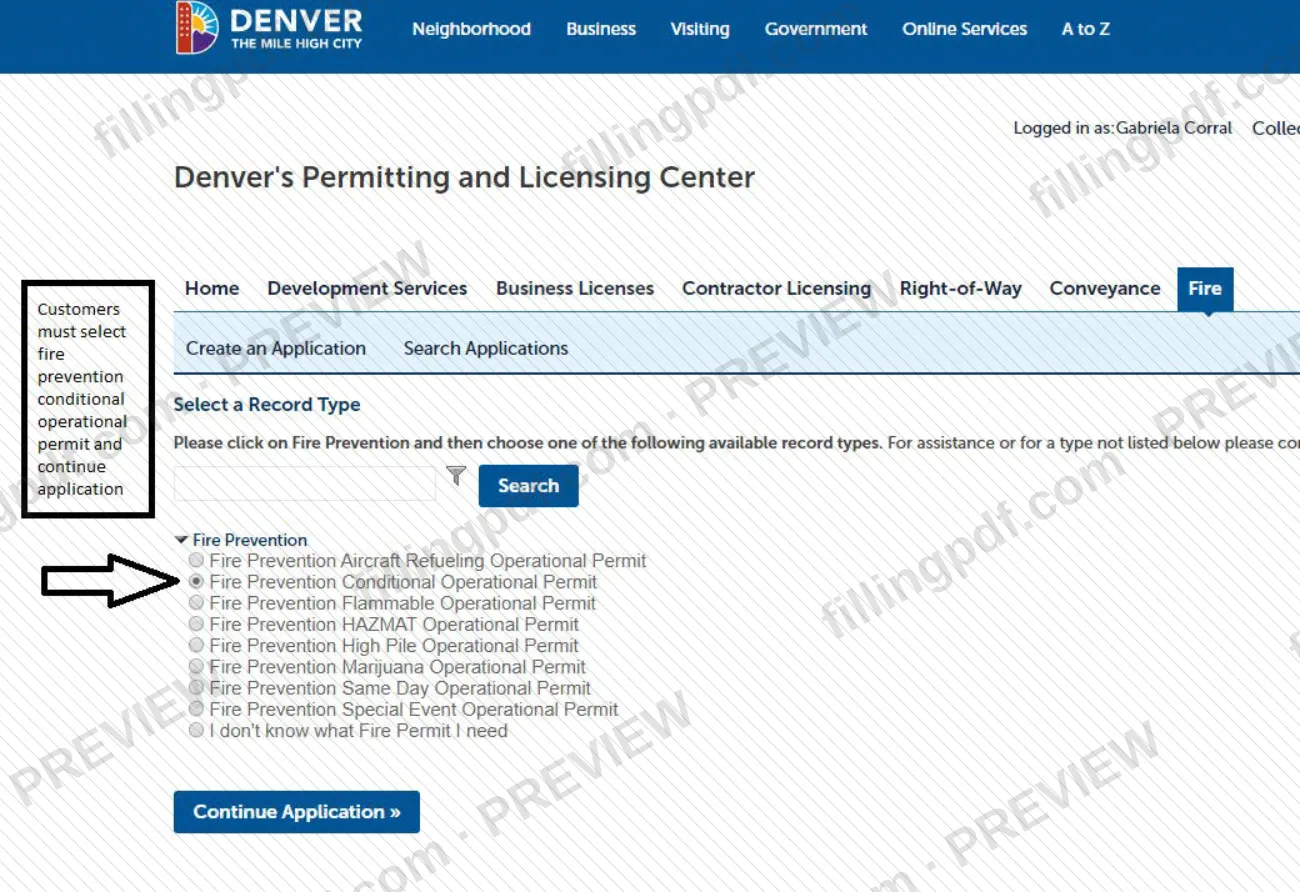
Select the Operational Permit type for your occupancy; a fire watch falls under Conditional Operational (including Firewatch). The screen is titled Fire Prevention Conditional Operational Permit.
Enter the site address
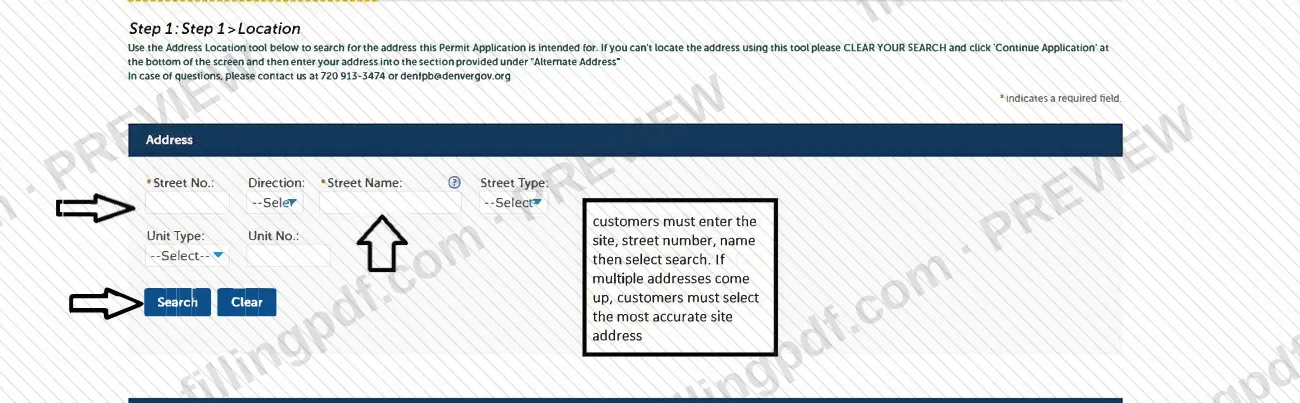
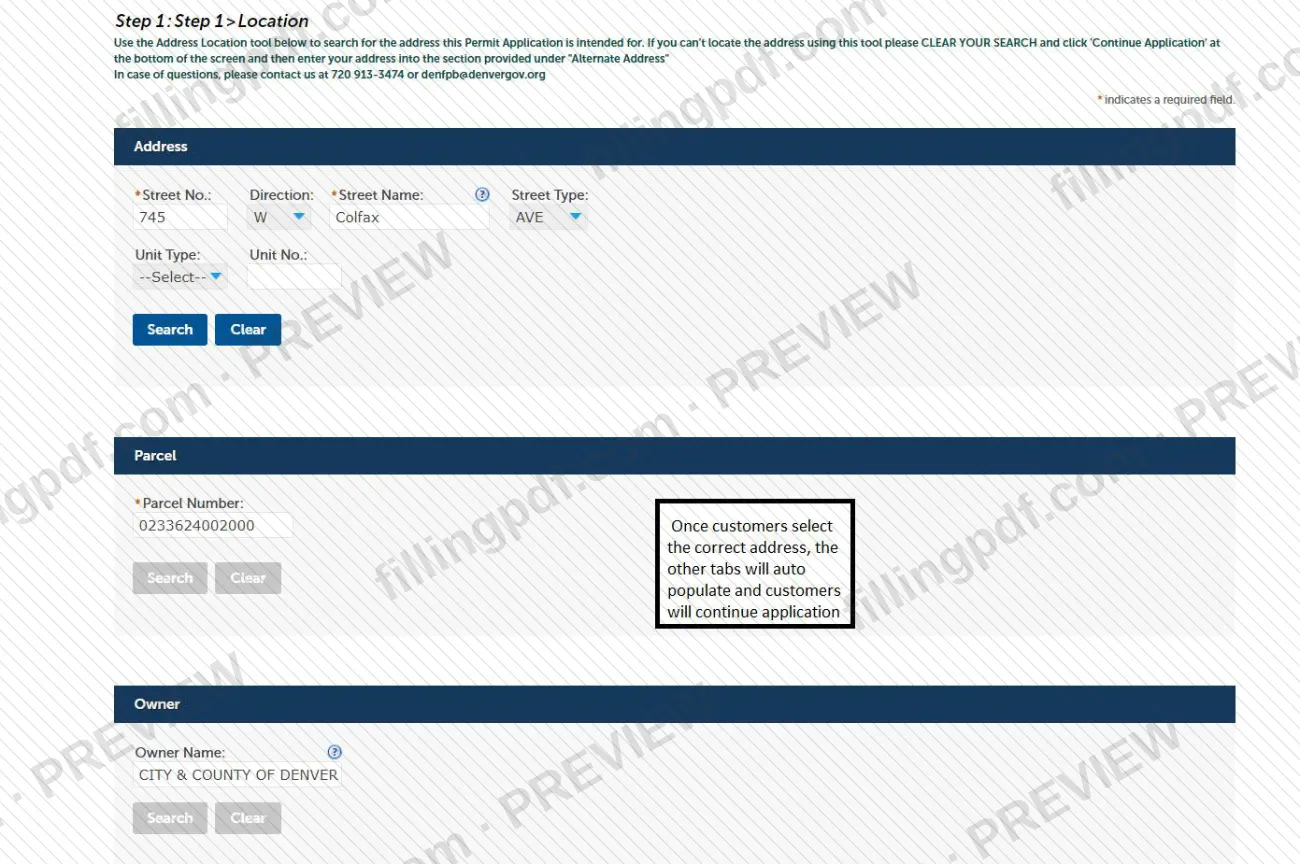
In Step 1 > Location, enter the street number, street name and street type (unit type and number if needed) and select search. If several addresses appear, choose the most accurate one; if none is found, clear your search, continue and use Alternate Address.
Describe the business and operations
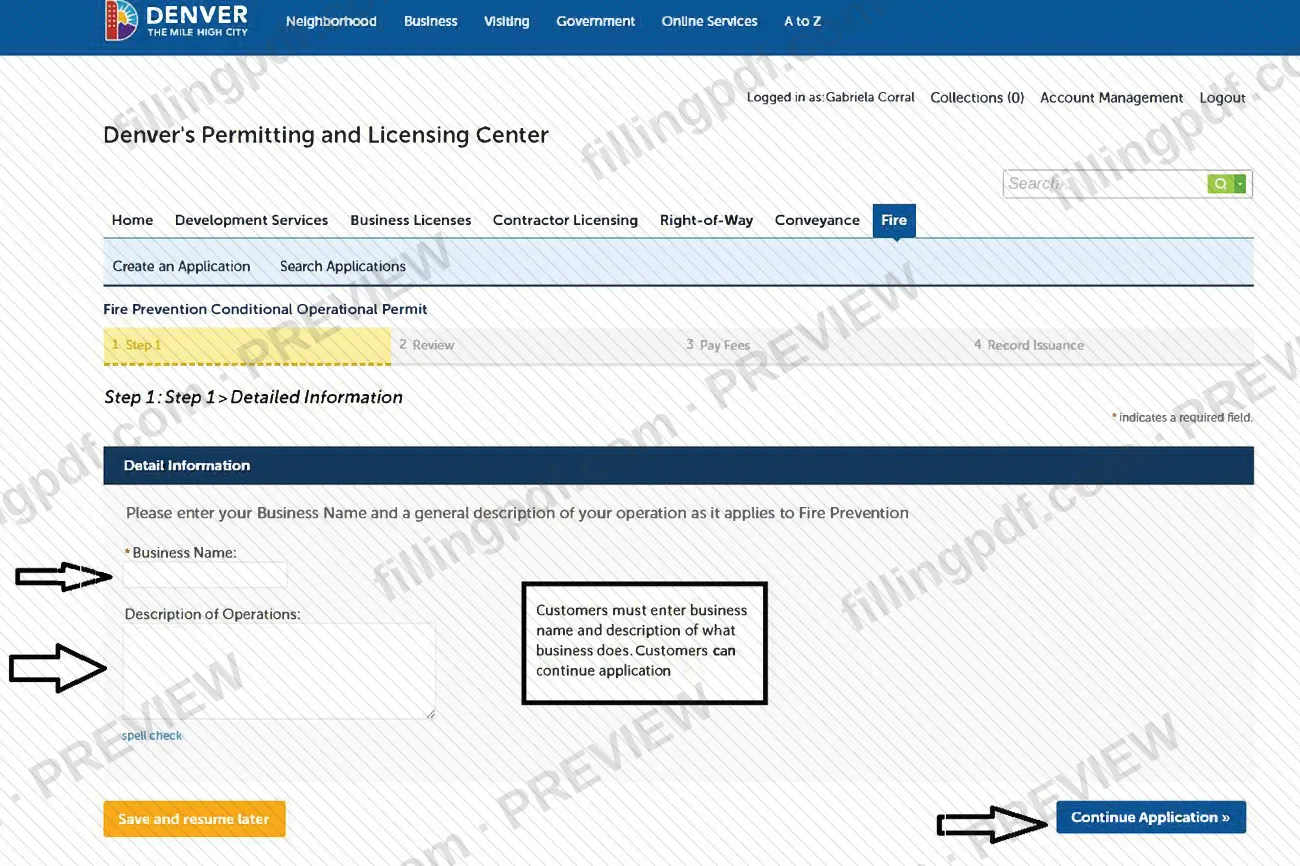
On the Detailed Information screen, enter the required Business Name and a general description of your operation in Description of Operations. You can use spell check, or save and resume later.
Submit and keep your record number
Review for accuracy and submit. On the Record Issuance screen, print the page and keep your record number; you need it for status checks and inspections.
Pay fees when notified
The application is reviewed and the city emails you about any fees due. Pay as instructed; fees can also be paid by mail to P.O. Box 733422, Dallas, TX 75373-3422.
Email for your fire watch permit
Email [email protected] with your record number and the words fire watch in the subject line to obtain the permit.
Review and download the PDF
Check your entries against the guide, then download or print the completed PDF from FillingPDF and keep it with your record number.
How to submit Fire Watch Permit Application Guide – Denver, CO
The application is submitted online through Accela Citizen Access, Denver's e-permit system; the city does not accept walk-in permit applications at this time, and mail is used only to pay fees.
- Online: register for or log in to your Accela Citizen Access account, click FIRE at the top right, choose Create an Application, accept the disclaimer and continue. Enable pop-ups, and try another browser if the electronic permission feature gives trouble. The process is described on the city's Fire Safety Operational Permit Application Process page.
- Email after submitting: on the last screen, print the page and keep your record number. Email [email protected] with the record number and the words fire watch in the subject line to obtain your fire watch permit.
- Fees: you are notified by email when fees are due. Fees can also be paid by mail to P.O. Box 733422, Dallas, TX 75373-3422. After payment, the permit is emailed to you as an attachment.
- Questions: 720-913-3474 or [email protected].
FillingPDF lets you fill out and download the PDF; submission follows the channels above.
Common mistakes to avoid
- Starting the online application before a Fire Prevention Officer has approved the fire watch permit, which the guide says not to do.
- Not enabling pop-ups in the browser before starting; the system asks you to allow pop-ups from the site.
- Picking an inaccurate address when several come up in the search, instead of selecting the most accurate site address.
- Entering an address the search cannot find without first clearing the search and using the Alternate Address section.
- Leaving the business name or the description of operations empty on the Detailed Information screen; the name is a required field.
- Not printing the final screen or losing the record number, which you need to check status, schedule inspections and request the permit.
- Skipping the email to [email protected], or leaving the words fire watch out of the subject line.
- Choosing the wrong operational permit type, for example using another type for a marijuana occupancy, which has its own permit.
- Going to a city office to apply in person; walk-in permit applications are not accepted at this time.
Frequently asked questions
What is the Denver Fire Watch Permit Application Guide?
It is a City and County of Denver PDF that shows the online steps for applying for a fire watch permit in Accela Citizen Access: disclaimer, address search, business details and the record number screen. It opens with a notice that a Fire Prevention Officer's approval is required first.
Do I need approval before applying for a Denver fire watch permit?
Yes. The guide states that Fire Prevention Officer approval is required to initiate a fire watch permit and asks you not to start an application before receiving it. To reach a Fire Prevention Officer, call 720-913-3474.
How do I get my fire watch permit after I submit the application?
Print the final screen and note your record number, then email [email protected] with the record number and the words fire watch in the subject line. The city emails any fees due, and after payment you receive the permit as an email attachment.
Is there a fee for a Denver fire watch permit?
Yes, the city says there is a charge for permits, assessed after review and sent to you by email. Fees can also be paid by mail to P.O. Box 733422, Dallas, TX 75373-3422. Ask the Fire Prevention Division for the amount: 720-913-3474 or [email protected].
Can I apply for the fire watch permit in person?
No. The city says it does not accept walk-in permit applications at this time; operational permits are issued through Accela Citizen Access. Mail is listed only for paying fees.
Is this a Denver building permit?
No. This guide covers a fire safety operational permit. Fire Construction Permits required by IFCA 105.7, and permits for new construction or life safety system installation, go through Development Services after plan review.
Do Denver operational permits have to be renewed?
Operational permits must be renewed every year, with fees assessed at issuance and renewal. The city emails instructions for permits accepted for renewal. The guide itself does not give a separate renewal date for the fire watch permit.
Can I fill out the Fire Watch Permit Application Guide on FillingPDF?
You can fill out the PDF online on FillingPDF and download or print it. FillingPDF is an independent service, not connected to the City and County of Denver, and does not apply for or issue permits; the application goes through the city's e-permit system.
Ready to fill out Fire Watch Permit Application Guide – Denver, CO?
Fill out Fire Watch Permit Application Guide – Denver, CO now