
The Green Building Declaration Form for New Buildings is a Development Services form from City and County of Denver Planning and Development (Community Planning and Development). On it, the project team describes the building and its roofs, gives cool roof data and picks one way to comply with the Green Buildings Ordinance (GBO). It is one of the documents that goes in with the plans for a Denver permit when the building is large enough. On this page you can fill out the form online on FillingPDF and download or print the completed PDF; the official PDF is published by the City and County of Denver.
Last updated
What is Green Building Declaration Form, New Buildings – Denver, CO?
The Green Building Declaration Form, New Buildings is the Denver Development Services form that states a project's size, its cool roof data and the compliance option chosen under the Green Buildings Ordinance (GBO), submitted with the building plans.
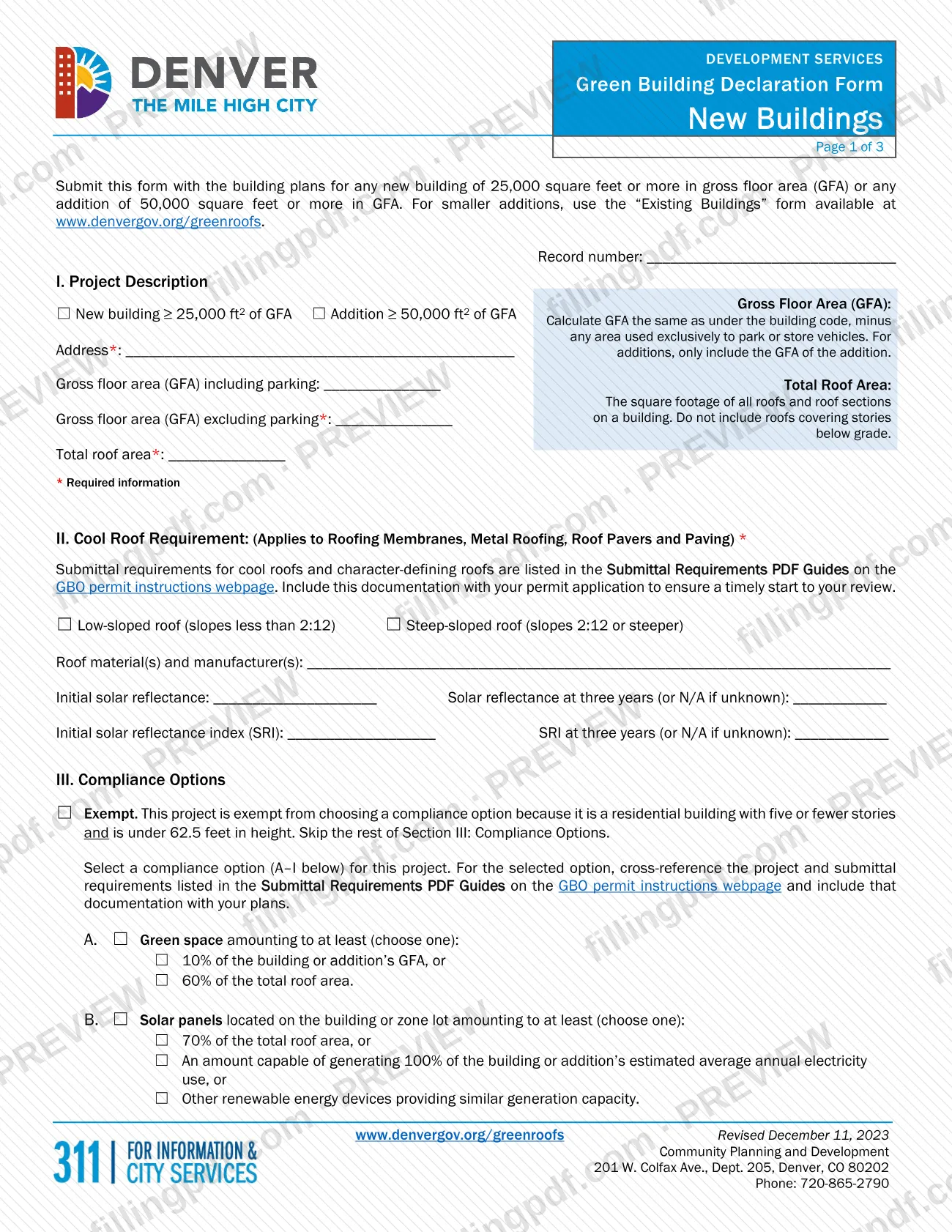
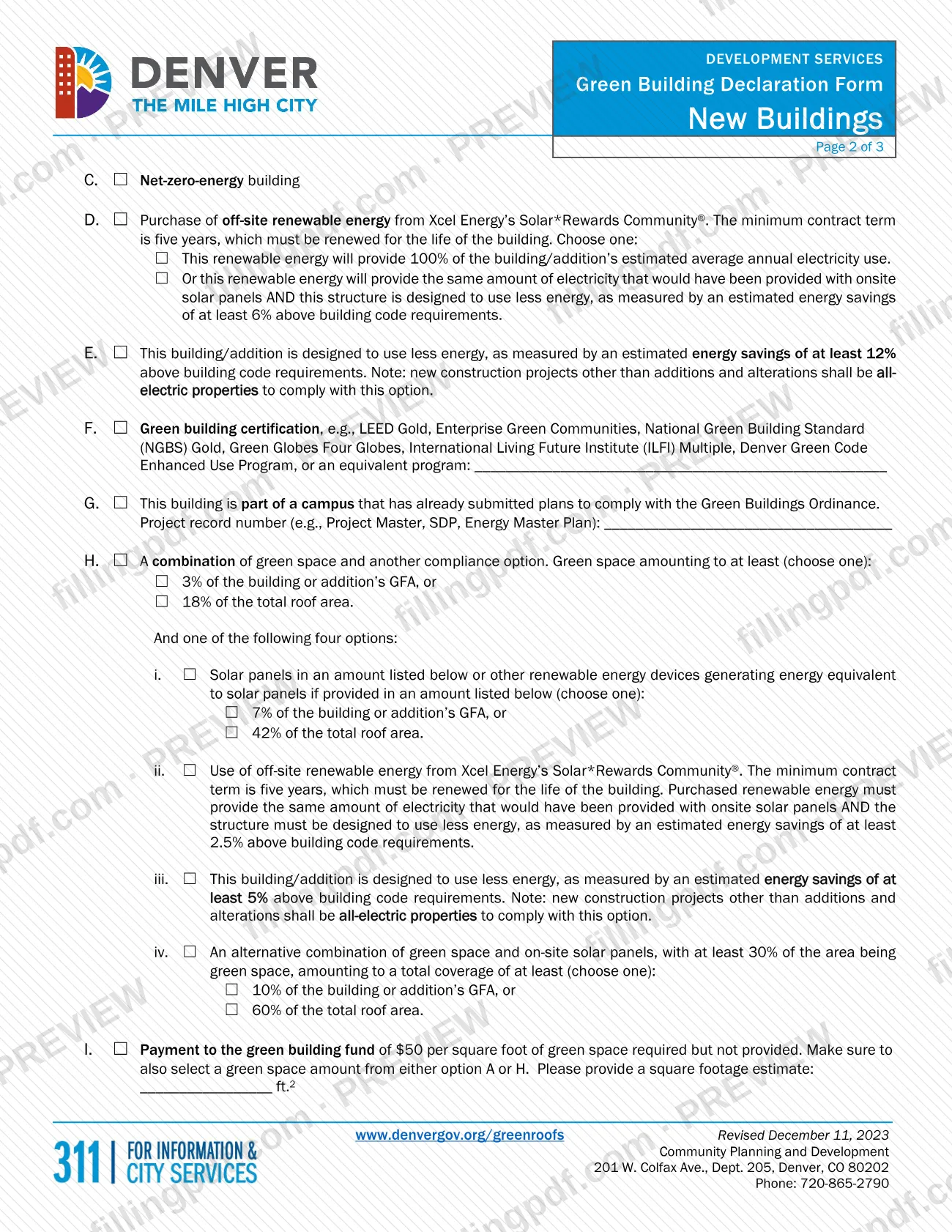
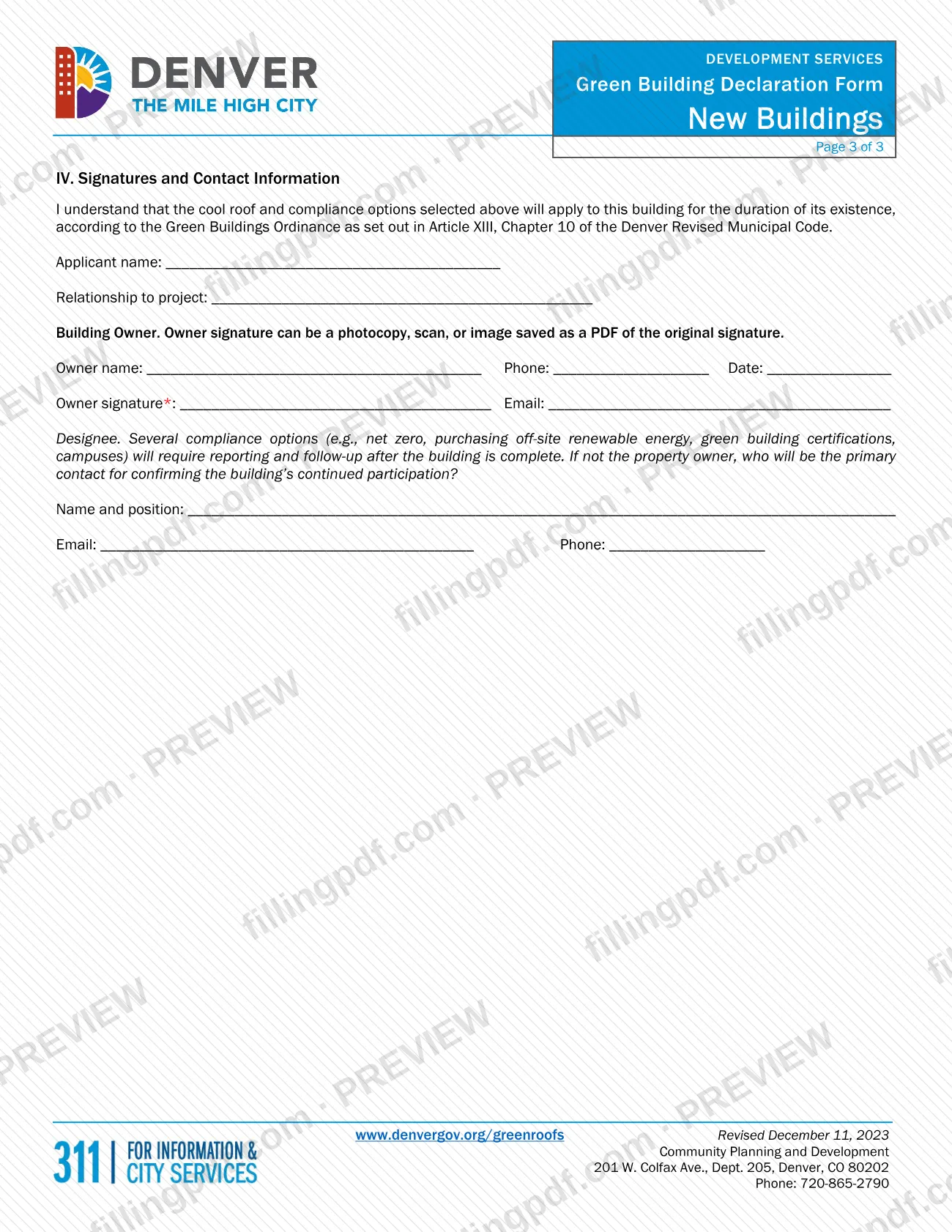
The form has four parts. I. Project Description asks for the record number, the address, the gross floor area (GFA) with and without parking, and the total roof area. II. Cool Roof Requirement covers roofing membranes, metal roofing, roof pavers and paving, and asks for roof slope, materials, manufacturers and solar reflectance values. III. Compliance Options lists an exemption and options A through I: green space, solar panels, net-zero-energy building, off-site renewable energy from Xcel Energy's Solar*Rewards Community®, energy savings above building code, green building certification, a campus already covered, a combination, or a payment to the green building fund. IV. Signatures and Contact Information collects the owner's signature and a designee for follow-up.
By signing, the owner acknowledges that the cool roof and compliance options selected apply to the building for the duration of its existence, under Article XIII, Chapter 10 of the Denver Revised Municipal Code.
This is the New Buildings form. The form itself says smaller additions use the separate "Existing Buildings" form, available at www.denvergov.org/greenroofs.
Who needs to file Green Building Declaration Form, New Buildings – Denver, CO?
Project teams submitting plans for a new building of 25,000 square feet or more in gross floor area (GFA), or for an addition of 50,000 square feet or more in GFA, submit this form with the building plans. The same threshold appears on the City's page for site development plan review, which lists the GBO declaration form among the documents to gather for a formal site development plan.
- Smaller additions: do not use this form. The form directs additions below 50,000 square feet to the "Existing Buildings" form at www.denvergov.org/greenroofs.
- Exempt buildings: a residential building with five or fewer stories that is under 62.5 feet in height is exempt from choosing a compliance option. It checks the Exempt box and skips the rest of Section III.
- Who signs: the building owner signs in Section IV. The owner's signature may be a photocopy, scan or image saved as a PDF of the original signature.
- Designee: if the owner will not be the primary contact for confirming the building's continued participation, the form asks for a name, position, email and phone of the person who will.
When to file Green Building Declaration Form, New Buildings – Denver, CO
Submit the form together with the building plans for the qualifying new building or addition; the form states that it goes in with the plans and sets no separate due date. For a formal site development plan, the City's page lists the declaration form among the documents to gather before you submit online. The form also says to include the cool roof and compliance-option documentation with your permit application to ensure a timely start to your review. Several compliance options, such as net zero, purchasing off-site renewable energy, green building certifications and campuses, require reporting and follow-up after the building is complete.
Documents you need
- Building plans for the new building or addition: the form is submitted with them.
- Documentation for the cool roof requirement, listed in the Submittal Requirements PDF Guides on the GBO permit instructions webpage, included with your permit application.
- Documentation for the compliance option you select (A–I), cross-referenced to the Submittal Requirements PDF Guides and included with your plans; not needed if you check Exempt.
- For option F: the name of the green building certification or equivalent program, written on the form.
- For option G: the project record number (for example Project Master, SDP or Energy Master Plan) of the campus that already submitted plans.
- For a formal site development plan: the City's page lists the GBO declaration form among the documents to gather, alongside the plan and a TDM Plan submitted separately in e-permits.
How to fill out Green Building Declaration Form, New Buildings – Denver, CO
Enter the record number
At the top of page 1, write the permit or project Record number that the form asks for.
Check the project type
In Section I, check New building ≥ 25,000 ft2 of GFA or Addition ≥ 50,000 ft2 of GFA. For additions, include only the GFA of the addition.
Complete address and areas
Enter the Address, the GFA including parking, the GFA excluding parking and the total roof area. GFA follows the building code minus any area used exclusively to park or store vehicles; roofs over stories below grade are not counted.
Complete the cool roof section
In Section II, check Low-sloped roof (slopes less than 2:12) or Steep-sloped roof (2:12 or steeper). Enter roof materials and manufacturers, initial solar reflectance and initial SRI, and the three-year values, or N/A if unknown.
Check Exempt if it applies
In Section III, check Exempt only for a residential building with five or fewer stories and under 62.5 feet in height, then skip the rest of Section III.
Select options A through D
Otherwise check one option and its sub-choices: A green space (10% of GFA or 60% of roof area), B solar panels or other renewable devices, C net-zero-energy building, or D Xcel Energy Solar*Rewards Community® purchase.
Select options E through I
Choose E (energy savings of at least 12%), F (certification, name it), G (campus, give the project record number), H (green space plus one of i–iv) or I (green building fund payment, with a square footage estimate and a green space amount from A or H).
Add applicant and owner details
In Section IV, enter the applicant name and relationship to the project, then the owner's name, phone, date and email.
Name a designee if needed
If the owner is not the primary contact for confirming the building's continued participation, enter that person's name and position, email and phone.
Review, sign and download
Check required fields and the option you selected. The owner signs on Owner signature; then download or print the completed PDF from FillingPDF and submit it with your plans and supporting documentation as described under How to submit.
How to submit Green Building Declaration Form, New Buildings – Denver, CO
The form is submitted with the building plans, and the City's page on site development plan review describes the online channel for plans filed there.
- Online (e-permits): register for a free online account in e-permits, click Development Services > Apply for a Permit, select the appropriate Site Planning option and click Continue Application. Follow the prompts for contact information and project details, and upload the site planning documents, including the GBO declaration form.
- Resubmittals: sign in to e-permits, open the record under My Records, then Record Info and Attachments, and add the revised documents; save after uploading. For projects first submitted by email or on the old e-plan/EFT site, email [email protected] as the City's page instructs.
- Questions: Community Planning and Development, 201 W. Colfax Ave., Dept. 205, Denver, CO 80202, phone 720-865-2790.
The form names no mailing or in-person channel of its own. Option I is a payment to the green building fund; the form prints the rate per square foot of green space required but not provided. FillingPDF lets you fill out and download the PDF; submission follows the City's channels above.
Common mistakes to avoid
- Using this New Buildings form for an addition under 50,000 square feet, which the form sends to the "Existing Buildings" form.
- Leaving out a field marked with an asterisk: address, gross floor area excluding parking, total roof area or the cool roof section.
- Counting roofs over stories below grade in the total roof area, which the form excludes.
- Including parking in the GFA excluding parking line, or counting the whole building's GFA for an addition instead of only the addition.
- Checking Exempt for a building that is not residential, has more than five stories or is 62.5 feet or taller.
- Choosing option I without also selecting a green space amount from option A or H, or leaving the square footage estimate blank.
- Choosing option E or H.iii for new construction that is not an all-electric property; the form notes that new construction other than additions and alterations must be all-electric.
- Submitting the form without the owner's signature, or without the cool roof and compliance documentation listed in the Submittal Requirements PDF Guides.
- Entering a blank instead of N/A for the three-year solar reflectance or SRI when the value is unknown.
Frequently asked questions
What is the Denver GBO declaration form?
It is the Green Building Declaration Form for New Buildings from Denver Development Services. It records the building's size and cool roof data and the option chosen to comply with the Green Buildings Ordinance (GBO). It is submitted with the building plans.
Do I need this form for a Denver building permit?
Only for a new building of 25,000 square feet or more in GFA, or an addition of 50,000 square feet or more. Smaller additions use the "Existing Buildings" form. Other Denver permit projects are not covered by what this form says.
Who is exempt from choosing a compliance option?
A residential building with five or fewer stories that is under 62.5 feet in height. You check the Exempt box and skip the rest of Section III, Compliance Options. Section II, the cool roof section, is still marked as required.
Where do I submit the GBO declaration form?
Submit it with the building plans. For a formal site development plan, upload it in e-permits through Development Services > Apply for a Permit and the Site Planning option. The City's contact is 720-865-2790, 201 W. Colfax Ave., Dept. 205, Denver, CO 80202.
Who signs the Green Building Declaration Form?
The building owner signs in Section IV. The owner's signature can be a photocopy, scan or image saved as a PDF of the original signature. A designee is named only as the contact for confirming the building's continued participation.
How long do my choices on the form last?
For the duration of the building's existence. By signing, the owner confirms that the cool roof and compliance options selected apply under Article XIII, Chapter 10 of the Denver Revised Municipal Code.
What is the difference between options A and H?
Option A is green space alone, at least 10% of GFA or 60% of total roof area. Option H combines a smaller green space amount, 3% of GFA or 18% of roof area, with one of four other measures: solar, off-site renewable energy, energy savings of at least 5%, or an alternative combination.
Can I fill out the Denver green building declaration form online?
Yes. You can fill out the PDF online on FillingPDF and download or print it. FillingPDF is independent of the City and County of Denver and does not file the form; you submit it through the City's channels.
Ready to fill out Green Building Declaration Form, New Buildings – Denver, CO?
Fill out Green Building Declaration Form, New Buildings – Denver, CO now