
Instrucciones paso a paso para reservar un sitio de picnic is the Spanish-language guide that Denver Parks and Recreation publishes for booking a picnic area through its online reservations website. It is one of the Denver city park permit resources, and it fits anyone who needs a picnic permit for a group event in a city or Denver Mountain Park. On this page you can fill out the form online on FillingPDF and download or print the completed PDF; the original guide and the reservation website stay with the City and County of Denver.
Last updated
What is Instrucciones paso a paso para reservar un sitio de picnic – Denver, CO?
Instrucciones paso a paso para reservar un sitio de picnic is the Spanish-language, step-by-step guide that Denver Parks and Recreation publishes to explain how to reserve a picnic area through its online reservations website, from creating an account to receiving the permit by email.
The guide is three pages long and carries the date 1.29.25 on each page. It does not replace the reservation itself: the booking is made on the online reservations website at https://apm.activecommunities.com/denver/Home, and the guide walks through the screens in order.
What it covers:
- Signing in or creating the account that every person reserving a picnic area must have.
- Opening Instalaciones, searching the park name and choosing the picnic area, where the site information, the reservation rules and the availability calendar appear.
- Choosing a date, entering the number of attendees and, if wanted, adding more dates.
- Filling in the event details, answering the custom questions, initialing the required information and waivers, and adding the reservation to the cart.
- Payment, the permit approval email and the rules for changes and cancellations.
It also notes that reservations at Genesee Park, Newton Juvenile Park and Newton Stromberg Park (Mountain Parks) start with a tentative permit status. The agency's picnic permits page adds Mountain Park rules such as the picnic season, holiday closures and fire restrictions.
Who needs to file Instrucciones paso a paso para reservar un sitio de picnic – Denver, CO?
Anyone who wants to reserve a picnic area for an event in a Denver park uses this guide. The person making the reservation must have an account on the online reservations website. If you have held a permit before or dealt with Denver Parks and Recreation, the guide says to sign in with that information; otherwise you create a new account.
Groups the guide treats differently:
- People reserving at Genesee Park, Newton Juvenile Park or Newton Stromberg Park (Mountain Parks): the confirmation receipt shows a tentative permit status, and the permit office staff contact you with next steps.
- People who need to change, transfer or cancel a reservation: these requests cannot be made online. The guide says to do them by phone with the Parks Permit Office, and the agency's page also lists email.
- People with login or technical problems: the guide gives the email [email protected].
This is a how-to guide, not a form with entries to submit by itself. The reservation is made on the website, not by sending the PDF to the city.
When to file Instrucciones paso a paso para reservar un sitio de picnic – Denver, CO
The guide is used whenever you want to book a picnic area, and it sets no separate deadline of its own. Availability depends on the calendar of the site you choose: dates shown in gray are not available and dates shown in blue can be reserved.
For the Mountain Parks, the agency's picnic permits page gives a picnic season of May 1 – September 30, with hours from 9:00 a.m. to 8:00 p.m. Newton Park (Juvenile and Stromberg) starts its season May 8. Lookout Mountain Park and Corwina Park picnic sites are unavailable for permitting on Memorial Day, July 4 and Labor Day.
Change or transfer requests can be made at any time, but a changed or transferred reservation must fall within the current picnic season.
How to fill out Instrucciones paso a paso para reservar un sitio de picnic – Denver, CO
Open the reservations website in Chrome
Use Chrome to go to https://apm.activecommunities.com/denver/Home, the online reservations page named in the guide.
Sign in or create an account
Everyone who reserves a picnic area needs an account. Use your previous permit or Denver Parks and Recreation information if you have it; for login problems email [email protected].
Find your picnic site
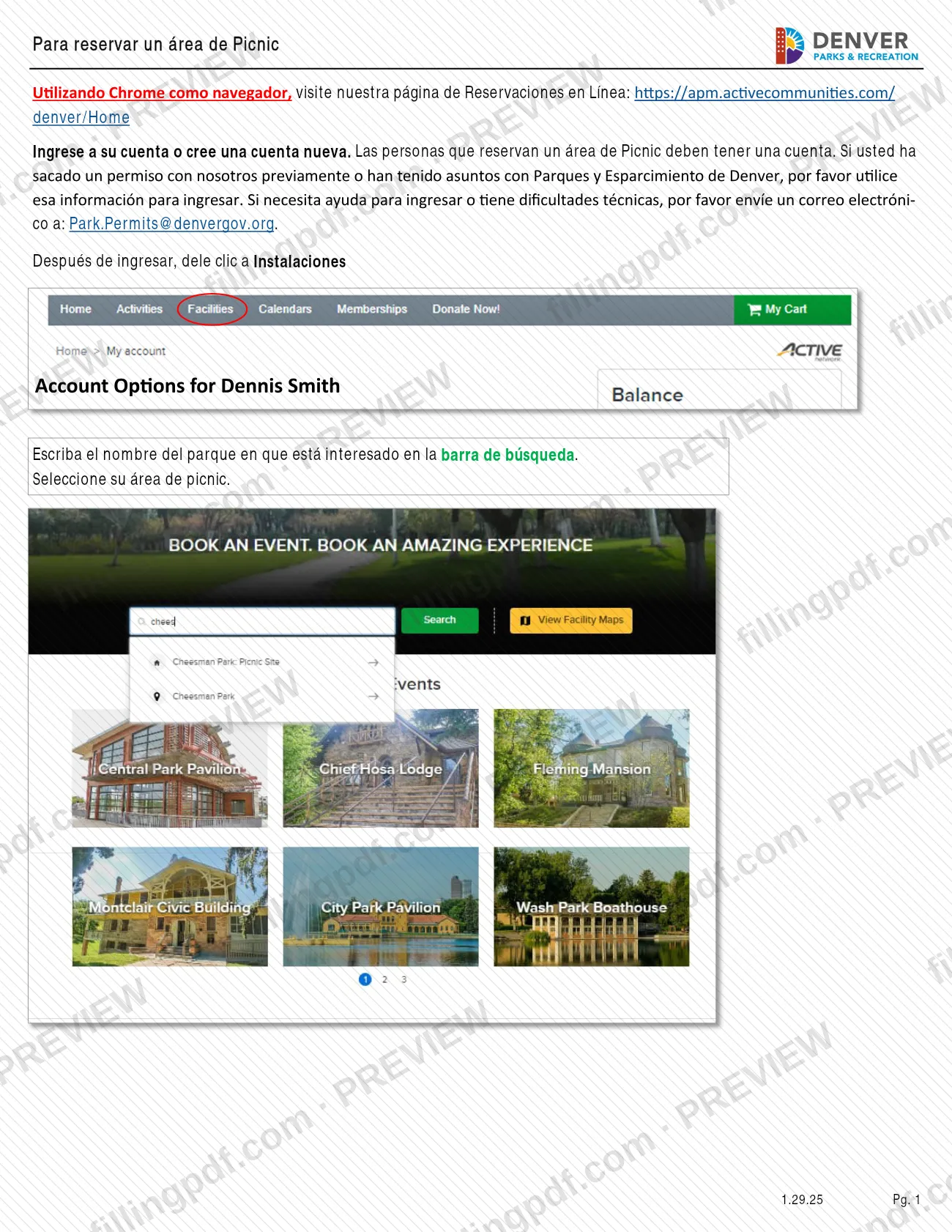
After signing in, click Instalaciones, type the park name in the search bar and select your picnic area. The page shows site information, reservation rules and the availability calendar.
Choose a date on the calendar
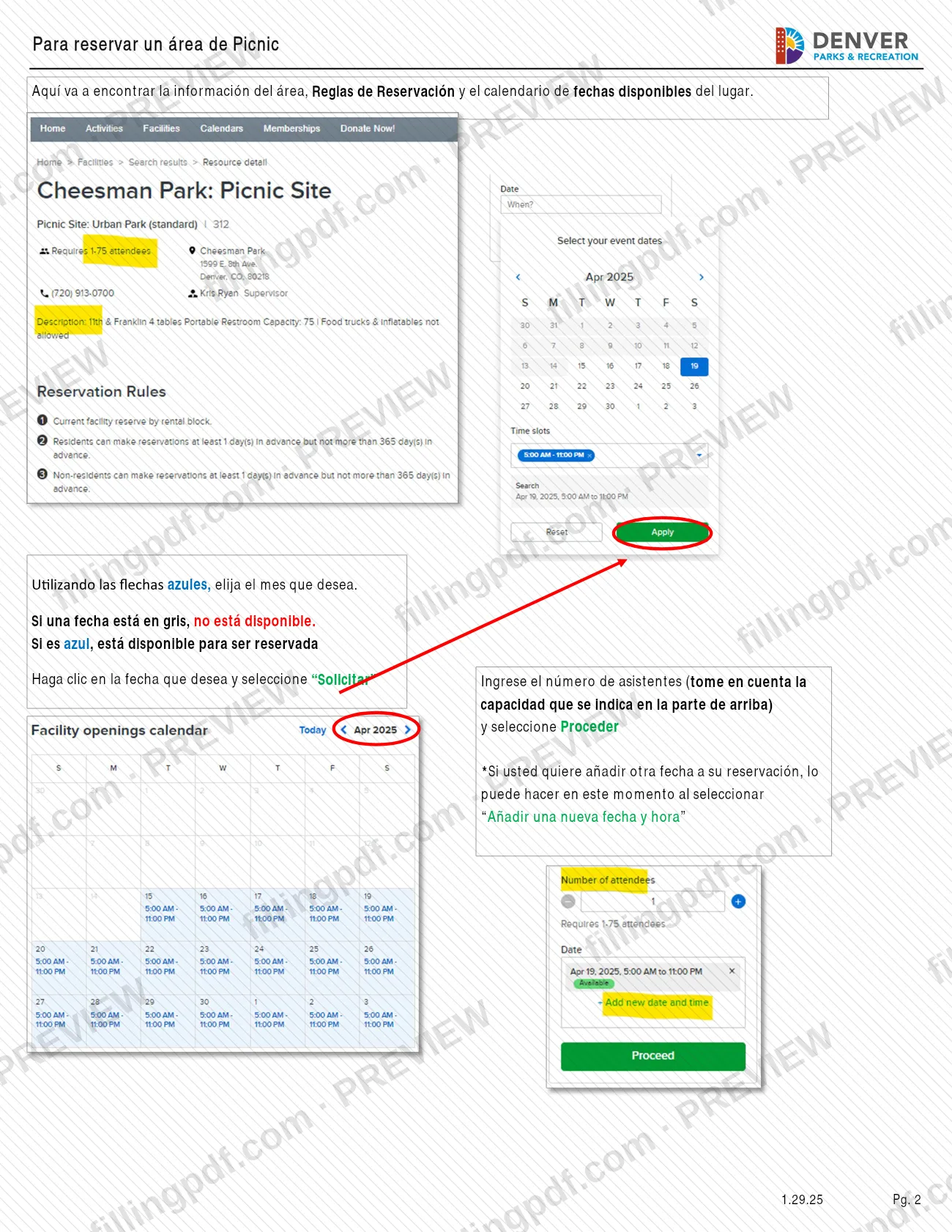
Use the blue arrows to pick the month. Gray dates are unavailable and blue dates can be reserved; click the date and select Solicitar.
Enter attendees and extra dates
Enter the number of attendees, keeping within the capacity shown at the top of the page, and select Proceder. To add another date, select Añadir una nueva fecha y hora.
Complete the event details
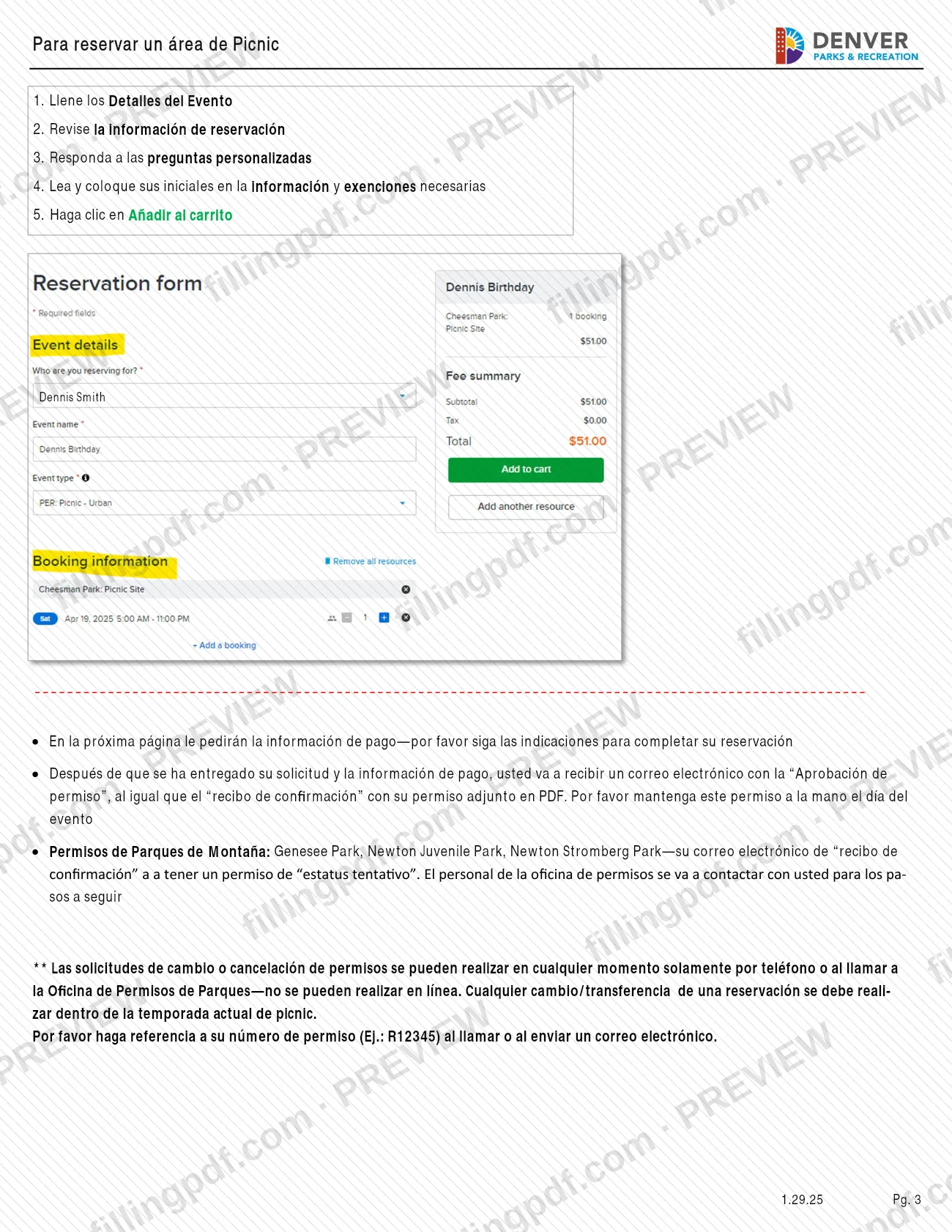
Fill in the Detalles del Evento, review the reservation information and answer the custom questions.
Initial the information and waivers
Read the required information and waivers and place your initials, then click Añadir al carrito.
Enter payment information
The next page asks for payment information. Follow the prompts to complete the reservation.
Save your permit email
After you submit, you receive the permit approval and a confirmation receipt with the permit as a PDF. Keep it for the event day; Mountain Park receipts show a tentative status.
Review and download the PDF
Check the steps above against your own reservation, then download or print the PDF from FillingPDF and keep it with your permit email.
How to submit Instrucciones paso a paso para reservar un sitio de picnic – Denver, CO
The reservation is made online on the Denver Parks and Recreation reservations website; changes and cancellations go through the Parks Permit Office.
- Online reservation: use Chrome to open https://apm.activecommunities.com/denver/Home, sign in or create an account, open Instalaciones, find your park and picnic area, choose the date and complete the five screens ending with Añadir al carrito. The next page asks for payment information; follow its prompts to finish the reservation.
- After you submit: you receive an email with the permit approval and a confirmation receipt with the permit attached as a PDF. Keep the permit with you on the day of the event. For Genesee Park, Newton Juvenile Park and Newton Stromberg Park, the receipt shows a tentative status and permit office staff contact you.
- Help with login: email [email protected].
- Changes or cancellations: only by calling the Parks Permit Office (the agency's page also lists email); they cannot be made online. Give your permit number, for example R12345.
For Mountain Park questions, the agency's page lists the Park Ranger line, 303-331-4050. FillingPDF lets you fill out and download the PDF; submission follows the channels above.
Common mistakes to avoid
- Trying to reserve without an account: the guide says people who reserve a picnic area must have one.
- Choosing a date shown in gray; gray dates are not available, only blue dates can be requested.
- Ignoring the capacity shown at the top of the site page when entering the number of attendees.
- Stopping at Añadir al carrito: the next page asks for payment information, and the reservation is completed by following its prompts.
- Trying to change or cancel a permit online; those requests are made only by calling the Parks Permit Office (the agency's page also lists email).
- Calling or emailing about a change without your permit number, for example R12345.
- Treating a Mountain Park confirmation receipt as final when it shows a tentative status; permit office staff contact you with next steps.
- Requesting a change or transfer outside the current picnic season; changes must stay within it.
- Using a charcoal grill or open fire at a Mountain Park under fire restrictions; only gas grills are allowed in those cases.
Frequently asked questions
How do I reserve a picnic site in Denver?
Use Chrome to open the Denver Parks and Recreation reservations website at https://apm.activecommunities.com/denver/Home, sign in or create an account, open Instalaciones, choose your park and picnic area, then request a blue date and complete the checkout screens.
Do I need an account to reserve a Denver picnic area?
Yes. The guide says people who reserve a picnic area must have an account. If you have had a permit or dealt with Denver Parks and Recreation before, use that information to sign in; otherwise create a new account.
How do I know which dates are available?
On the site's calendar, a gray date is not available and a blue date is available to reserve. Use the blue arrows to change months, click the date you want and select Solicitar to start the request.
What do I receive after I reserve?
After your request and payment information are submitted, you get an email with the permit approval and a confirmation receipt with your permit attached as a PDF. Keep the permit available on the day of the event.
Can I cancel or change my picnic reservation online?
No. The guide says changes and cancellations can be made at any time but only by phone with the Parks Permit Office, and the agency's page also lists email. Give your permit number, such as R12345, and keep any change within the current picnic season.
Why does my Mountain Park permit say tentative?
Reservations at Genesee Park, Newton Juvenile Park and Newton Stromberg Park show a tentative permit status on the confirmation receipt. Permit office staff then contact you with the next steps.
Who do I contact if I cannot log in?
Email [email protected]. The guide gives that address for help signing in and for technical difficulties on the reservations website.
Can I fill out this Denver picnic guide on FillingPDF?
You can fill out the PDF online on FillingPDF and download or print it. FillingPDF is an independent service, is not connected to the City and County of Denver, and does not make or file reservations; you reserve on the city's website.
Ready to fill out Instrucciones paso a paso para reservar un sitio de picnic – Denver, CO?
Fill out Instrucciones paso a paso para reservar un sitio de picnic – Denver, CO now