
The Landmark Preservation Quick Review Application is the three-page form that Denver Landmark Preservation, part of City and County of Denver Planning and Development, uses for small exterior projects on an individual landmark or a building in a historic district. It is one of the Denver permit documents handled through the city's e-permit portal, and it covers work such as roofing, fences, skylights, HVAC, a shed or a rear-yard deck. On FillingPDF you can fill out the form online and download or print the completed PDF; the application itself goes through the Denver e-permit portal, as described below.
Last updated
What is Landmark Preservation Quick Review Application – Denver, CO?
The Landmark Preservation Quick Review Application is the Denver form, with its application checklist, on which an applicant describes a small exterior project on a landmark or historic-district building and lists the materials Landmark Preservation staff need to review it.
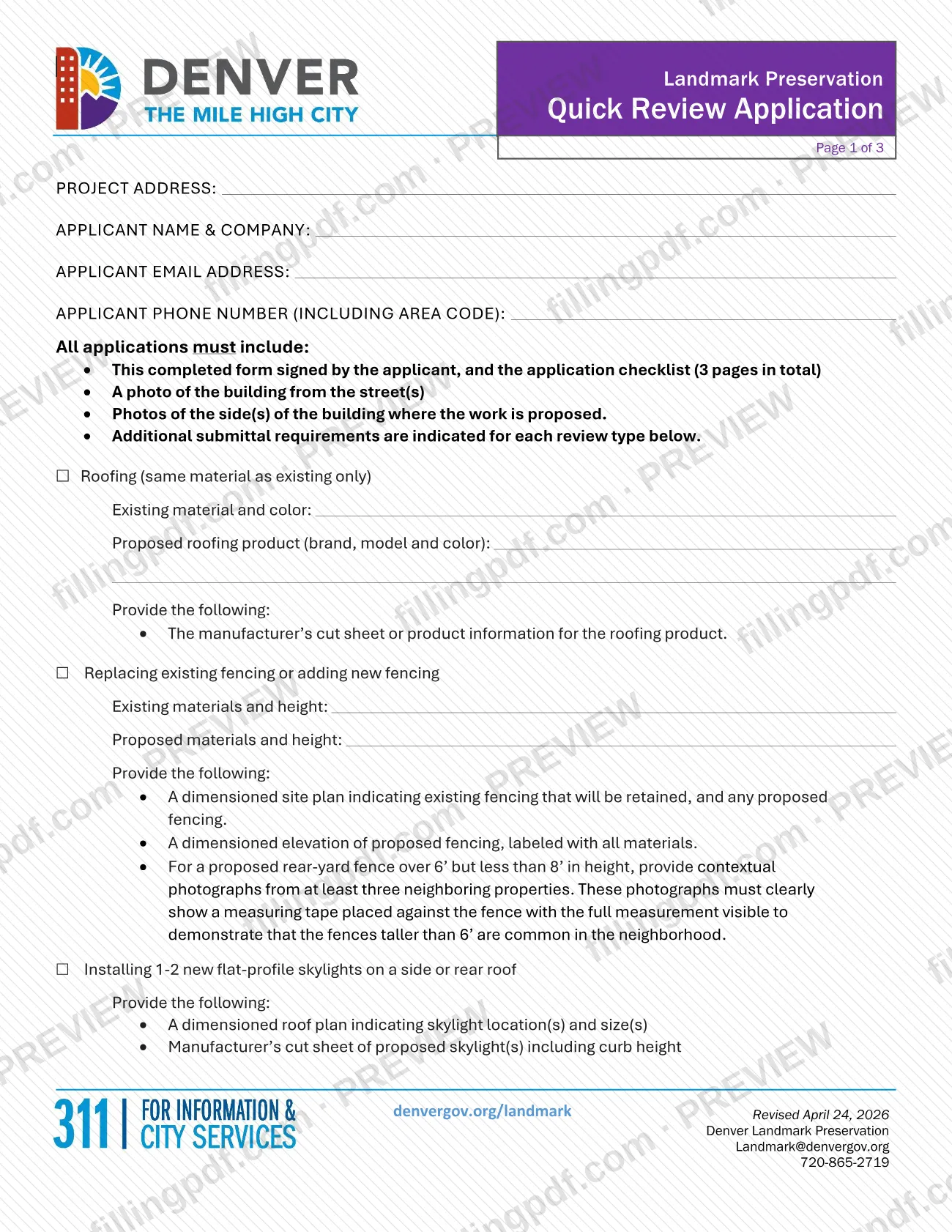
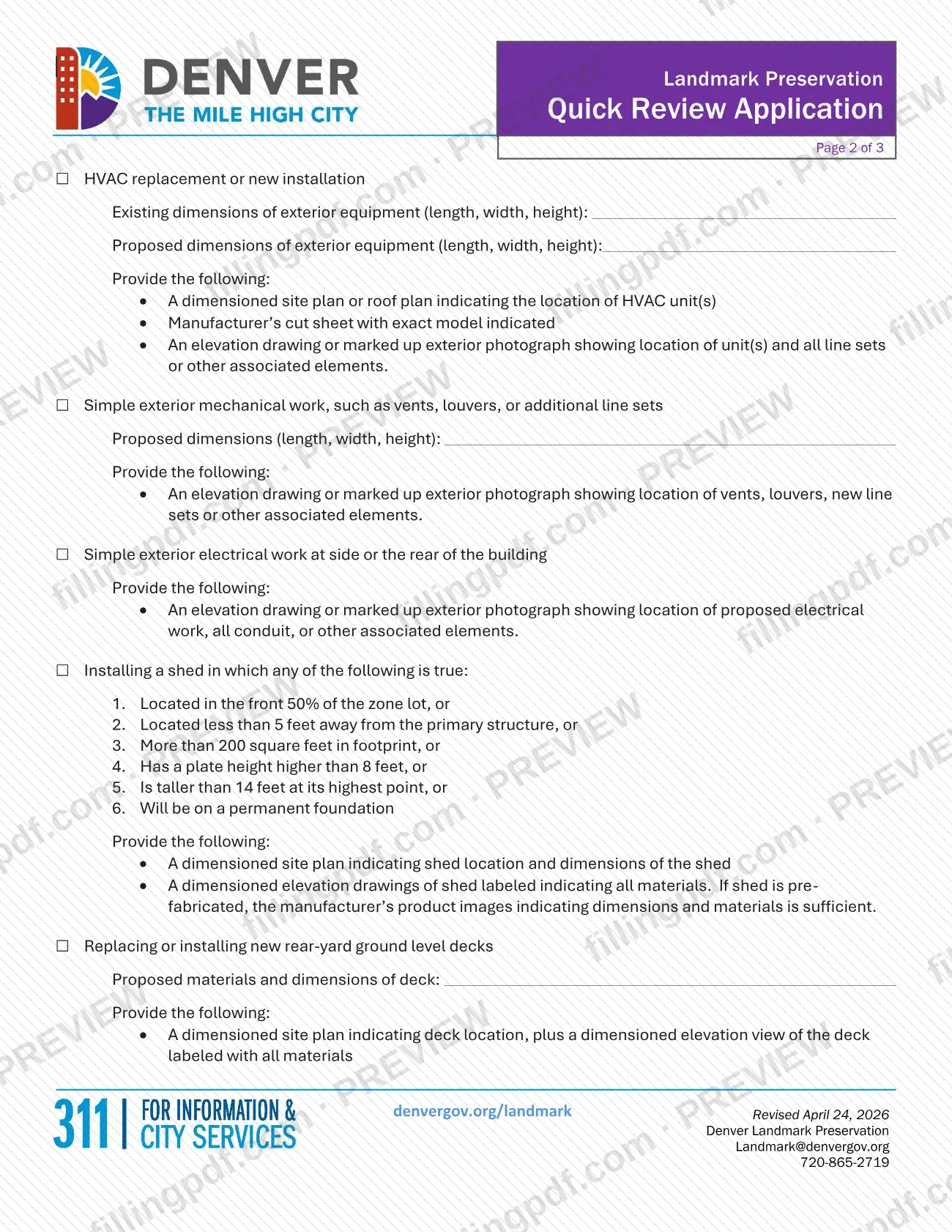
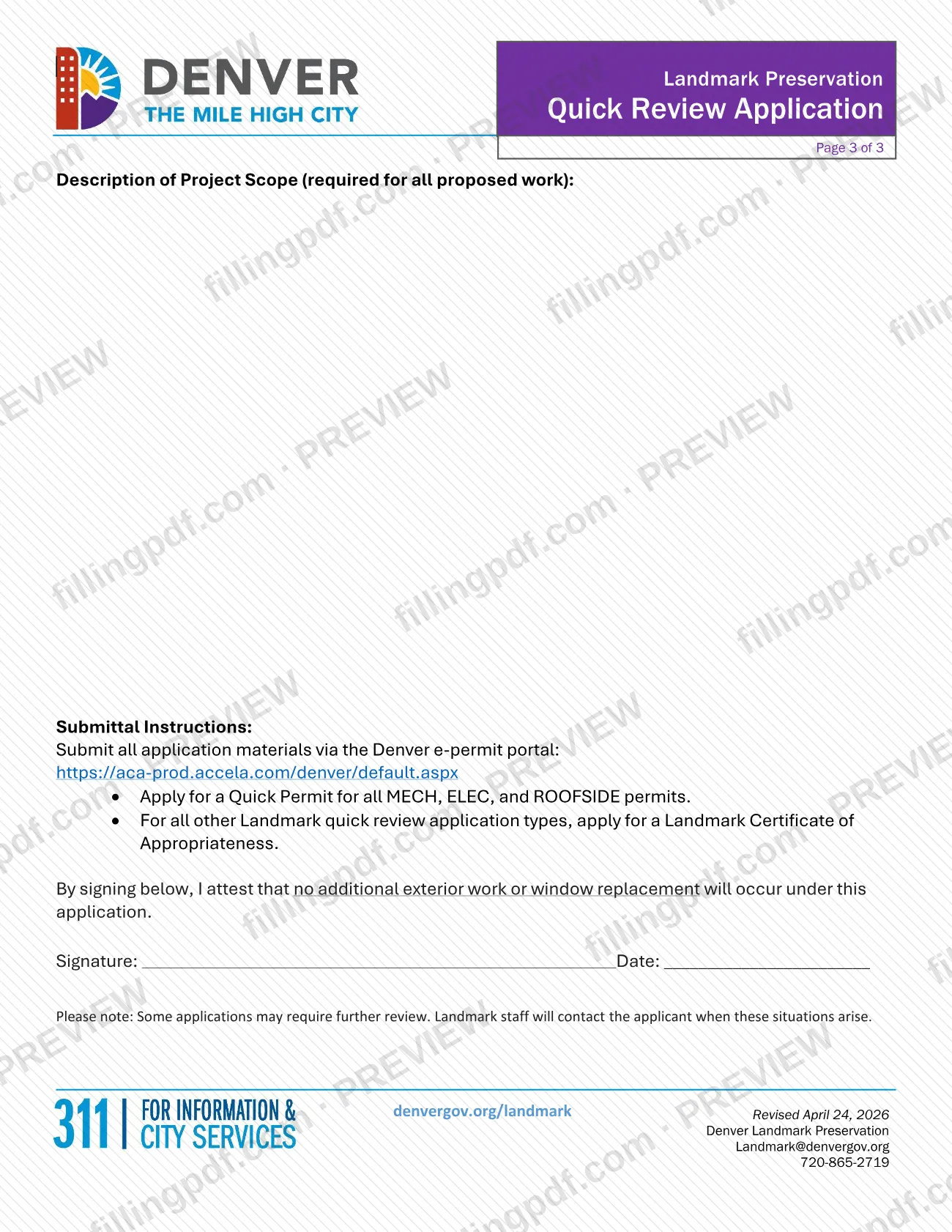
The three pages work together. Page 1 asks for the project address and the applicant's name, company, email and phone number, and sets out what every application must include. Pages 1 and 2 then list the eligible types of work, each with its own boxes, fields and required drawings or photos: roofing (same material as existing only), fencing, 1-2 new flat-profile skylights on a side or rear roof, HVAC replacement or new installation, simple exterior mechanical work, simple exterior electrical work at the side or rear, certain sheds, and rear-yard ground-level decks. Page 3 has the Description of Project Scope, the submittal instructions and the signature block.
Denver's Quick Permits page says Landmark Preservation must review all roof permits and any other quick permits involving exterior work on an individual landmark or a building within a historic district. The form is the submittal that supports that review; it is uploaded with an e-permit application and is not a permit by itself. Some applications may require further review, and Landmark staff contact the applicant when that happens.
Who needs to file Landmark Preservation Quick Review Application – Denver, CO?
The main group is anyone proposing exterior work on an individual landmark or on a building within a historic district in Denver who falls under one of the quick review project types printed on the form. That means roofing in the same material as the existing roof, replacing or adding fencing, installing one or two flat-profile skylights, HVAC replacement or installation, simple exterior mechanical or electrical work, certain sheds, and replacing or installing rear-yard ground-level decks.
Conditions on the form:
- Skylights are limited to a side or rear roof, and exterior electrical work to the side or rear of the building.
- The shed option applies when any one of the six listed conditions is true, such as being in the front 50% of the zone lot, being on a permanent foundation or being over 200 square feet in footprint.
- The signature attests that no additional exterior work or window replacement will occur under the application, so projects that include window replacement or other exterior work are not covered by it.
The form asks for an applicant name and company, so a contractor or other representative can be the applicant. The form does not describe any separate representative or authorization rule.
When to file Landmark Preservation Quick Review Application – Denver, CO
Complete this form when you are ready to submit a Landmark quick review through the Denver e-permit portal, because the portal application requires it as an upload. The form sets no calendar deadline of its own. Landmark Preservation must approve exterior work on an individual landmark or a building in a historic district, and for roofing and siding the Quick Permits page says that work must be approved by Landmark Preservation first.
After you apply, Landmark staff issue the Certificate of Appropriateness, approve the LOG record and mark the trade permit as ready to pay once the applicable design guidelines and standards are met. The form warns that some applications may require further review, in which case staff contact the applicant. Neither the form nor the agency page gives a processing time for this review.
Documents you need
- The completed Landmark Preservation Quick Review Application, signed by the applicant, together with the application checklist (3 pages in total); required for every application.
- A photo of the building from the street(s); required for every application.
- Photos of the side(s) of the building where the work is proposed; required for every application.
- Roofing: the manufacturer's cut sheet or product information for the proposed roofing product.
- Fencing: a dimensioned site plan showing fencing to be retained and any proposed fencing, plus a dimensioned elevation of proposed fencing labeled with all materials.
- Rear-yard fence over 6' but less than 8': contextual photographs from at least three neighboring properties, each showing a measuring tape against the fence with the full measurement visible.
- Skylights: a dimensioned roof plan showing skylight location(s) and size(s), plus the manufacturer's cut sheet including curb height.
- HVAC: a dimensioned site plan or roof plan showing unit location(s), a manufacturer's cut sheet with the exact model indicated, and an elevation drawing or marked-up exterior photograph showing the units and all line sets or associated elements.
- Simple exterior mechanical work: an elevation drawing or marked-up exterior photograph showing vents, louvers, new line sets or other associated elements.
- Simple exterior electrical work: an elevation drawing or marked-up exterior photograph showing the proposed electrical work, all conduit and other associated elements.
- Shed: a dimensioned site plan with shed location and dimensions, and dimensioned elevation drawings labeled with all materials; for a prefabricated shed, manufacturer's product images showing dimensions and materials are sufficient.
- Rear-yard ground-level deck: a dimensioned site plan showing deck location, plus a dimensioned elevation view labeled with all materials.
How to fill out Landmark Preservation Quick Review Application – Denver, CO
Enter project and applicant details
At the top of page 1, enter the PROJECT ADDRESS, APPLICANT NAME & COMPANY, APPLICANT EMAIL ADDRESS and APPLICANT PHONE NUMBER (INCLUDING AREA CODE).
Check each type of work
Check the box for every quick review type that applies to your project. Each box lists the drawings and photos you must provide for it.
Describe roofing materials
If you check Roofing (same material as existing only), enter the existing material and color and the proposed roofing product (brand, model and color).
Describe fencing
For replacing or adding fencing, enter the existing materials and height and the proposed materials and height. A rear-yard fence over 6' but less than 8' also needs the neighboring-property photos.
Enter HVAC and mechanical dimensions
For HVAC, give the existing and proposed dimensions of exterior equipment (length, width, height). For simple exterior mechanical work, give the proposed dimensions (length, width, height).
Complete shed and deck entries
For a shed, confirm that one of the six listed conditions is true. For a rear-yard ground-level deck, enter the proposed materials and dimensions of the deck.
Write the project scope
On page 3, fill in the Description of Project Scope. The form requires it for all proposed work.
Sign and date the application
Sign and date the attestation that no additional exterior work or window replacement will occur under this application.
Gather photos, plans and cut sheets
Collect the street photo, the photos of the work area and the plans, elevations or cut sheets listed under each box you checked.
Review and download the completed PDF
Check that every box, field and the scope description are complete, then download or print the completed PDF from FillingPDF and upload it with your attachments as described under How to submit.
How to submit Landmark Preservation Quick Review Application – Denver, CO
Submit the application through one channel: the Denver e-permit portal at https://aca-prod.accela.com/denver/default.aspx. The form says to submit all application materials there, and the type of application depends on the work:
- Quick Permit: apply for a Quick Permit for all MECH, ELEC, and ROOFSIDE permits.
- Landmark Certificate of Appropriateness: use this for all other Landmark quick review application types.
On the Quick Permits page, Denver says to apply through e-permits and select the appropriate trade permit under Quick Permits. You upload the completed form and checklist, a photo of the building from the street, a photo or photos of the exterior area of work, and a cut sheet or product information for proposed roofing, mechanical or electrical equipment. E-permits creates three records: a Certificate of Appropriateness record, a LOG record seen only by Landmark staff, and a trade permit record.
For questions about the review, contact Denver Landmark Preservation at [email protected] or 720-865-2719. For help with e-permits, email [email protected] or call 720-865-2720.
FillingPDF lets you fill out and download the PDF; submission follows the channels above.
Common mistakes to avoid
- Leaving the Description of Project Scope on page 3 blank; the form requires it for all proposed work.
- Signing the attestation when additional exterior work or window replacement is planned; the signature states that none will occur under this application.
- Omitting the photo of the building from the street or the photos of the sides where the work is proposed, which every application must include.
- Proposing a rear-yard fence over 6' but less than 8' without photos from at least three neighboring properties showing a measuring tape with the full measurement visible.
- Submitting a skylight cut sheet that does not show the curb height, or an HVAC cut sheet that does not indicate the exact model.
- Submitting only part of the form; the application and checklist are 3 pages in total.
- Choosing the wrong portal application type: Quick Permit is for MECH, ELEC and ROOFSIDE permits, and all other quick review types use a Landmark Certificate of Appropriateness.
- Using roofing quick review for a different roofing material; the roofing option covers the same material as existing only.
- Providing drawings that are not dimensioned or not labeled with all materials where the form asks for a dimensioned site plan or elevation.
Frequently asked questions
What is the Landmark Preservation Quick Review Application?
It is a three-page Denver form, with an application checklist, for small exterior projects on a landmark or historic-district building. It lists eligible work such as roofing, fences, skylights, HVAC, sheds and decks, and the photos and drawings each requires.
Where do I submit the Denver Landmark quick review application?
Through the Denver e-permit portal at https://aca-prod.accela.com/denver/default.aspx. Apply for a Quick Permit for MECH, ELEC and ROOFSIDE permits; for all other quick review types, apply for a Landmark Certificate of Appropriateness.
What do I have to attach to the application?
Every application needs the signed form and checklist, a photo of the building from the street and photos of the sides where work is proposed. Each work type adds its own plans, elevations or cut sheets, which are listed on the form.
Can I replace windows under this application?
No. By signing, you attest that no additional exterior work or window replacement will occur under this application. Work that is not one of the listed quick review types needs a different review.
What happens after I apply in e-permits?
E-permits creates a Certificate of Appropriateness record, a LOG record for Landmark staff and a trade permit record. Staff issue the COA, approve the LOG and mark the trade permit ready to pay once design guidelines and standards are met.
Is this form a Denver building permit?
No. It is the Landmark review submittal that goes with your e-permit application. Depending on the scope, permits from Wastewater, Zoning or the Fire Department may also be required, and some work is exempt under Section 130.3 of the Denver Building and Fire Code.
Who do I contact with questions about my application?
Contact Denver Landmark Preservation at [email protected] or 720-865-2719. For help with e-permits or general permitting questions, email [email protected] or call 720-865-2720.
Can I fill out this form online on FillingPDF?
Yes. You can fill out the PDF online on FillingPDF and download or print it. FillingPDF is an independent service and does not submit the application; you upload it through the Denver e-permit portal.
Ready to fill out Landmark Preservation Quick Review Application – Denver, CO?
Fill out Landmark Preservation Quick Review Application – Denver, CO now