
The Operational Permit Renewal Guide is the City and County of Denver's step-by-step PDF for renewing a fire operational permit through its online permit account. It is one of the Denver permit resources on the Denver Fire Department's permits pages, and it serves permit holders whose existing record needs its yearly renewal. On FillingPDF you can fill out the form online and download or print the completed PDF; the renewal itself is completed in the city's e-permit system, Accela Citizen Access, and the original guide is published by the city at the link on this page.
Last updated
What is Operational Permit Renewal Guide – Denver, CO?
The Operational Permit Renewal Guide is a step-by-step PDF from the City and County of Denver that shows permit holders how to renew an existing fire operational permit online, from the My Records page of their account through to the emailed permit.
It is published on the Denver Fire Department's website. The guide walks through the renewal in nine numbered steps: open My Records, choose Fire, select the record number that needs renewing, click Renew Application, check the information copied over from the previous application, add any required documentation, review the application and continue. It then explains what follows: the application is processed and reviewed, an email with fees ready to pay is sent once it is approved, and the permit is issued and emailed after the fees are paid.
Operational permits are issued for processes and materials and must be renewed every year. According to the city's Fire Safety Operational Permit Application Process page, the permit types are Hazmat, Flammables, Marijuana, Special Events, Same Day, High Piled Storage (including Tire Storage) and Conditional Operational (including Firewatch).
The guide covers renewal only. It is not the application for a new permit, and it is not for Fire Construction Permits or permits for new construction or installation of life safety systems, which go through Development Services after plan review (required by IFCA 105.7).
Who needs to file Operational Permit Renewal Guide – Denver, CO?
Holders of a Denver fire operational permit whose record is due for renewal use this guide. The renewal is done from your own account in Accela Citizen Access, so you need a registered account that already shows the record under My Records and Fire.
- Owners or operators of facilities whose permit falls under one of the operational permit types: Hazmat, Flammables, Marijuana, Special Events, Same Day, High Piled Storage (including Tire Storage) or Conditional Operational (including Firewatch).
- Permit holders whose facility or premises involves hazardous materials, processes or equipment, for which Operational Permits are required per IFCA 105.6.
Who should not use the renewal route:
- If anything has changed since the previous application, the guide says you must submit a new application instead of renewing. Only minor modifications can be handled by contacting [email protected].
- Applicants for Fire Construction Permits (required by IFCA 105.7) or permits for new construction or installation of life safety systems submit through Development Services.
- The city does not accept walk-in permit applications at this time.
When to file Operational Permit Renewal Guide – Denver, CO
Operational permits must be renewed every year, and fees are assessed at both issuance and renewal. The city notifies you by email about permits that are accepted for renewal, with instructions on how to renew, so the email is the practical trigger to open your record and start the renewal. The guide prints no calendar deadline of its own.
Once you submit, permits are reviewed in the order in which they are received. After approval, an email with fees ready to pay is sent to you, and the permit is issued and emailed once the fees are paid. The guide gives no processing time.
Documents you need
- Any documentation the renewal application requires, added at the documentation step before you click Continue Application; the guide does not list specific documents.
How to fill out Operational Permit Renewal Guide – Denver, CO
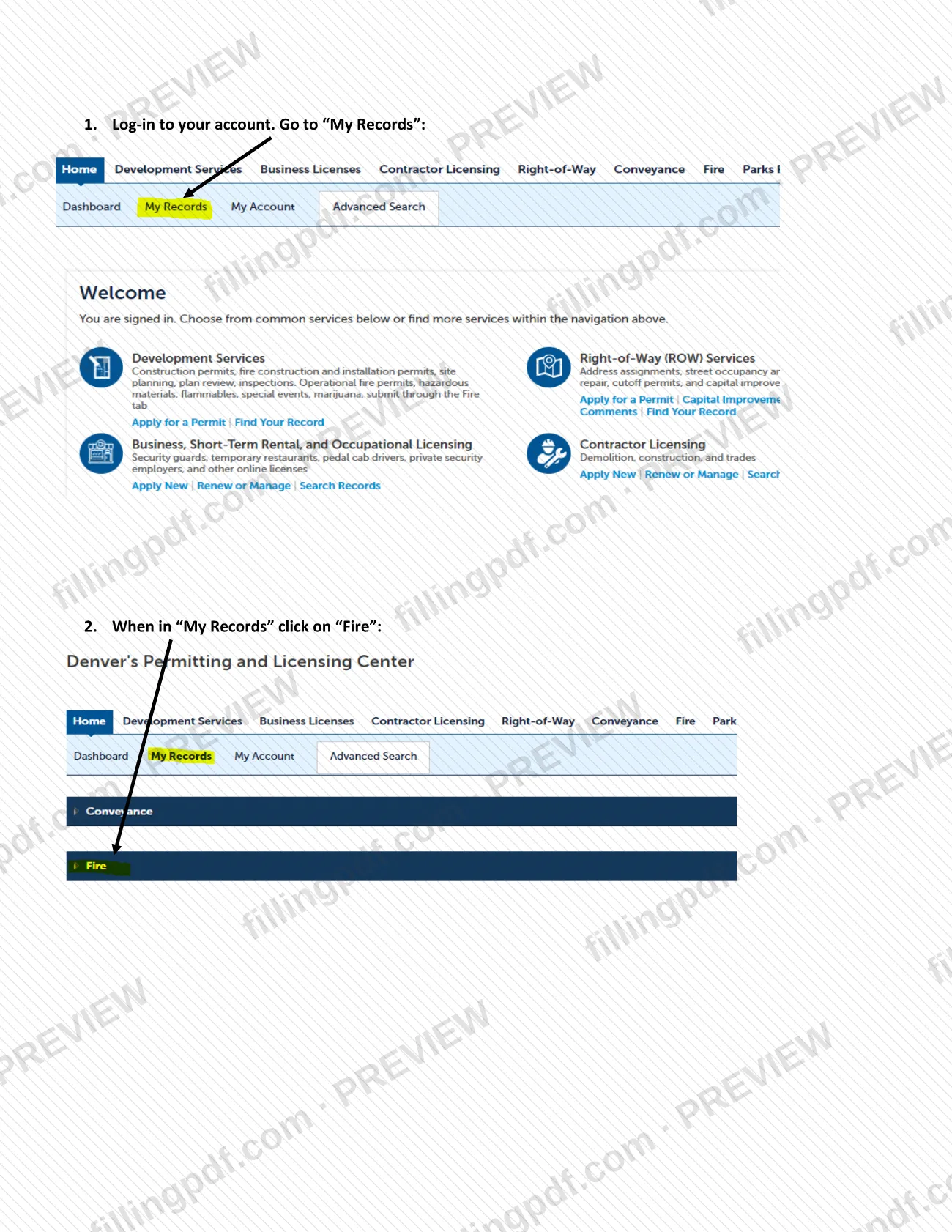
Log in to your account
Log in to your Accela Citizen Access account, the city's e-permit system. If you do not yet have an account, register for one on the home page first.
Open My Records
Go to My Records, then click Fire to see your fire permit records.
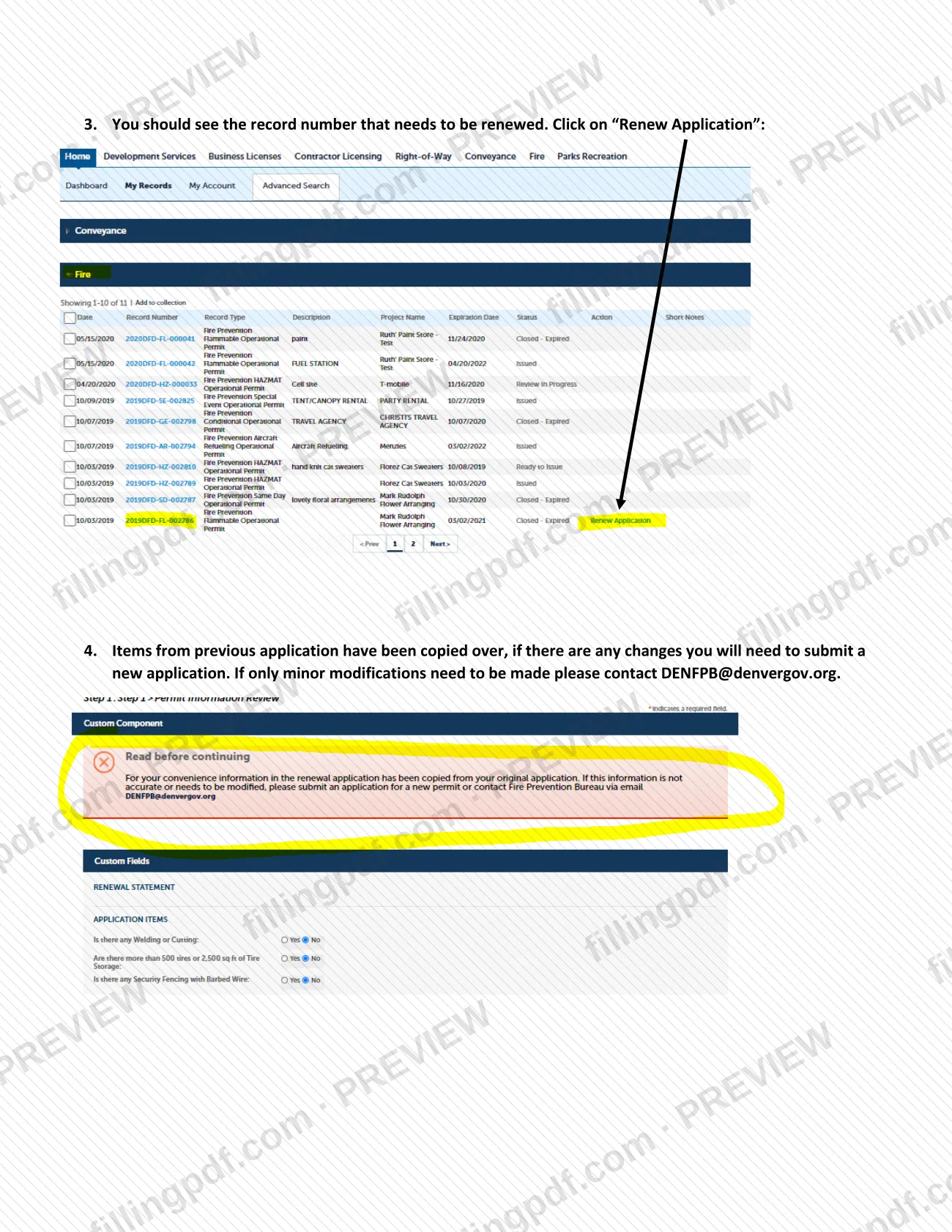
Select the record to renew
Find the record number that needs to be renewed and click Renew Application.
Check the copied information
Items from the previous application are copied over. If anything has changed, submit a new application; for only minor modifications, contact [email protected].
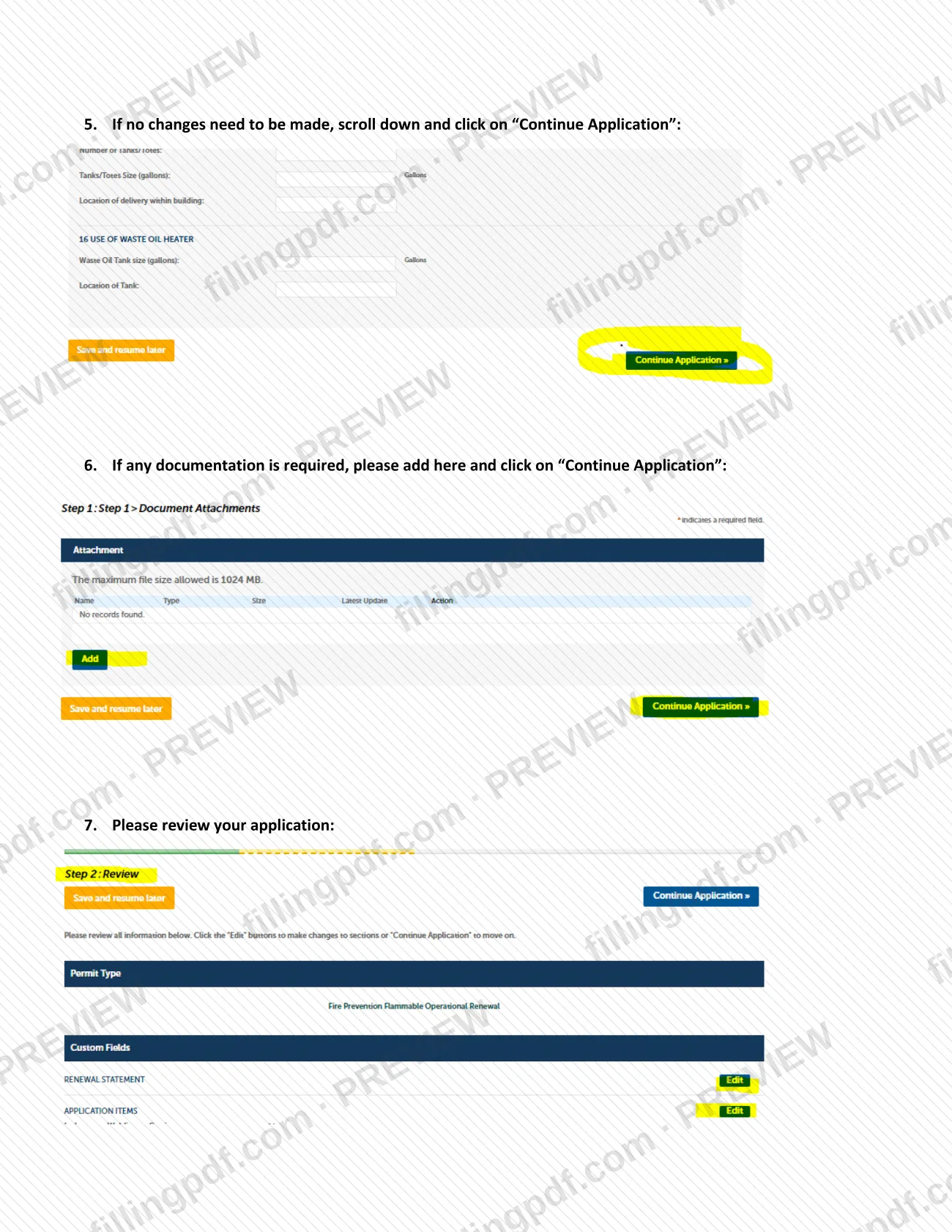
Continue if nothing changed
If no changes are needed, scroll down and click Continue Application.
Add required documentation
If any documentation is required, add it on this screen and click Continue Application.
Review your application
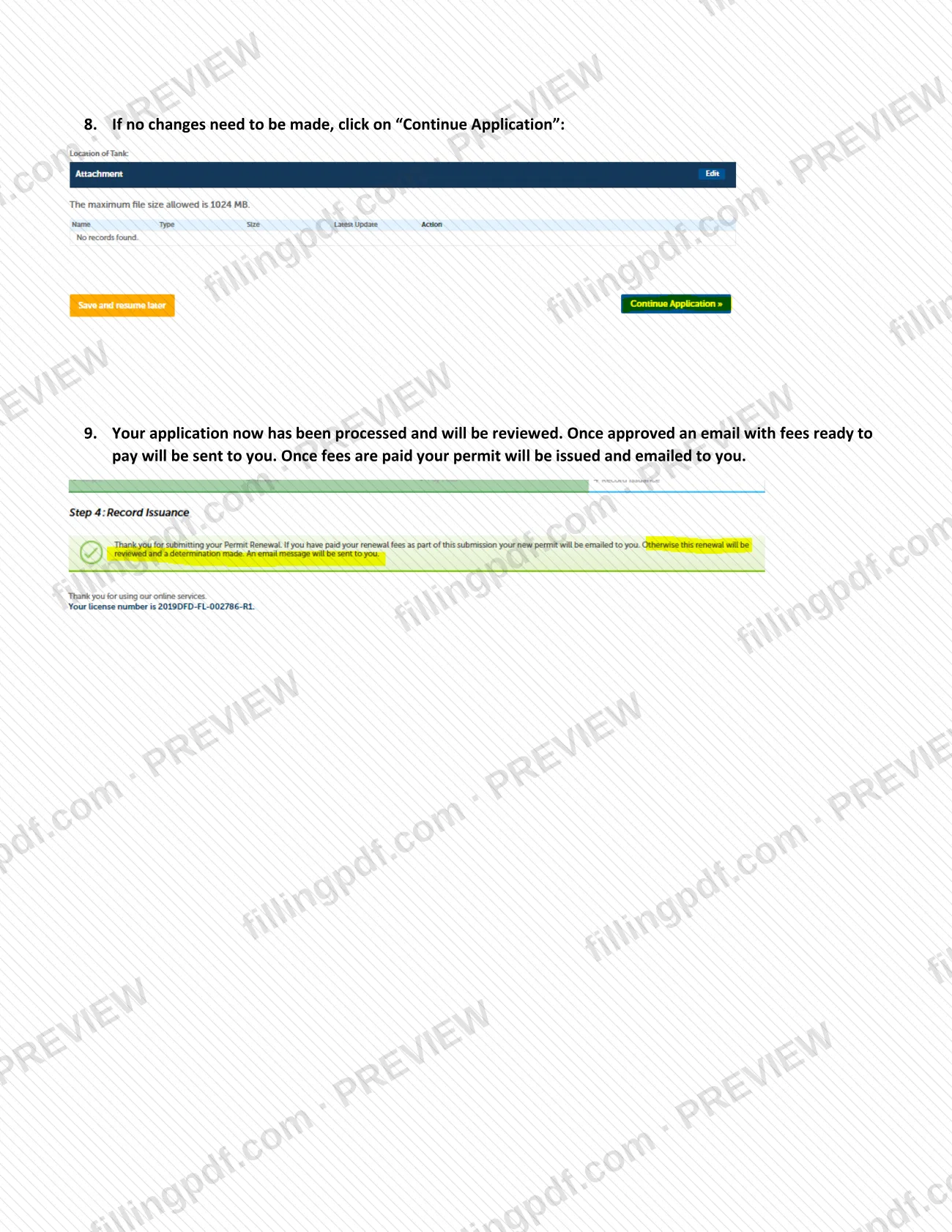
Review the application. If no changes need to be made, click Continue Application to finish submitting it.
Wait for approval and pay fees
The application is processed and reviewed. After approval, an email with fees ready to pay is sent to you; once the fees are paid, the permit is issued and emailed to you.
Download the guide PDF
Download or print the PDF from FillingPDF to keep the steps at hand, then complete the renewal in Accela Citizen Access as described under How to submit.
How to submit Operational Permit Renewal Guide – Denver, CO
Operational permit renewals are submitted online through the city's e-permit system, Accela Citizen Access. Mail is used only for paying fees, and the city does not take walk-in applications.
- Online: log in to your Accela Citizen Access account, go to My Records, click Fire, select the record number to renew and click Renew Application. Continue through the screens, add any required documentation, review the application and continue to submit it. If the system misbehaves, the city suggests trying a different web browser and enabling pop-up windows.
- By mail (fees only): fees can be paid by mail to P.O. Box 733422, Dallas, TX 75373-3422. Permits themselves are issued through Accela Citizen Access.
- In person: no walk-in permit applications are accepted at this time.
- Questions about minor changes: contact [email protected].
After approval you receive an email with fees ready to pay; the amount is set by the city, so check that email or the Denver Fire Department's permit application process page. Once fees are paid, the permit arrives as an email attachment. FillingPDF lets you fill out and download the PDF; submission follows the channels above.
Common mistakes to avoid
- Clicking through a renewal when something has changed since the previous application; the guide says changes require a new application.
- Emailing [email protected] for a major change; the guide offers that contact only for minor modifications.
- Skipping the documentation screen when the application requires documents, then continuing without adding them.
- Expecting the permit before paying: it is issued and emailed only after the fees listed in the approval email are paid.
- Showing up in person to apply or renew; the city does not accept walk-in permit applications at this time.
- Using this renewal route for a Fire Construction Permit or a life safety system installation, which go through Development Services.
- Working in a browser that blocks pop-up windows, which can interfere with the electronic permit feature.
- Overlooking the renewal email: the city notifies you by email of permits accepted for renewal, with instructions.
Frequently asked questions
What is the Denver Operational Permit Renewal Guide?
It is a City and County of Denver PDF with nine steps for renewing a fire operational permit online. It starts at My Records in your Accela Citizen Access account and ends with the permit being emailed to you after fees are paid.
How often must a Denver operational permit be renewed?
Every year. The city's permit process page says operational permits must be renewed annually and that fees are assessed at issuance and renewal. You get an email for permits accepted for renewal, with instructions on how to renew.
Can I renew a Denver fire permit in person?
No. The city issues operational permits through Accela Citizen Access and does not accept walk-in permit applications at this time. Mail is used only to pay fees, at P.O. Box 733422, Dallas, TX 75373-3422.
What if my information changed since last year's application?
Submit a new application instead of renewing. The renewal copies over items from the previous application, so it fits only unchanged records. For minor modifications, the guide says to contact [email protected].
Is this a Denver building permit?
No. This guide renews fire operational permits. Fire Construction Permits and permits for new construction or installation of life safety systems are issued after plan review through Development Services (required by IFCA 105.7).
When do I pay the renewal fee?
After approval. The city emails you that fees are ready to pay, and your permit is issued and emailed once they are paid. The amount is not in the guide, so check that email or the Denver Fire Department's permit pages.
Can I fill out the Operational Permit Renewal Guide on FillingPDF?
You can fill out the PDF online on FillingPDF and download or print it. FillingPDF is independent and not affiliated with the City and County of Denver, and it does not renew or file permits; renewals are completed in Accela Citizen Access.
Ready to fill out Operational Permit Renewal Guide – Denver, CO?
Fill out Operational Permit Renewal Guide – Denver, CO now