
The Temporary Managed Community Permit Guide is the Development Services guide from City and County of Denver Planning and Development that explains the review process and the minimum submittal items for a Temporary Managed Community (TMC) use permit. It is one of the Denver permit resources for commercial zoning, and it includes the Temporary Managed Community Zoning Use Permit Application and an operator information page. On this page you can fill out the form online on FillingPDF and download or print the completed PDF; the guide itself is published by the City and County of Denver at the official URL.
Last updated
What is Temporary Managed Community Permit Guide – Denver, CO?
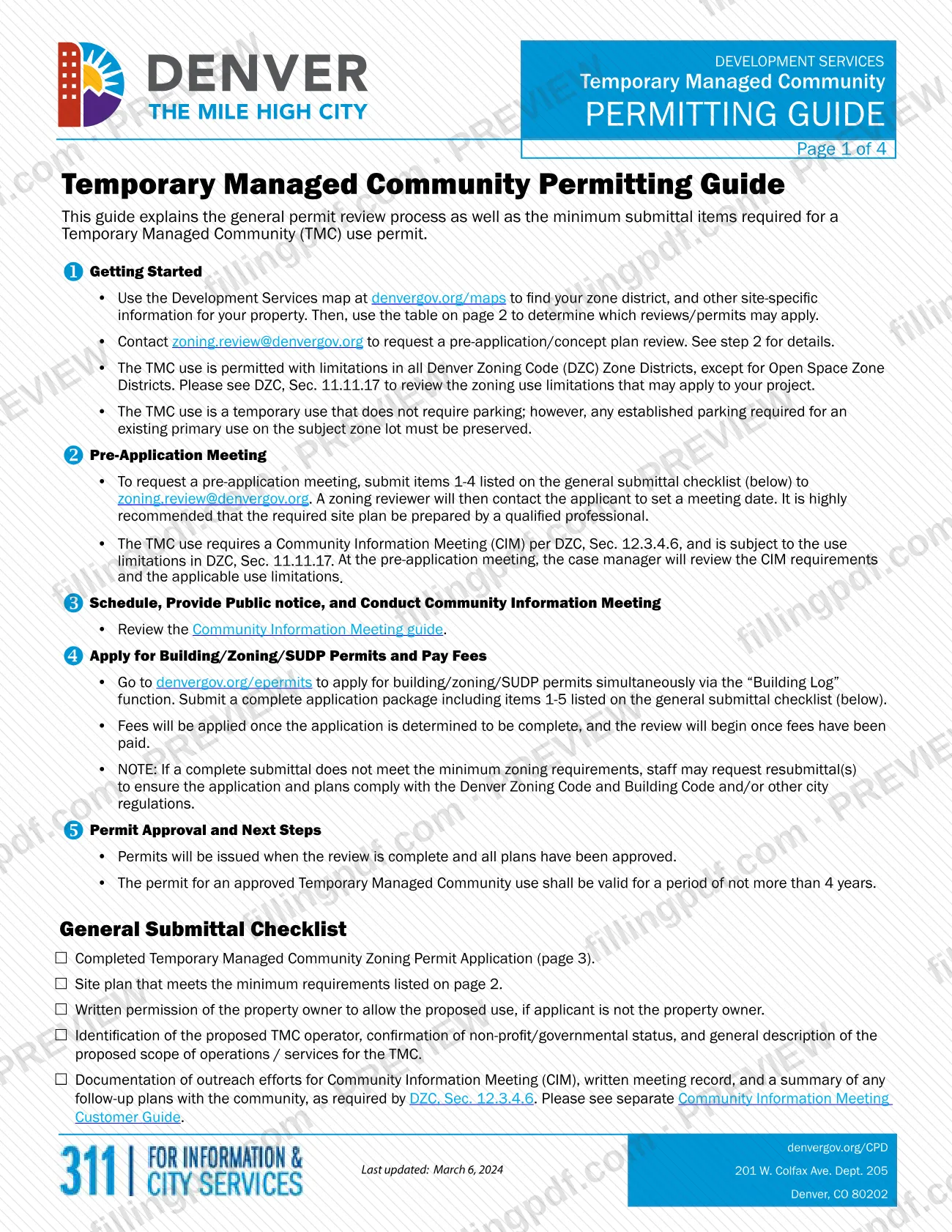
The Temporary Managed Community Permit Guide is the City and County of Denver Planning and Development guide that explains the general permit review process and the minimum submittal items for a Temporary Managed Community (TMC) use permit. Its page 3 holds the zoning use permit application.
According to the City's TMC page, a Temporary Managed Community provides temporary shelter or housing to people who are experiencing homelessness or are at risk of becoming homeless. At a minimum it offers a safe, managed space to sleep overnight, in temporary structures such as "tiny homes," tents, or a guest's own parked vehicle. Many also include bathrooms, showers, laundry, gathering spaces and workspaces for staff or service providers.
The four-page PDF contains:
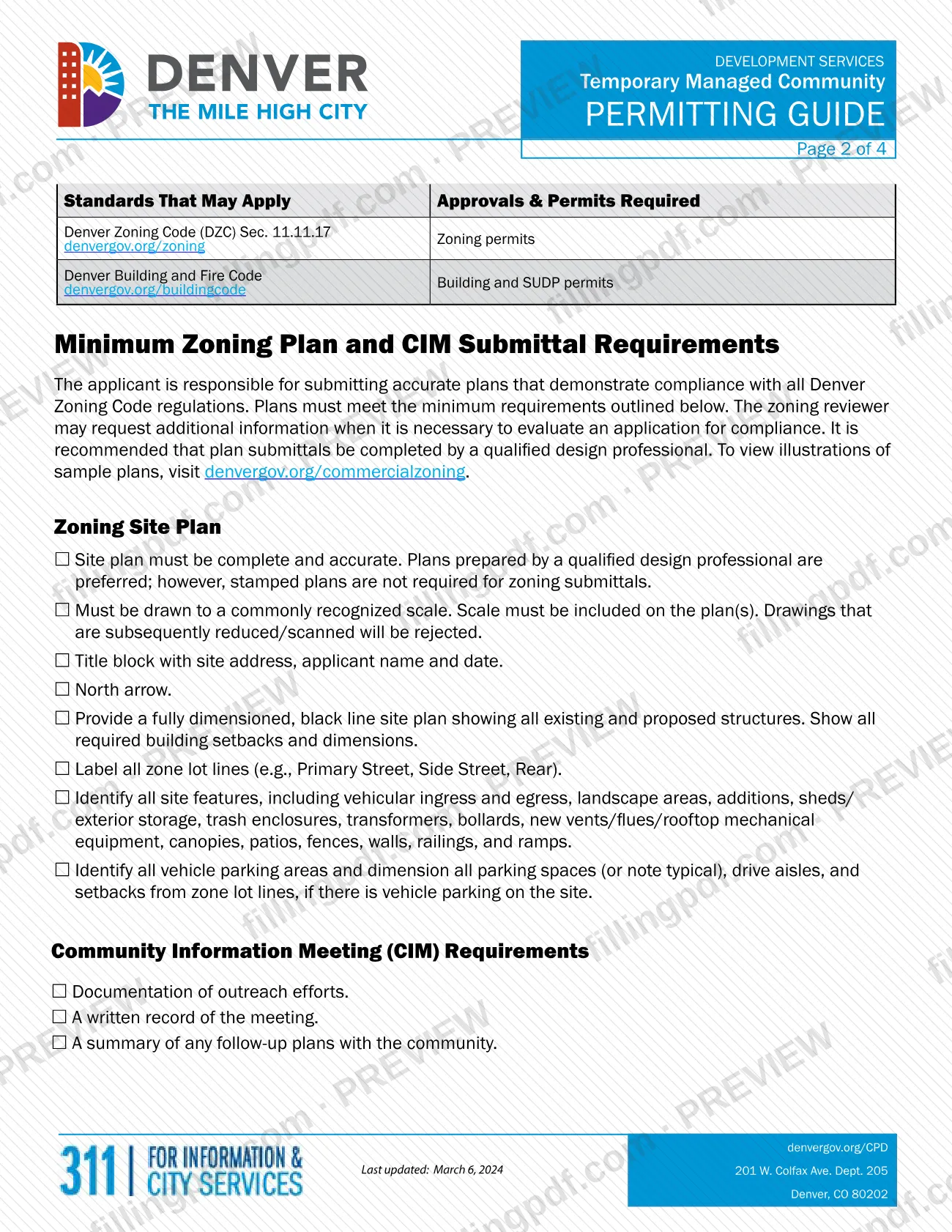
- A permitting guide with the steps from pre-application to permit approval and a General Submittal Checklist (pages 1 and 2).
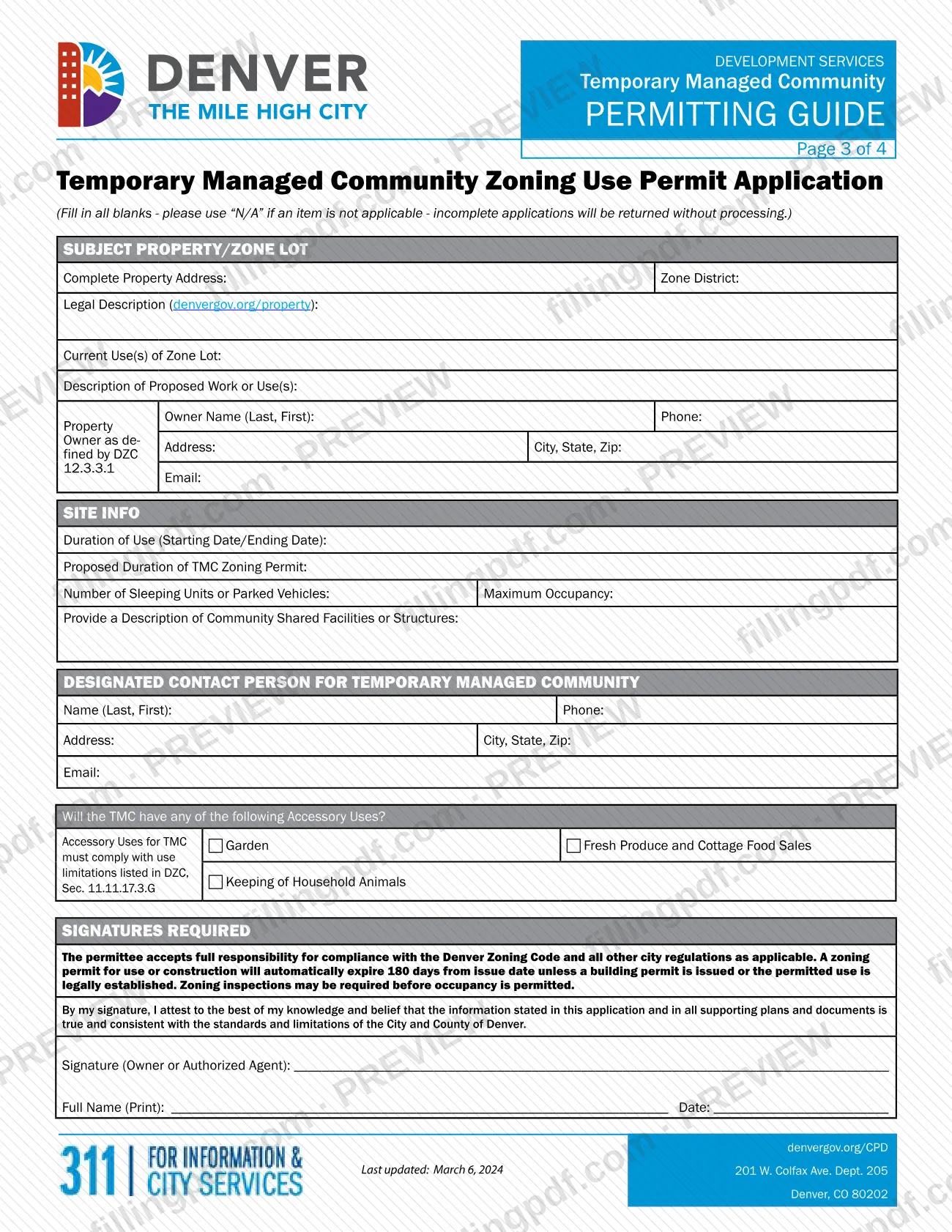
- The Temporary Managed Community Zoning Use Permit Application (page 3), with property, site, contact, accessory use and signature sections.
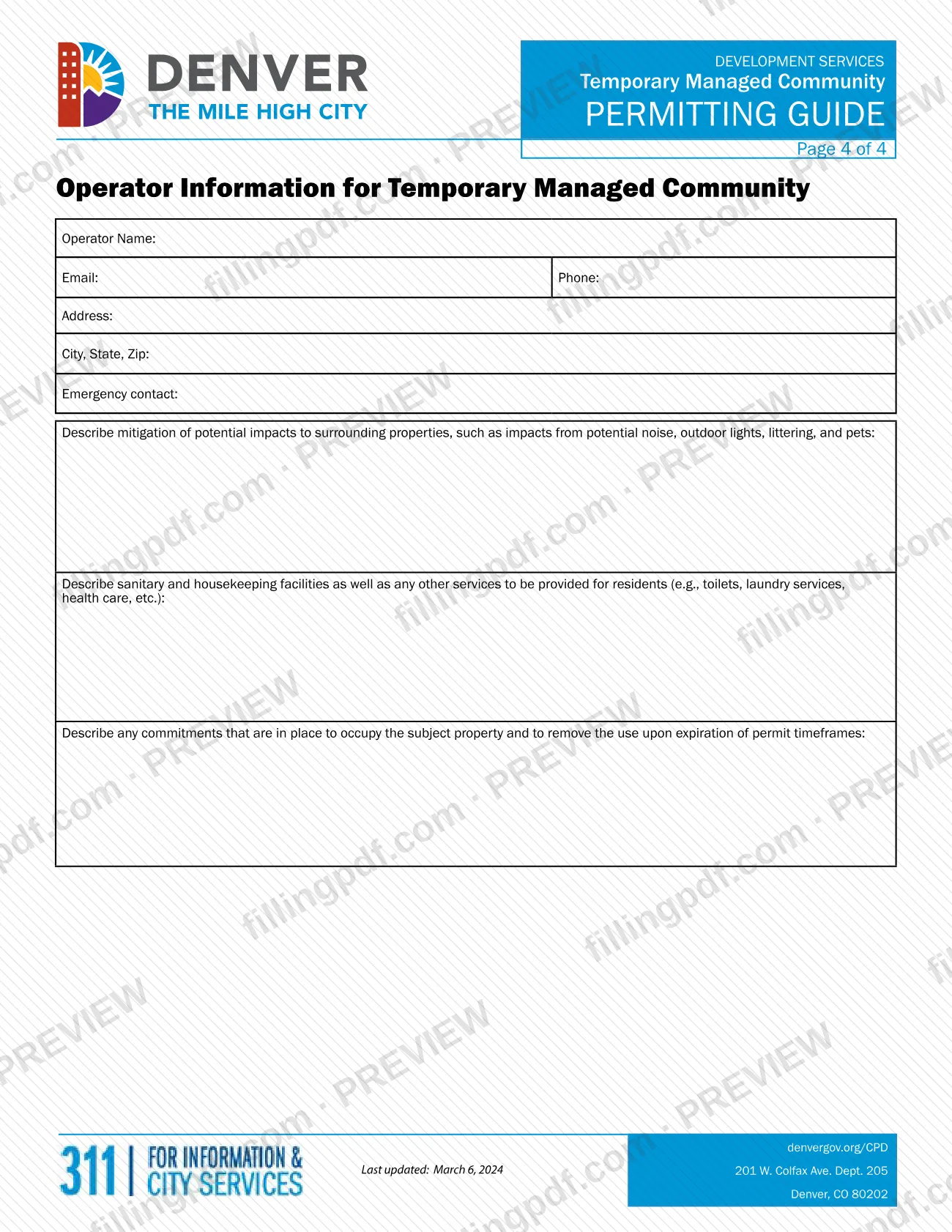
- Operator Information for Temporary Managed Community (page 4).
The TMC use is permitted with limitations in all Denver Zoning Code (DZC) zone districts except Open Space Zone Districts; the limits are in DZC, Sec. 11.11.17. The guide sets out zoning plan requirements and the Community Information Meeting (CIM) documents required by DZC, Sec. 12.3.4.6. It also states that building and SUDP permits are among the approvals that may apply.
Who needs to file Temporary Managed Community Permit Guide – Denver, CO?
The property owner, or an applicant acting with the owner's written permission, who wants a Temporary Managed Community use permit in Denver uses this guide and application. The signature block is for the owner or an authorized agent.
- Applicants who are not the property owner must provide written permission from the owner to allow the proposed use.
- The proposed TMC operator must be identified, with confirmation of non-profit or governmental status and a general description of the scope of operations or services. The application's page 4 collects the operator's details.
- Sites in Open Space Zone Districts are excluded: the TMC use is permitted with limitations in all Denver Zoning Code zone districts except those.
The guide points to DZC, Sec. 11.11.17 for the use limitations that may apply. Plans prepared by a qualified design professional are preferred, though stamped plans are not required for zoning submittals. The City's page adds that other city and state approvals may still be required depending on the project.
When to file Temporary Managed Community Permit Guide – Denver, CO
The guide sets a sequence rather than a calendar deadline: a pre-application meeting, then a Community Information Meeting (CIM), then the permit application. To request the pre-application meeting, email checklist items 1-4 to [email protected]. You apply for the permits after the CIM, because the application package must include items 1-5, including the CIM outreach documentation.
Timing rules that follow approval: a permit for an approved TMC use is valid for a period of not more than 4 years. A zoning permit automatically expires 180 days from the issue date unless a building permit is issued or the permitted use is legally established; if a building permit is needed and not obtained in that window, you must re-apply for a zoning permit. The guide gives no processing time.
Documents you need
- Site plan meeting the minimum zoning plan requirements: drawn to a commonly recognized scale, with title block, north arrow, dimensioned black line drawing, setbacks and site features. Reduced or scanned drawings are rejected.
- Written permission of the property owner to allow the proposed use, only if the applicant is not the property owner.
- Identification of the proposed TMC operator, confirmation of non-profit or governmental status, and a general description of the proposed scope of operations or services.
- Documentation of outreach efforts for the Community Information Meeting (CIM), a written meeting record, and a summary of any follow-up plans with the community, as required by DZC, Sec. 12.3.4.6.
- For the pre-application meeting request, only items 1-4 of the checklist (the application, site plan, owner permission and operator identification) are sent; the CIM documents are added when you apply.
How to fill out Temporary Managed Community Permit Guide – Denver, CO
Find your zone district first
Use the Development Services map at denvergov.org/maps to find your zone district and site information, then check the guide's table to see which reviews and permits may apply.
Enter the subject property details
Under SUBJECT PROPERTY/ZONE LOT, enter the complete property address, zone district, legal description (look it up at denvergov.org/property), current uses of the zone lot and a description of the proposed work or uses. Enter "N/A" for anything that does not apply.
Enter the property owner information
Enter the owner name (Last, First), phone, address, city, state, ZIP and email. The form refers to the owner as defined by DZC 12.3.3.1.
Complete the site information
Under SITE INFO, enter the starting and ending dates of use, the proposed duration of the TMC zoning permit, the number of sleeping units or parked vehicles, the maximum occupancy and a description of community shared facilities or structures.
Name the designated contact person
Enter the contact person for the Temporary Managed Community: name (Last, First), phone, address, city, state, ZIP and email.
Mark any accessory uses
Check the boxes that apply: Garden, Fresh Produce and Cottage Food Sales, or Keeping of Household Animals. These must comply with the use limitations in DZC, Sec. 11.11.17.3.G.
Complete the operator information page
On page 4, enter the operator name, email, phone, address, city, state, ZIP and emergency contact. Then describe mitigation of impacts such as noise, outdoor lights, littering and pets; sanitary and housekeeping facilities and other services; and commitments to occupy the property and remove the use when the permit period ends.
Sign and date the application
The owner or an authorized agent signs, prints the full name and enters the date, attesting that the information and all supporting plans and documents are true and consistent with City and County of Denver standards.
Prepare the site plan and attachments
Prepare the zoning site plan to the page 2 minimum requirements, plus owner permission if you are not the owner, operator identification and non-profit or governmental confirmation, and the CIM documents.
Review and download the completed PDF
Check that every blank is completed or marked "N/A", then download or print the completed PDF from FillingPDF. Assemble the package and submit it through the channels described under How to submit.
How to submit Temporary Managed Community Permit Guide – Denver, CO
The guide uses two channels: email for the pre-application request and the City's online permit system for the application.
- Pre-application meeting: email items 1-4 of the General Submittal Checklist to [email protected]. A zoning reviewer then contacts you to set a meeting date.
- Permit application: go to denvergov.org/epermits and apply for building, zoning and SUDP permits at the same time through the "Building Log" function. Submit a complete package with items 1-5 of the checklist.
- Fees: fees are applied once the application is determined to be complete, and review begins after they are paid. The guide states no amount; check with Development Services at denvergov.org/CPD.
Incomplete applications are returned without processing. If a complete submittal does not meet the minimum zoning requirements, staff may request resubmittals. Watch your email for updates during review. FillingPDF lets you fill out and download the PDF; submission follows the channels above.
Common mistakes to avoid
- Leaving blanks on the application instead of entering "N/A"; the form says incomplete applications will be returned without processing.
- Submitting a site plan that was reduced or scanned after drawing, or one with no scale shown; such drawings are rejected.
- Omitting the owner's written permission when the applicant is not the property owner.
- Applying for the permit without the CIM outreach documentation, written meeting record and follow-up summary (checklist item 5).
- Sending all five checklist items with the pre-application request; the guide asks for items 1-4 at that stage.
- Expecting review to begin before fees are paid; review starts after fees are paid on a complete application.
- Not obtaining a required building permit within 180 days of zoning permit issuance, which means re-applying for the zoning permit.
- Assuming the permit lasts longer than 4 years; it is valid for not more than 4 years.
- Removing parking required for the existing primary use on the zone lot; that established parking must be preserved.
Frequently asked questions
What is the Temporary Managed Community Permit Guide?
It is a City and County of Denver Planning and Development guide that explains the review process and minimum submittal items for a Temporary Managed Community use permit. It includes the zoning use permit application on page 3 and an operator information page on page 4.
Where in Denver is a Temporary Managed Community allowed?
In all Denver Zoning Code zone districts except Open Space Zone Districts, with limitations. The limits are in DZC, Sec. 11.11.17, which the guide says to review before applying. The City's page also says the use is allowed in all zone districts in Former Chapter 59.
Do I need a Denver building permit for a Temporary Managed Community?
Possibly. The guide lists building and SUDP permits among the approvals that may apply, and you can apply for building, zoning and SUDP permits together through the "Building Log" function at denvergov.org/epermits. If a building permit is required, it must be obtained within 180 days of the zoning permit.
How long is a Temporary Managed Community permit valid?
For not more than 4 years. Separately, a zoning permit automatically expires 180 days from its issue date unless a building permit is issued or the permitted use is legally established.
What do I submit with the permit application?
Items 1-5 of the General Submittal Checklist: the completed application, a site plan, owner permission if you are not the owner, operator identification with non-profit or governmental status and scope of services, and the Community Information Meeting documentation.
How do I request a pre-application meeting?
Email checklist items 1-4 to [email protected]. A zoning reviewer will then contact you to set a meeting date. The guide highly recommends that a qualified professional prepare the site plan.
Is there a fee to apply for the Temporary Managed Community permit?
Yes, fees apply. They are applied once the application is determined to be complete, and review begins after they are paid. The guide gives no amount, so check with Development Services at denvergov.org/CPD.
Can I fill out the Denver Temporary Managed Community permit form online?
You can fill out the PDF online on FillingPDF and download or print it. FillingPDF is independent of the City and County of Denver and does not submit anything; you apply through denvergov.org/epermits and the email channel described by the City.
Ready to fill out Temporary Managed Community Permit Guide – Denver, CO?
Fill out Temporary Managed Community Permit Guide – Denver, CO now