
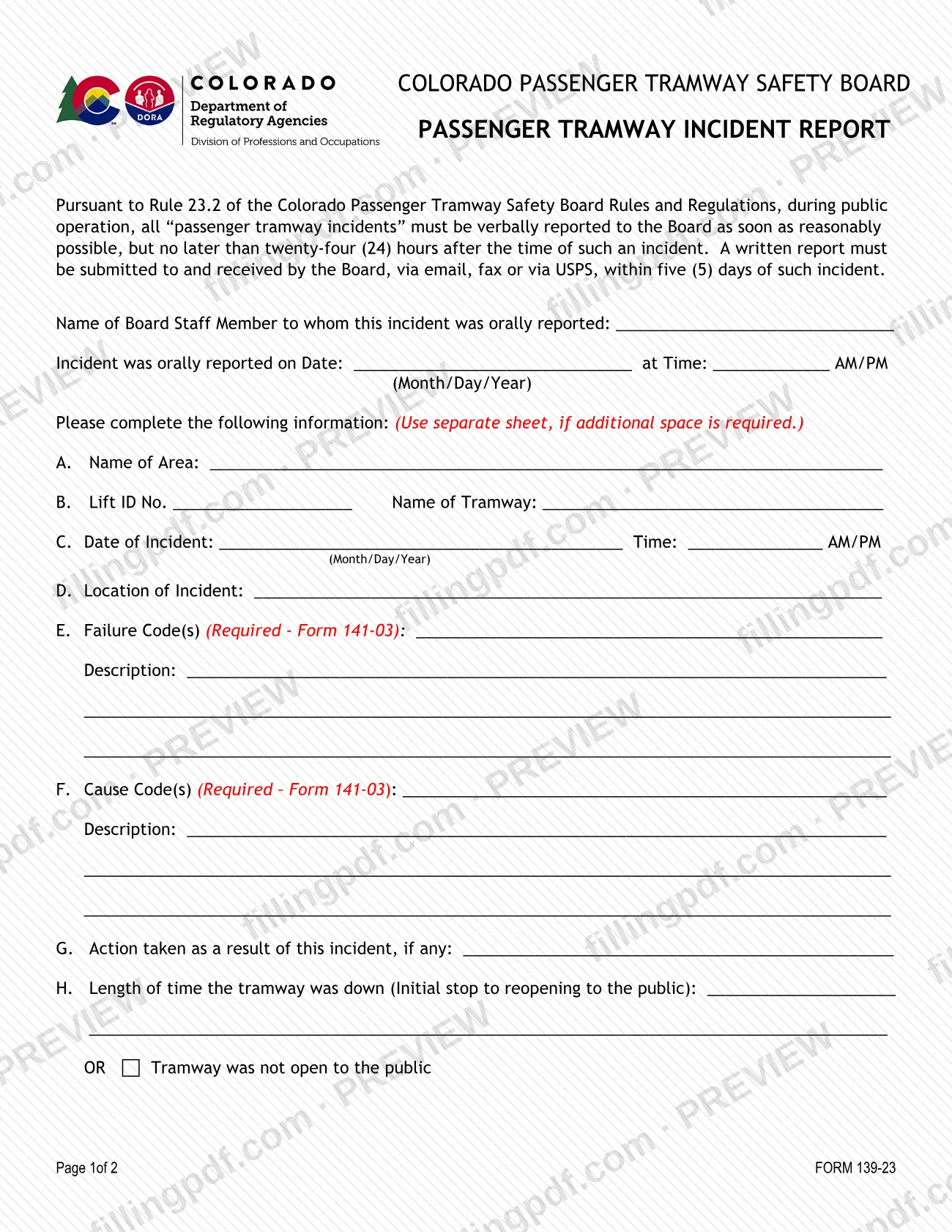
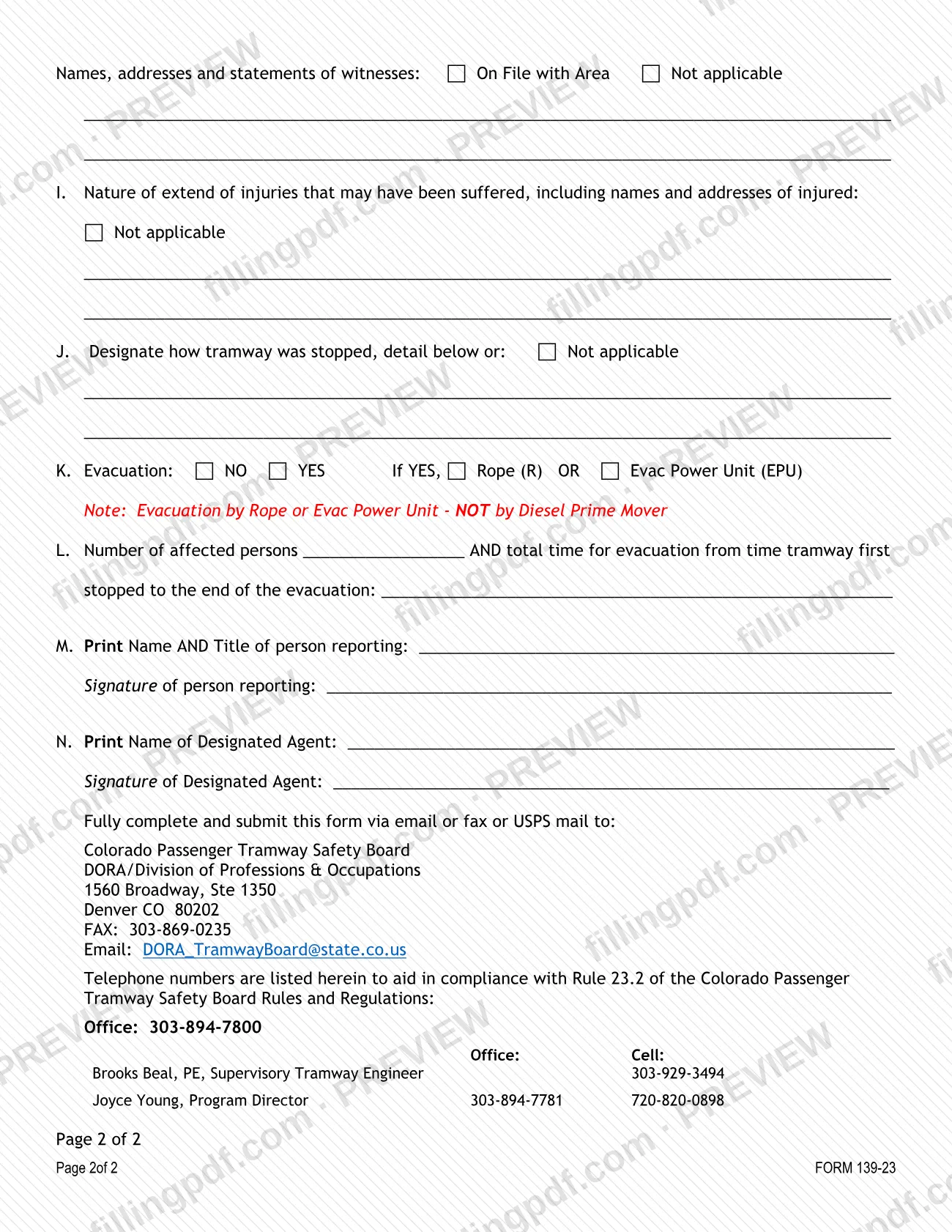
The Incident Report Form (Form 139-23), printed as the Passenger Tramway Incident Report, is the written report that the Colorado Passenger Tramway Safety Board requires after a passenger tramway incident during public operation. The Board sits within the Colorado Division of Professions and Occupations (DORA). Area operators use it to record where and when the incident happened, the failure and cause codes, the action taken, any injuries and any evacuation. On this page you can fill out the form online on FillingPDF and download or print the completed PDF; the Board receives it only through the channels it lists.
Last updated
What is Form 139-23?
The Incident Report Form (Form 139-23), printed on the form as the Passenger Tramway Incident Report, is the Colorado Passenger Tramway Safety Board's written report of a passenger tramway incident that occurs during public operation, issued through the Division of Professions and Occupations (DORA).
The form exists to comply with Rule 23.2 of the Colorado Passenger Tramway Safety Board Rules and Regulations. Under that rule, incidents are first reported verbally to the Board and then in writing. This form is the written report. The DORA tramway page describes it as the document required when the Licensee reports a 24 Hour Incident, and says these incidents are defined in Section 23 of the Board's Rules and Regulations.
The report has lettered items A through N. They cover the name of the area, the lift ID number and tramway name, the date, time and location of the incident, failure and cause codes with descriptions, the action taken, how long the tramway was down, witnesses, injuries, how the tramway was stopped, evacuation details, and the signatures of the person reporting and the designated agent.
The failure and cause codes come from Form 141-03, the Log Code sheet, which the DORA page says you need to complete the report. The DORA page also lists Component Report Forms separately, as the document for reporting component failures to the Board. Form 139-23 is the incident report.
Who needs to file Form 139-23?
Licensees and area operators of passenger tramways in Colorado use Form 139-23 when a "passenger tramway incident" happens during public operation. The form states that all such incidents must be reported to the Board, and the DORA tramway page says the form is required when the Licensee reports a 24 Hour Incident.
Within the area, the report is completed and signed by the person reporting, who prints name and title, and by the Designated Agent, who prints a name and signs. Item M and item N each have a signature line.
The form applies to incidents during public operation. It has an option to state that the tramway was not open to the public in the item on downtime, but the reporting rule it quotes is written for public operation.
Component failures are listed on the DORA page under Component Report Forms, a separate heading from the 24 Hour Incident Report Forms. If your question is whether a specific event counts as a reportable incident, the form points to Rule 23.2 and the DORA page to Section 23 of the Board's Rules and Regulations. Contact the Board office with questions.
When to file Form 139-23
Report the incident verbally to the Board as soon as reasonably possible, and no later than 24 hours after the time of the incident. Then submit the written report, Form 139-23. The Board must receive it, by email, fax or USPS, within five (5) days of the incident. These deadlines are printed on the form under Rule 23.2 and apply to incidents during public operation.
The top of the form records the verbal report: the name of the Board staff member who took it, and the date and time it was made. Complete that part before you send the written report. Because the Board must receive the report within five days, allow for mail time if you use USPS.
Documents you need
- Failure and cause codes from Form 141-03 (the Log Code sheet): the form marks both code entries, items E and F, as required, and the DORA page says you need the sheet to complete the report.
- A separate sheet, only if the lines on the form do not give enough space; the form says to use a separate sheet if additional space is required.
- Names, addresses and statements of witnesses, unless they are on file with the area or the item is not applicable; the form offers the "On File with Area" and "Not applicable" options.
How to fill out Form 139-23
Record the verbal report
At the top, enter the name of the Board staff member to whom the incident was orally reported, the date (Month/Day/Year) and the time, marking AM or PM.
Identify the area and tramway
Item A: the name of the area. Item B: the Lift ID No. and the name of the tramway.
Enter date, time and location
Item C: the date of the incident (Month/Day/Year) and the time, with AM or PM. Item D: the location of the incident.
Enter failure and cause codes
Items E and F are marked required. Enter the code(s) from Form 141-03, the Log Code sheet, and write a description on the lines provided for each.
Describe action taken and downtime
Item G: the action taken as a result of the incident, if any. Item H: the length of time the tramway was down, from the initial stop to reopening to the public, or mark that the tramway was not open to the public.
Add witness information
Give names, addresses and statements of witnesses, or mark On File with Area or Not applicable.
Describe injuries (item I)
Give the nature and extent of injuries that may have been suffered, with the names and addresses of the injured, or mark Not applicable.
Explain how the tramway stopped
Item J: detail how the tramway was stopped, or mark Not applicable.
Report any evacuation
Item K: mark NO or YES. If YES, mark Rope (R) or Evac Power Unit (EPU); the form notes that evacuation by Diesel Prime Mover is not covered.
Enter affected persons and evacuation time
Item L: enter the number of affected persons and the total evacuation time, from the time the tramway first stopped to the end of the evacuation.
Add names and signatures
Item M: print the name and title of the person reporting and sign. Item N: print the name of the Designated Agent and have that person sign.
Review and download the PDF
Check that items E and F are filled in, the dates and times are correct and both signature blocks are complete. Download or print the completed PDF from FillingPDF and send it to the Board as described under How to submit.
How to submit Form 139-23
You can submit Form 139-23 by email, by fax or by USPS mail to the Colorado Passenger Tramway Safety Board. The form tells you to fully complete it before sending.
- Email: [email protected]
- Fax: 303-869-0235
- USPS mail: Colorado Passenger Tramway Safety Board, DORA/Division of Professions & Occupations, 1560 Broadway, Ste 1350, Denver CO 80202
The Board must receive the written report within five (5) days of the incident, so choose the channel that gets it there in time.
The verbal report comes first, within 24 hours of the incident. The form lists the Board office telephone number, 303-894-7800, and gives direct numbers for Brooks Beal, PE, Supervisory Tramway Engineer, and Joyce Young, Program Director, to help you comply with Rule 23.2. The form does not state a fee. FillingPDF lets you fill out and download the PDF; submission follows the channels above.
Common mistakes to avoid
- Sending the written report without first making the verbal report. The form requires the verbal report within 24 hours and asks who took it, and when.
- Mailing the report so that it arrives after the five-day limit. The form says it must be submitted to and received by the Board within five (5) days of the incident.
- Leaving the failure codes (item E) or cause codes (item F) blank. The form marks both as required and refers to Form 141-03.
- Entering a code without the description lines that follow items E and F.
- Forgetting to mark "Not applicable" or "On File with Area" for witnesses, injuries or how the tramway was stopped, when no details apply.
- Reporting an evacuation by diesel prime mover. The form notes that evacuation is by Rope (R) or Evac Power Unit (EPU), not by Diesel Prime Mover.
- Marking an evacuation (item K) but omitting the number of affected persons and total evacuation time in item L.
- Leaving out the signature of the person reporting (item M) or of the Designated Agent (item N).
Frequently asked questions
What is the Incident Report Form (Form 139-23)?
It is the Passenger Tramway Incident Report of the Colorado Passenger Tramway Safety Board, part of DORA. Licensees use it to give the Board a written report of a passenger tramway incident during public operation, as Rule 23.2 of the Board's Rules and Regulations requires.
How soon must a tramway incident be reported?
Verbally to the Board as soon as reasonably possible, and no later than 24 hours after the incident. The written report on Form 139-23 must then be submitted to and received by the Board within five (5) days of the incident.
Where do I send the incident report form?
Send it by email to [email protected], by fax to 303-869-0235, or by USPS to the Colorado Passenger Tramway Safety Board, DORA/Division of Professions & Occupations, 1560 Broadway, Ste 1350, Denver CO 80202.
Where do I get the failure and cause codes?
The form refers to Form 141-03 for the failure codes (item E) and cause codes (item F), and marks both as required. The DORA tramway page calls this the Log Code sheet and says you need it to complete the report.
Can I fill out the incident report form online?
Yes. You can fill out Form 139-23 online on FillingPDF and download or print the PDF. FillingPDF is an independent service and does not file the report: you send it to the Board by email, fax or USPS.
Who signs Form 139-23?
Two signatures are requested. In item M, the person reporting prints name and title and signs; in item N, the Designated Agent prints a name and signs.
What if I need more space on the form?
Use a separate sheet. The form says to use one if additional space is required for the information requested.
What is the difference between this form and a component report?
The DORA tramway page lists 24 Hour Incident Report Forms and Component Report Forms under separate headings. Form 139-23 is the incident report; the component report form is the one the page lists for reporting component failures.
Ready to fill out Form 139-23?
Fill out Form 139-23 now