
CT-W4P is the Connecticut Department of Revenue Services (DRS) certificate that tells the payer of your pension or annuity how much Connecticut income tax to withhold from each payment. It is for Connecticut resident recipients of pensions, annuities and certain other deferred compensation. On FillingPDF you can fill out the form online and download or print the completed PDF. You then give it to your payer, not to DRS; the official PDF is published by DRS at portal.ct.gov/DRS.
Last updated
What is CT-W4P?
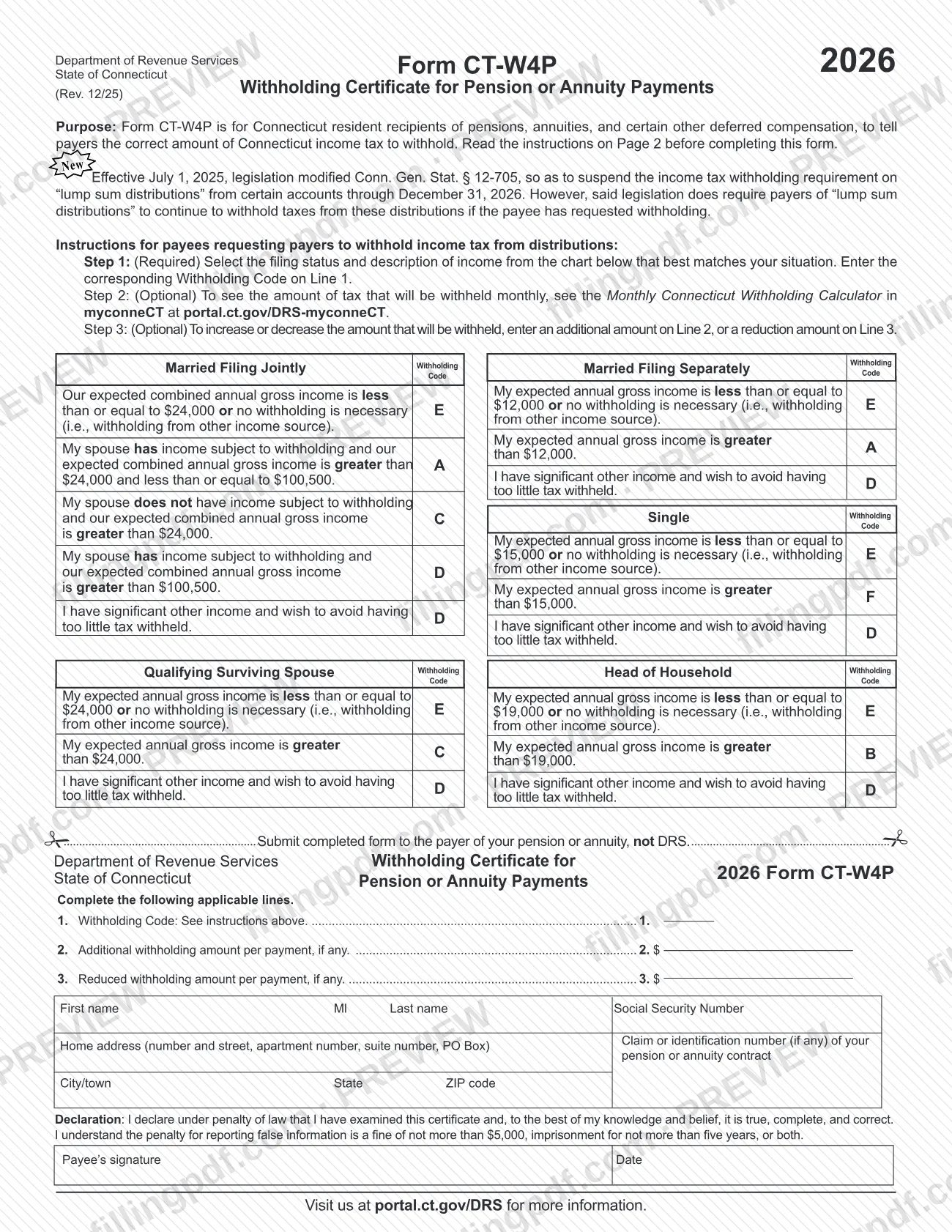
Form CT-W4P, 2026 Withholding Certificate for Pension or Annuity Payments, is the State of Connecticut form that Connecticut resident recipients of pensions, annuities and certain other deferred compensation use to tell their payer the correct amount of Connecticut income tax to withhold.
The form is issued by the Connecticut Department of Revenue Services (DRS). You choose a Withholding Code from a chart on page 1, based on the filing status you expect to report on your Connecticut income tax return and the description of your expected annual gross income. You may also ask for an extra amount to be withheld per payment or a reduced amount.
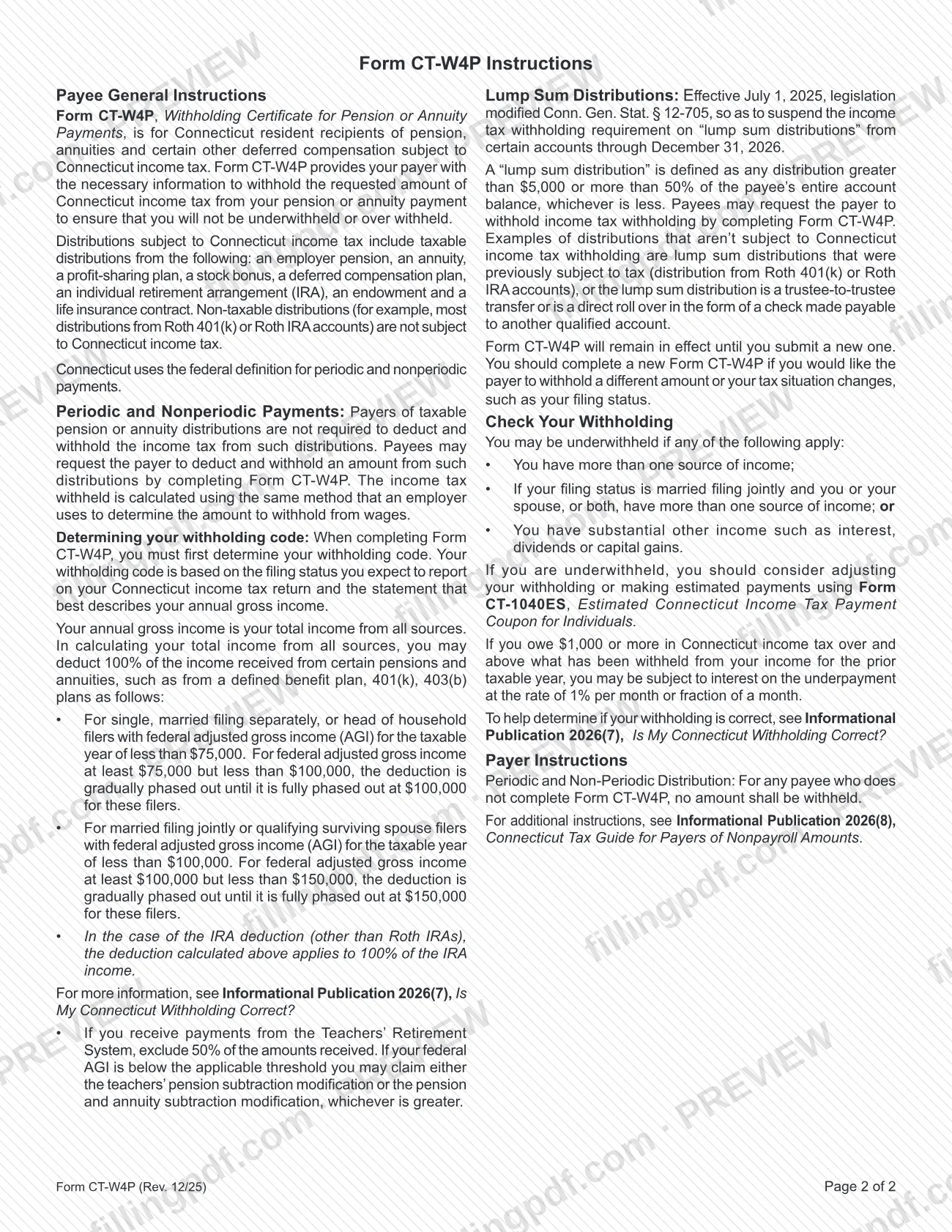
Distributions covered include taxable amounts from an employer pension, an annuity, a profit-sharing plan, a stock bonus, a deferred compensation plan, an individual retirement arrangement (IRA), an endowment and a life insurance contract. Non-taxable distributions, such as most distributions from Roth 401(k) or Roth IRA accounts, are not subject to Connecticut income tax.
Payers of taxable pension or annuity distributions are not required to withhold unless you ask them to, and CT-W4P is how you ask. The tax is calculated with the same method an employer uses for wages. The DRS withholding forms page lists a separate form, CT-W4, the Employee's Withholding Certificate, for wages.
The form also notes that, effective July 1, 2025, legislation modified Conn. Gen. Stat. § 12-705 to suspend withholding on "lump sum distributions" from certain accounts through December 31, 2026. Payers must still withhold from those distributions if the payee has requested it.
Who needs to file CT-W4P?
Connecticut resident recipients of a pension, annuity or certain other deferred compensation who want the payer to withhold Connecticut income tax from their payments complete Form CT-W4P. It covers taxable distributions from sources such as an employer pension, an annuity, a profit-sharing plan, a stock bonus, a deferred compensation plan, an IRA, an endowment or a life insurance contract.
You may also use it to request withholding on a "lump sum distribution" while the legislative suspension of mandatory withholding runs through December 31, 2026.
The instructions say you may be underwithheld if you have more than one source of income, if you file jointly and you or your spouse have more than one source of income, or if you have substantial other income such as interest, dividends or capital gains. In that case consider the "significant other income" code, adjusting your withholding, or making estimated payments with Form CT-1040ES.
Distributions that are not subject to Connecticut income tax, such as most Roth 401(k) or Roth IRA distributions, do not need withholding. The form does not say who may sign for a payee; it asks for the payee's signature.
When to file CT-W4P
Complete Form CT-W4P when you want your payer to start withholding Connecticut income tax from your pension or annuity payments, or to change what is withheld. The form remains in effect until you submit a new one, so there is no annual filing date printed on it.
Complete a new CT-W4P if you want the payer to withhold a different amount or if your tax situation changes, such as your filing status. For a payee who does not complete the form, the payer withholds nothing from periodic and non-periodic distributions.
Check your withholding if you have more than one source of income or substantial other income. The instructions refer to Informational Publication 2026(7), Is My Connecticut Withholding Correct?, to help decide whether your withholding is right.
How to fill out CT-W4P
Read the instructions on page 2
Review the Payee General Instructions before you start, including the lump sum distribution notice and the explanation of how annual gross income is figured.
Find your withholding code in the chart
On page 1, pick the filing status you expect to report (Married Filing Jointly, Married Filing Separately, Single, Qualifying Surviving Spouse or Head of Household). Then choose the income description that best matches your situation and note its code letter.
Enter the code on Line 1
Line 1, Withholding Code, is required. Enter the single code letter from the chart that corresponds to your status and income description.
Add extra withholding on Line 2
Line 2 is optional: enter an additional withholding amount per payment if you want more tax withheld. Leave it blank if none.
Enter a reduction on Line 3
Line 3 is optional: enter a reduced withholding amount per payment if you want less withheld. Leave it blank if none.
Enter your name and Social Security Number
Fill in your first name, middle initial, last name and Social Security Number in the identification block.
Enter your address and contract number
Write your home address (number and street, apartment, suite or PO Box), city/town, state and ZIP code. Add the claim or identification number of your pension or annuity contract, if any.
Sign and date the declaration
Read the declaration made under penalty of law, then add the payee's signature and the date.
Review, download and give to your payer
Check the code and amounts, then download or print the completed PDF from FillingPDF. Give it to your payer as described under How to submit.
How to submit CT-W4P
Give the completed Form CT-W4P to the payer of your pension or annuity. The form states plainly: submit it to the payer, not to DRS. It names no mailing address, portal or appointment process for DRS.
- To your payer: deliver the signed certificate in the way your payer accepts. Ask the payer how it takes forms; the form gives no payer address.
- Optional estimate: before you choose a code or extra amounts, you can see the monthly withholding in the Monthly Connecticut Withholding Calculator in myconneCT at portal.ct.gov/DRS-myconneCT.
- Payer guidance: payers are directed to Informational Publication 2026(8), Connecticut Tax Guide for Payers of Nonpayroll Amounts.
Keep a copy for your records. If you later want a different amount withheld, give the payer a new CT-W4P. FillingPDF lets you fill out and download the PDF; submission follows the channels above.
Common mistakes to avoid
- Sending Form CT-W4P to the Department of Revenue Services; the form says to submit it to the payer of your pension or annuity, not DRS.
- Leaving Line 1 blank. Step 1 is required: you must select the filing status and income description that match your situation and enter the Withholding Code.
- Not submitting the form at all and expecting withholding; for a payee who does not complete CT-W4P, no amount is withheld from periodic or non-periodic distributions.
- Picking a code by the wrong filing status. The code is based on the filing status you expect to report on your Connecticut income tax return.
- Assuming lump sum distributions are withheld automatically; withholding on them is suspended through December 31, 2026 unless the payee requests it.
- Leaving the form unsigned or undated; the declaration under penalty of law requires the payee's signature and date.
- Not completing a new CT-W4P after your filing status or tax situation changes; the old certificate stays in effect until you submit a new one.
- Ignoring other income such as interest, dividends or capital gains instead of using the code for significant other income or making estimated payments.
Frequently asked questions
What is Form CT-W4P used for?
Form CT-W4P tells the payer of your pension, annuity or other deferred compensation how much Connecticut income tax to withhold. It is for Connecticut resident recipients, and the Connecticut Department of Revenue Services issues it.
Where do I send Form CT-W4P?
Give it to the payer of your pension or annuity. The form says to submit the completed form to the payer, not DRS. The form prints no DRS mailing address or portal for it.
Do I have to fill out CT-W4P?
No. Payers are not required to withhold from taxable pension or annuity distributions unless you ask. If you do not complete the form, no amount is withheld, so you may need estimated payments with Form CT-1040ES.
How do I choose my withholding code on CT-W4P?
Use the chart on page 1. Select your expected filing status, then the description of your expected annual gross income that fits best, and enter its code on Line 1. Codes include one for significant other income.
How long does a CT-W4P stay in effect?
It stays in effect until you submit a new one. Complete a new Form CT-W4P if you want a different amount withheld or if your tax situation changes, such as your filing status.
Is withholding required on lump sum distributions?
Not currently. Effective July 1, 2025, withholding on lump sum distributions from certain accounts is suspended through December 31, 2026, but payers must still withhold if the payee requested it by completing Form CT-W4P.
Can I fill out CT-W4P online?
Yes. You can fill out the CT-W4P PDF online on FillingPDF and download or print it. FillingPDF is independent of DRS and does not send the form to your payer; you deliver it yourself.
Ready to fill out CT-W4P?
Fill out CT-W4P now