
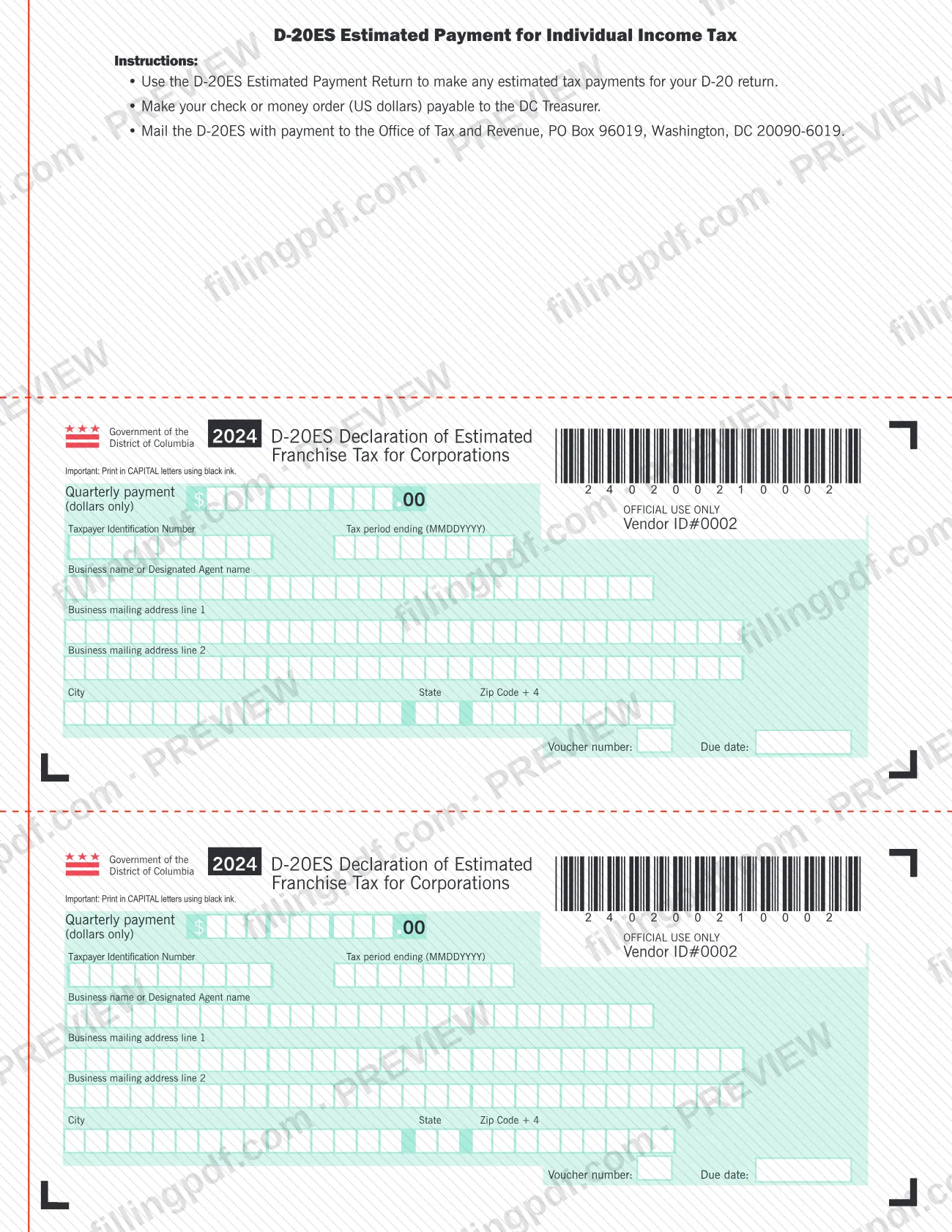
The 2024 D-20ES is the estimated payment voucher issued by the District of Columbia Office of Tax and Revenue (OTR). Its printed instructions say to use it to make any estimated tax payments for your D-20 return. It is a tax-payment voucher, not a property tax form. On this page you can fill out Form D-20ES online on FillingPDF and download or print the completed PDF; OTR publishes the original form, and the payment goes to OTR by mail as described below.
Last updated
What is D-20ES?
The 2024 D-20ES is the Government of the District of Columbia voucher that accompanies a quarterly estimated tax payment, issued by the DC Office of Tax and Revenue (OTR) for taxpayers making estimated payments toward their D-20 return.
The printed instructions at the top of the form give its purpose: use the D-20ES Estimated Payment Return to make any estimated tax payments for your D-20 return. The instructions are headed "D-20ES Estimated Payment for Individual Income Tax", while each voucher on the page is titled "2024 D-20ES Declaration of Estimated Franchise Tax for Corporations". Both identify the document as the D-20ES, and the voucher is the part you complete and send with your payment.
Each voucher asks for the same entries: the quarterly payment in dollars only, the Taxpayer Identification Number, the tax period ending date (MMDDYYYY), the business name or designated agent name, the business mailing address, and a voucher number and due date. A section marked OFFICIAL USE ONLY, including the Vendor ID# 0002, is left for OTR. The form tells you to print in CAPITAL letters using black ink.
The form is a payment voucher. It is not a return and it is not a property tax form. OTR's page for the 2024 D-20ES lists two versions: a Booklet and this Fill-in version.
Who needs to file D-20ES?
Anyone who makes estimated tax payments for a D-20 return in the District of Columbia uses Form D-20ES to send each payment to the Office of Tax and Revenue (OTR). The printed instructions say to use it for any estimated tax payments for your D-20 return, and the voucher is addressed to a business name or its designated agent.
- Taxpayers with a D-20 return: use the voucher for each estimated payment you make toward that return.
- Designated agents: the voucher has a line for the Designated Agent name, so an agent paying for the business can be named there.
The form does not say which taxpayers are required to make estimated payments or how the payment amount is figured, so check the instructions for your D-20 return or contact OTR. Do not use the D-20ES for a return other than the D-20 return it is printed for. The form lists no other exclusions.
When to file D-20ES
Use Form D-20ES each time you make an estimated tax payment for your D-20 return. The form is built for quarterly payments: it says "Quarterly payment (dollars only)" and each voucher carries its own voucher number and a Due date line, so pay by the due date shown on the voucher you are sending.
Enter the tax period ending date in the MMDDYYYY format. The page prints two identical vouchers, so you can complete one for each payment you plan to make. The form sets no deadline beyond the due date on the voucher and gives no filing window of its own, so confirm payment dates in your D-20 instructions or with OTR.
Documents you need
- A check or money order in US dollars payable to the DC Treasurer for the estimated payment, sent with the completed D-20ES.
How to fill out D-20ES
Enter the quarterly payment
In the Quarterly payment box, enter the amount of your estimated payment in dollars only. The form prints the .00 for you.
Enter the Taxpayer Identification Number
Write your Taxpayer Identification Number in the box provided on the voucher.
Enter the tax period ending date
In the Tax period ending field, enter the date in MMDDYYYY format, with no slashes or dashes.
Enter the business or agent name
In Business name or Designated Agent name, enter the name of the business or of its designated agent.
Complete the mailing address
Enter the business mailing address on line 1 and, if needed, line 2, then the City, State and Zip Code + 4.
Check voucher number and due date
Confirm the Voucher number and the Due date printed on the voucher you are using, so the payment matches the period it covers.
Leave the official use section blank
Do not write in the OFFICIAL USE ONLY area or change the Vendor ID# printed there.
Review and download the completed PDF
Check each entry against your D-20 return, then download or print the completed PDF from FillingPDF. Print or write in CAPITAL letters using black ink where the form requires it, and prepare your check or money order for mailing.
How to submit D-20ES
Form D-20ES is submitted by mail, with payment, to the Office of Tax and Revenue. The form names no other channel.
- By mail: send the completed D-20ES with your payment to Office of Tax and Revenue, PO Box 96019, Washington, DC 20090-6019.
- Payment: make your check or money order (US dollars) payable to the DC Treasurer.
Enter the payment on the voucher in dollars only, print in CAPITAL letters using black ink, and leave the OFFICIAL USE ONLY section blank. FillingPDF lets you fill out and download the PDF; submission follows the channels above.
Common mistakes to avoid
- Making the check or money order payable to anyone other than the DC Treasurer; the form says to make it payable to the DC Treasurer.
- Mailing the voucher and payment to an address other than Office of Tax and Revenue, PO Box 96019, Washington, DC 20090-6019.
- Entering cents in the quarterly payment box; the form asks for dollars only.
- Printing in lowercase letters or in a color other than black ink; the form says to print in CAPITAL letters using black ink.
- Entering the tax period ending date in a format other than MMDDYYYY.
- Writing in the OFFICIAL USE ONLY section or changing the printed Vendor ID#.
- Using the D-20ES for estimated payments on a return other than the D-20 return named in the instructions.
- Sending the voucher without the payment; the instructions say to mail the D-20ES with payment.
Frequently asked questions
What is Form D-20ES used for?
Form D-20ES is the DC Office of Tax and Revenue voucher for making estimated tax payments for your D-20 return. You complete the voucher with your payment amount, Taxpayer Identification Number, tax period and business name or agent, and mail it with your payment.
Is the D-20ES a DC property tax form?
No. Form D-20ES is an estimated tax payment voucher for the D-20 return and has nothing to do with real property tax. The form lists no property tax information, so contact the Office of Tax and Revenue (OTR) for dc property tax questions.
Where do I mail Form D-20ES?
Mail it with your payment to Office of Tax and Revenue, PO Box 96019, Washington, DC 20090-6019. The form gives this as the mailing address and names no other submission channel.
Who do I make the check payable to for the D-20ES?
Make your check or money order, in US dollars, payable to the DC Treasurer. The instructions on the form state this and ask you to mail the D-20ES together with the payment.
Do I enter cents on the D-20ES quarterly payment?
No. The quarterly payment box is marked dollars only, and the form prints the .00 after the amount. Enter whole dollars.
What format do I use for the tax period ending date?
Use MMDDYYYY, the format printed beside the Tax period ending field. For example, a period ending December 31, 2024 is written 12312024.
Can I fill out Form D-20ES online?
Yes. You can fill out the PDF online on FillingPDF and download or print it. FillingPDF does not send the voucher or payment to OTR; you mail them to the address on the form.
Is there more than one version of the 2024 D-20ES?
Yes. OTR's page for the 2024 D-20ES lists a Booklet version and a Fill-in version. This page covers the Fill-in version, which contains the payment vouchers.
Ready to fill out D-20ES?
Fill out D-20ES now