
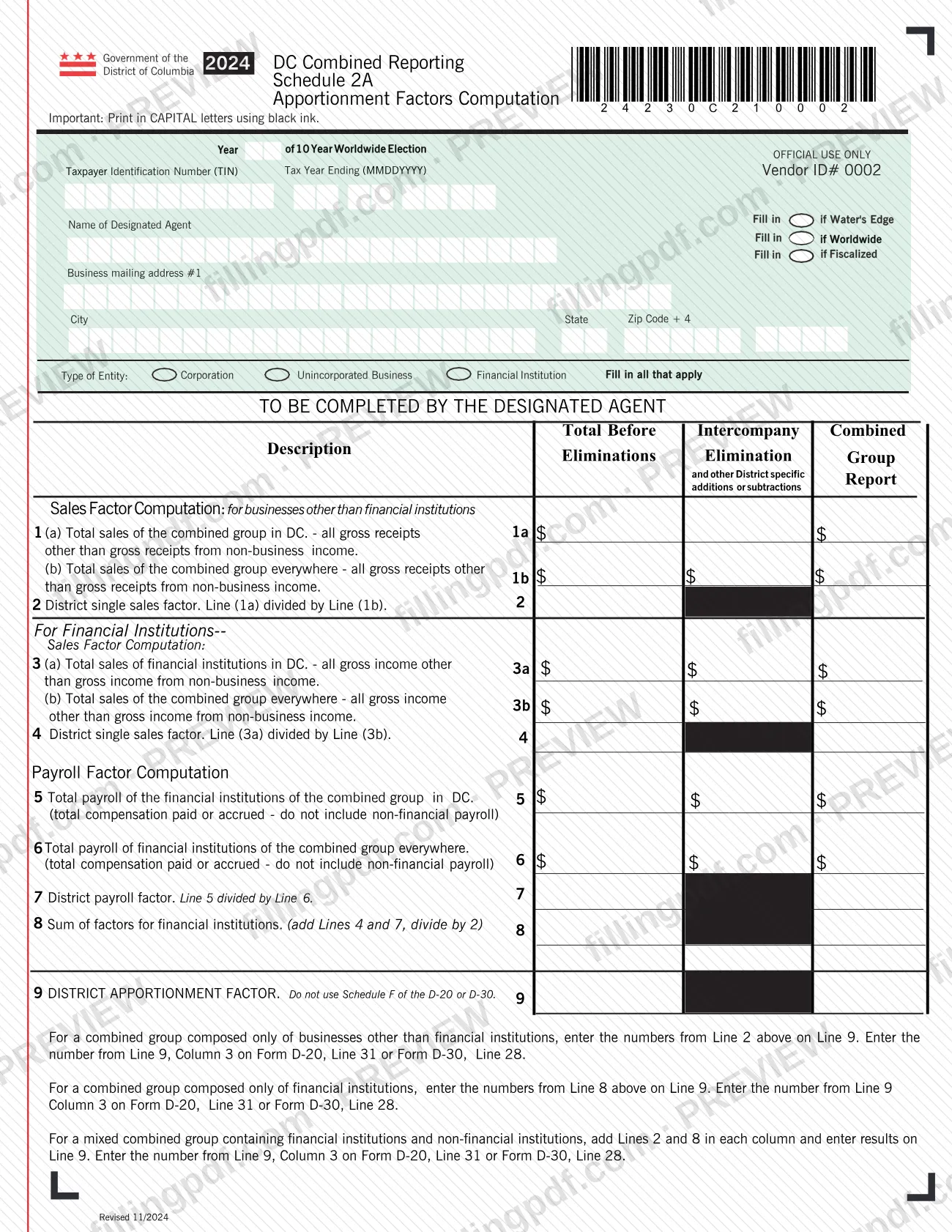
Schedule 2A, Apportionment Factors Computation, is a 2024 District of Columbia combined reporting schedule issued by the DC Office of Tax and Revenue (OTR). The designated agent of a combined group uses it to compute the District apportionment factor from sales and, for financial institutions, payroll. The result on Line 9 is carried to Form D-20 or Form D-30. On this page you can fill out the form online on FillingPDF and download or print the completed PDF; OTR publishes the original PDF and the combined reporting instructions on its website.
Last updated
What is Schedule 2A?
2024 DC Combined Reporting Schedule 2A, Apportionment Factors Computation, is the District of Columbia Office of Tax and Revenue (OTR) schedule on which the designated agent of a combined group computes the District apportionment factor for the tax year.
The schedule has three working parts. Lines 1 and 2 are the sales factor computation for businesses other than financial institutions: Line 1a is the combined group's total sales in DC, Line 1b is its total sales everywhere, and Line 2, the District single sales factor, is Line 1a divided by Line 1b. Lines 3 and 4 repeat that computation for financial institutions, using gross income instead of gross receipts. Lines 5 to 8 add a payroll factor for financial institutions: payroll in DC (Line 5), payroll everywhere (Line 6), the payroll factor (Line 7) and the sum of factors (Line 8, Lines 4 and 7 added and divided by 2).
Line 9 is the DISTRICT APPORTIONMENT FACTOR. The number in Line 9, Column 3 is entered on Form D-20, Line 31 or Form D-30, Line 28. The form says not to use Schedule F of the D-20 or D-30 for this purpose.
The amount columns are headed Total Before Eliminations, Intercompany Elimination and other District specific additions or subtractions, and Combined Group Report. OTR lists Schedule 2A with the 2024 Combined Reporting Instructions and Schedules 1A, 1B and 2B on its combined reporting page.
Who needs to file Schedule 2A?
Schedule 2A is completed by the designated agent of a combined group filing under the DC combined reporting rules. The form is headed TO BE COMPLETED BY THE DESIGNATED AGENT and asks for the agent's name.
What you enter depends on the makeup of the group:
- Only businesses other than financial institutions: complete Lines 1 and 2, and enter the Line 2 numbers on Line 9.
- Only financial institutions: complete Lines 3 to 8, and enter the Line 8 numbers on Line 9.
- A mixed group of financial institutions and non-financial institutions: add Lines 2 and 8 in each column and enter the results on Line 9.
The heading also asks you to mark the group's election and reporting basis (Year of 10 Year Worldwide Election, Water's Edge, Worldwide, Fiscalized) and the type of entity: Corporation, Unincorporated Business or Financial Institution, filling in all that apply. The form does not say who else may sign or file for the group.
When to file Schedule 2A
Complete Schedule 2A when you prepare the 2024 combined report, because the Line 9, Column 3 result is entered on Form D-20, Line 31 or Form D-30, Line 28. The schedule prints no separate due date. The Tax Year Ending (MMDDYYYY) box at the top identifies the period it covers, and a group on a fiscal year marks Fill in if Fiscalized. For the filing deadline of the return it supports, check the 2024 Combined Reporting Instructions that OTR publishes on its combined reporting page.
How to fill out Schedule 2A
Enter taxpayer and tax year details
At the top, enter the Taxpayer Identification Number (TIN) and the Tax Year Ending in MMDDYYYY format. Use CAPITAL letters; the form asks for black ink if you print it.
Mark the election and reporting basis
Fill in Year of 10 Year Worldwide Election as it applies, then fill in Water's Edge, Worldwide or Fiscalized as they apply to the combined group.
Enter the designated agent's information
Write the Name of Designated Agent, the Business mailing address #1, and the City, State and Zip Code + 4.
Select the type of entity
Under Type of Entity, fill in Corporation, Unincorporated Business and Financial Institution, marking all that apply.
Enter DC and total sales on Lines 1a and 1b
Line 1a is the combined group's total sales in DC and Line 1b is its total sales everywhere, in each case all gross receipts other than those from non-business income. Enter them in the amount columns provided.
Compute the sales factor on Line 2
Divide Line 1a by Line 1b to get the District single sales factor for businesses other than financial institutions.
Complete Lines 3a, 3b and 4 for financial institutions
Line 3a is the financial institutions' total sales in DC and Line 3b is the combined group's total sales everywhere, using gross income other than non-business income. Line 4 is Line 3a divided by Line 3b.
Enter payroll on Lines 5 and 6
Line 5 is total payroll of the financial institutions of the combined group in DC; Line 6 is the total everywhere. Use total compensation paid or accrued and leave out non-financial payroll.
Compute Lines 7 and 8
Line 7, the District payroll factor, is Line 5 divided by Line 6. Line 8 is Lines 4 and 7 added together and divided by 2.
Enter the District apportionment factor on Line 9
For a group of only non-financial businesses, enter the Line 2 numbers; for only financial institutions, the Line 8 numbers; for a mixed group, add Lines 2 and 8 in each column. Do not use Schedule F of the D-20 or D-30.
Review and download the completed PDF
Check each line and confirm the Line 9, Column 3 number matches what you will enter on Form D-20, Line 31 or Form D-30, Line 28. Then download or print the completed PDF from FillingPDF.
How to submit Schedule 2A
Schedule 2A has no filing channel of its own: the form prints no mailing address, portal or fee. It supports the combined return, because its Line 9, Column 3 number is entered on Form D-20, Line 31 or Form D-30, Line 28. Check the 2024 Combined Reporting Instructions for how the schedules are filed with that return. OTR publishes the instructions and the fill-in schedules at https://otr.cfo.dc.gov/publication/2024-dc-combined-reporting-instructions-and-schedules-official-and-fill. FillingPDF lets you fill out and download the PDF; submission follows the agency's channels.
Common mistakes to avoid
- Using Schedule F of the D-20 or D-30 for the apportionment factor; Line 9 says not to use it.
- Entering the Line 9 number from the wrong column; Form D-20, Line 31 and Form D-30, Line 28 take the number from Line 9, Column 3.
- Including gross receipts or gross income from non-business income in Lines 1a, 1b, 3a or 3b; those lines exclude it.
- Counting non-financial payroll on Line 5 or Line 6, which cover only the financial institutions of the combined group.
- Filling Line 9 for a mixed group from only one line; add Lines 2 and 8 in each column and enter the results on Line 9.
- Skipping the divide-by-2 on Line 8, which is Lines 4 and 7 added together, divided by 2.
- Marking only one box under Type of Entity when the group includes more than one type; the form says to fill in all that apply.
- Printing in lower case or in a color other than black when completing by hand; the form asks for CAPITAL letters in black ink.
Frequently asked questions
What is Schedule 2A in DC combined reporting?
Schedule 2A, Apportionment Factors Computation, is the 2024 OTR schedule on which a combined group's designated agent computes the District apportionment factor. It uses sales for non-financial businesses, plus payroll for financial institutions, and ends with Line 9, the DISTRICT APPORTIONMENT FACTOR.
Is Schedule 2A a DC property tax form?
No. Although it is a DC OTR form, Schedule 2A is a combined reporting schedule: it asks for sales and payroll figures and feeds Form D-20 or Form D-30. It has no lines for property assessments or property tax. Look for property tax forms on the OTR website.
Who completes Schedule 2A?
The designated agent of the combined group completes it; the form is headed TO BE COMPLETED BY THE DESIGNATED AGENT and asks for the agent's name and address. The group's entity types (corporation, unincorporated business, financial institution) are marked at the top.
Where does the Line 9 result go?
Enter the number from Line 9, Column 3 on Form D-20, Line 31 or Form D-30, Line 28. The form also says not to use Schedule F of the D-20 or D-30 for the District apportionment factor.
What do I enter on Line 9 for a mixed combined group?
If the group has both financial institutions and non-financial institutions, add Lines 2 and 8 in each column and enter the results on Line 9. A group of only non-financial businesses uses Line 2; a group of only financial institutions uses Line 8.
Which lines apply to financial institutions?
Lines 3 to 8. Lines 3a, 3b and 4 give the sales factor using gross income, Lines 5 to 7 give the payroll factor, and Line 8 adds Lines 4 and 7 and divides by 2. Non-financial payroll is excluded from Lines 5 and 6.
Can I fill out Schedule 2A online?
Yes. You can fill out the PDF online on FillingPDF and download or print it. FillingPDF is an independent service and does not file the schedule with OTR; submission follows the agency's channels described in the OTR instructions.
Where can I find the instructions for Schedule 2A?
OTR lists the 2024 Combined Reporting Instructions with Schedules 1A, 1B, 2A and 2B on its page "2024 DC Combined Reporting Instructions and Schedules (Official and Fill-in)" at otr.cfo.dc.gov.
Ready to fill out Schedule 2A?
Fill out Schedule 2A now