
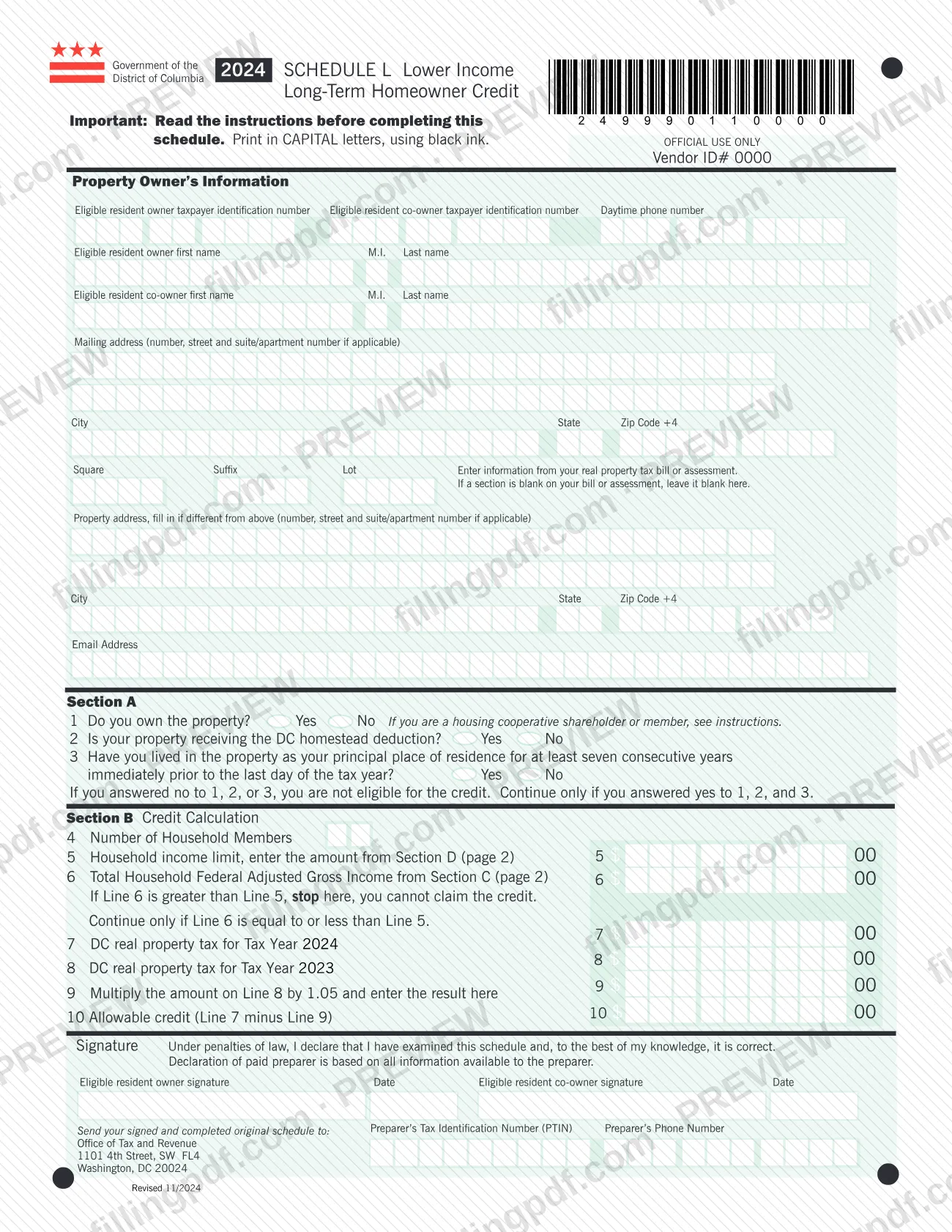
The 2024 Schedule L is the District of Columbia Office of Tax and Revenue (OTR) schedule for the Lower Income Long-Term Homeowner Credit. It is one of the forms tied to DC property tax: it lets a long-term homeowner with household income at or under the limit claim a refund for certain real property taxes. On this page you can fill out the form online on FillingPDF and download or print the completed PDF; the form itself is published by OTR, and the signed original is mailed to OTR.
Last updated
What is Schedule L?
2024 Schedule L, Lower Income Long-Term Homeowner Credit, is the DC Office of Tax and Revenue (OTR) schedule that long-term homeowners with lower household income use to claim a refund of certain DC real property taxes.
The credit works as a refund from DC individual income tax, and the instructions printed on the schedule say it is available if you have no outstanding DC government liabilities. To figure it, you subtract 1.05 times the real property tax imposed for tax year 2023 from the real property tax imposed for tax year 2024. The difference is your potential refund.
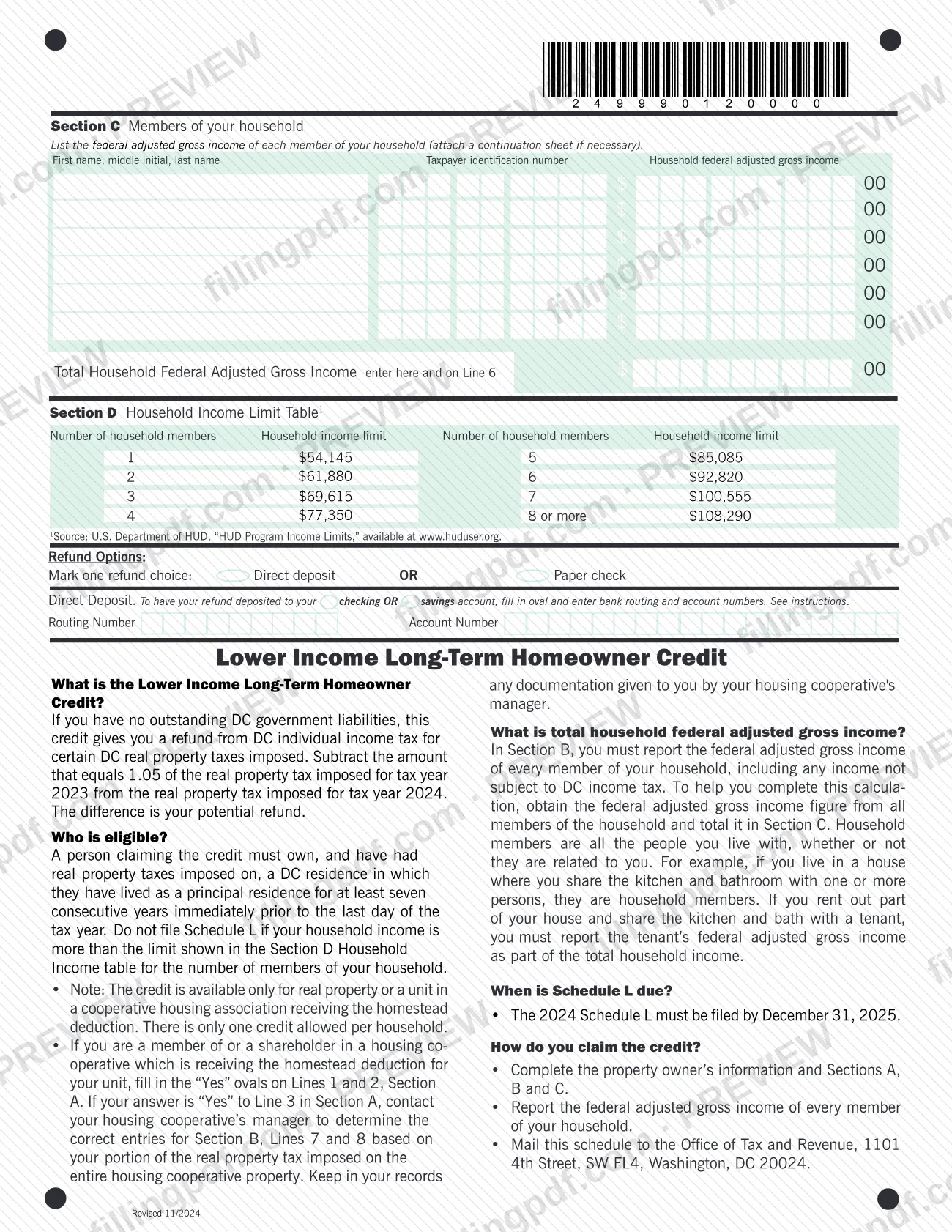
The schedule has a property owner block, Section A (three eligibility questions), Section B (the credit calculation, lines 4 to 10), Section C (members of your household and their federal adjusted gross income) and Section D (the household income limit table by number of household members). It also has a signature block with a paid preparer area and a choice between direct deposit and a paper check for the refund.
The credit is available only for real property, or a unit in a cooperative housing association, that receives the homestead deduction. Only one credit is allowed per household. The form's Section D table cites the U.S. Department of HUD's program income limits as its source.
Who needs to file Schedule L?
Homeowners in the District of Columbia who meet all three Section A conditions use Schedule L: you own the property, the property receives the DC homestead deduction, and you have lived in it as your principal place of residence for at least seven consecutive years immediately before the last day of the tax year. The form says that if you answer no to any of lines 1, 2 or 3 you are not eligible for the credit.
Your household income must also be at or under the limit. Do not file Schedule L if your total household federal adjusted gross income is more than the Section D limit for the number of people in your household. Household members are all the people you live with, whether or not they are related to you, including a tenant who shares your kitchen and bathroom.
Other conditions printed on the form:
- Only one credit is allowed per household.
- Housing cooperative shareholders and members whose unit receives the homestead deduction fill in Yes on lines 1 and 2 and should contact the cooperative's manager for the correct entries on lines 7 and 8.
- An owner and a co-owner may each be listed and each signs. A paid preparer completes the preparer area of the signature block.
When to file Schedule L
The 2024 Schedule L must be filed by December 31, 2025, according to the instructions printed on the form. The schedule is for tax year 2024: line 7 asks for the DC real property tax for Tax Year 2024 and line 8 for Tax Year 2023.
Seven-year residency is measured to the last day of the tax year, so check that date before you answer line 3. The form prints no separate processing time. For tax years other than 2024, use the Schedule L that OTR publishes for that year, because the tax years on lines 7 and 8 and the income limits are printed for 2024 only.
Documents you need
- Continuation sheet listing additional household members, attached only if your household has more members than the rows in Section C allow.
- Signed original of the completed schedule, which is what the form says to mail to the Office of Tax and Revenue; the form asks for no other attachment.
How to fill out Schedule L
Enter property owner information
Fill in the eligible resident owner's and co-owner's taxpayer identification numbers, names, daytime phone number, mailing address and email address. Add the property address only if it differs from the mailing address.
Copy Square, Suffix and Lot
Enter the Square, Suffix and Lot from your real property tax bill or assessment. If a section is blank on your bill, leave it blank here.
Answer the Section A questions
Mark Yes or No on line 1 (do you own the property), line 2 (receiving the DC homestead deduction) and line 3 (lived there as principal residence for at least seven consecutive years). Continue only if all three answers are Yes.
Enter household size on line 4
Enter the number of household members, counting everyone you live with whether or not they are related to you.
List household members in Section C
For each member enter name, taxpayer identification number and household federal adjusted gross income, then total them. Attach a continuation sheet if you need more rows.
Find your income limit in Section D
Look up the limit for your number of household members in the Section D table and enter it on line 5. Enter the Section C total on line 6; if line 6 is greater than line 5, stop.
Enter real property tax on lines 7 and 8
Line 7: DC real property tax for Tax Year 2024. Line 8: DC real property tax for Tax Year 2023. Cooperative members get these figures from the cooperative's manager.
Calculate lines 9 and 10
Line 9: multiply line 8 by 1.05. Line 10, the allowable credit: line 7 minus line 9.
Choose your refund option
Mark one: Direct deposit or Paper check. For direct deposit, fill in the oval and enter your bank routing number and account number.
Sign, date and add preparer details
The owner and co-owner (if any) sign and date under the declaration. A paid preparer adds a PTIN and phone number.
Review and download the completed PDF
Check each line against your tax bills and household income, then download or print the completed PDF from FillingPDF and mail the signed original as described under How to submit.
How to submit Schedule L
The form names one channel: mail. Send your signed and completed original schedule to:
Office of Tax and Revenue 1101 4th Street, SW FL4 Washington, DC 20024
- Signature: the eligible resident owner (and co-owner, if listed) must sign and date the schedule under the declaration. A paid preparer adds a Preparer's Tax Identification Number (PTIN) and phone number.
- Refund option: mark one choice, Direct deposit or Paper check. For direct deposit, fill in the oval and enter your bank routing number and account number.
- Continuation sheet: if your household has more members than Section C has rows, attach a continuation sheet.
The form lists no online filing, portal or fee. The OTR page for the schedule offers both a standard and a fill-in PDF. FillingPDF lets you fill out and download the PDF; submission follows the channel above.
Common mistakes to avoid
- Continuing past Section A after answering no to line 1, 2 or 3; the form says you are not eligible for the credit in that case.
- Claiming the credit when line 6 (total household federal adjusted gross income) is greater than line 5; the form says to stop there.
- Leaving out household members' income, including people you are not related to or a tenant who shares your kitchen and bath, or income not subject to DC income tax.
- Filling in the Square, Suffix and Lot entries when they are blank on your tax bill; the form says to leave a section blank if it is blank on your bill or assessment.
- Entering the wrong tax years: line 7 is Tax Year 2024 and line 8 is Tax Year 2023, and line 9 is line 8 multiplied by 1.05.
- Using line 5 from the wrong row of the Section D table instead of the limit for your exact number of household members.
- Mailing an unsigned schedule; both the owner and any listed co-owner sign and date it.
- Filing after December 31, 2025, the deadline printed for the 2024 Schedule L.
- Housing cooperative members guessing lines 7 and 8 instead of contacting the cooperative's manager for the correct entries.
Frequently asked questions
What is the DC Schedule L Lower Income Long-Term Homeowner Credit?
It is a refund from DC individual income tax for certain DC real property taxes. You subtract 1.05 times the 2023 real property tax from the 2024 real property tax; the difference is your potential refund. You claim it on Schedule L, and you need no outstanding DC government liabilities.
Who qualifies for Schedule L?
You must own the DC property, receive the homestead deduction on it, and have lived there as your principal residence for at least seven consecutive years before the last day of the tax year. Household income must not exceed the Section D limit, and only one credit is allowed per household.
What is the deadline for the 2024 Schedule L?
The 2024 Schedule L must be filed by December 31, 2025. This is the date printed in the instructions on the schedule itself.
Where do I mail Schedule L?
Mail your signed and completed original to the Office of Tax and Revenue, 1101 4th Street, SW FL4, Washington, DC 20024. The form lists mail as its filing channel and names no portal or other address.
Whose income counts as household income?
The federal adjusted gross income of every member of your household, including income not subject to DC income tax. Household members are all the people you live with, related or not; a tenant who shares your kitchen and bath counts.
Can I claim the credit if I live in a housing cooperative?
Yes, if the cooperative receives the homestead deduction for your unit. Fill in Yes on lines 1 and 2, and contact the cooperative's manager for the correct entries on lines 7 and 8, based on your portion of the property tax on the whole cooperative.
How do I get the refund?
Mark one refund option on the schedule: Direct deposit or Paper check. For direct deposit, fill in the oval and enter your bank routing and account numbers for a checking or savings account.
Can I fill out Schedule L online on FillingPDF?
Yes. You can fill out the fillable PDF online on FillingPDF and download or print it. FillingPDF is independent of OTR and does not file the schedule; you mail the signed original to the Office of Tax and Revenue.
Ready to fill out Schedule L?
Fill out Schedule L now