
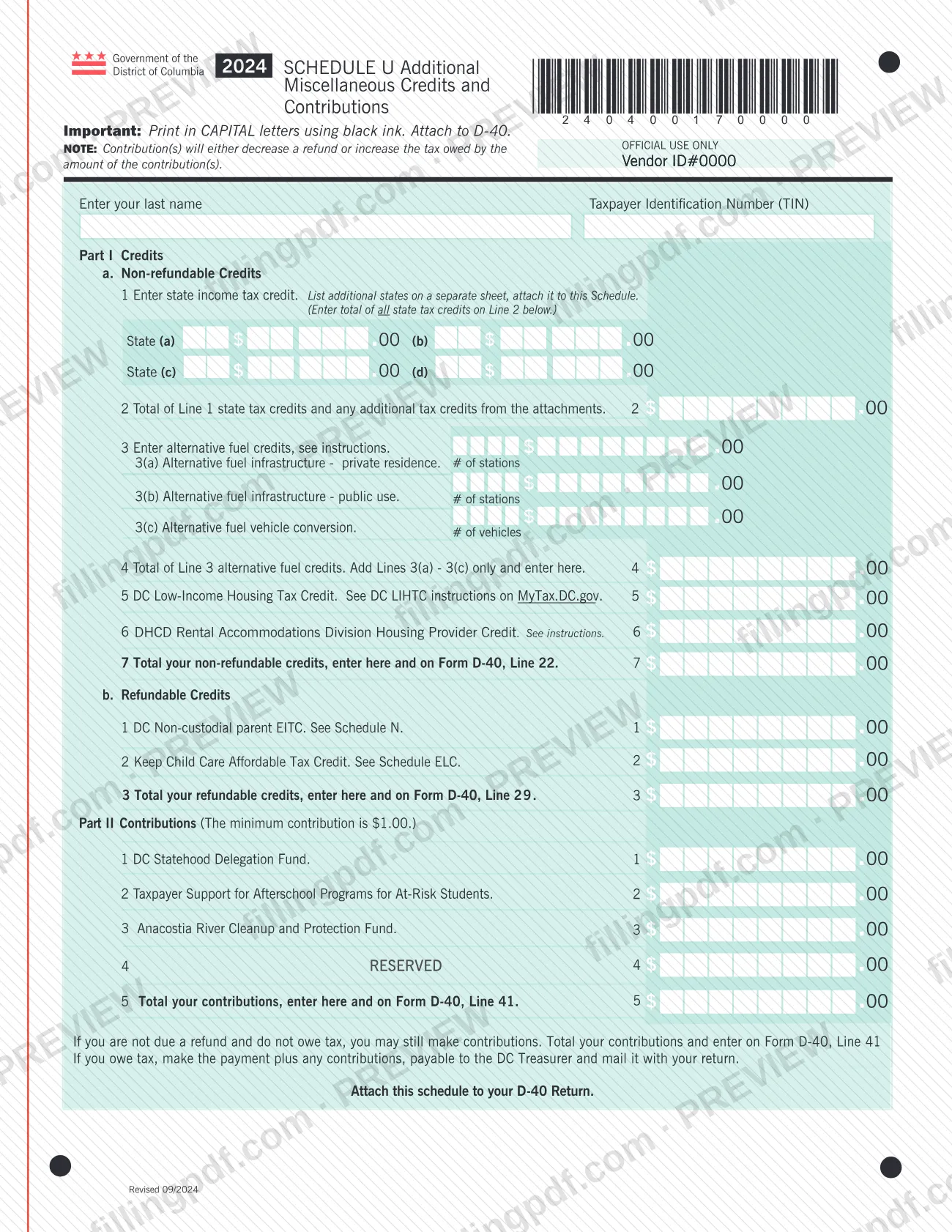
The 2024 Schedule U, Additional Miscellaneous Credits and Contributions, is a District of Columbia schedule from the DC Office of Tax and Revenue (OTR) that you attach to your D-40 return. It collects state tax credits, alternative fuel credits, a housing provider credit, two refundable credits and optional contributions, and sends the totals to Form D-40. On this page you can fill out the form online on FillingPDF and download or print the completed PDF; the original PDF is published by OTR at otr.cfo.dc.gov.
Last updated
What is Schedule U?
2024 Schedule U, Additional Miscellaneous Credits and Contributions is the District of Columbia schedule, issued by the DC Office of Tax and Revenue (OTR), on which a taxpayer totals extra non-refundable credits, refundable credits and voluntary contributions and carries the totals to Form D-40.
The schedule has two parts. Part I, Credits, is split into non-refundable credits and refundable credits. The non-refundable section covers state tax credits (line 1, with line 2 as the total), alternative fuel credits (lines 3 and 4), a DC credit on line 5 whose instructions are on MyTax.DC.gov, and the DHCD Rental Accommodations Division Housing Provider Credit (line 6). Line 7 totals them. The refundable section covers the DC Non-custodial parent EITC (see Schedule N) and a credit that refers to Schedule ELC, with a total on line 3.
Part II, Contributions, lists the DC Statehood Delegation Fund, Taxpayer Support for Afterschool Programs for At-Risk Students and the Anacostia River Cleanup and Protection Fund, plus one reserved line and a total. The form notes that contributions either decrease a refund or increase the tax owed by the amount contributed.
It is a schedule of the D-40 return, not a return of its own. Nothing on it concerns property tax. OTR's page for the form also lists a fill-in version of the 2024 Schedule U.
Who needs to file Schedule U?
Taxpayers who file a DC D-40 return and want to claim one of the credits on this schedule, or make a contribution, attach Schedule U to that return. The form tells you to attach it to your D-40.
The lines point to specific groups:
- Taxpayers claiming a credit for tax paid to another state use line 1, listing additional states on a separate sheet.
- Taxpayers claiming alternative fuel credits use lines 3(a) to 3(c): infrastructure at a private residence, infrastructure for public use, or vehicle conversion.
- Housing providers claiming the DHCD Rental Accommodations Division Housing Provider Credit use line 6.
- Taxpayers claiming the DC Non-custodial parent EITC or the credit tied to Schedule ELC use the refundable credits section.
- Taxpayers who want to give to the listed funds use Part II.
You can contribute even if you are not due a refund and do not owe tax. If none of these credits or contributions applies to you, the form gives no reason to attach it.
When to file Schedule U
Schedule U has no due date of its own: you complete it when you complete your D-40 return, and it is submitted with that return. The form is marked for tax year 2024 (Revised 09/2024).
If you owe tax and are making contributions, the form says to make one payment covering the tax plus the contributions, payable to the DC Treasurer, and to mail it with your return. If you are neither due a refund nor owe tax, you may still make contributions by totaling them and entering the total on Form D-40. For the D-40 deadline and any extension rules, check OTR's materials for that return.
Documents you need
- A separate sheet listing additional states, attached to Schedule U, when you claim state tax credits for more states than the four spaces on line 1 hold; include those amounts in the line 2 total.
- Any other attachments that support additional tax credits counted on line 2; the form says line 2 includes additional tax credits from the attachments.
How to fill out Schedule U
Enter your name and TIN
At the top, enter your last name and your Taxpayer Identification Number (TIN). Leave the OFFICIAL USE ONLY area alone.
List state income tax credits
On line 1, enter the state and the amount in spaces (a) through (d). List additional states on a separate sheet and attach it to this schedule.
Total your state credits
On line 2, enter the total of the line 1 state tax credits plus any additional tax credits from the attachments.
Enter alternative fuel credits
On line 3, enter the number of stations on 3(a) and 3(b) and the number of vehicles on 3(c), with the credit amounts. On line 4, add lines 3(a) through 3(c) only.
Complete lines 5 and 6
Line 5 refers to instructions on MyTax.DC.gov. Line 6 is the DHCD Rental Accommodations Division Housing Provider Credit; see the instructions for it.
Total non-refundable credits
On line 7, total your non-refundable credits and carry the amount to Form D-40 at the line printed beside line 7.
Enter refundable credits
Under Refundable Credits, line 1 is the DC Non-custodial parent EITC (see Schedule N) and line 2 refers to Schedule ELC. Total them on line 3 and carry the amount to Form D-40 as the form directs.
Enter your contributions
In Part II, enter an amount on line 1, 2 or 3 for each fund you choose: DC Statehood Delegation Fund, Taxpayer Support for Afterschool Programs for At-Risk Students, or Anacostia River Cleanup and Protection Fund. Line 4 is RESERVED.
Total contributions and carry over
On Part II line 5, total your contributions and enter the total on Form D-40 at the line printed on the schedule. You may contribute even if you are not due a refund and owe no tax.
Review, download and attach
Check every total against the lines it carries to. Download or print the completed PDF from FillingPDF and attach it to your D-40 return, as described under How to submit.
How to submit Schedule U
Schedule U has no filing channel of its own. You attach it to your D-40 return, and it is submitted through whichever channel you use for that return.
- With the D-40: the form says twice to attach this schedule to your D-40 return. If you add state credits for more than the states printed on line 1, attach the separate sheet to the schedule.
- Payment: if you owe tax, the form says to make the payment, plus any contributions, payable to the DC Treasurer and mail it with your return.
- Instructions: line 5 refers to instructions on MyTax.DC.gov, and lines 3 and 6 say to see the instructions. The form itself prints no mailing address.
If you complete the form by hand, print in capital letters using black ink. FillingPDF lets you fill out and download the PDF; submission follows the channels above.
Common mistakes to avoid
- Filing Schedule U on its own instead of attaching it to the D-40 return, as the form directs.
- Leaving additional states' credits off the separate sheet, or leaving them out of the line 2 total.
- Adding anything other than lines 3(a) through 3(c) into line 4; the form says to add those lines only.
- Entering a contribution on the line marked RESERVED instead of on one of the listed funds.
- Forgetting that contributions reduce your refund or increase the tax you owe by the amount contributed.
- Making the payment payable to someone other than the DC Treasurer when you owe tax plus contributions.
- Carrying the line 7 or refundable credit totals to the wrong place; the form says which D-40 line receives each total.
- Completing a printed copy in lowercase letters or non-black ink, when the form asks for capital letters and black ink.
Frequently asked questions
What is Schedule U for DC taxes?
Schedule U, Additional Miscellaneous Credits and Contributions, is an OTR schedule you attach to your D-40 return. It totals non-refundable credits, refundable credits and voluntary contributions, then carries those totals to Form D-40.
Is Schedule U a DC property tax form?
No. Schedule U has no property tax lines. Its lines are state tax credits, alternative fuel credits, a housing provider credit, two refundable credits and contributions, and the totals go to Form D-40, the return it must be attached to.
Do I have to attach Schedule U to my D-40?
Yes, if you use it. The form says twice to attach it to your D-40 return, so it is not filed on its own. It has no separate address or due date printed on it.
Can I make contributions if I am not due a refund?
Yes. The form says that if you are not due a refund and do not owe tax, you may still make contributions. Total them on Part II line 5 and enter the total on Form D-40.
How do I pay if I owe tax and make a contribution?
Make one payment covering the tax plus any contributions, payable to the DC Treasurer, and mail it with your return. Contributions otherwise decrease a refund or increase the tax owed by the amount contributed.
What goes on line 4 of Schedule U?
Line 4 is the total of the alternative fuel credits on line 3. Add lines 3(a) through 3(c) only, covering private-residence infrastructure, public-use infrastructure and vehicle conversion, and enter the sum on line 4.
What if I have more state tax credits than line 1 holds?
List the additional states on a separate sheet and attach it to Schedule U. Include those amounts in the line 2 total, which combines the line 1 credits and any additional credits from the attachments.
Can I fill out Schedule U online on FillingPDF?
Yes. You can fill out the form online on FillingPDF and download or print the completed PDF. FillingPDF is independent of OTR and does not file anything; you attach the schedule to your D-40 and submit it through the D-40 channels.
Ready to fill out Schedule U?
Fill out Schedule U now