
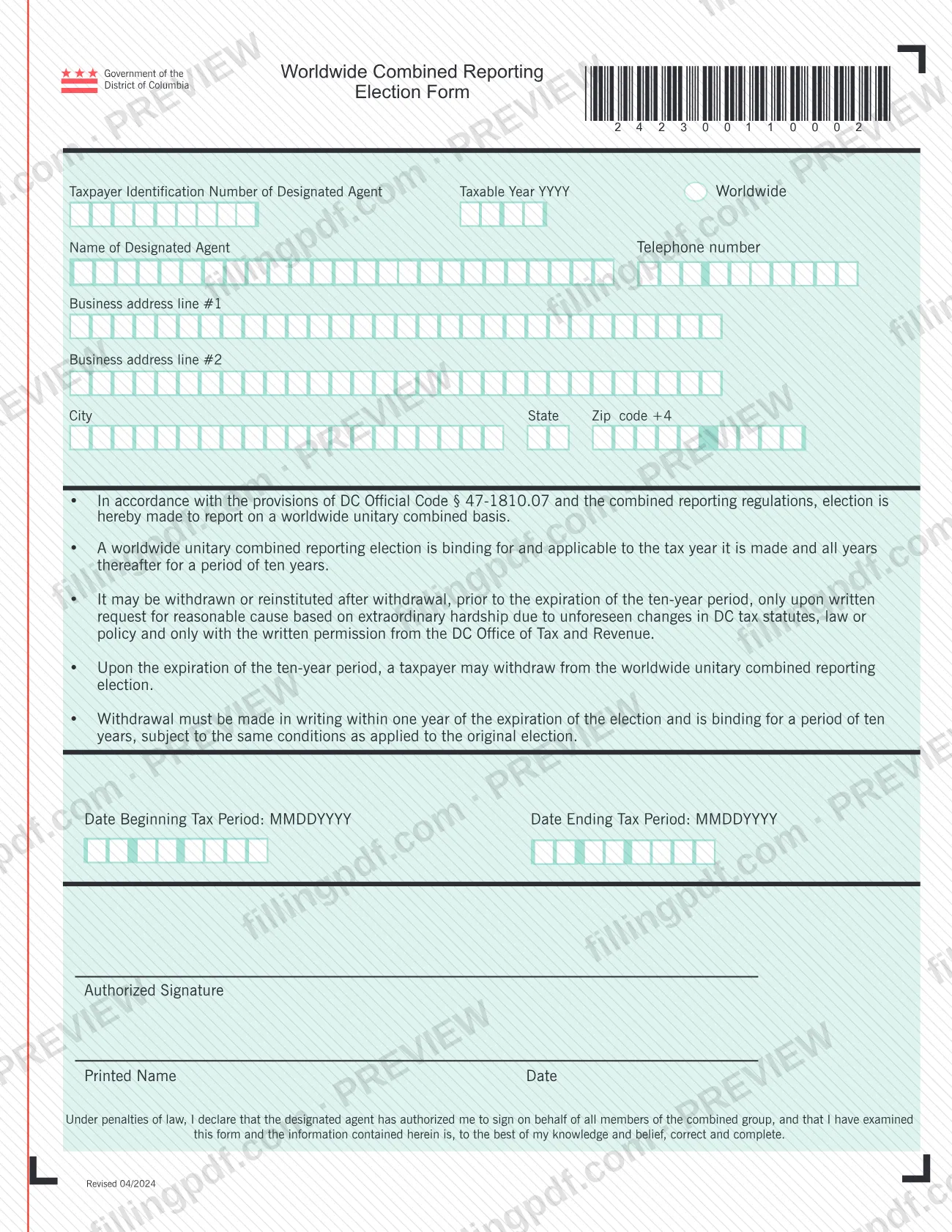
The 2024 Worldwide Combined Reporting Election Form (Fill-in) is the District of Columbia form on which a taxpayer elects to report on a worldwide unitary combined basis. It is published by the DC Office of Tax and Revenue (OTR) and identifies a designated agent, a taxable year and the tax period the election covers. A signer authorized by the designated agent signs for all members of the combined group. On this page you can fill out the form online on FillingPDF and download or print the completed PDF; the original is published by OTR at otr.cfo.dc.gov.
Last updated
What is 2024 Worldwide Combined Reporting Election Form (Fill-in) – Washington, DC?
The 2024 Worldwide Combined Reporting Election Form is the DC Office of Tax and Revenue (OTR) form used to make the election, under DC Official Code § 47-1810.07 and the combined reporting regulations, to report on a worldwide unitary combined basis.
The form is short. It asks for the taxpayer identification number, name, telephone number and business address of the designated agent, the taxable year (YYYY), and the beginning and ending dates of the tax period (MMDDYYYY). It closes with an authorized signature, a printed name and a date.
The printed text sets out the terms of the election:
- It is binding for the tax year in which it is made and all years after that, for a period of ten years.
- Before the ten years end, it may be withdrawn or reinstituted after withdrawal only on written request for reasonable cause based on extraordinary hardship due to unforeseen changes in DC tax statutes, law or policy, and only with written permission from OTR.
- When the ten-year period expires, the taxpayer may withdraw. Withdrawal must be made in writing within one year of the expiration of the election and is binding for ten years, under the same conditions as the original election.
By signing, the signer declares that the designated agent has authorized them to sign on behalf of all members of the combined group, and that the information on the form is correct and complete to the best of their knowledge and belief.
Who needs to file 2024 Worldwide Combined Reporting Election Form (Fill-in) – Washington, DC?
Taxpayers that choose to report on a worldwide unitary combined basis under DC Official Code § 47-1810.07 and the combined reporting regulations use this form to make that election.
- The designated agent. The form identifies the combined group through a designated agent, whose taxpayer identification number, name, telephone number and business address are entered at the top.
- The signer. Someone the designated agent has authorized signs for all members of the combined group. The declaration at the bottom states that authorization, so the signer should hold it before signing.
- Groups considering withdrawal. The form states that withdrawal, or reinstitution after withdrawal, is not made on this page of the form: it requires a written request, and during the ten-year period it also requires written permission from OTR.
The form prints no exclusions. Because the election binds the taxpayer for ten years, read the terms printed on the form before you sign.
When to file 2024 Worldwide Combined Reporting Election Form (Fill-in) – Washington, DC
Complete the form when a taxpayer decides to elect worldwide unitary combined reporting for a taxable year. The election applies to the tax year in which it is made and to all years after that, for a period of ten years, so the taxable year and the tax period you enter set where that period starts.
The form prints no filing deadline for making the election. It does give timing for leaving it: after the ten-year period expires, withdrawal must be made in writing within one year of the expiration. Before the ten years are up, withdrawal or reinstitution is possible only on a written request for reasonable cause with OTR's written permission.
How to fill out 2024 Worldwide Combined Reporting Election Form (Fill-in) – Washington, DC
Enter the designated agent's taxpayer ID
In the first field, write the Taxpayer Identification Number of the Designated Agent.
Enter the taxable year
Write the taxable year in the YYYY format in the Taxable Year field.
Enter the agent's name and phone
Fill in Name of Designated Agent and the Telephone number.
Enter the business address
Complete Business address line #1, line #2 if needed, City, State and Zip code +4.
Read the election terms
Review the bullet points on the form: the election under DC Official Code § 47-1810.07, the ten-year binding period, and the withdrawal conditions.
Enter the tax period dates
Write Date Beginning Tax Period and Date Ending Tax Period in the MMDDYYYY format.
Sign, print your name and date
The authorized signer completes Authorized Signature, Printed Name and Date, confirming the designated agent authorized them to sign for all members of the combined group.
Review and download the completed PDF
Check every field, then download or print the completed PDF from FillingPDF and submit it through OTR's channels described under How to submit.
How to submit 2024 Worldwide Combined Reporting Election Form (Fill-in) – Washington, DC
The form names no mailing address, portal or office window of its own. It is an election made to the DC Office of Tax and Revenue (OTR), which publishes the form on its website at https://otr.cfo.dc.gov/publication/2024-worldwide-combined-reporting-election-form-official, so check that page or contact OTR to confirm how it takes the signed election.
Before you send it, check that the authorized signature, printed name and date are filled in. Any withdrawal or reinstitution request is a separate written request; the form states that during the ten-year period it needs OTR's written permission.
FillingPDF lets you fill out and download the PDF; submission follows OTR's channels.
Common mistakes to avoid
- Treating the election as a one-year choice: the form states it is binding for the year it is made and all years after that, for ten years.
- Assuming the election can be dropped at will before the ten years end; withdrawal then needs a written request for reasonable cause and OTR's written permission.
- Missing the withdrawal window after the ten-year period: withdrawal must be made in writing within one year of the expiration of the election.
- Entering dates in another format instead of MMDDYYYY for the beginning and ending of the tax period, or the taxable year in another format than YYYY.
- Signing without authorization from the designated agent; the declaration says the agent has authorized the signer to sign for all members of the combined group.
- Leaving the authorized signature, printed name or date blank.
- Entering the taxpayer identification number of someone other than the designated agent in the first field.
Frequently asked questions
What is the Worldwide Combined Reporting Election Form?
It is the DC Office of Tax and Revenue form used to elect, under DC Official Code § 47-1810.07, to report on a worldwide unitary combined basis. It identifies a designated agent, the taxable year and the tax period, and is signed for the combined group.
How long does a worldwide combined reporting election last?
Ten years. The form states the election is binding for the tax year in which it is made and all years after that for a period of ten years. After the period expires, the taxpayer may withdraw in writing within one year.
Can I withdraw the election before ten years are up?
Only in limited cases. The form says withdrawal or reinstitution before the ten-year period ends requires a written request for reasonable cause based on extraordinary hardship from unforeseen changes in DC tax statutes, law or policy, plus written permission from OTR.
Who signs the Worldwide Combined Reporting Election Form?
An authorized signer signs, prints their name and dates the form. The declaration states that the designated agent has authorized the signer to sign on behalf of all members of the combined group.
Where do I send the completed election form?
The form prints no address or portal. OTR publishes it at otr.cfo.dc.gov, so check that page or contact OTR to confirm how it accepts the signed election. FillingPDF does not send it to OTR.
Is this a DC property tax form?
No. It is an election form for worldwide unitary combined reporting issued by OTR under DC Official Code § 47-1810.07. It asks for the designated agent, taxable year and tax period, not property details.
Can I fill out the form online on FillingPDF?
Yes. You can fill out the fillable PDF online on FillingPDF and download or print it. FillingPDF is an independent service and does not file the election with OTR; you submit it through OTR's channels.
What date format does the form use?
The taxable year is entered as YYYY, and the beginning and ending dates of the tax period as MMDDYYYY, exactly as printed on the form.
Ready to fill out 2024 Worldwide Combined Reporting Election Form (Fill-in) – Washington, DC?
Fill out 2024 Worldwide Combined Reporting Election Form (Fill-in) – Washington, DC now