
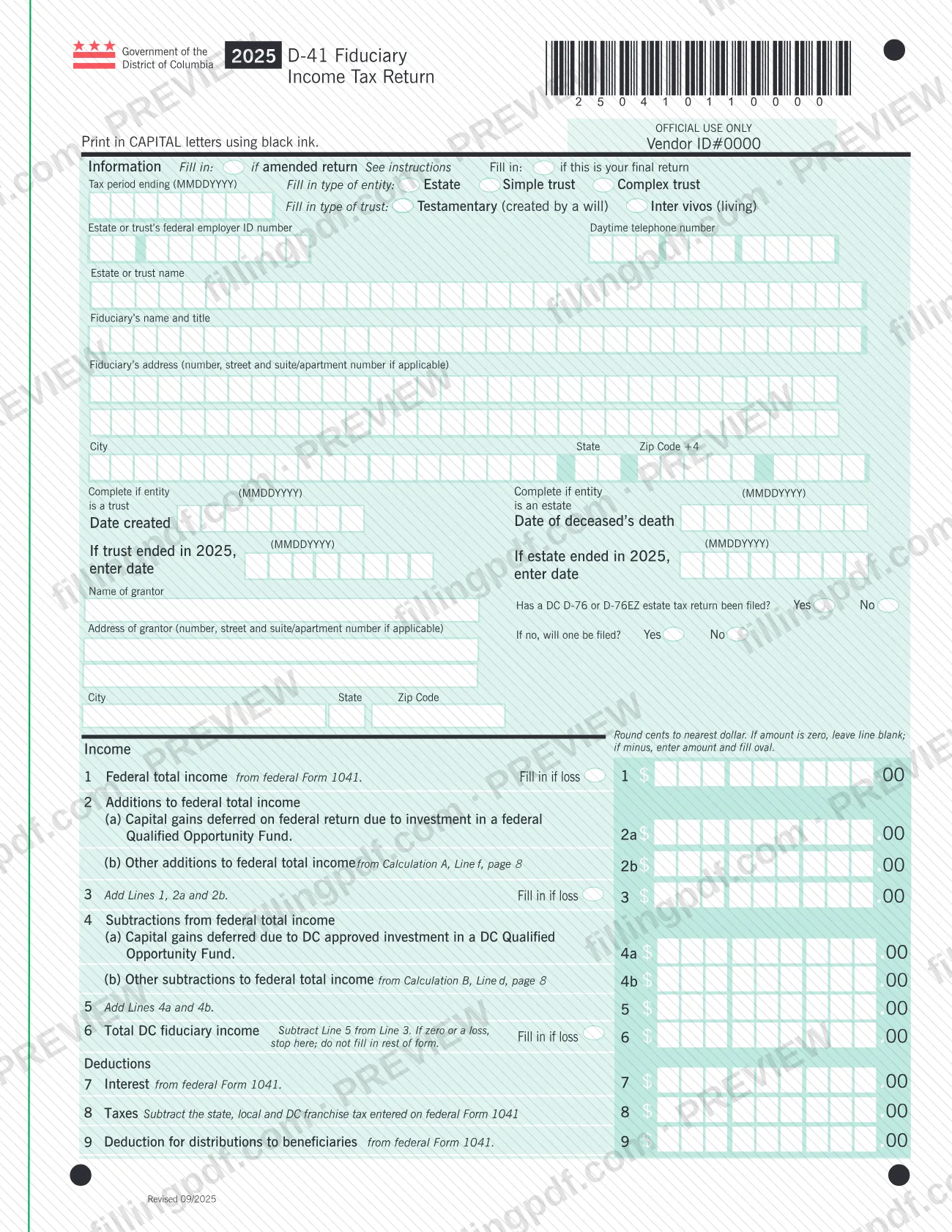
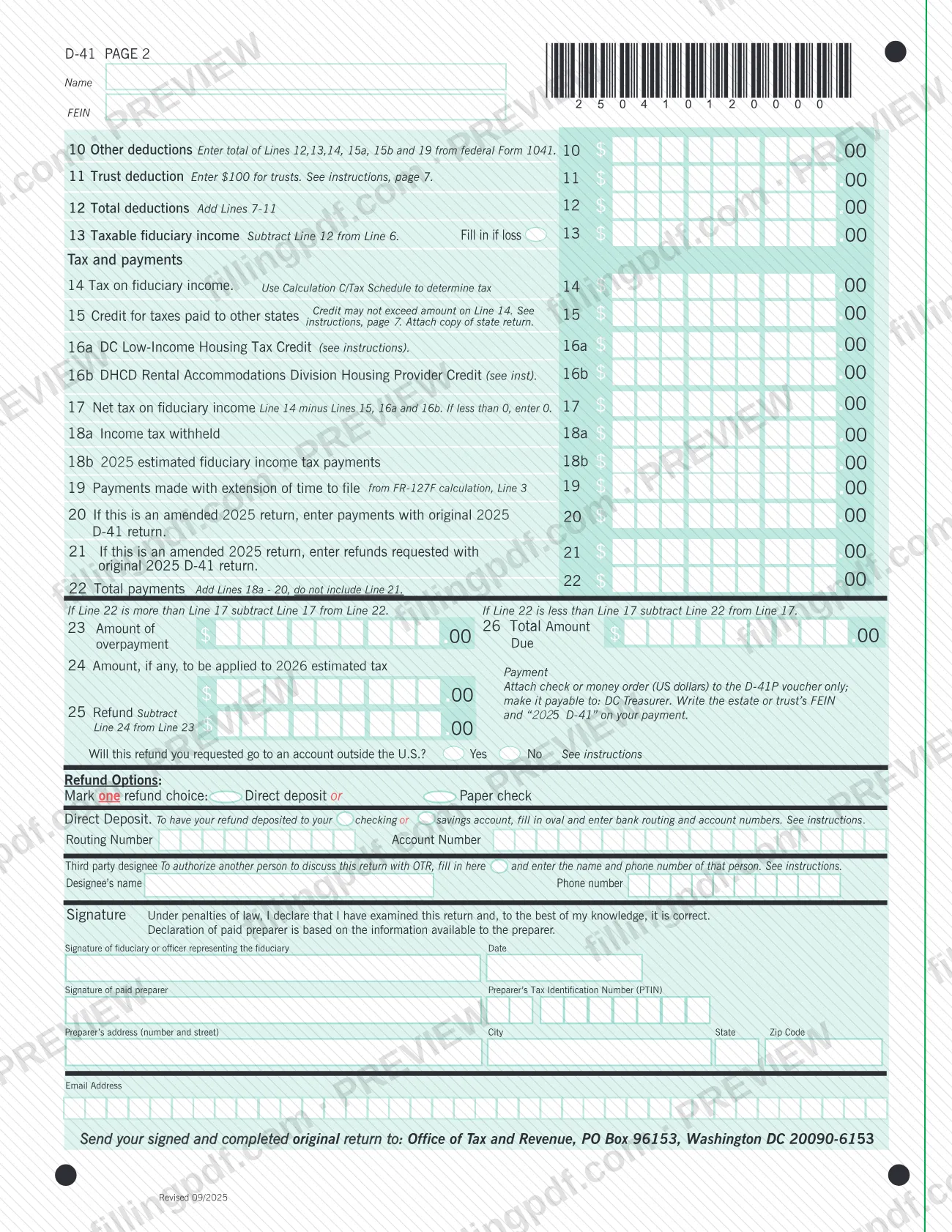
The 2025 D-41 Fiduciary Income Tax Return is the form the District of Columbia Office of Tax and Revenue (OTR) uses to collect income tax from estates and trusts. The fiduciary starts from the federal total income on Form 1041, applies DC additions, subtractions and deductions, and arrives at the tax, the payments and a refund or an amount due. It is an income tax return, not a real property tax form. On this page you can fill out the D-41 online on FillingPDF and download or print the completed PDF; the original form is published by OTR at otr.cfo.dc.gov.
Last updated
What is D-41?
The 2025 D-41 Fiduciary Income Tax Return is the Government of the District of Columbia form on which the fiduciary of an estate or trust reports DC fiduciary income for the 2025 tax period and figures the tax, payments, refund or amount due.
The return is issued by the DC Office of Tax and Revenue (OTR). It begins with the federal total income from federal Form 1041 (line 1), adds DC-specific items such as capital gains deferred through a federal Qualified Opportunity Fund (line 2a), and subtracts items such as gains deferred through a DC Qualified Opportunity Fund (line 4a). Calculation A and Calculation B on page 8 support the other additions and subtractions, and Calculation C/Tax Schedule is used to find the tax on line 14.
After the deductions on lines 7 to 12, the form reaches taxable fiduciary income on line 13, then credits (credit for taxes paid to other states, DC Low-Income Housing Tax Credit, DHCD Rental Accommodations Division Housing Provider Credit), payments, and the overpayment or amount due on lines 23 to 26.
The D-41 is a DC income tax return. It is not a property tax form. The form has a separate D-41P payment voucher, and extension payments are figured on an FR-127F calculation that feeds line 19.
Who needs to file D-41?
The fiduciary of an estate or trust completes the D-41. The form has boxes for three types of entity: Estate, Simple trust and Complex trust. For trusts it also asks whether the trust is testamentary (created by a will) or inter vivos (living).
- Trusts: enter the date the trust was created, the name and address of the grantor and, if the trust ended in 2025, the date it ended.
- Estates: enter the date of the deceased's death and, if the estate ended in 2025, the date it ended.
- Final returns: fill in the oval at the top if this is the final return.
- Amended returns: fill in the oval at the top if this is an amended return, and complete lines 20 and 21.
The return is signed by the fiduciary or the officer representing the fiduciary. A paid preparer also signs and gives a Preparer's Tax Identification Number (PTIN). The fiduciary may name a third party designee to discuss the return with OTR.
If line 6, total DC fiduciary income, is zero or a loss, the form tells you to stop there and leave the rest blank.
When to file D-41
The D-41 is the return for the tax period you enter in the Tax period ending (MMDDYYYY) box at the top of page 1; this edition is the 2025 form. No due date is printed on the form itself, so check OTR's instructions for the 2025 D-41 at otr.cfo.dc.gov for the filing deadline.
If the estate or trust ended in 2025, enter the end date in the matching box. Fill in the oval for a final return when no further returns will follow, and fill in the oval for an amended return when you are correcting a 2025 D-41 already filed. An amended return reports payments made with the original return on line 20 and refunds requested with it on line 21.
If you need more time to file, payments made with an extension of time go on line 19, from the FR-127F calculation, line 3.
Documents you need
- A copy of the other state's return, attached when you claim the credit for taxes paid to other states on line 15.
- The D-41P voucher with a check or money order in US dollars payable to DC Treasurer, only when line 26 shows an amount due; the payment goes with the voucher, not with the return.
How to fill out D-41
Mark amended or final return
At the top of page 1, fill in the oval if this is an amended return or if this is your final return. Enter the tax period ending date in MMDDYYYY format.
Select entity and trust type
Fill in the type of entity: Estate, Simple trust or Complex trust. For a trust, also fill in Testamentary (created by a will) or Inter vivos (living).
Enter entity and fiduciary details
Enter the estate or trust's federal employer ID number, daytime telephone number, the estate or trust name, the fiduciary's name and title, and the fiduciary's address. Print in CAPITAL letters.
Complete the trust or estate dates
For a trust, enter the date created, the date it ended if it ended in 2025, and the grantor's name and address. For an estate, enter the date of the deceased's death and the date the estate ended, if it ended in 2025.
Report income and adjustments
Enter federal total income from Form 1041 on line 1, additions on lines 2a and 2b, and subtractions on lines 4a and 4b. Add lines 1, 2a and 2b on line 3, and subtract line 5 from line 3 on line 6; stop if line 6 is zero or a loss.
Figure your deductions
Enter interest (line 7), taxes (line 8), distributions to beneficiaries (line 9), other deductions (line 10) and the trust deduction (line 11). Add lines 7 to 11 on line 12, then subtract line 12 from line 6 for taxable fiduciary income on line 13.
Calculate tax and credits
Use Calculation C/Tax Schedule to find the tax on line 14. Enter credits on lines 15, 16a and 16b, then subtract them from line 14 on line 17; if less than 0, enter 0.
Enter payments
Enter income tax withheld (18a), 2025 estimated payments (18b), payments made with an extension (line 19) and, for an amended return, payments and refunds from the original return (lines 20 and 21). Add lines 18a to 20 on line 22, leaving out line 21.
Determine refund or amount due
Compare lines 22 and 17. Enter the overpayment on line 23 and the part to apply to 2026 estimated tax on line 24; the refund on line 25 is line 23 minus line 24. If you owe, the amount due is shown on line 26.
Choose a refund option
Mark Direct deposit or Paper check. For direct deposit, enter the routing and account numbers, and answer whether the refund goes to an account outside the U.S.
Add a third party designee
If you want another person to discuss the return with OTR, fill in the designee box and enter the designee's name and phone number.
Sign and add preparer details
The fiduciary or officer representing the fiduciary signs and dates. A paid preparer signs and enters the PTIN, address and email.
Review and download the completed PDF
Check each line, the oval marks and the entity details. Download or print the completed PDF from FillingPDF and send it as described under How to submit.
How to submit D-41
The form names one filing channel: mail. Send your signed and completed original return to: Office of Tax and Revenue, PO Box 96153, Washington DC 20090-6153.
- Mail: send the original, signed return to the address above. The form does not print any other address, portal or in-person option.
- Payment of a balance due: if line 26 shows an amount due, attach a check or money order in US dollars to the D-41P voucher only, not to the return. Make it payable to DC Treasurer, and write the estate or trust's FEIN and "2025 D-41" on the payment.
- Refund: mark either Direct deposit or Paper check. For direct deposit, enter the bank routing and account numbers, and answer whether the refund will go to an account outside the U.S.
- Attachment: if you claim the credit for taxes paid to other states on line 15, attach a copy of the state return.
FillingPDF lets you fill out and download the PDF; submission follows the channels above.
Common mistakes to avoid
- Attaching the check or money order to the return instead of to the D-41P voucher; the form says to attach payment to the voucher only.
- Making the payment out to anyone other than DC Treasurer, or leaving off the estate or trust's FEIN and "2025 D-41" on the payment.
- Continuing past line 6 when total DC fiduciary income is zero or a loss; the form says to stop there and not fill in the rest.
- Entering cents instead of rounding to the nearest dollar, or entering 0 on a line where the form says to leave the line blank if the amount is zero.
- Entering a loss without filling in the oval next to the line where the form asks for it, such as lines 1, 3, 6 and 13.
- Claiming a credit for taxes paid to other states on line 15 that exceeds the amount on line 14, or omitting the copy of the state return.
- Including the line 21 refunds in the line 22 total payments; the form says to add lines 18a to 20 and not to include line 21.
- Not marking one refund choice, Direct deposit or Paper check, when a refund is due.
- Printing in lowercase or in a color other than black ink when the form asks for CAPITAL letters in black ink.
Frequently asked questions
What is the 2025 D-41 used for?
The 2025 D-41 is the DC fiduciary income tax return. The fiduciary of an estate or trust uses it to report DC fiduciary income for the 2025 tax period, figure the tax and credits, and show a refund or an amount due to the Office of Tax and Revenue.
Is the D-41 a DC property tax form?
No. Despite searches for dc property tax, the D-41 is an income tax return for estates and trusts. It starts from federal Form 1041 income and ends with the tax, payments and refund or balance due; property tax is a different matter handled elsewhere.
Where do I mail the D-41?
Mail the signed original to Office of Tax and Revenue, PO Box 96153, Washington DC 20090-6153. The form prints no other address or filing channel. A payment, if you owe, goes with the D-41P voucher rather than with the return.
How do I pay if I owe tax on the D-41?
Attach a check or money order in US dollars to the D-41P voucher only, payable to DC Treasurer. Write the estate or trust's FEIN and "2025 D-41" on the payment. The amount due is shown on line 26.
What do I do if line 6 is zero or a loss?
Stop at line 6. The form says that if total DC fiduciary income is zero or a loss you should not fill in the rest of the form. Fill in the oval next to line 6 if the amount is a loss.
How do I file an amended 2025 D-41?
Fill in the oval for an amended return at the top of page 1. On line 20 enter payments made with the original 2025 D-41, and on line 21 enter refunds requested with the original. Line 21 is not included in total payments on line 22.
Can I get my D-41 refund by direct deposit?
Yes. Under Refund Options, mark Direct deposit and enter the bank routing and account numbers, or mark Paper check. The form also asks whether the refund will go to an account outside the U.S.; see the instructions for that question.
Can I fill out the D-41 online on FillingPDF?
You can fill out the D-41 PDF online on FillingPDF and download or print it. FillingPDF is an independent service and does not file the return or accept payment for OTR; you mail the signed return to the Office of Tax and Revenue.
Ready to fill out D-41?
Fill out D-41 now