
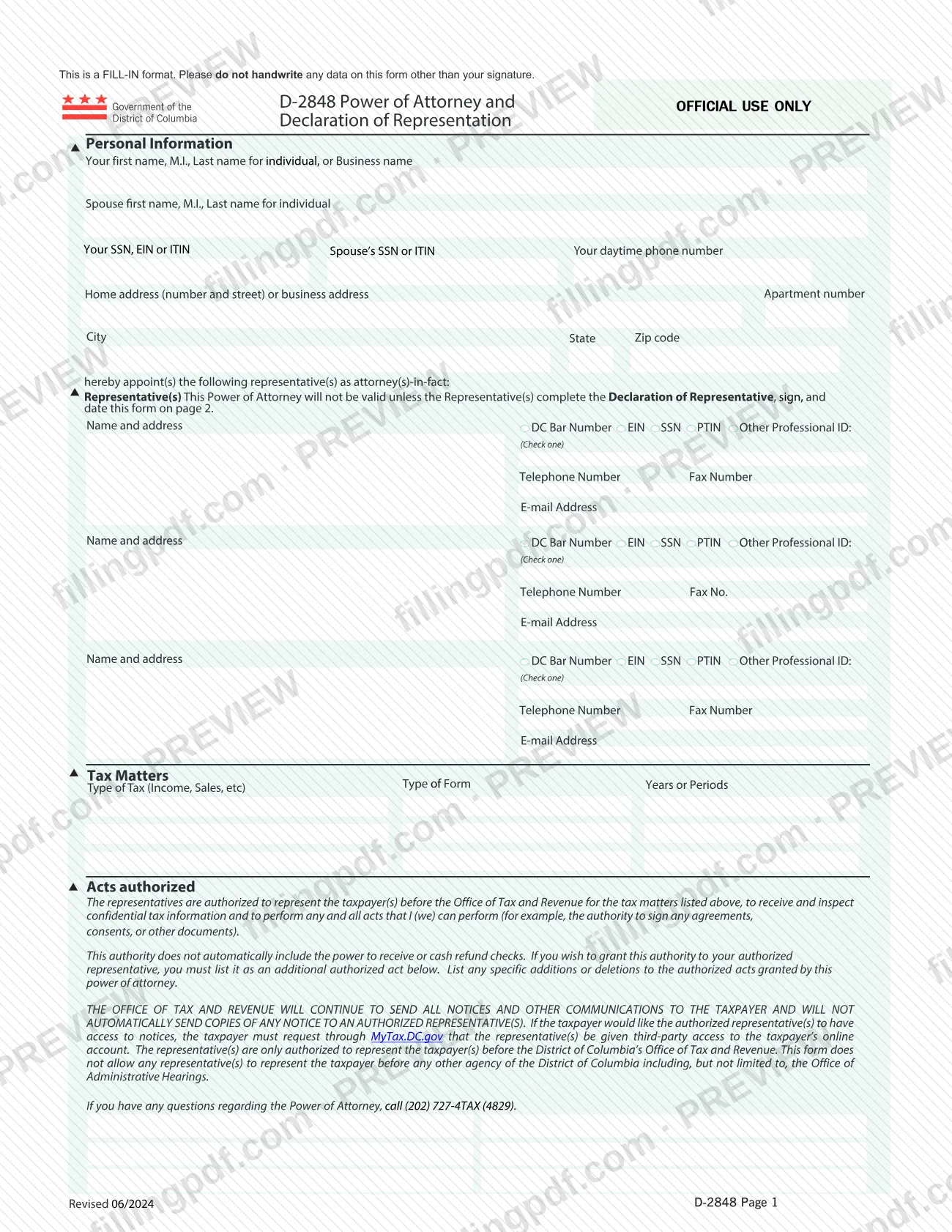
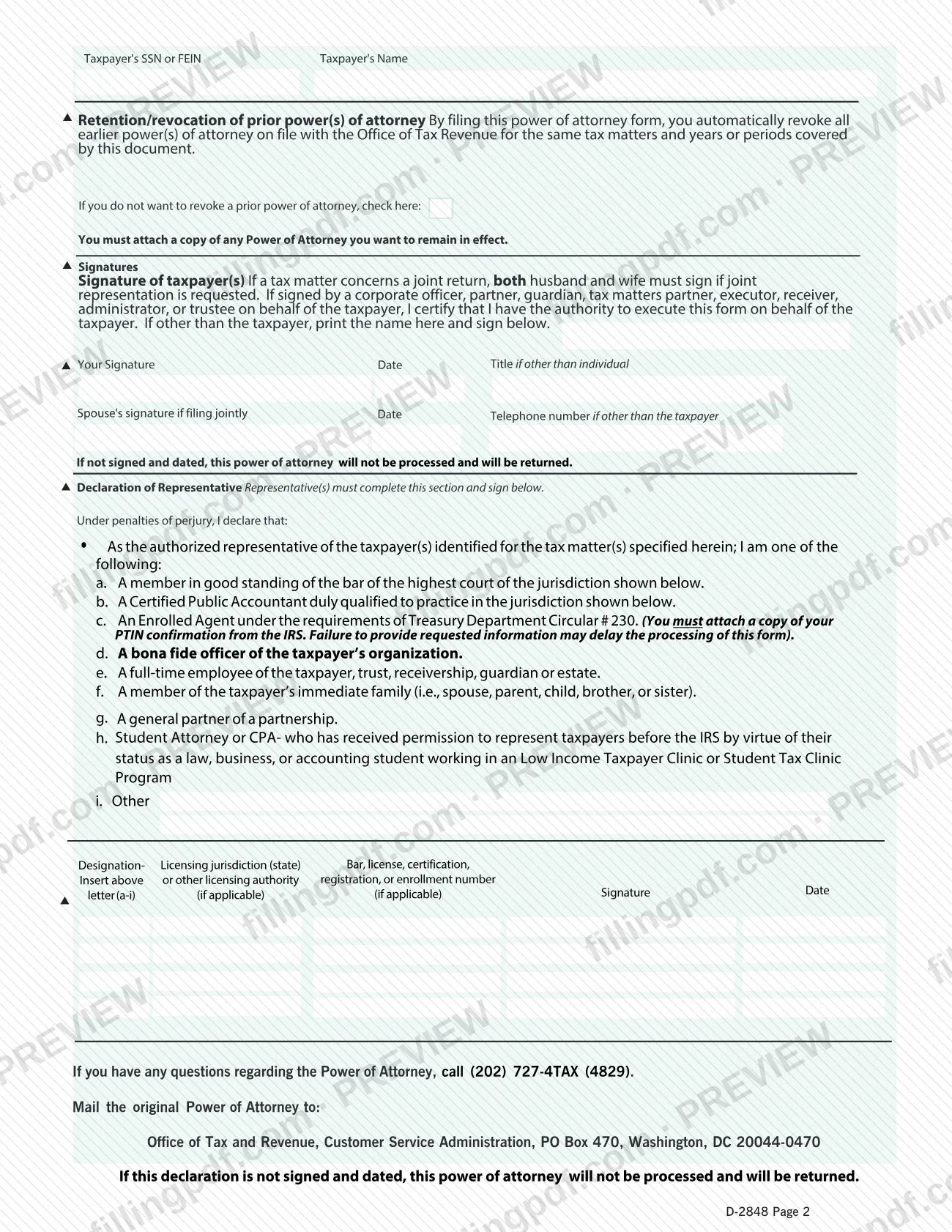
Form D-2848, Power of Attorney and Declaration of Representation, is the form the District of Columbia Office of Tax and Revenue (OTR) uses when a taxpayer wants another person to act for them before OTR. The taxpayer names the representative, lists the tax matters and periods, and signs; the representative then signs a declaration on page 2. On this page you can fill out the form online on FillingPDF and download or print the completed PDF. The original PDF is published by OTR, and the signed original is mailed to OTR.
Last updated
What is D-2848?
D-2848 Power of Attorney and Declaration of Representation is the District of Columbia form on which a taxpayer appoints one or more representatives as attorneys-in-fact to act for them before the Office of Tax and Revenue (OTR), and each representative declares their qualification.
The form has two pages. Page 1 collects the taxpayer's personal information (and a spouse's, if any), up to three representatives with their contact details and an identifier (DC Bar Number, EIN, SSN, PTIN or other professional ID), and the tax matters: the type of form, the type of tax (the form prints "Income, Sales, etc" as examples) and the years or periods. Page 2 covers the retention or revocation of earlier powers of attorney, the taxpayer's signatures and the Declaration of Representative.
What it grants: the representatives may represent the taxpayer before OTR for the matters listed, receive and inspect confidential tax information, and perform any act the taxpayer could perform, such as signing agreements, consents or other documents. The authority does not automatically include receiving or cashing refund checks; to grant it, you must list it as an additional authorized act.
What it does not do: OTR keeps sending notices and other communications to the taxpayer and does not automatically copy the representative. A taxpayer who wants the representative to see notices must request third-party access to the online account through MyTax.DC.gov. The form also does not let a representative appear before any other District agency, including the Office of Administrative Hearings.
The power of attorney is not valid unless the representative completes, signs and dates the declaration on page 2. The form is revised 06/2024 and is a fill-in format: apart from your signature, nothing is to be handwritten.
Who needs to file D-2848?
Taxpayers, whether individuals or businesses, who want someone to represent them before the DC Office of Tax and Revenue on specific tax matters use Form D-2848. Spouses can appoint together: if the matter concerns a joint return and joint representation is requested, both husband and wife must sign.
Someone other than the taxpayer may sign for the taxpayer if they are a corporate officer, partner, guardian, tax matters partner, executor, receiver, administrator or trustee. By signing, that person certifies they have authority to execute the form, and they print their name and give a title and telephone number where the form asks.
The representative must complete the Declaration of Representative and state one capacity:
- a member in good standing of the bar of the highest court of a jurisdiction;
- a Certified Public Accountant qualified to practice in a jurisdiction;
- an Enrolled Agent under Treasury Department Circular # 230;
- a bona fide officer of the taxpayer's organization;
- a full-time employee of the taxpayer, trust, receivership, guardian or estate;
- a member of the taxpayer's immediate family (spouse, parent, child, brother or sister);
- a general partner of a partnership;
- a student attorney or CPA working in a Low Income Taxpayer Clinic or Student Tax Clinic Program;
- other.
Do not use this form to authorize representation before any other District agency, including the Office of Administrative Hearings.
When to file D-2848
Submit Form D-2848 when you want a representative authorized to act for you before OTR on the tax matters and periods you list. The form prints no due date of its own.
Filing the form automatically revokes all earlier powers of attorney on file with OTR for the same tax matters and years or periods. If you want an earlier power of attorney to stay in effect, check the box in the retention/revocation section and attach a copy of that power of attorney.
Timing also depends on signatures: if the taxpayer's signature and date, or the representative's declaration signature and date, are missing, OTR will not process the form and will return it.
Documents you need
- A copy of any earlier power of attorney you want to remain in effect, only if you check the box that you do not want to revoke prior powers of attorney.
- A copy of your PTIN confirmation from the IRS, only if the representative signs the declaration as an Enrolled Agent (option c).
How to fill out D-2848
Enter the taxpayer's personal information
Under Personal Information, enter your first name, M.I. and last name (or business name), your spouse's name if applicable, your SSN, EIN or ITIN, your spouse's SSN or ITIN, and your daytime phone number. Add your home or business address, apartment number, city, state and zip code.
Name your representative or representatives
In the Representative(s) section, enter each representative's name and address, check one identifier (DC Bar Number, EIN, SSN, PTIN or Other Professional ID) and enter it, then add telephone number, fax number and e-mail address. The form has room for three representatives.
List the tax matters
Under Tax Matters, enter the Type of Form, the Type of Tax (the form gives Income and Sales as examples) and the Years or Periods covered.
Add or delete authorized acts
In the Acts authorized section, list any specific additions or deletions to the authority granted. If you want the representative to receive or cash refund checks, you must list that here as an additional act.
Choose whether to revoke prior powers
Filing the form revokes earlier powers of attorney for the same matters and periods. If you do not want to revoke one, check the box in the retention/revocation section and attach a copy of that power of attorney.
Sign and date as the taxpayer
Enter the taxpayer's SSN or FEIN and name at the top of page 2, then sign and date under Signatures. A spouse signs too if filing jointly; if someone signs on the taxpayer's behalf, print their name and give the title and telephone number requested.
Have the representative complete the declaration
Each representative inserts the designation letter (a-i), the licensing jurisdiction (state), and the bar, license, certification, registration or enrollment number if applicable, then signs and dates. An Enrolled Agent (c) attaches the IRS PTIN confirmation.
Review, download and mail the PDF
Check every entry, since only signatures may be handwritten, and confirm all required signatures and dates are present. Download or print the completed PDF from FillingPDF, add any attachments and mail the original as described under How to submit.
How to submit D-2848
The form names one channel: mail the original to OTR. Send the signed and dated original Power of Attorney to: Office of Tax and Revenue, Customer Service Administration, PO Box 470, Washington, DC 20044-0470.
- By mail: include every attachment the form requires for your situation, such as a copy of an earlier power of attorney you want to keep in effect, or an Enrolled Agent's PTIN confirmation from the IRS.
- Online account access: the form does not send notices to your representative. To give the representative access to notices, request third-party access to your online account through MyTax.DC.gov; this is a separate request from the form.
- Questions: call OTR at (202) 727-4TAX (4829).
Before mailing, confirm that the taxpayer and the representative have both signed and dated; otherwise OTR returns the form unprocessed. FillingPDF lets you fill out and download the PDF; submission follows the channels above.
Common mistakes to avoid
- Handwriting entries on the form: it is a fill-in format, and only the signatures should be handwritten.
- Leaving the Declaration of Representative on page 2 unsigned or undated; the power of attorney is not valid without it and OTR returns it.
- Submitting the taxpayer signature section without a signature and date; OTR will not process it and will return it.
- Signing for only one spouse when joint representation is requested on a joint return; both husband and wife must sign.
- Assuming the representative can receive or cash refund checks; this must be listed as an additional authorized act.
- Expecting OTR to copy the representative on notices; the taxpayer must request third-party access through MyTax.DC.gov.
- Listing the form for representation before another District agency, such as the Office of Administrative Hearings, which it does not cover.
- Not checking the retention box and attaching a copy when an earlier power of attorney should stay in effect; filing revokes earlier ones for the same matters and periods.
- Choosing Enrolled Agent (c) without attaching the IRS PTIN confirmation, which may delay processing.
Frequently asked questions
What is Form D-2848 used for?
Form D-2848 is the DC Office of Tax and Revenue power of attorney and declaration of representation. A taxpayer uses it to appoint a representative to act before OTR on listed tax matters, receive and inspect confidential tax information, and sign documents the taxpayer could sign.
Can I use Form D-2848 for a DC property tax matter?
The form authorizes representation before OTR for the tax matters you list: you write the type of tax and the years or periods, and the form prints Income and Sales only as examples. For a specific tax matter, confirm with OTR at (202) 727-4TAX (4829).
Where do I mail Form D-2848?
Mail the original to Office of Tax and Revenue, Customer Service Administration, PO Box 470, Washington, DC 20044-0470. The form prints no other submission channel. Make sure both the taxpayer and the representative have signed and dated it.
Does the representative automatically receive my OTR notices?
No. OTR keeps sending all notices to the taxpayer and does not automatically send copies to the representative. To give the representative access, the taxpayer must request third-party access to the online account through MyTax.DC.gov.
Can my representative receive or cash my refund check?
Not automatically. The authority does not include receiving or cashing refund checks unless you list it as an additional authorized act in the Acts authorized section of the form.
Does Form D-2848 cancel my earlier power of attorney?
Yes, by default. Filing it automatically revokes earlier powers of attorney on file with OTR for the same tax matters and years or periods. To keep one in effect, check the box in the retention/revocation section and attach a copy of it.
Who signs Form D-2848?
The taxpayer signs, and both spouses sign if joint representation is requested on a joint return. Each representative also signs and dates the Declaration of Representative on page 2. Without these signatures and dates, OTR will not process the form.
Who can be my representative on Form D-2848?
Options a through i in the declaration include a bar member, a CPA, an Enrolled Agent, an officer or full-time employee of the taxpayer's organization, an immediate family member, a general partner and a student attorney or CPA in a clinic program. Enrolled Agents attach IRS PTIN confirmation.
Can I fill out Form D-2848 online?
You can fill out the PDF online on FillingPDF and download or print it. FillingPDF is an independent service and does not file the form with OTR; you mail the signed original to OTR yourself.
Ready to fill out D-2848?
Fill out D-2848 now