
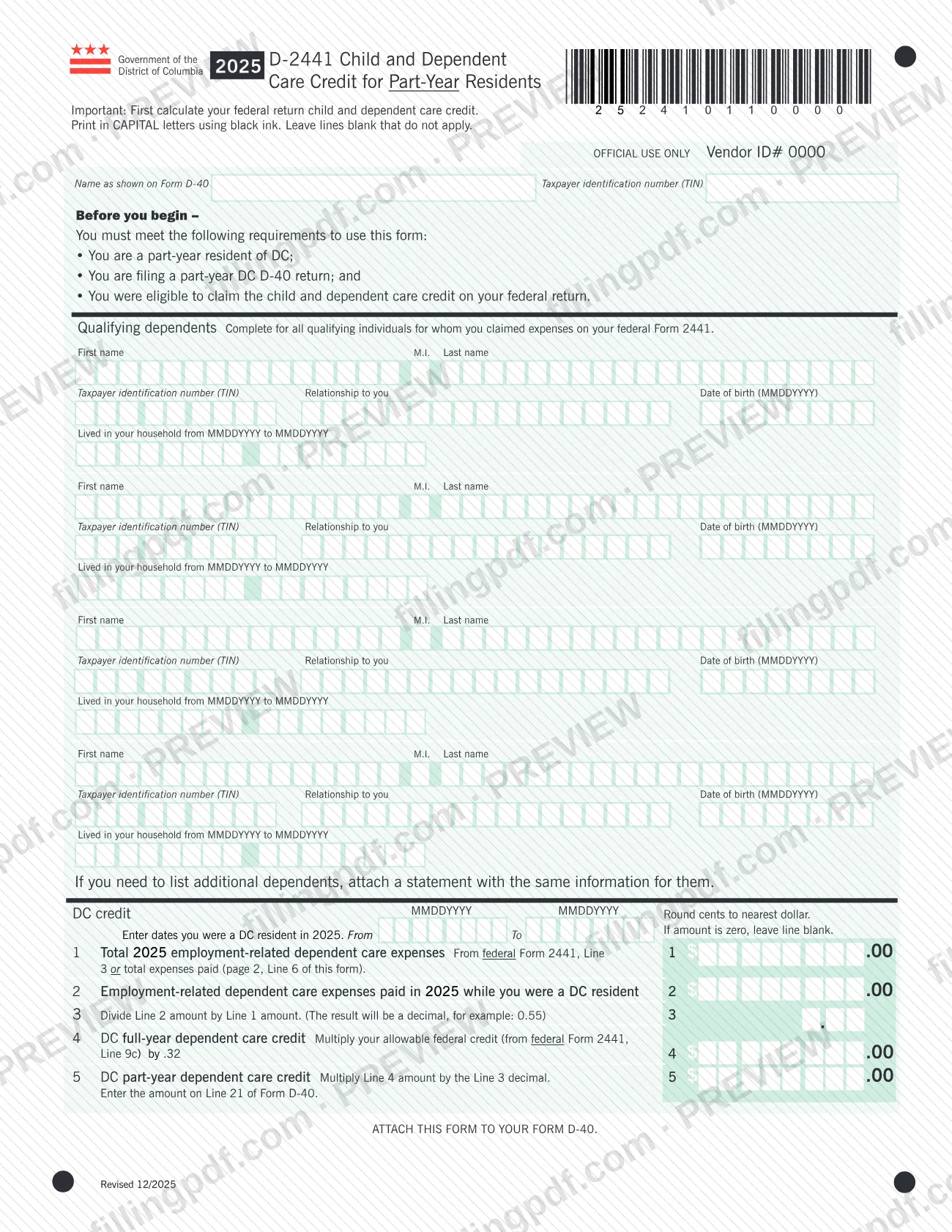
Form D-2441, Child and Dependent Care Credit for Part-Year Residents, is a Government of the District of Columbia form issued by the DC Office of Tax and Revenue (OTR). Part-year DC residents who are filing a part-year Form D-40 use it to work out the DC child and dependent care credit for 2025 from the credit allowed on their federal return. On this page you can fill out the form online on FillingPDF and download or print the completed PDF; the official PDF is published by OTR.
Last updated
What is D-2441?
Form D-2441, Child and Dependent Care Credit for Part-Year Residents, is the DC Office of Tax and Revenue (OTR) form part-year DC residents use to figure their 2025 child and dependent care credit based on expenses paid while living in DC.
The form does not start from scratch. It tells you to calculate your federal child and dependent care credit first, then it borrows figures from federal Form 2441. Line 1 takes your total 2025 employment-related dependent care expenses, either from federal Form 2441, Line 1 or from the total on Line 6 of this form. Line 2 is the part of those expenses paid while you were a DC resident, and Line 3 divides Line 2 by Line 1 to give a decimal. Line 4 multiplies your allowable federal credit (federal Form 2441, Line 9c) by .32, and Line 5 multiplies that result by the Line 3 decimal. The Line 5 amount is the DC part-year dependent care credit, entered on Line 21 of Form D-40.
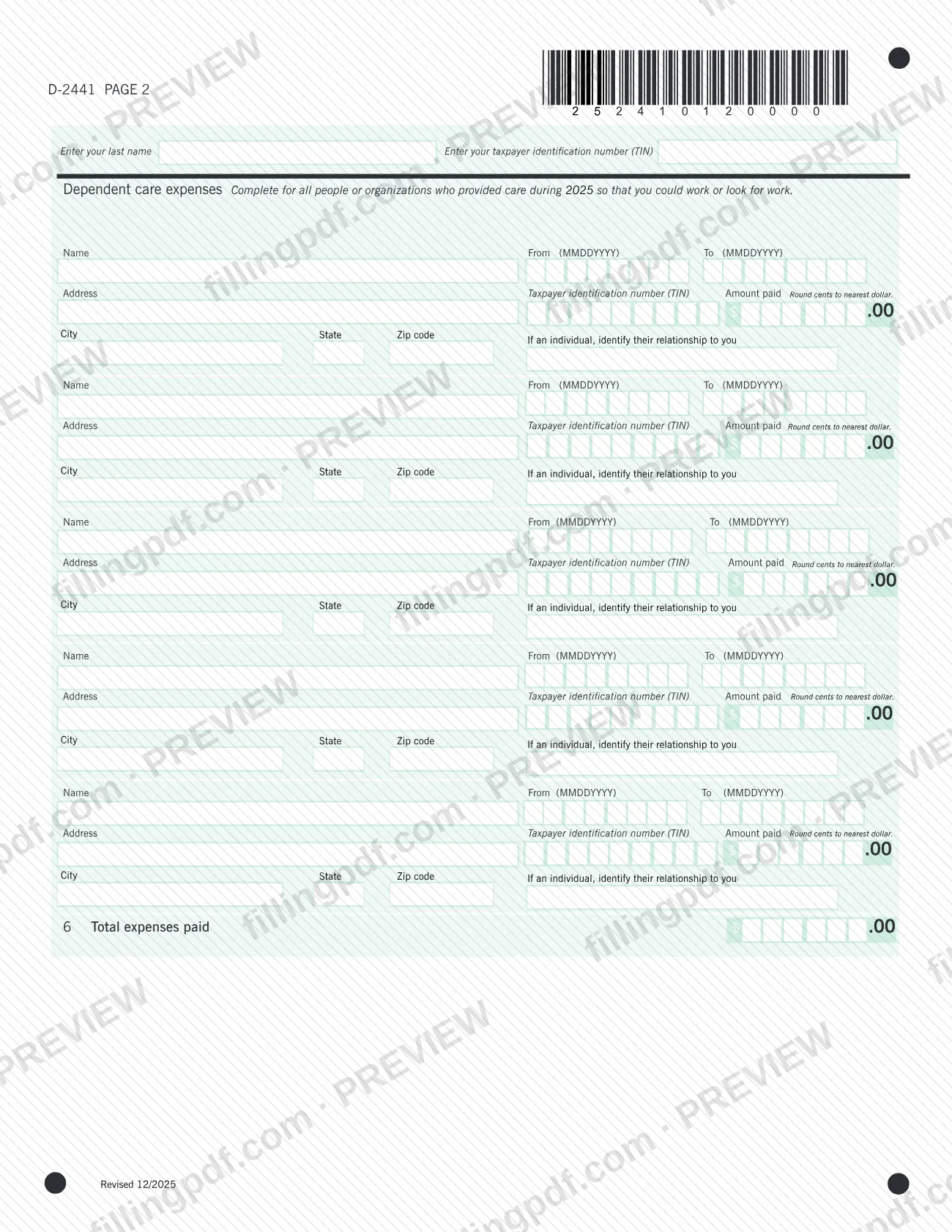
Page 1 lists the qualifying dependents and the dates you were a DC resident in 2025. Page 2 lists each person or organization that provided care so that you could work or look for work, with the amount paid to each. The form is attached to your Form D-40 and is not filed on its own.
Who needs to file D-2441?
You can use Form D-2441 only if you meet all three requirements printed on the form:
- you are a part-year resident of DC;
- you are filing a part-year DC Form D-40 return; and
- you were eligible to claim the child and dependent care credit on your federal return.
If any of the three does not apply to you, the form tells you that you cannot use it.
Complete the dependents section for all qualifying individuals for whom you claimed expenses on your federal Form 2441. The form has room for four dependents; if you need to list more, attach a statement with the same information for them. Page 2 must cover all people or organizations who provided care during 2025 so that you could work or look for work, with room for five providers.
The form does not describe who may complete it on someone else's behalf. Questions about your residency or filing status belong with the DC Office of Tax and Revenue.
When to file D-2441
Complete Form D-2441 when you prepare your 2025 part-year DC Form D-40, because the form says to attach it to that return. It prints no separate due date, so the deadline that applies to your Form D-40 governs when this form is submitted.
Before you begin, calculate your federal child and dependent care credit: Line 4 uses the allowable credit from federal Form 2441, Line 9c, and Line 1 may use the total from federal Form 2441, Line 1. The form covers tax year 2025, and you enter the dates you were a DC resident in 2025 in the From and To boxes on page 1. For the filing deadline of Form D-40, check with the DC Office of Tax and Revenue.
Documents you need
- Form D-40: attach Form D-2441 to your part-year DC D-40 return; the Line 5 amount is entered on Line 21 of that form.
- A statement listing additional qualifying dependents with the same information the form asks for, only if you have more than the four dependents the form has room for.
How to fill out D-2441
Calculate your federal credit first
The form's note says to calculate your federal return child and dependent care credit before you begin. Print in CAPITAL letters using black ink and leave blank any line that does not apply.
Enter your name and TIN
Write your name as shown on Form D-40 and your taxpayer identification number (TIN) at the top of page 1. Page 2 repeats the request for your last name and TIN.
List your qualifying dependents
For each qualifying individual for whom you claimed expenses on federal Form 2441, enter first name, M.I., last name, TIN, relationship to you, date of birth (MMDDYYYY) and the MMDDYYYY dates the person lived in your household. If you have more than four, attach a statement with the same information.
Enter your DC residency dates
In the DC credit section, enter the From and To dates (MMDDYYYY) that you were a DC resident in 2025.
Complete the care provider list
On page 2, enter for each person or organization that provided care: name, From and To dates, address, TIN, amount paid (rounded to the nearest dollar), city, state, ZIP code and, for an individual, the relationship to you.
Total the expenses on Line 6
On page 2, enter the total of the amounts paid to all providers on Line 6, Total expenses paid.
Enter total expenses on Line 1
Enter your total 2025 employment-related dependent care expenses from federal Form 2441, Line 1, or the total expenses paid from page 2, Line 6 of this form.
Enter DC-resident expenses on Line 2
Enter the employment-related dependent care expenses you paid in 2025 while you were a DC resident.
Divide on Line 3
Divide the Line 2 amount by the Line 1 amount and enter the result as a decimal, for example 0.55.
Figure the full-year credit on Line 4
Multiply your allowable federal credit, from federal Form 2441, Line 9c, by .32 and enter the result.
Figure the part-year credit on Line 5
Multiply the Line 4 amount by the Line 3 decimal. Enter this amount on Line 21 of Form D-40.
Review and download the completed PDF
Check that dates use MMDDYYYY, cents are rounded to the nearest dollar and lines that do not apply are blank. Download or print the completed PDF from FillingPDF and attach it to your Form D-40.
How to submit D-2441
Form D-2441 has no separate submission channel. The form says to attach it to your Form D-40, so it travels with your part-year D-40 return through whatever channel you use to file that return.
- Attach to Form D-40: enter the Line 5 amount on Line 21 of Form D-40, then attach both pages of Form D-2441 to the return.
- Address and portal: the form prints no mailing address, portal or appointment rule of its own. Use the filing details for Form D-40 or ask the DC Office of Tax and Revenue, which publishes the form at https://otr.cfo.dc.gov/publication/2025-d-2441.
- Extra dependents: if you have more than four qualifying dependents, include the statement listing the additional ones with the package.
FillingPDF lets you fill out and download the PDF; submission follows the channels used for Form D-40.
Common mistakes to avoid
- Using Form D-2441 without being a part-year DC resident filing a part-year Form D-40 who was eligible for the federal child and dependent care credit.
- Starting the form before calculating your federal child and dependent care credit, which Line 4 (federal Form 2441, Line 9c) depends on.
- Filing the form on its own instead of attaching it to your Form D-40.
- Listing more than four dependents without attaching a statement with the same information for the extra ones.
- Entering cents on the money lines; the form says to round cents to the nearest dollar.
- Entering an amount on a line that is zero; the form says to leave the line blank if the amount is zero.
- Writing dates in a format other than MMDDYYYY in the birth date, household, residency and provider date boxes.
- Skipping the page 2 provider list, which must cover all people or organizations who provided care during 2025, and so leaving Line 6 and Line 1 unsupported.
- Entering the Line 5 result somewhere other than Line 21 of Form D-40.
Frequently asked questions
What is Form D-2441?
Form D-2441 is the DC Office of Tax and Revenue form for the child and dependent care credit for part-year residents. It converts your federal child and dependent care credit into a DC part-year credit, and the result goes on Line 21 of Form D-40.
Who can use Form D-2441?
You can use it only if you are a part-year resident of DC, you are filing a part-year DC Form D-40, and you were eligible to claim the child and dependent care credit on your federal return. All three requirements are printed on the form.
How is the credit on Form D-2441 calculated?
Line 4 multiplies your allowable federal credit (federal Form 2441, Line 9c) by .32. Line 5 then multiplies that amount by the Line 3 decimal, which is the care expenses paid while a DC resident (Line 2) divided by total expenses (Line 1).
Where does the Form D-2441 amount go?
Enter the Line 5 amount on Line 21 of Form D-40. The form also says to attach it to your Form D-40, so it is not filed separately and prints no address of its own.
What if I have more than four dependents?
Attach a statement with the same information for the additional dependents: first name, M.I., last name, TIN, relationship, date of birth and the dates each lived in your household. The form has room for four dependents only.
Do I need to calculate my federal credit first?
Yes. The form says to calculate your federal child and dependent care credit first. Line 4 uses the allowable credit from federal Form 2441, Line 9c, and Line 1 may use the total from federal Form 2441, Line 1.
Is Form D-2441 a DC property tax form?
No. Form D-2441 calculates a child and dependent care credit for part-year residents and is attached to Form D-40; it does not deal with property tax. It is published by the DC Office of Tax and Revenue, which also issues other DC tax forms.
Can I fill out Form D-2441 online on FillingPDF?
Yes. You can fill out the PDF online on FillingPDF and download or print it. FillingPDF is an independent service and does not file the form; you submit it with your Form D-40 through the channels for that return.
Ready to fill out D-2441?
Fill out D-2441 now