
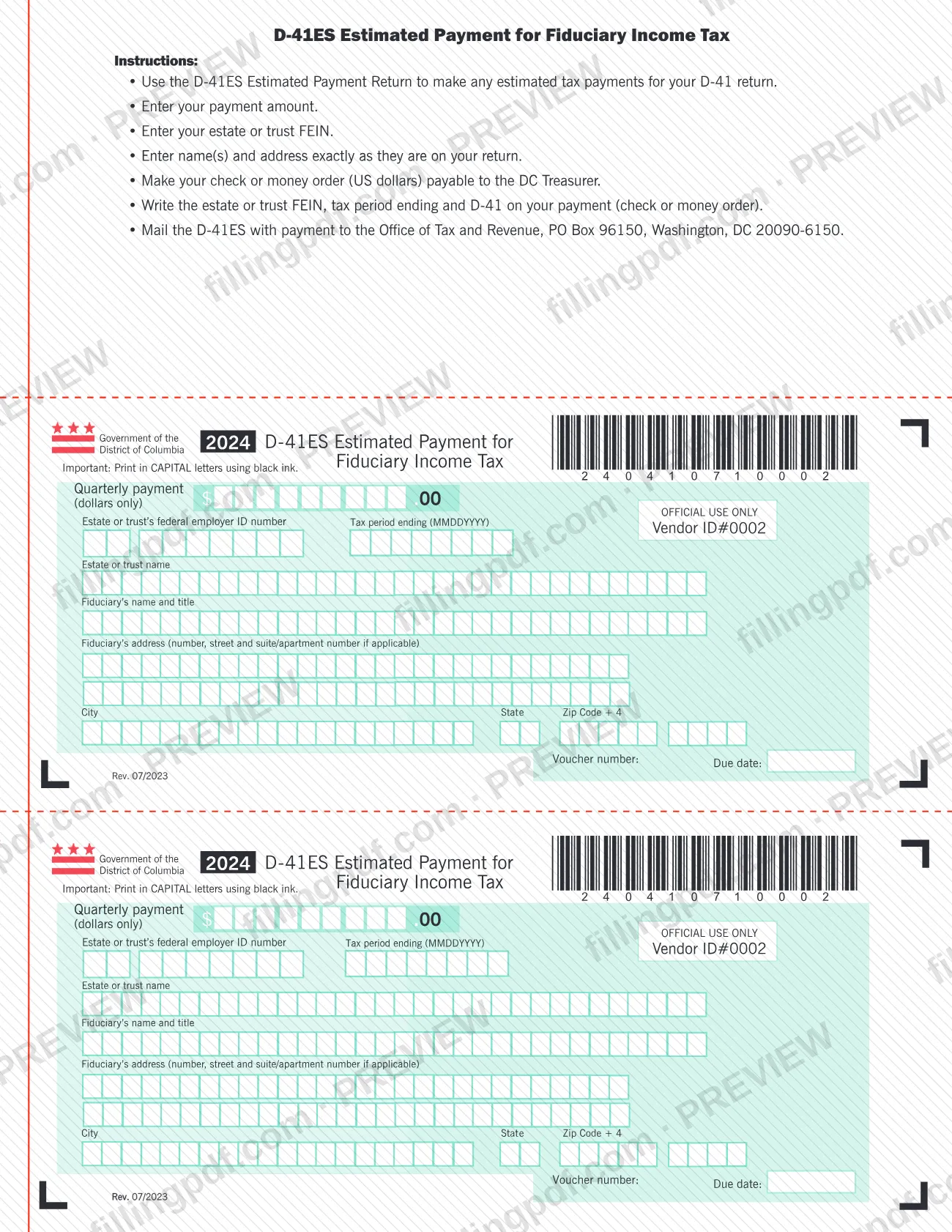
Form D-41ES, Estimated Payment for Fiduciary Income Tax, is the payment voucher the District of Columbia Office of Tax and Revenue (OTR) provides for estimated tax payments on a D-41 return. A fiduciary of an estate or trust completes one voucher for each quarterly payment, entering the amount, the estate or trust FEIN and the tax period ending. On FillingPDF you can fill out the form online and download or print the completed PDF; the payment itself goes to OTR by mail, as the form directs.
Last updated
What is D-41ES?
D-41ES Estimated Payment for Fiduciary Income Tax is the District of Columbia voucher that accompanies a check or money order when an estate or trust makes an estimated tax payment for its D-41 return. The 2024 edition is printed Rev. 07/2023.
The form is issued by the DC Office of Tax and Revenue (OTR). Its own instructions say to use it to make any estimated tax payments for your D-41 return. Each voucher carries a quarterly payment amount in whole dollars, the estate or trust's federal employer ID number (FEIN), the tax period ending date, the estate or trust name, the fiduciary's name and title, and the fiduciary's address. A voucher number and a due date are also printed on each voucher.
The page holds two identical vouchers, each with its own voucher number and due date line. The D-41ES is only a payment voucher: it does not report income or compute tax, which the D-41 return does. It is also not a DC property tax form; it covers fiduciary income tax only.
Who needs to file D-41ES?
Fiduciaries of estates and trusts that make estimated tax payments for a D-41 return use the D-41ES. The form's instructions say to use it for any estimated tax payments for your D-41 return, and it asks for the fiduciary's name and title along with the estate or trust name and FEIN.
Use one voucher for each quarterly payment. The name and address you enter must match the name and address on the return.
The form says nothing about who is required to make estimated payments or about thresholds. Check the D-41 instructions or OTR if you are unsure whether estimated payments apply to the estate or trust. The voucher is for fiduciary income tax only; do not use it for other DC taxes.
When to file D-41ES
Send a D-41ES with each quarterly estimated payment you make toward your D-41 return. Each voucher has a Due date line and a Voucher number line printed on it, so the due date for that payment comes from the voucher itself. The form sets no other deadline, and the 2024 edition refers to the tax period ending date you enter on it. For rules on when estimated payments are required, see the D-41 instructions or contact OTR.
Documents you need
- A check or money order in US dollars payable to the DC Treasurer, sent with the voucher as the quarterly payment.
- The estate or trust FEIN, the tax period ending and "D-41" written on the check or money order; the form's instructions require these notations on the payment.
How to fill out D-41ES
Enter the quarterly payment amount
In the Quarterly payment (dollars only) box, enter the whole-dollar amount you are paying with this voucher.
Enter the estate or trust FEIN
In Estate or trust's federal employer ID number, enter the FEIN of the estate or trust.
Enter the tax period ending
In Tax period ending (MMDDYYYY), enter the date in that format.
Enter the estate or trust name
In Estate or trust name, write the name exactly as it appears on your return.
Enter the fiduciary's name and title
In Fiduciary's name and title, enter the fiduciary's name and the capacity in which the fiduciary acts.
Enter the fiduciary's address
Enter the number, street and suite or apartment number if applicable, then the city, state and ZIP Code + 4, exactly as on your return.
Check the printed voucher details
The Voucher number and Due date lines are printed on each voucher. Confirm that you are completing the voucher for the payment you are making.
Print in capitals and prepare payment
The form asks for CAPITAL letters in black ink. Make your check or money order payable to the DC Treasurer and write the FEIN, tax period ending and D-41 on it.
Review and download the completed PDF
Check every entry against your D-41 return, then download or print the completed PDF from FillingPDF and mail it with your payment as described under How to submit.
How to submit D-41ES
The D-41ES instructions give one channel: mail the voucher with your payment.
- By mail: send the D-41ES with payment to the Office of Tax and Revenue, PO Box 96150, Washington, DC 20090-6150.
- Payment: make your check or money order (US dollars) payable to the DC Treasurer. Write the estate or trust FEIN, the tax period ending and "D-41" on the check or money order.
The form names no other submission channel, portal or in-person option. FillingPDF lets you fill out and download the PDF; submission follows the channel above.
Common mistakes to avoid
- Writing the payee as anything other than the DC Treasurer on the check or money order.
- Leaving the estate or trust FEIN, the tax period ending or "D-41" off the check or money order.
- Entering a name or address that differs from the one on the D-41 return; the form says to enter them exactly as on the return.
- Printing in lowercase or in colored ink; the form asks for CAPITAL letters in black ink.
- Entering cents in the quarterly payment box; the amount is in dollars only.
- Writing the tax period ending date in a format other than MMDDYYYY.
- Mailing the voucher to an address other than Office of Tax and Revenue, PO Box 96150, Washington, DC 20090-6150.
- Paying with currency or a non-US-dollar instrument instead of a check or money order in US dollars.
Frequently asked questions
What is Form D-41ES used for?
Form D-41ES is the DC Office of Tax and Revenue voucher used to make estimated tax payments for a D-41 fiduciary income tax return. You send one voucher with each quarterly payment, along with a check or money order payable to the DC Treasurer.
Is Form D-41ES a DC property tax form?
No. Form D-41ES is an estimated payment voucher for fiduciary income tax on a D-41 return, so it does not cover DC property tax. If you searched for DC property tax, contact OTR for the correct payment channel.
Where do I mail Form D-41ES?
Mail the voucher with your payment to the Office of Tax and Revenue, PO Box 96150, Washington, DC 20090-6150. The form's instructions name no other submission channel.
Who do I make the check payable to?
Make your check or money order, in US dollars, payable to the DC Treasurer. Write the estate or trust FEIN, the tax period ending and D-41 on the payment so it can be matched to the return.
What do I enter on the D-41ES?
Enter the quarterly payment in dollars only, the estate or trust FEIN, the tax period ending (MMDDYYYY), the estate or trust name, the fiduciary's name and title, and the fiduciary's address, exactly as on your return.
Where do I find the due date for a D-41ES payment?
Each voucher has a Due date line and a Voucher number line printed on it. The form itself states no other deadline, so use the due date shown on the voucher you are sending.
Can I fill out Form D-41ES online?
You can fill out the PDF online on FillingPDF and download or print it. FillingPDF is an independent service and does not send the voucher or payment to OTR; you mail them yourself as the form directs.
Do I need a separate voucher for each payment?
Yes, the D-41ES is a quarterly payment voucher, so complete one for each payment you make toward your D-41 return. The form includes two vouchers, each with its own voucher number and due date line.
Ready to fill out D-41ES?
Fill out D-41ES now