
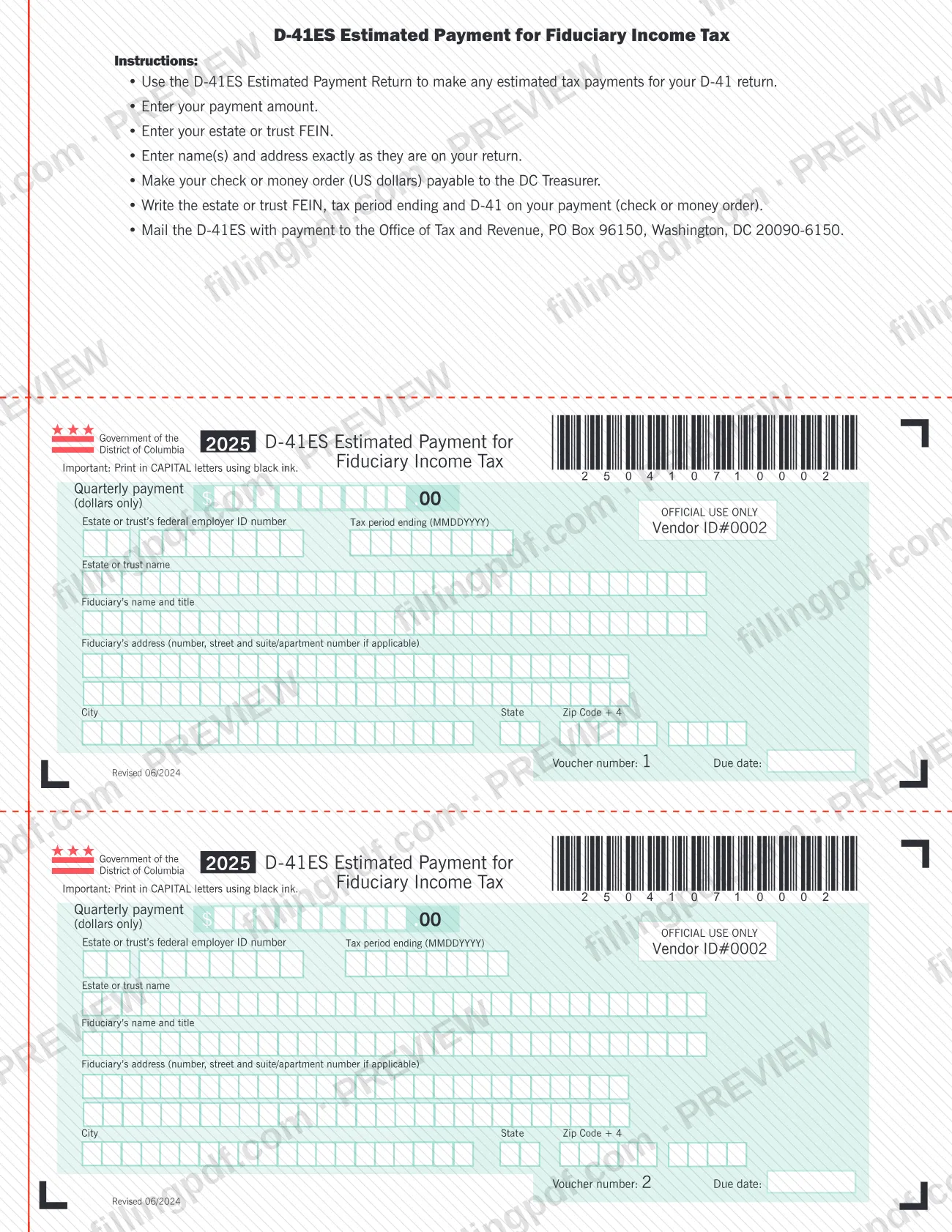
Form D-41ES, Estimated Payment for Fiduciary Income Tax, is the payment voucher the District of Columbia Office of Tax and Revenue (OTR) provides for the 2025 tax year. An estate or trust uses it to make any estimated tax payments for its D-41 return. On this page you can fill out the form online on FillingPDF and download or print the completed PDF; the form and its agency page are published by OTR, and the payment is mailed to OTR with a check or money order.
Last updated
What is D-41ES?
Form D-41ES, Estimated Payment for Fiduciary Income Tax, is the payment voucher from the District of Columbia Office of Tax and Revenue (OTR) that an estate or trust sends with each estimated tax payment toward its D-41 return.
The form is a payment voucher, not a return. Its printed instructions say to use the D-41ES Estimated Payment Return to make any estimated tax payments for your D-41 return. Each voucher on the page carries a voucher number and a due date, and asks for a quarterly payment in dollars only, the estate or trust's federal employer ID number (FEIN), the tax period ending date, the estate or trust name, the fiduciary's name and title, and the fiduciary's address.
The edition on this page is the 2025 D-41ES, printed with the revision notes "Revised 06/2024" and "Rev. 08/19". The OTR page lists it as "2025 D-41ES (Fill-in)".
The D-41ES concerns District of Columbia fiduciary income tax. It is not a property tax form, and it does not replace the D-41 return itself.
Who needs to file D-41ES?
The main users are estates and trusts that make estimated tax payments for a D-41 return. The fiduciary completes the voucher, entering the estate or trust's FEIN and the name and title of the fiduciary.
Points the form itself makes clear:
- The voucher is for payments toward the D-41 return. The instructions on the form tie it to that return only.
- The name(s) and address must be entered exactly as they are on your return.
- Each payment is made with its own voucher, identified by the voucher number and due date printed on it.
The voucher prints no income thresholds and does not say who must make estimated payments, so use the D-41 return and its instructions at otr.cfo.dc.gov to decide whether estimated payments apply to the estate or trust.
When to file D-41ES
Send a D-41ES voucher with each estimated payment you make for your D-41 return. Every voucher on the form has a Voucher number and a Due date line, so use the voucher whose number and due date match the payment you are making and follow the due date printed on it.
The form covers the 2025 tax year and asks for the tax period ending date in MMDDYYYY format. It sets no separate deadline beyond those printed due dates.
Documents you need
- A check or money order in US dollars payable to the DC Treasurer, for the estimated payment amount; write the estate or trust FEIN, the tax period ending and D-41 on it.
How to fill out D-41ES
Pick the right voucher
Each voucher on the form shows a voucher number and a due date. Complete the one that matches the payment you are making.
Enter the payment amount
In the Quarterly payment box, enter the amount in dollars only, with no cents.
Enter the estate or trust FEIN
Fill in the Estate or trust's federal employer ID number, the same FEIN you will write on your check or money order.
Enter the tax period ending
Type the Tax period ending date in MMDDYYYY format.
Enter the estate or trust name
Write the Estate or trust name exactly as it appears on your D-41 return.
Enter the fiduciary's name and title
Fill in the Fiduciary's name and title in the field provided.
Enter the fiduciary's address
Give the number, street and suite or apartment number if applicable, then the City, State and Zip Code + 4, exactly as on your return.
Prepare your check or money order
Make it payable to the DC Treasurer in US dollars and write the estate or trust FEIN, the tax period ending and D-41 on it.
Review and download the PDF
Check each entry against your D-41 return, then download or print the completed PDF from FillingPDF and mail it with your payment as described under How to submit.
How to submit D-41ES
The form names one channel: mail the completed D-41ES together with your payment.
- By mail: send the D-41ES with payment to the Office of Tax and Revenue, PO Box 96150, Washington, DC 20090-6150.
- Payment: make your check or money order (US dollars) payable to the DC Treasurer.
- On the check or money order: write the estate or trust FEIN, the tax period ending and D-41.
Enter the name(s) and address exactly as they are on your return. If you complete the voucher by hand, the form asks you to print in CAPITAL letters using black ink. The form lists no online payment option or in-person channel. FillingPDF lets you fill out and download the PDF; submission follows the channels above.
Common mistakes to avoid
- Entering cents in the quarterly payment box; the form asks for dollars only.
- Entering a name or address that differs from the one on the D-41 return; the form says to enter them exactly as on your return.
- Leaving the estate or trust FEIN, the tax period ending or "D-41" off the check or money order.
- Making the check or money order payable to anyone other than the DC Treasurer, or paying in a currency other than US dollars.
- Mailing the voucher and payment to an address other than the Office of Tax and Revenue, PO Box 96150, Washington, DC 20090-6150.
- Writing the tax period ending in a format other than MMDDYYYY.
- Completing a printed voucher in lowercase letters or in a color other than black ink, when the form asks for CAPITAL letters in black ink.
- Using this voucher for something other than estimated payments toward a D-41 return.
Frequently asked questions
What is Form D-41ES used for?
Form D-41ES is the OTR voucher an estate or trust uses to make estimated tax payments toward its D-41 return. It is a payment voucher for DC fiduciary income tax, not a return, and each voucher carries its own voucher number and due date.
Is Form D-41ES a DC property tax form?
No. The D-41ES is for estimated payments of fiduciary income tax on a D-41 return, issued by the DC Office of Tax and Revenue. It is not used to pay DC property tax.
Where do I mail Form D-41ES?
Mail the D-41ES with your payment to the Office of Tax and Revenue, PO Box 96150, Washington, DC 20090-6150. The form lists no other submission channel, so use that address for the voucher and the payment together.
Who do I make the check payable to for the D-41ES?
Make your check or money order payable to the DC Treasurer, in US dollars. Write the estate or trust FEIN, the tax period ending and D-41 on the payment so it can be matched to your account.
Do I enter cents on the D-41ES payment amount?
No. The quarterly payment box on the form is for dollars only. Enter the whole-dollar amount you are paying with that voucher.
Can I fill out Form D-41ES online?
You can fill out the D-41ES PDF online on FillingPDF and download or print it. FillingPDF is an independent service and does not send the form or payment to OTR; you mail them to the address printed on the form.
How do I enter the name and address on the D-41ES?
Enter the estate or trust name, the fiduciary's name and title, and the address exactly as they appear on your D-41 return. The address has fields for number and street, suite or apartment if applicable, city, state and Zip Code + 4.
What tax period date format does the D-41ES use?
The Tax period ending field uses MMDDYYYY, with no slashes or dashes shown in the format label. Enter the ending date of the tax period covered by your D-41 return in that pattern.
Ready to fill out D-41ES?
Fill out D-41ES now