
QHTC-CERT is the annual self-certification that the DC Office of Tax and Revenue (OTR) uses to confirm a company is a Qualified High Technology Company (QHTC). Companies complete it before claiming QHTC tax benefits, which include a reduction in real property tax for qualified leasehold improvements, so it sits among the DC property tax resources for technology tenants. On this page you can fill out the form online on FillingPDF and download or print the completed PDF; the certification itself is submitted through MyTax.DC.gov, as OTR's step-by-step user guide explains.
Last updated
What is QHTC-CERT?
QHTC-CERT is the annual self-certification that a company in Washington, DC submits electronically on MyTax.DC.gov to certify that it meets the conditions required of a Qualified High Technology Company (QHTC) under the New E-Conomy Transformation Act of 2000, so it can claim QHTC tax benefits.
The Act granted certain tax benefits to DC QHTCs for tax years beginning after December 31, 2000. The QHTC Incentives Modification Act (Title VII, Subtitle M of the FY 2021 Budget Support Act of 2020) changed several benefits for tax years beginning after 12/31/2019, and OTR advises companies to consult the new law to see the effect on them.
Incorporated QHTCs can claim tax credits for retraining qualified disadvantaged employees, for wages paid to qualified disadvantaged employees and for wages paid to qualified employees, plus a reduction in real property tax for qualified leasehold improvements made by or for a QHTC tenant. Unincorporated QHTCs can claim only the real property tax reduction.
The certification is made in good faith: OTR states that a penalty may be imposed if it is not. QHTC-CERT is separate from the Form D-20 and the Certification of Gross Revenue Worksheet that incorporated QHTCs also complete.
Who needs to file QHTC-CERT?
A company that wants to claim a tax credit or another QHTC benefit under the Act must complete QHTC-CERT. A QHTC, according to OTR, is an individual or entity that:
- is organized for profit;
- leases or owns an office in the District of Columbia;
- has 10 or more qualified employees in the District;
- derives at least 51% of its gross revenues earned in the District from one or more permitted activities (DC Code §47-1817.01(5)(A)(iii)); and
- is registered with the DC government as a business in DC.
Permitted activities include Internet-related services and sales, information and communication technologies, advanced materials and processing technologies, engineering, production, biotechnology and defense technologies, and electronic and photonic devices and components.
A QHTC does not include an individual or entity that derives 51% or more of its gross revenues from operating in the District an online or brick and mortar retail store, an electronic equipment facility, or a building or construction company. It also excludes a professional athletic team (DC Code §47-2002.05(a)(3)) and a business entity located in the DC Sports Facilities Fee TIF Area (DC Code §2-1217.12).
Incorporated QHTCs must also complete Form D-20 with the QHTC schedule.
When to file QHTC-CERT
QHTC-CERT is an annual self-certification, and you must complete it electronically before you can claim a tax credit or any other benefit available under the Act. OTR's user guide and agency page print no calendar deadline for it, so confirm timing with OTR.
The Certification of Gross Revenue Worksheet is required with the request only if this is not your first year as a QHTC. Incorporated QHTCs also complete the QHTC Tax, Exemption and Credits Schedule on page 4 of Form D-20 with their return, and submit the Certification of Gross Revenue Worksheet from page 11 of the FR-399 Instruction booklet.
Documents you need
- Proof of DC office location: proof of ownership or a current lease agreement, attached with the request in MyTax.DC.gov.
- QHTC Certification of Gross Revenue Worksheet: attach it if this is not your first year as a QHTC.
- Incorporated QHTCs only: Form D-20 with the QHTC Tax, Exemption and Credits Schedule on page 4, and the Certification of Gross Revenue Worksheet from page 11 of the FR-399 Instruction booklet.
How to fill out QHTC-CERT
Log in to MyTax.DC.gov
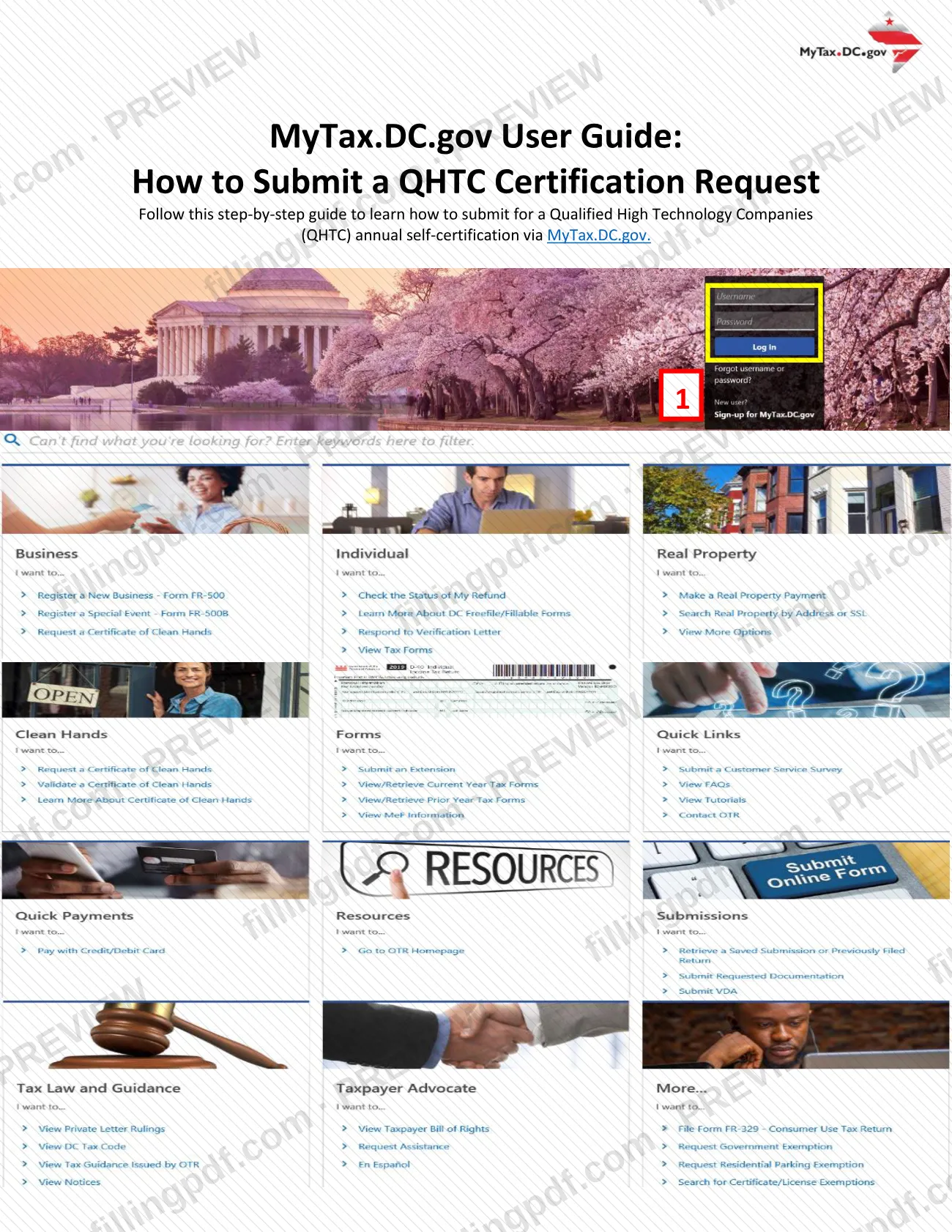
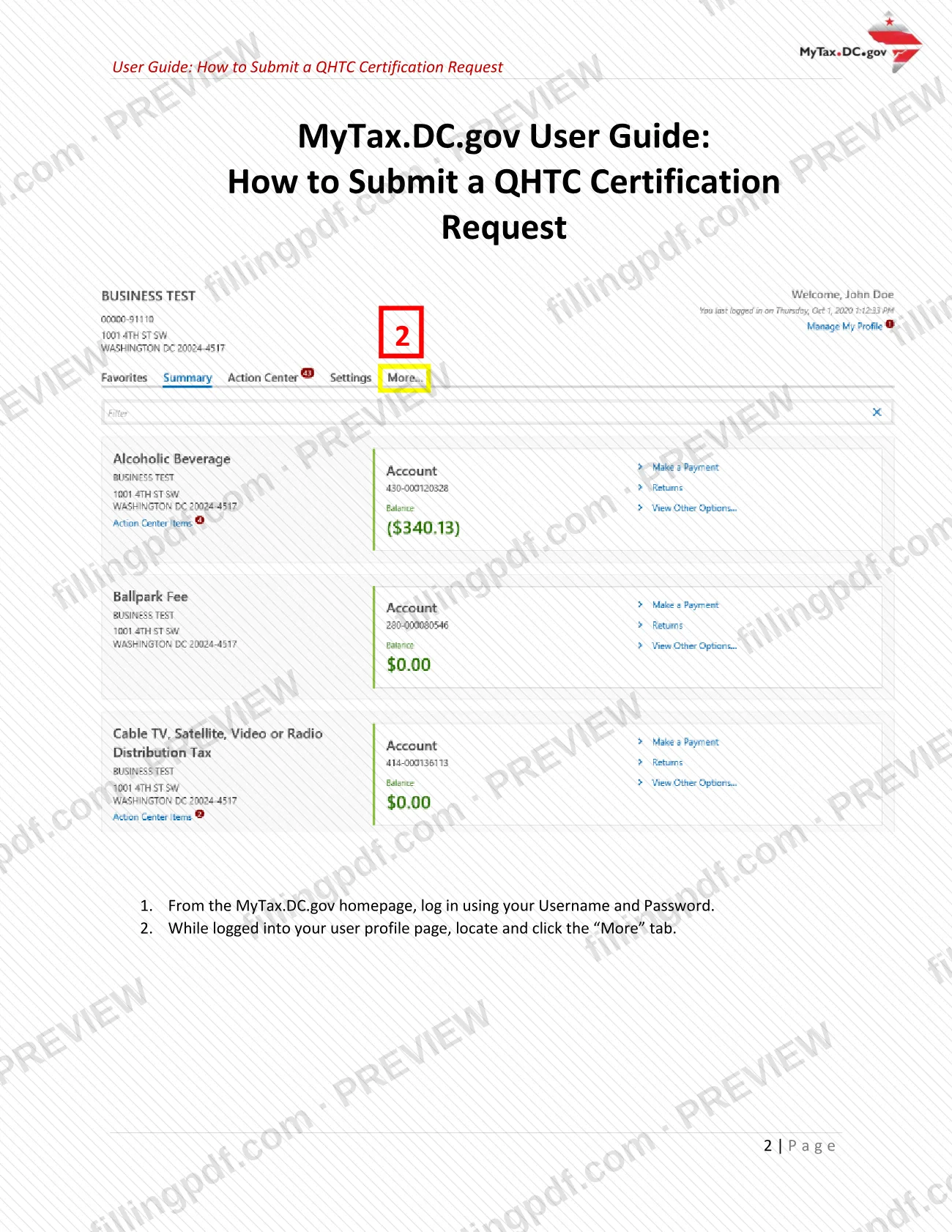
From the MyTax.DC.gov homepage, log in with your Username and Password. On your user profile page, click the More tab.
Open the QHTC self-certification
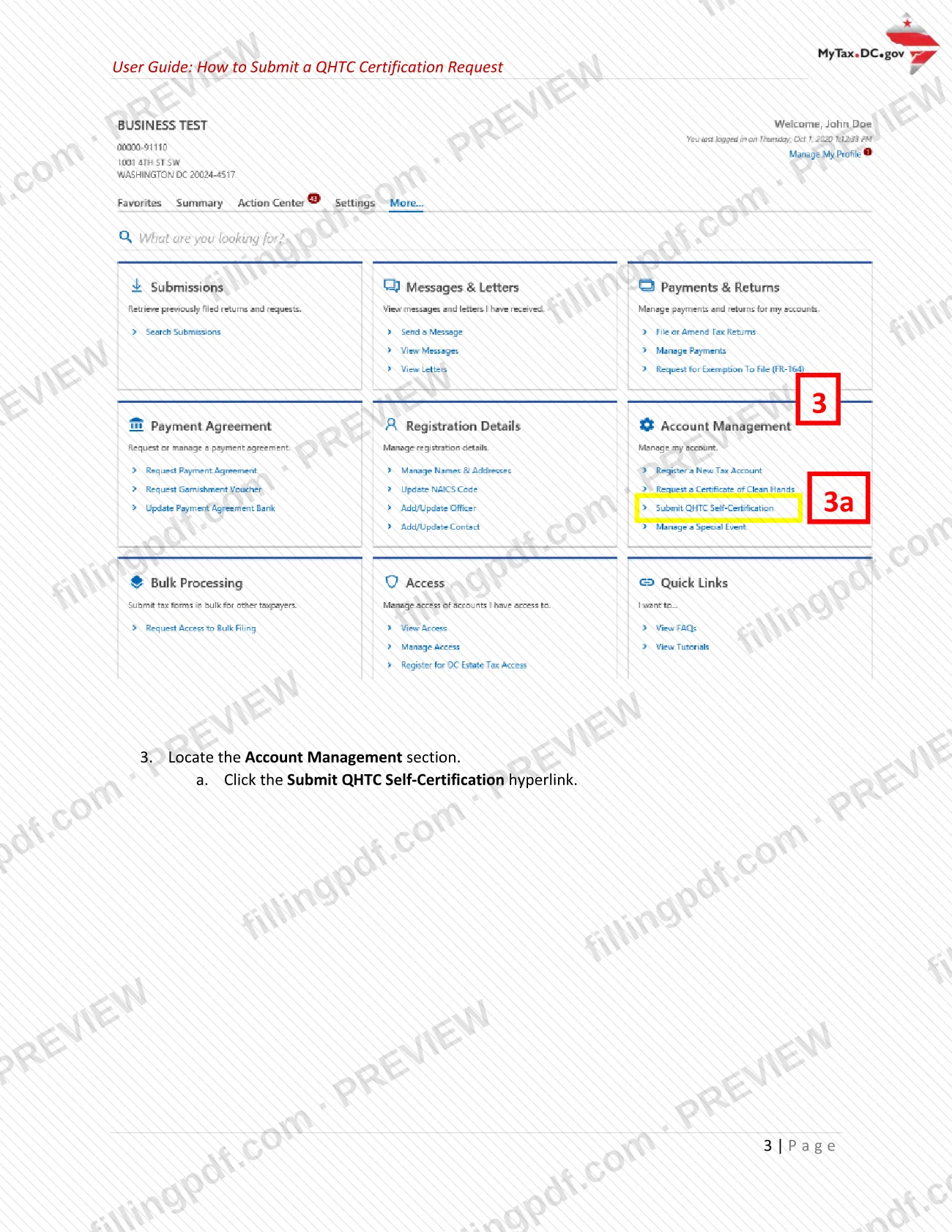
In the Account Management section, click the Submit QHTC Self-Certification hyperlink.
Answer the QHTC Certification questions
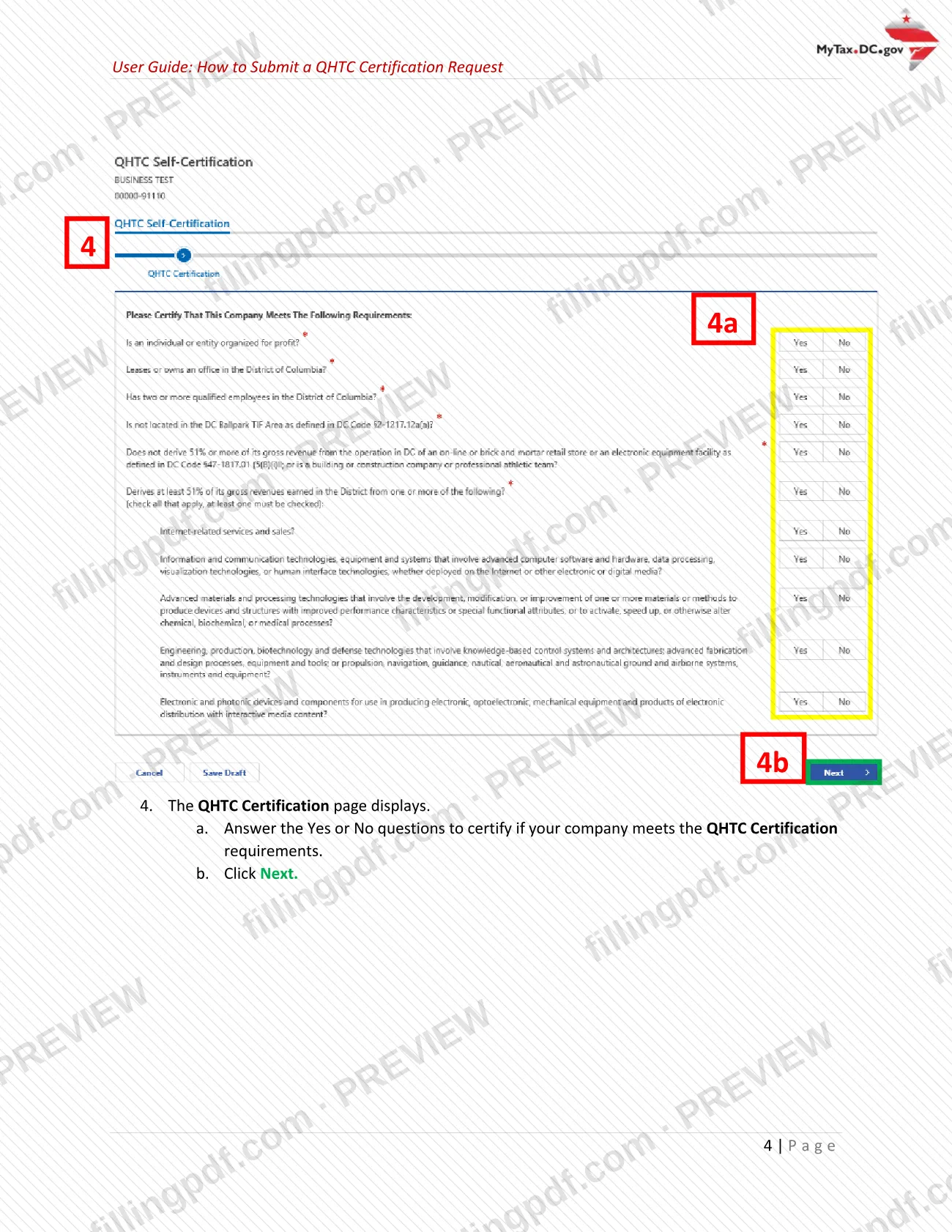
On the QHTC Certification page, answer the Yes or No questions that certify whether your company meets the QHTC requirements, then click Next.
Review the pre-populated company data
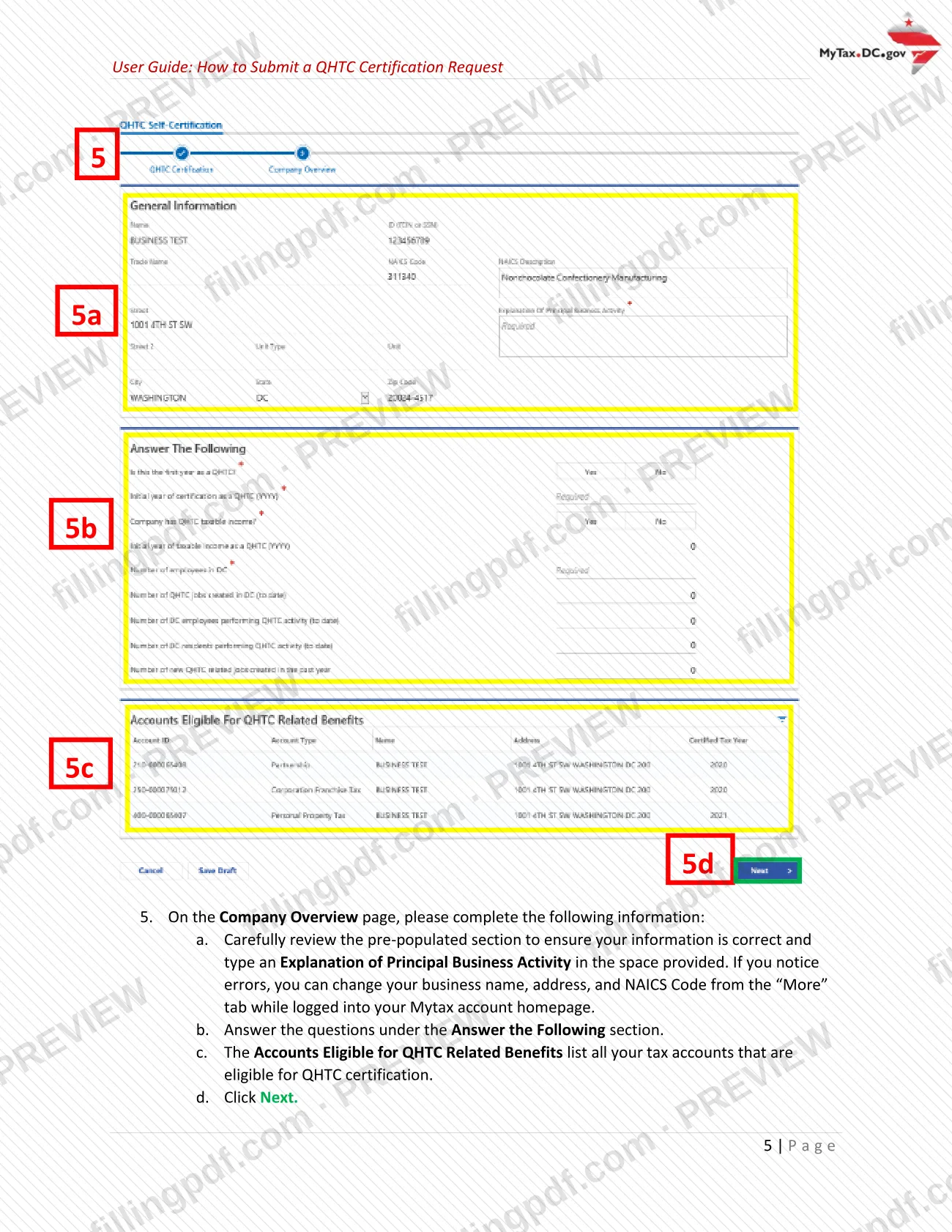
On the Company Overview page, check the pre-populated section and type an Explanation of Principal Business Activity. Fix errors in business name, address or NAICS Code from the More tab.
Answer the follow-up questions
Answer the questions under Answer the Following. Check that the Accounts Eligible for QHTC Related Benefits list shows your eligible tax accounts, then click Next.
Read the QHTC Consent and identify yourself
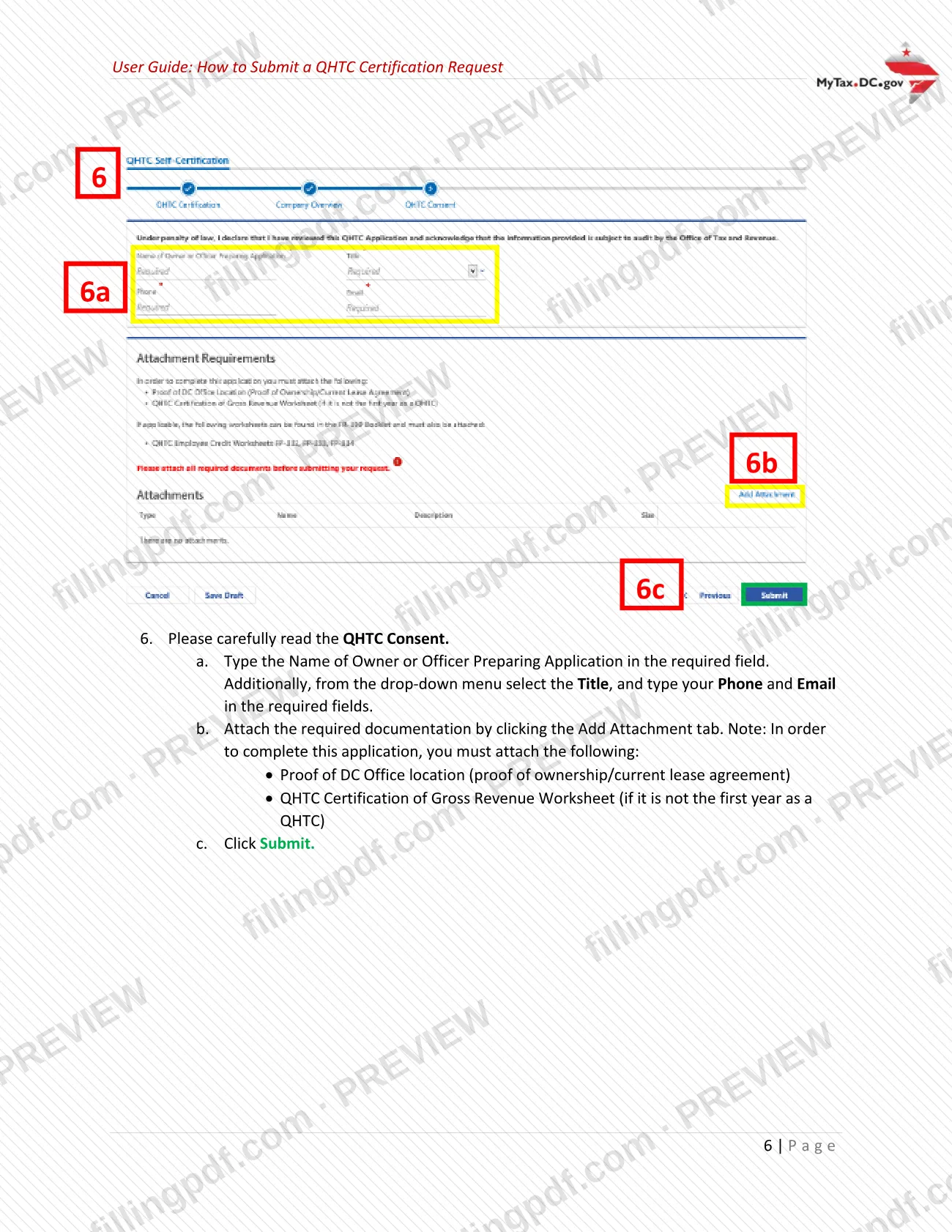
Type the Name of Owner or Officer Preparing Application, select the Title from the drop-down menu, and enter your Phone and Email.
Attach the required documents
Click Add Attachment and attach proof of DC office location (proof of ownership or current lease agreement). Add the QHTC Certification of Gross Revenue Worksheet if it is not your first year as a QHTC.
Submit with your password
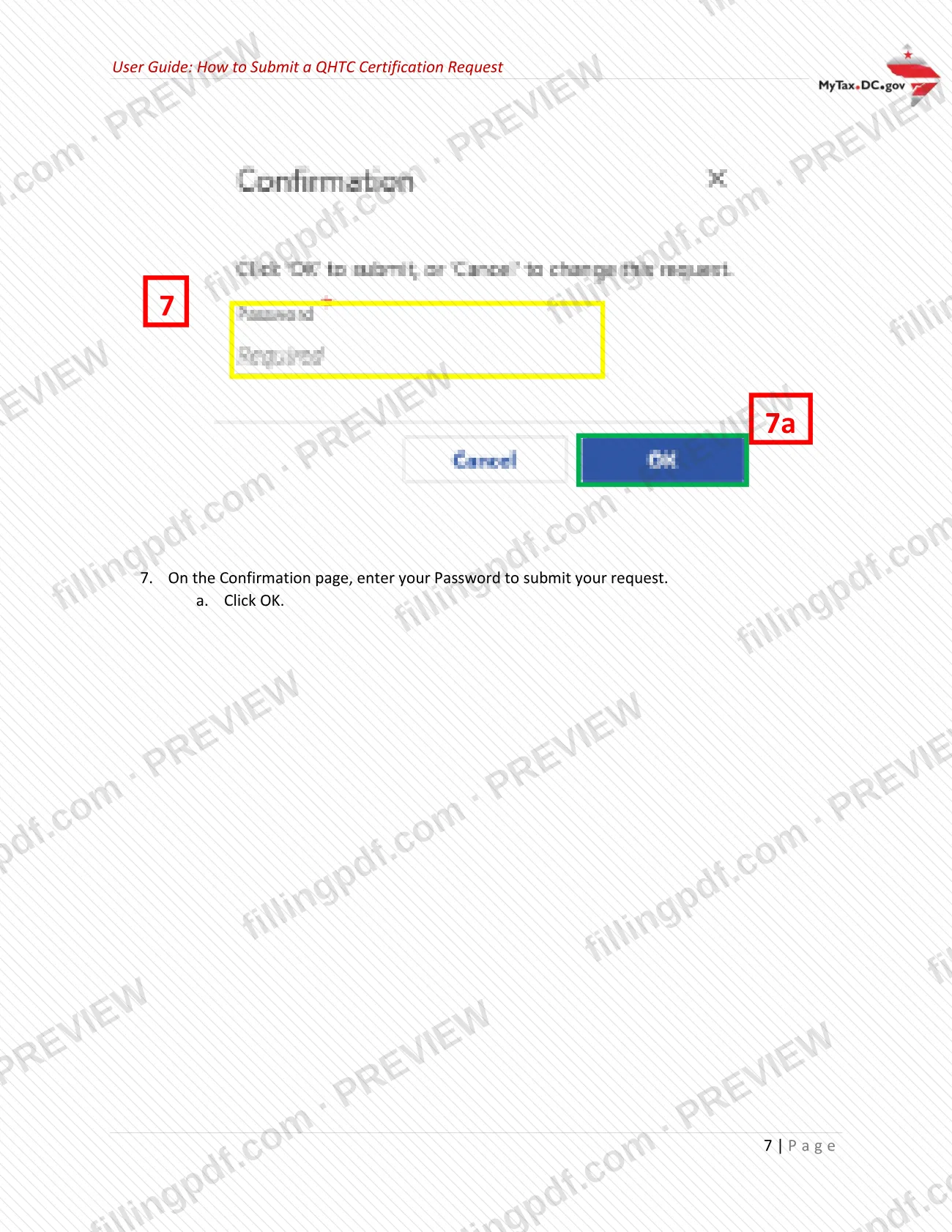
Click Submit, then enter your Password on the Confirmation page and click OK.
Print confirmation and download the PDF
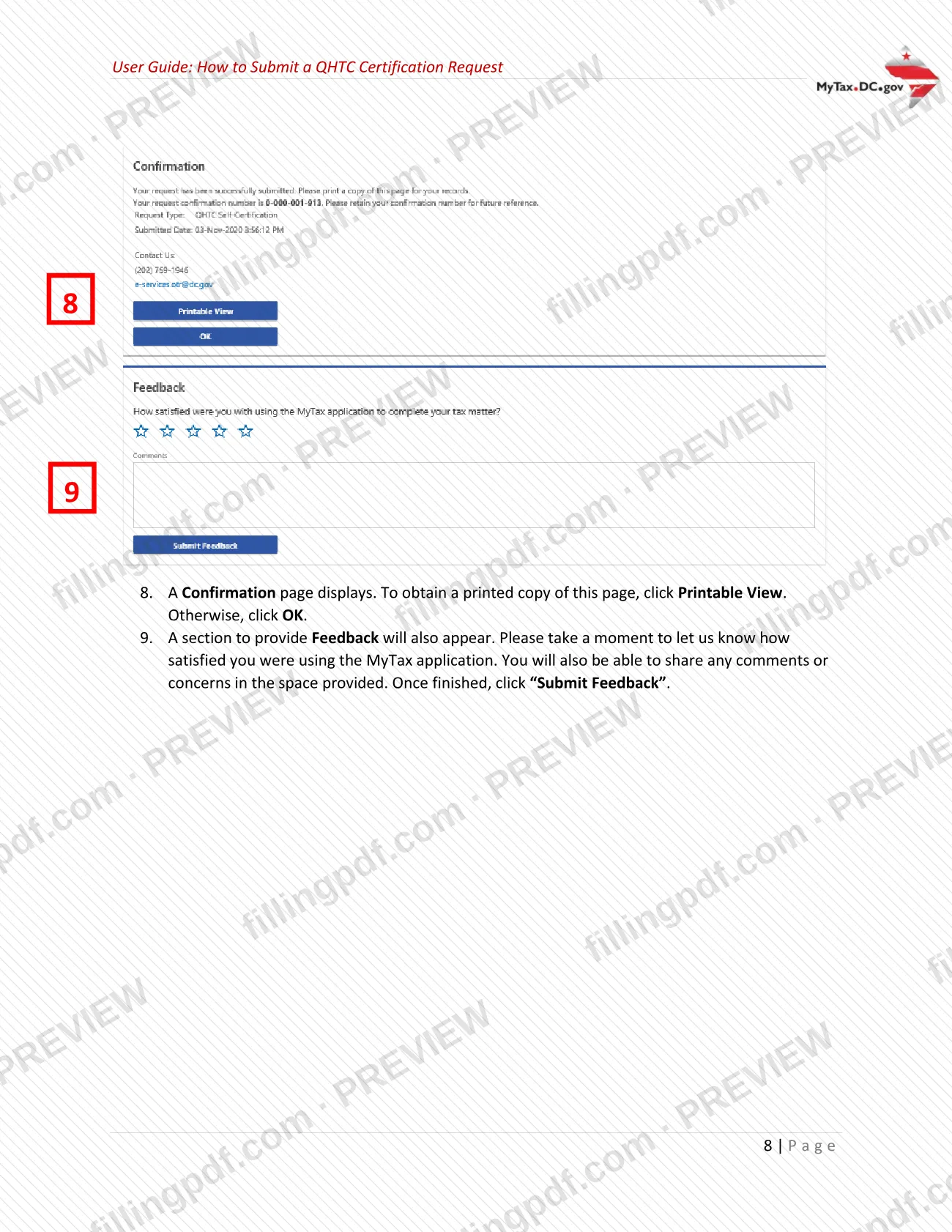
On the Confirmation page, click Printable View for a printed copy. You can also fill out the form online on FillingPDF and download or print the completed PDF for your records.
How to submit QHTC-CERT
The only channel the guide describes is the online one: you submit QHTC-CERT through your MyTax.DC.gov account.
- MyTax.DC.gov: log in with your Username and Password, open the More tab, and under Account Management click Submit QHTC Self-Certification. Complete the QHTC Certification and Company Overview pages, read the QHTC Consent, add your attachments and click Submit. Enter your Password on the Confirmation page and click OK to send the request.
- Attachments: you must attach proof of DC office location (proof of ownership or current lease agreement) and, if it is not your first year as a QHTC, the QHTC Certification of Gross Revenue Worksheet.
- Confirmation: a Confirmation page appears afterward; click Printable View for a printed copy.
Incorporated QHTCs also complete Form D-20 and submit the worksheet from page 11 of the FR-399 Instruction booklet. The guide names no fee, mailing address or in-person channel. FillingPDF lets you fill out the form online and download or print the completed PDF; submission follows the agency's channels above.
Common mistakes to avoid
- Submitting the request without attaching proof of DC office location (proof of ownership or current lease agreement), which the guide says is required to complete the application.
- Leaving out the QHTC Certification of Gross Revenue Worksheet when it is not your first year as a QHTC.
- Trying to correct a wrong business name, address or NAICS Code on the Company Overview page, instead of changing it from the More tab of your MyTax account.
- Skipping the Explanation of Principal Business Activity on the Company Overview page.
- Certifying QHTC status when 51% or more of gross revenues come from an excluded activity such as a retail store or a building or construction company.
- Certifying without good faith; OTR says a penalty may be imposed.
- Incorporated QHTCs skipping the QHTC Tax, Exemption and Credits Schedule on page 4 of Form D-20.
- Clicking Submit but not entering your Password on the Confirmation page, which is needed to submit the request.
Frequently asked questions
What is QHTC-CERT?
QHTC-CERT is the annual self-certification, completed electronically on MyTax.DC.gov, that your company meets all conditions required of a Qualified High Technology Company. You complete it to claim the tax credits and other benefits available under the New E-Conomy Transformation Act of 2000.
Who qualifies as a Qualified High Technology Company in DC?
A for-profit individual or entity that leases or owns a DC office, has 10 or more qualified employees in the District, earns at least 51% of its DC gross revenues from permitted activities and is registered as a DC business. Retail, construction, equipment-facility, pro sports and TIF Area businesses are excluded.
Where do I submit the QHTC certification?
Submit it on MyTax.DC.gov. Log in, go to the More tab, click Submit QHTC Self-Certification under Account Management, complete the pages, attach your documents and click Submit. Enter your Password on the Confirmation page to send it.
What do I need to attach to a QHTC certification request?
Attach proof of DC office location, meaning proof of ownership or a current lease agreement. If it is not your first year as a QHTC, also attach the QHTC Certification of Gross Revenue Worksheet.
What tax benefits does a QHTC get?
Incorporated QHTCs can claim credits for retraining and wages of qualified disadvantaged employees and wages of qualified employees, plus a real property tax reduction for qualified leasehold improvements. Unincorporated QHTCs can claim only the real property tax reduction.
Do incorporated QHTCs file anything besides QHTC-CERT?
Yes. Incorporated QHTCs complete Form D-20, including the QHTC Tax, Exemption and Credits Schedule on page 4, and submit the Certification of Gross Revenue Worksheet from page 11 of the FR-399 Instruction booklet.
What happens if the QHTC certification is not made in good faith?
OTR states that a penalty may be imposed if the certification is not made in good faith. The certification states that you meet all of the conditions required of a QHTC, so answer the Yes or No questions accurately.
Can I fill out the QHTC form on FillingPDF?
You can fill out the form online on FillingPDF and download or print the completed PDF. FillingPDF is an independent service and does not submit the certification to OTR; you submit it through your MyTax.DC.gov account.
Ready to fill out QHTC-CERT?
Fill out QHTC-CERT now