
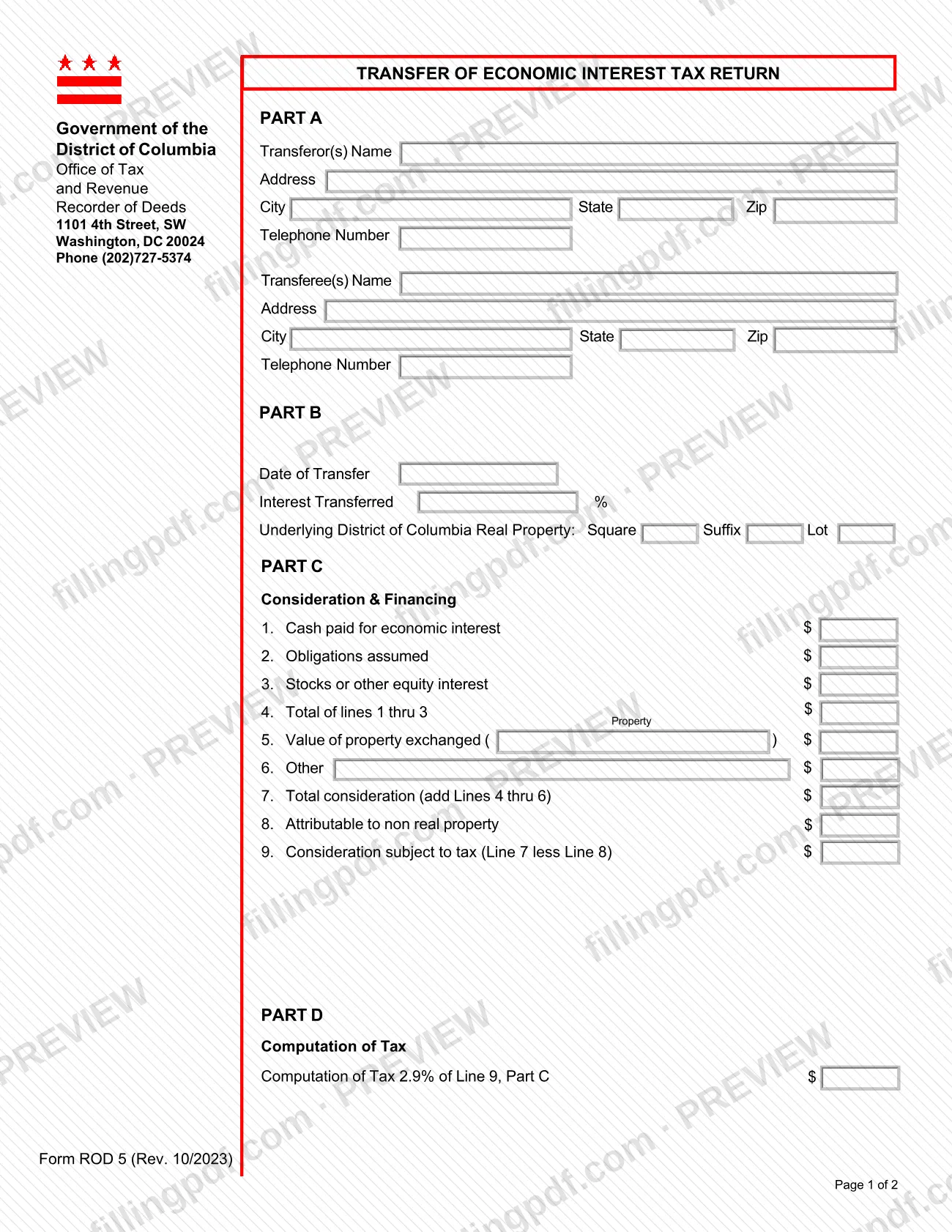
ROD 5 - Transfer of Economic Interest Tax Return is the District of Columbia return that the DC Office of Tax and Revenue (OTR) publishes for reporting a transfer of an economic interest in DC real property. It is one of the DC property tax resources on the OTR site, and the form itself carries the Recorder of Deeds office details. Transferors and transferees use it to describe the transfer, list the consideration, compute the tax and swear to the return. On this page you can fill out the form online on FillingPDF and download or print the completed PDF; the official PDF is published by OTR.
Last updated
What is ROD 5?
ROD 5 - Transfer of Economic Interest Tax Return is the District of Columbia form, issued by the DC Office of Tax and Revenue (OTR), on which transferors and transferees report a transfer of an economic interest in DC real property and compute the tax.
The two-page form is organized in five parts:
- Part A: names, addresses and telephone numbers of the transferor(s) and transferee(s).
- Part B: the date of transfer, the percentage of interest transferred and the underlying DC real property, identified by square, suffix and lot.
- Part C: consideration and financing, lines 1 through 9, ending with the consideration subject to tax.
- Part D: the computation of tax, figured on line 9 of Part C.
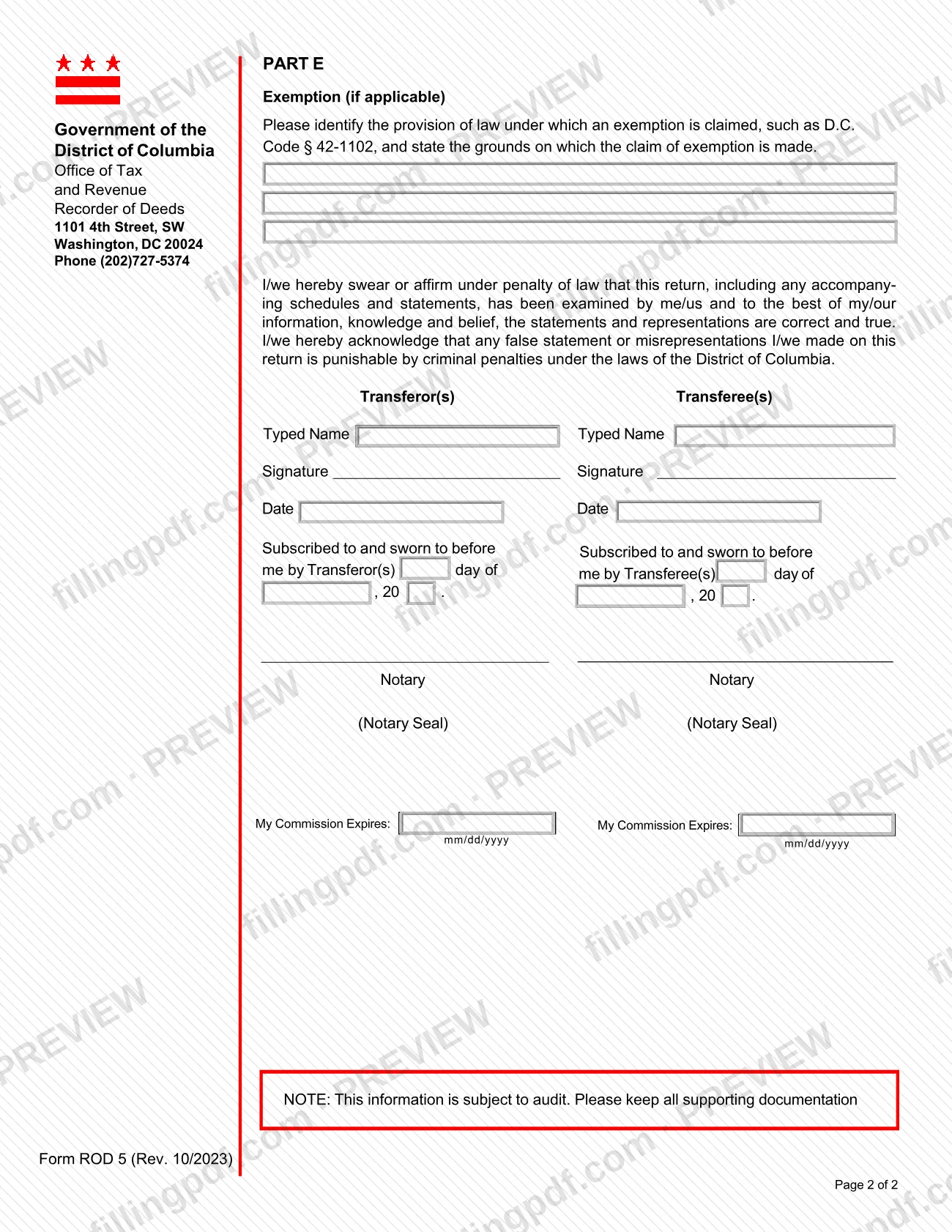
- Part E: the exemption section, used only if an exemption applies.
The return ends with a sworn statement signed by the transferor(s) and the transferee(s), each with a notary block. The form prints the Recorder of Deeds name, address and phone number, and notes that the information is subject to audit, so supporting documentation should be kept. Revision Rev. 10/2023 is the edition printed on both pages.
Who needs to file ROD 5?
The people who complete ROD 5 are the parties to a transfer of an economic interest in DC real property: the transferor(s), who give up the interest, and the transferee(s), who receive it. Both sides are named in Part A and both sign the sworn statement at the end of the form, each before a notary.
Details the form attaches to its use:
- Transferors and transferees supply their names, addresses and telephone numbers and sign and date separately.
- Parties claiming an exemption complete Part E, identifying the provision of law relied on, such as D.C. Code § 42-1102, and the grounds for the claim. Part E is marked "if applicable", so other filers leave it blank.
- Notaries complete the notary blocks stating the date of the oath, the notary seal and the commission expiration date in mm/dd/yyyy format.
The form does not describe who may sign for someone else and does not list any group that is excluded from using it.
When to file ROD 5
ROD 5 is triggered by a transfer of an economic interest in DC real property, and the date of that transfer is the first entry in Part B. No separate due date is printed on the form, so check timing with the Recorder of Deeds at (202)727-5374 or on the OTR page for the form.
Before you file, have the sworn statement ready for signature: the transferor(s) and transferee(s) must each sign, date and have the signature notarized in the blocks on page 2. The form also states that its information is subject to audit, so keep all supporting documentation after the return is completed.
How to fill out ROD 5
Enter transferor information in Part A
Write the transferor(s) name, address (city, state, ZIP) and telephone number in the first block of Part A.
Enter transferee information in Part A
In the second block, write the transferee(s) name, address (city, state, ZIP) and telephone number.
Describe the transfer in Part B
Enter the Date of Transfer and the Interest Transferred %. Then identify the underlying DC real property by Square, Suffix and Lot.
Report cash, obligations and equity
In Part C, enter cash paid for the economic interest on line 1, obligations assumed on line 2 and stocks or other equity interest on line 3. Add them on line 4.
Enter property exchanged and other items
Enter the value of property exchanged on line 5 and any other consideration on line 6. Add lines 4 through 6 for the total consideration on line 7.
Figure consideration subject to tax
Enter on line 8 the amount attributable to non real property. Subtract it from line 7 and enter the result on line 9.
Complete the computation of tax
In Part D, apply the percentage printed on the form to line 9, Part C, and enter the result in the computation of tax box.
Claim an exemption if one applies
In Part E, identify the provision of law under which the exemption is claimed, such as D.C. Code § 42-1102, and state the grounds. Leave Part E blank if no exemption applies.
Add names, signatures and notary details
Type the names of the transferor(s) and transferee(s), then sign and date in each column. Have each signature sworn before a notary, who completes the day, year, seal and commission expiration (mm/dd/yyyy).
Review, download and keep records
Check Parts A through E for consistency between lines 7, 8 and 9 and the tax figure. Download or print the completed PDF from FillingPDF and keep your supporting documentation, since the form says it is subject to audit.
How to submit ROD 5
The form does not list a filing channel of its own; it prints the contact details of the Recorder of Deeds, and the OTR page offers the PDF for download.
- Recorder of Deeds details printed on the form: 1101 4th Street, SW, Washington, DC 20024; phone (202)727-5374.
- Before sending: make sure both the transferor(s) and the transferee(s) have signed and that each notary block is completed, including the notary seal and the commission expiration date.
- Form page: the OTR publication page for ROD 5 is at https://otr.cfo.dc.gov/publication/rod-5-transfer-economic-interest-tax-return.
Because the form names no mailing, online or in-person procedure, call the Recorder of Deeds number above to confirm how and where the completed return is accepted. FillingPDF lets you fill out and download the PDF; submission follows the agency's channels.
Common mistakes to avoid
- Signing the sworn statement without the notary: each side has its own notary block and a "subscribed to and sworn to before me" line.
- Having only the transferor(s) or only the transferee(s) sign; the form has separate typed name, signature and date lines for both.
- Entering the tax in Part D from the wrong line; it is figured on line 9, Part C, the consideration subject to tax.
- Skipping line 8 (attributable to non real property), so line 9 is not line 7 less line 8.
- Claiming an exemption in Part E without naming the provision of law, such as D.C. Code § 42-1102, and the grounds for the claim.
- Leaving out the percentage of interest transferred or the square, suffix and lot of the underlying DC real property in Part B.
- Forgetting the notary's commission expiration date in mm/dd/yyyy format.
- Discarding supporting documentation; the form states the information is subject to audit and asks that all documentation be kept.
Frequently asked questions
What is the ROD 5 Transfer of Economic Interest Tax Return?
ROD 5 is the District of Columbia return on which the parties to a transfer of an economic interest in DC real property report the transfer, list the consideration and compute the tax. The DC Office of Tax and Revenue (OTR) publishes it, and the form carries the Recorder of Deeds details.
Is ROD 5 a DC property tax form?
It is a DC form tied to real property: it identifies the underlying DC real property by square, suffix and lot and computes tax on the consideration for the economic interest transferred. It is published by OTR and does not cover other matters the form does not mention.
Who signs Form ROD 5?
Both the transferor(s) and the transferee(s) sign. The form has a typed name, signature and date for each side, and each side has a notary block with the notary seal and commission expiration date, so each signature is sworn before a notary.
How do I claim an exemption on ROD 5?
Complete Part E. Identify the provision of law under which you claim the exemption, such as D.C. Code § 42-1102, and state the grounds for the claim. Part E is marked "if applicable", so leave it blank if no exemption applies.
How do I figure the consideration subject to tax on ROD 5?
In Part C, add lines 1 through 3 on line 4, then add lines 4 through 6 on line 7. Subtract the amount attributable to non real property (line 8) from line 7. The result on line 9 is the consideration subject to tax.
Can I fill out ROD 5 online?
Yes. You can fill out the PDF online on FillingPDF and download or print it. FillingPDF is an independent service and does not file the return; the completed, signed and notarized form goes through the agency's channels, and the Recorder of Deeds at (202)727-5374 can confirm them.
Do I need to keep documents after completing ROD 5?
Yes. The form states that its information is subject to audit and asks you to keep all supporting documentation. It does not list the specific documents to keep.
Ready to fill out ROD 5?
Fill out ROD 5 now