
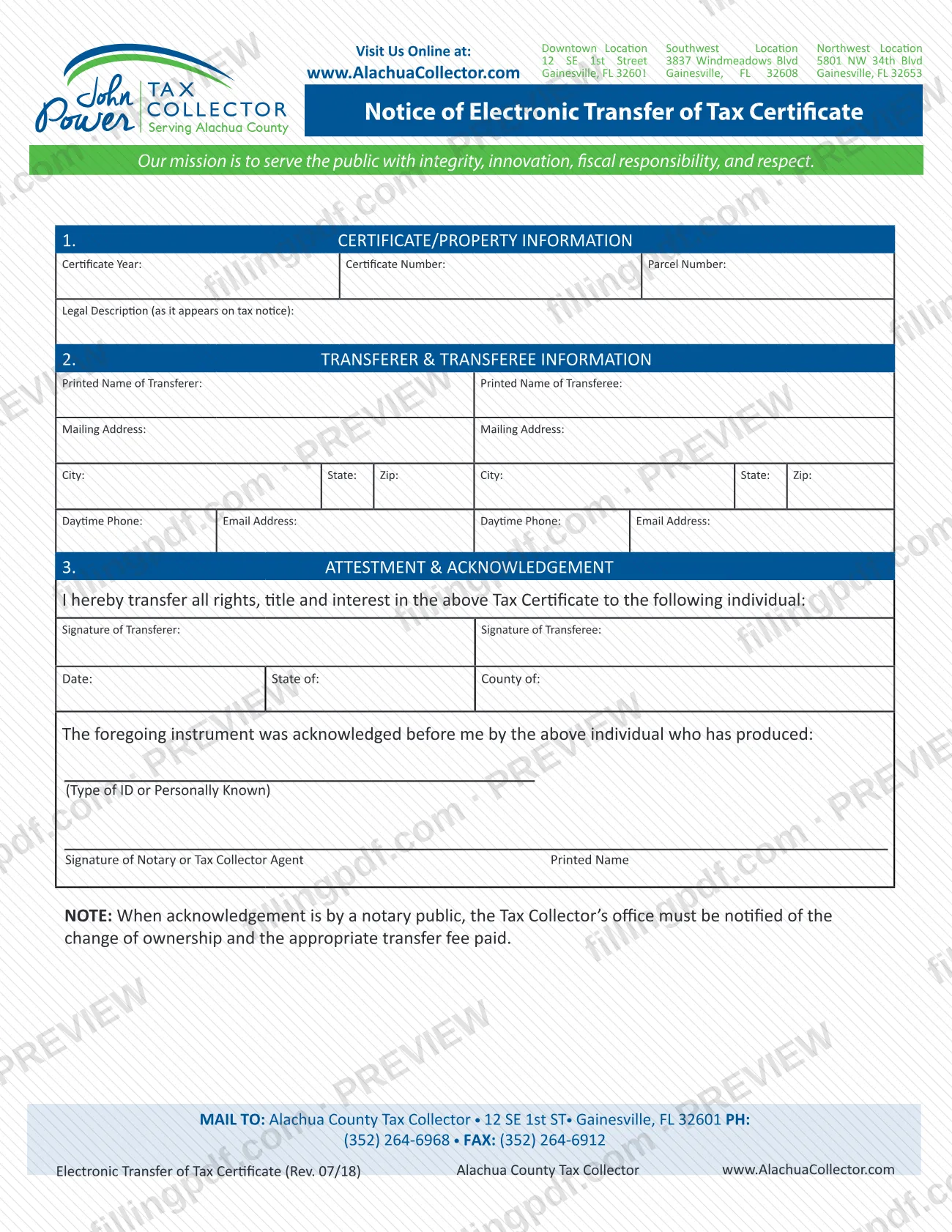
The Electronic Certificate Transfer, printed on the form as the Notice of Electronic Transfer of Tax Certificate, is the Alachua County Tax Collector form that records the transfer of a tax certificate from a transferer to a transferee. It is one of the Alachua County property tax forms published by the Tax Collector's office, and it is mailed to the office at 12 SE 1st ST in Gainesville. On this page you can fill out the form online on FillingPDF and download or print the completed PDF; the official PDF is published by the Alachua County Tax Collector at alachuacollector.com.
Last updated
What is Electronic Certificate Transfer – Alachua County, FL?
Electronic Certificate Transfer, printed on the form as the Notice of Electronic Transfer of Tax Certificate, is the Alachua County Tax Collector form by which a transferer transfers all rights, title and interest in a tax certificate to a transferee.
The form has three numbered parts:
- 1. Certificate/Property Information: the certificate year, certificate number, parcel number and the legal description as it appears on the tax notice.
- 2. Transferer & Transferee Information: the printed name, mailing address, daytime phone and email address of each party, side by side.
- 3. Attestment & Acknowledgement: the statement "I hereby transfer all rights, title and interest in the above Tax Certificate to the following individual," the signatures of the transferer and the transferee, and the acknowledgement block for a notary or Tax Collector agent.
Completing it produces a signed and acknowledged notice of the change in who holds the certificate. The form carries a note: when the acknowledgement is made by a notary public, the Tax Collector's office must be notified of the change of ownership and the appropriate transfer fee paid.
The Alachua County Tax Collector issues the form. The revision printed at the foot of the page is Rev. 07/18, and the form carries no form number.
Who needs to file Electronic Certificate Transfer – Alachua County, FL?
The main users are the two parties to a tax certificate transfer: the transferer, who signs over all rights, title and interest in the certificate, and the transferee, the individual who receives them. Both print their names and contact details in Part 2 and both sign in Part 3.
The acknowledgement block is completed by a notary or a Tax Collector agent, who records the state and county, the type of ID the individual produced (or that the individual is personally known) and signs and prints their name.
A transferer who uses a notary public must also notify the Alachua County Tax Collector's office of the change of ownership and pay the appropriate transfer fee, as the note printed on the form says.
The form is written for a transfer to an individual. It does not describe who may sign for someone else, so contact the Tax Collector's office at (352) 264-6968 with questions about representatives or other situations.
When to file Electronic Certificate Transfer – Alachua County, FL
Complete the form when a tax certificate is being transferred from one party to another; the form prints no separate deadline. The notice records the transfer, and the certificate year, certificate number and parcel number you enter identify which certificate is changing hands.
If the acknowledgement is made before a notary public, the form says the Tax Collector's office must be notified of the change of ownership and the appropriate transfer fee paid. Ask the office for the current fee amount and any timing rules at (352) 264-6968.
Documents you need
- Identification produced by the individual whose signature is acknowledged, unless that person is personally known to the notary or Tax Collector agent; the type of ID, or "Personally Known," is written in the acknowledgement block.
How to fill out Electronic Certificate Transfer – Alachua County, FL
Enter the certificate year and number
In Part 1, CERTIFICATE/PROPERTY INFORMATION, write the Certificate Year and the Certificate Number of the tax certificate being transferred.
Add the parcel number and legal description
Enter the Parcel Number, then the Legal Description exactly as it appears on the tax notice.
Enter the transferer's information
In Part 2, in the Transferer column, enter the printed name, mailing address, City, State, Zip, daytime phone and email address.
Enter the transferee's information
In the Transferee column of Part 2, enter the same details for the person receiving the certificate: printed name, mailing address, City, State, Zip, daytime phone and email address.
Read the transfer statement
Part 3 states "I hereby transfer all rights, title and interest in the above Tax Certificate to the following individual." Confirm that the transferee named above is the person you intend to receive the certificate.
Sign and date the transfer
The transferer signs on Signature of Transferer and the transferee on Signature of Transferee, and the Date is entered.
Complete the acknowledgement block
Enter State of and County of, then the type of ID produced or Personally Known. The notary or Tax Collector agent signs and prints their name.
Review and download the completed PDF
Check that names, certificate and parcel numbers match your records and the tax notice. Download or print the completed PDF from FillingPDF and assemble it for mailing as described under How to submit.
How to submit Electronic Certificate Transfer – Alachua County, FL
The form names one channel: mail. It prints the return line MAIL TO: Alachua County Tax Collector • 12 SE 1st ST • Gainesville, FL 32601.
- By mail: send the completed, signed and acknowledged form to Alachua County Tax Collector, 12 SE 1st ST, Gainesville, FL 32601.
- Phone and fax numbers on the form: the form prints PH: (352) 264-6968 and FAX: (352) 264-6912 next to the mailing address.
- Office locations: the form header lists three Tax Collector locations: Downtown, 12 SE 1st Street, Gainesville, FL 32601; Southwest, 3837 Windmeadows Blvd, Gainesville, FL 32608; and Northwest, 5801 NW 34th Blvd, Gainesville, FL 32653. The website is www.AlachuaCollector.com.
When a notary public handles the acknowledgement, a transfer fee applies and the office must be notified of the change of ownership. The form does not give the amount or a payment method, so ask the office before you send the form.
FillingPDF lets you fill out and download the PDF; submission follows the channels above.
Common mistakes to avoid
- Skipping the notice to the Tax Collector's office and the transfer fee when the acknowledgement was made by a notary public; the form's note requires both.
- Entering a legal description that differs from the one on the tax notice; the form asks for it as it appears there.
- Leaving out the certificate year, certificate number or parcel number in Part 1, so the certificate is not identified.
- Mixing up the transferer and transferee columns in Part 2, which sit side by side.
- Sending the form without the signature of the transferer or the transferee in Part 3.
- Leaving the acknowledgement block incomplete: State of, County of, the type of ID or Personally Known, and the notary or Tax Collector agent's signature and printed name.
- Mailing the form somewhere other than the Alachua County Tax Collector, 12 SE 1st ST, Gainesville, FL 32601, the address printed in the MAIL TO line.
Frequently asked questions
What is the Notice of Electronic Transfer of Tax Certificate?
It is an Alachua County Tax Collector form that records the transfer of all rights, title and interest in a tax certificate from a transferer to a transferee. It identifies the certificate by year, number and parcel number, and carries both signatures plus an acknowledgement.
Who signs the Electronic Certificate Transfer form?
The transferer and the transferee each sign in Part 3. A notary or a Tax Collector agent then signs and prints their name in the acknowledgement block, after recording the state, the county and the ID the individual produced or that the individual is personally known.
Do I need a notary for a tax certificate transfer in Alachua County?
The acknowledgement is signed by either a notary or a Tax Collector agent, as the signature line shows. If a notary public handles it, the form's note says the Tax Collector's office must be notified of the change of ownership and the transfer fee paid.
Is there a fee to transfer a tax certificate in Alachua County?
The form says an appropriate transfer fee must be paid when the acknowledgement is by a notary public. It prints no amount or payment method, so ask the Alachua County Tax Collector at (352) 264-6968 for the current fee.
Where do I mail the tax certificate transfer form?
Mail it to Alachua County Tax Collector, 12 SE 1st ST, Gainesville, FL 32601. The form also prints the office phone, (352) 264-6968, and fax, (352) 264-6912, beside that address.
What information do I need before filling out the form?
You need the certificate year, certificate number, parcel number and the legal description as it appears on the tax notice, plus each party's printed name, mailing address, daytime phone and email address for Part 2.
Is this one of the Alachua County property tax forms?
Yes, it is published by the Alachua County Tax Collector and concerns a tax certificate tied to a parcel number and legal description. The form is specific to transferring a certificate; other Alachua County property tax matters use other documents.
Can I fill out this form online on FillingPDF?
You can fill out the PDF online on FillingPDF and download or print it. FillingPDF is an independent service and does not file or submit the form; you mail it to the Alachua County Tax Collector yourself.
Ready to fill out Electronic Certificate Transfer – Alachua County, FL?
Fill out Electronic Certificate Transfer – Alachua County, FL now