
Chapter 4 – Form 82040 is the Escambia County Tax Collector's walkthrough of HSMV form 82040, the application for title for the purchaser, with notes for mobile home transactions. It is a titling guide, not a tax bill: people who land here from a search for Escambia County property tax will find the form that must accompany every title submitted to the Tax Collector for processing. On this page you can fill out the form online on FillingPDF and download or print the completed PDF; the original PDF is published by the Escambia County Tax Collector.
Last updated
What is 82040?
Chapter 4 – Form 82040 is the Escambia County Tax Collector's section-by-section guide to HSMV form 82040, the application for title for the purchaser, written for transactions involving mobile homes.
The guide says a completed 82040 should be submitted with every title given to the Tax Collector for processing. It calls the form multi-use: not every box needs an entry, and some sections may not apply to a particular transaction. The form covers off-highway vehicles (ATVs), motor vehicles (including trailers and motorcycles), mobile homes and vessels.
The guide numbers the entries 1 to 52 across 13 sections:
- Section 1: owner and applicant information.
- Section 2: description of the motor vehicle, mobile home or vessel.
- Sections 3 and 4: brands, usage and type, and lienholder information.
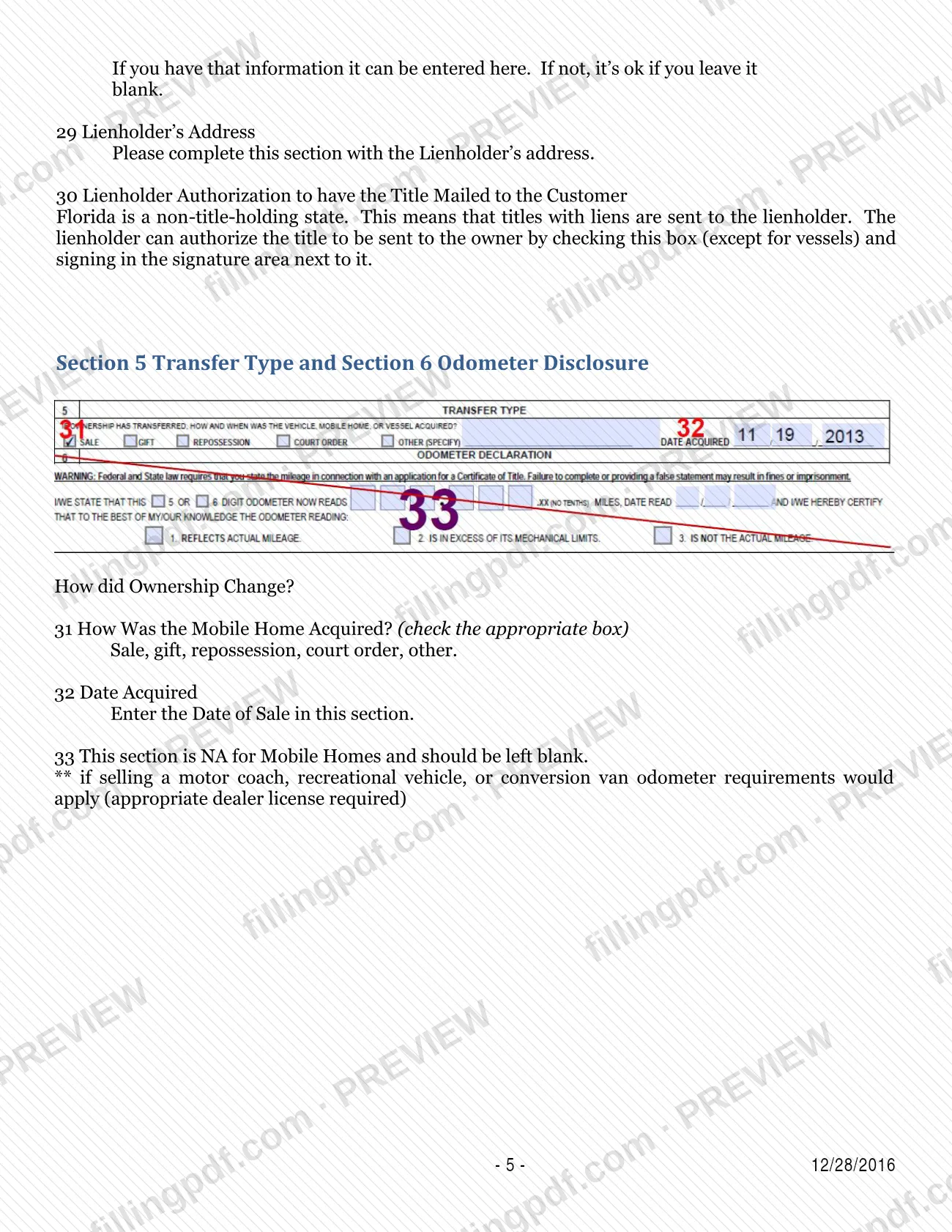
- Sections 5 and 6: transfer type and odometer disclosure.
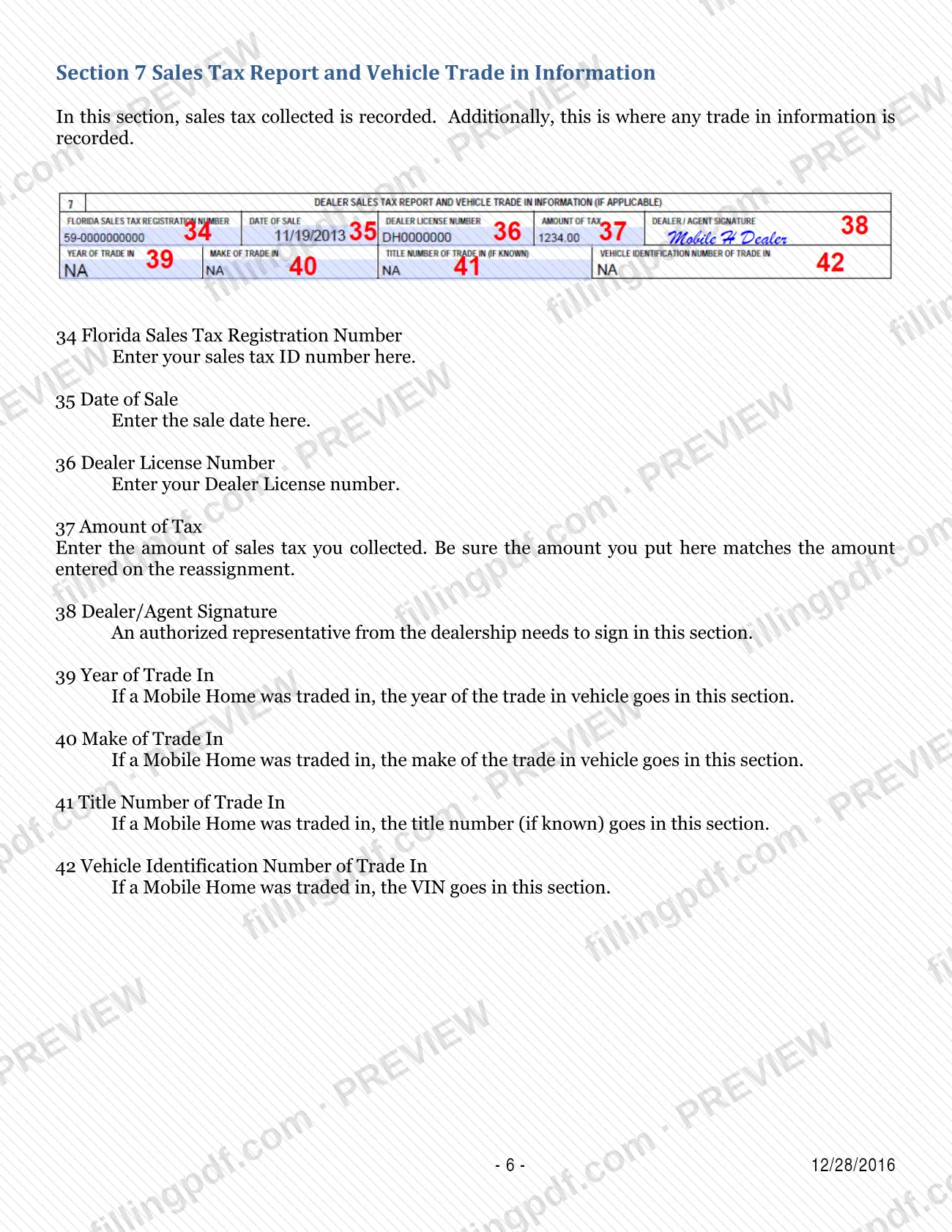
- Section 7: sales tax report and trade-in information.
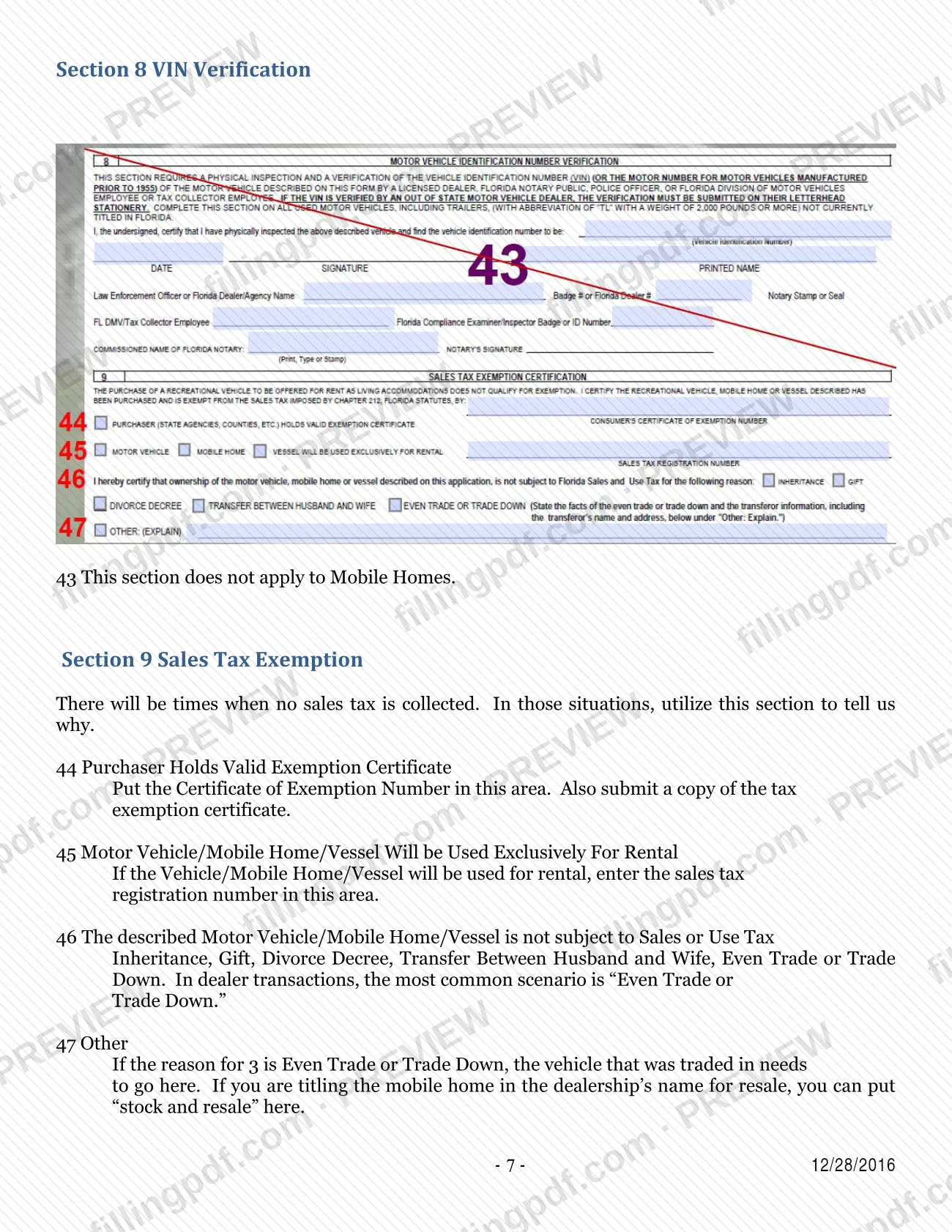
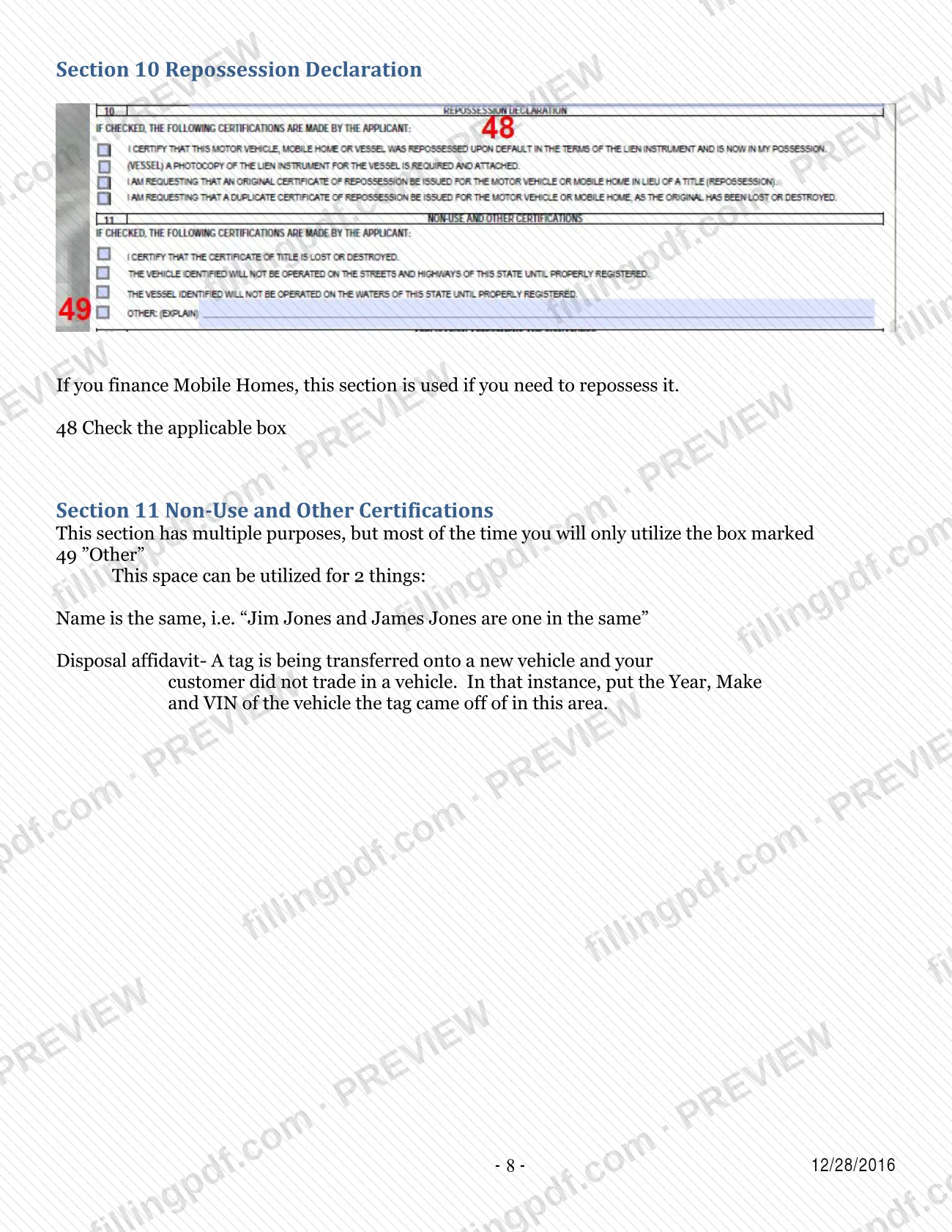
- Sections 8 to 11: VIN verification, sales tax exemption, repossession declaration, and non-use and other certifications.
- Sections 12 and 13: application attestment and signatures, and release of spouse or heirs interest.
For mobile homes, the guide marks some entries as not applicable, such as the odometer entry and VIN verification. It also explains mobile home details such as the body code, the real property (RP) decal and the location code.
Who needs to file 82040?
The guide is written for people who prepare title work for a purchaser and hand it to the Escambia County Tax Collector, such as dealership staff, and it speaks of "your customer" throughout. A completed 82040 goes with every title submitted for processing.
Who signs and who is listed:
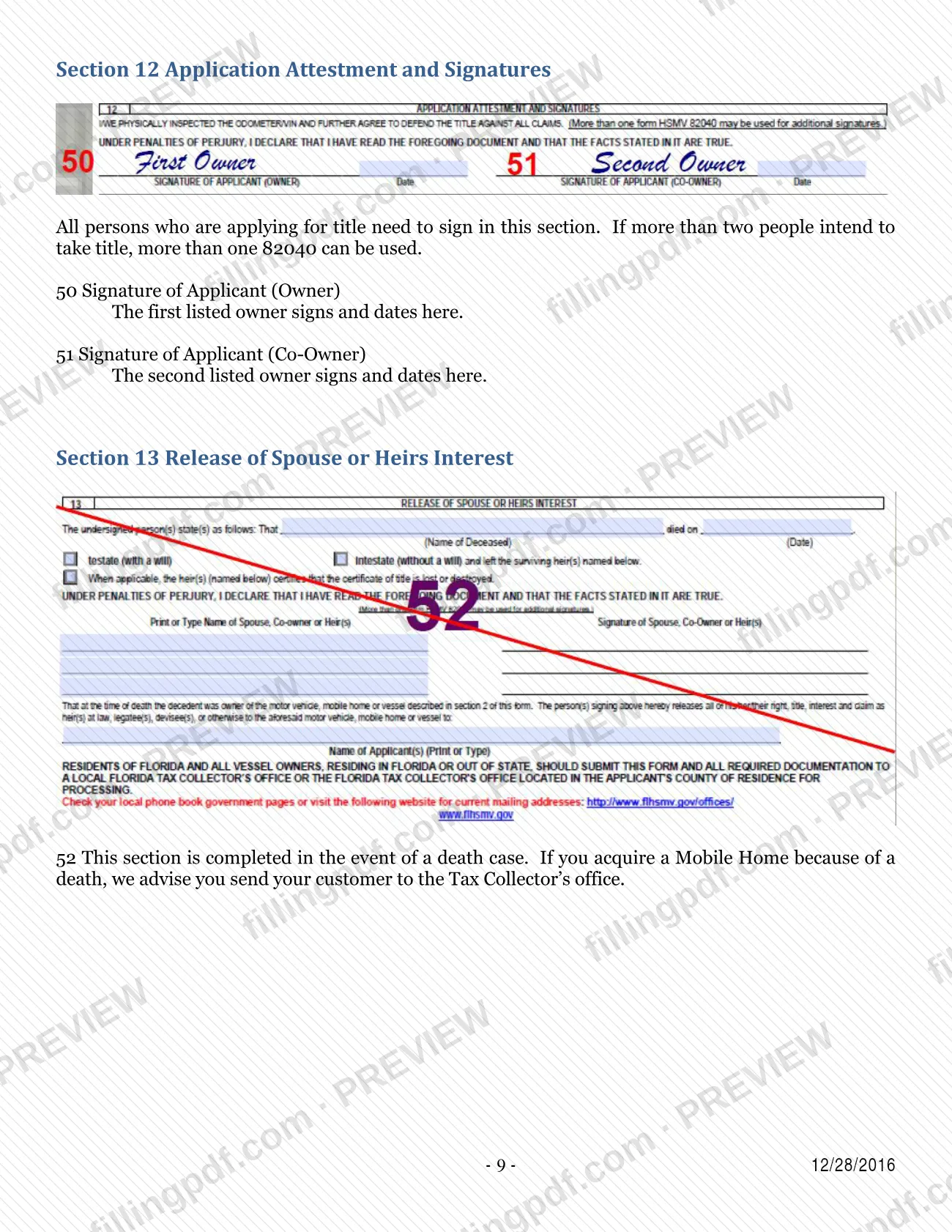
- All applicants must sign the form. Regardless of whether "OR" or "AND" is chosen between names, every person applying for title signs.
- The first listed owner signs on line 50 and the second listed owner on line 51.
- If more than two people intend to take title, more than one 82040 can be used.
- A dealer or agent signs line 38 as an authorized representative of the dealership.
Some sections apply only in certain cases: lienholder entries when the mobile home has a lien, the repossession declaration when a financed mobile home is repossessed, and the sales tax exemption section when no sales tax is collected.
Death cases: Section 13, release of spouse or heirs interest, is for a death case. If you acquire a mobile home because of a death, the guide advises sending your customer to the Tax Collector's office.
When to file 82040
Submit a completed Form 82040 whenever you give the Escambia County Tax Collector a title for processing: the guide says an 82040 should accompany every title. The guide sets no separate due date for the form.
Timing entries on the form itself: line 26 asks for the date of the lien, line 32 for the date acquired (the date of sale) and line 35 for the date of sale. For a mobile home that is a rental property, line 20 asks for the year you want the new registration decal to expire, because a new decal is issued each time ownership changes.
If you make an error, the guide says to complete a new 82040 rather than correct the first one, so allow time to redo the form before the title is submitted.
Documents you need
- The title being submitted for processing: the guide says a completed 82040 should be submitted with every title given to the Tax Collector.
- A copy of the owner's identification, only if the owner has no Florida driver license number to enter on line 7.
- A copy of the tax exemption certificate, only if the purchaser holds a valid exemption certificate and enters its number on line 44.
How to fill out 82040
Set application, vehicle type and title format
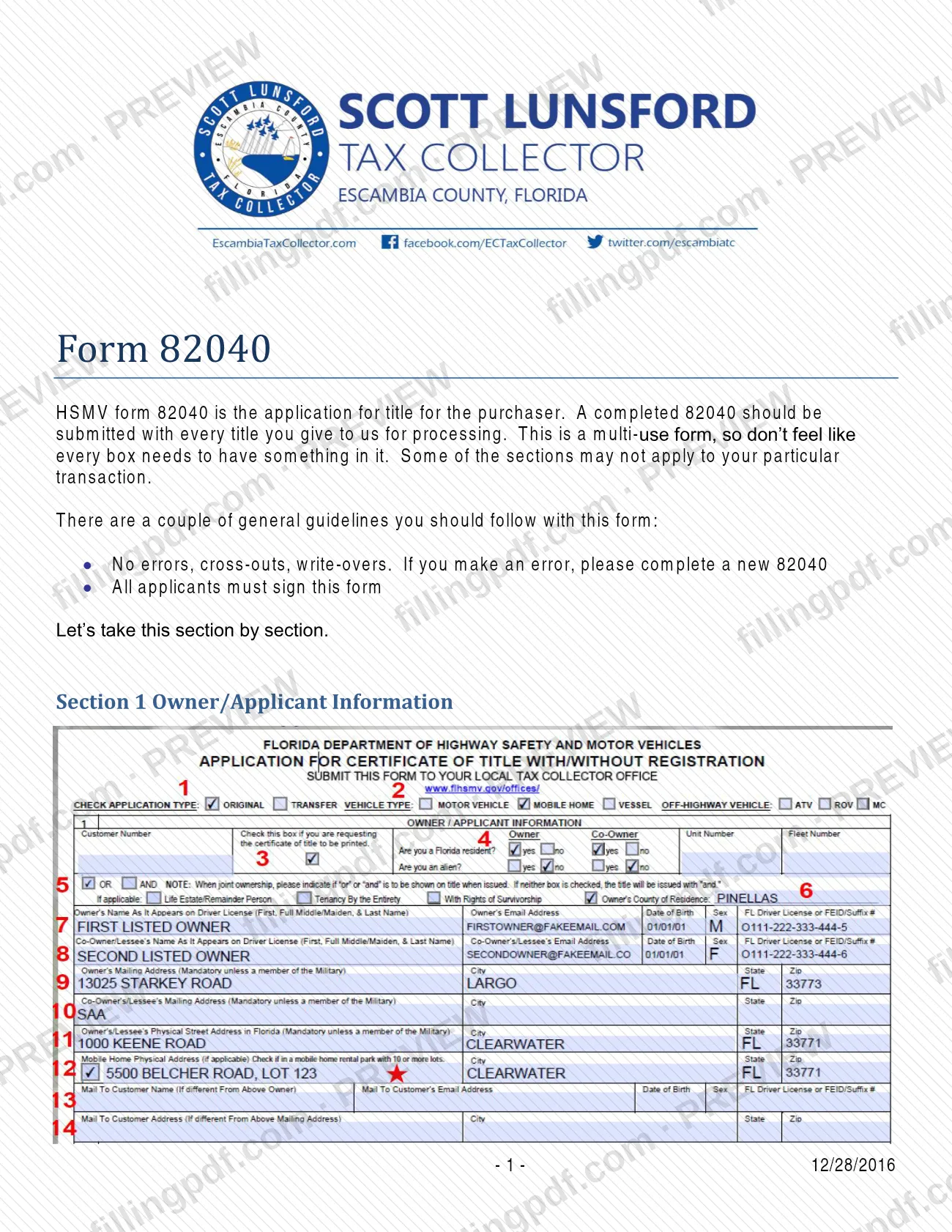
Line 1: check whether this is an original (MCO or out-of-state title becoming a Florida title) or a transfer of a current Florida title. Line 2: check the vehicle type, such as Mobile Home. Line 3: check the box only if you want a printed paper title; this affects fees.
Answer residency and conjunction questions
Line 4: check the Florida resident and alien boxes for the owner and co-owner. Line 5: choose "OR" (one signature for future transactions) or "AND" (all signatures); if you choose none, "AND" is entered. Line 6: enter the owner's county of residence, which is used for sales tax.
Enter owner and co-owner details
Line 7: owner's name, optional e-mail, date of birth, sex and Florida driver license number. Line 8: the same details for the co-owner.
Complete the address lines
Line 9 (owner's mailing address, taken from the driver license) and line 11 (physical address) are mandatory; enter SAA if they match. Line 10: co-owner's mailing address, or SAA. Line 12: the mobile home's physical location. Lines 13 and 14: a different name or address for mailing the title.
Describe the mobile home
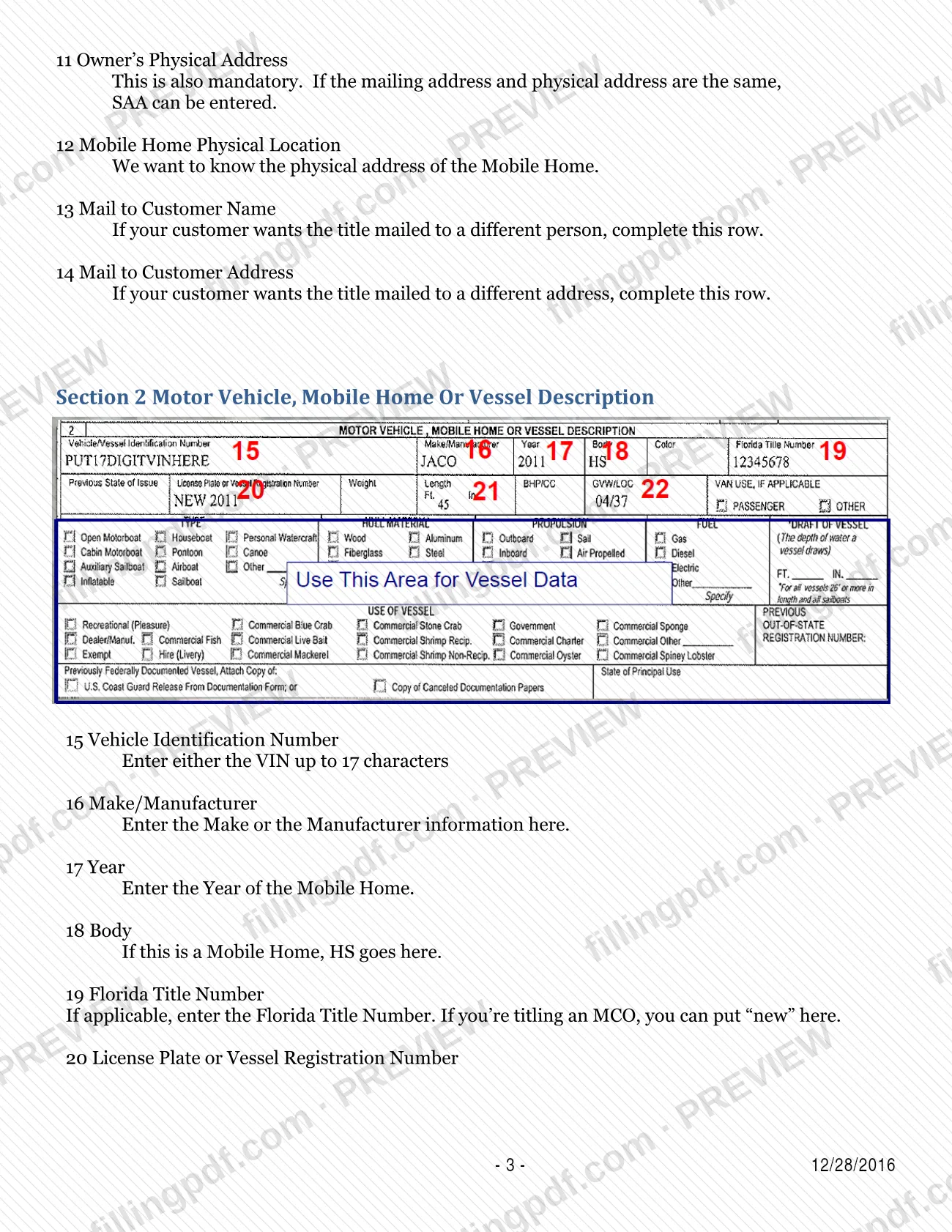
Line 15: VIN, up to 17 characters. Line 16: make or manufacturer. Line 17: year of the mobile home. Line 18: HS for the body. Line 19: Florida title number, or "new" for an MCO.
Enter decal, length and weight or location code
Line 20: for a mobile home that stays real property, the RP decal number; for rental property, the year you want the new decal to expire. Line 21: length in feet and inches. Line 22: the mobile home's location code (LOC).
Add lienholder information
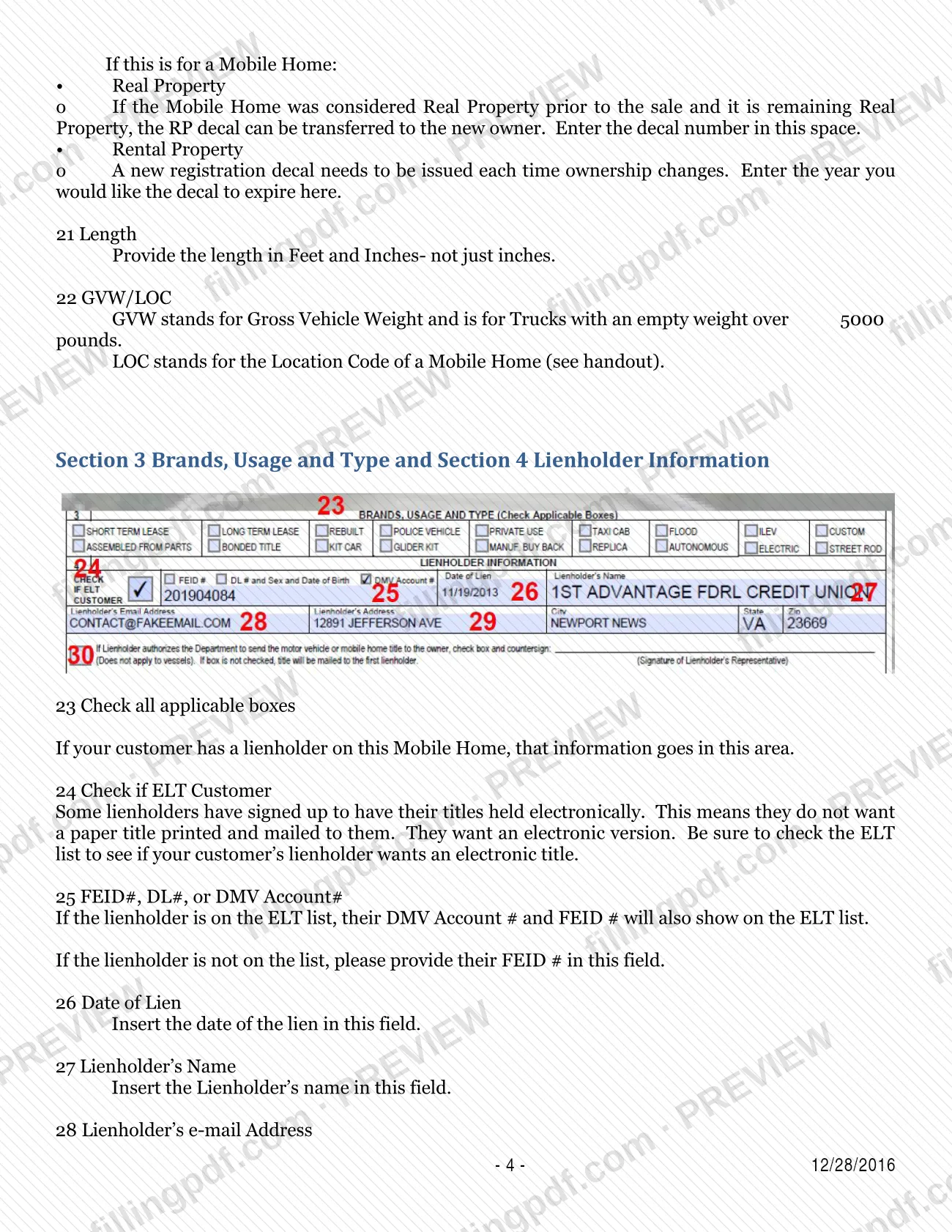
Line 23: check all applicable boxes. Line 24: check if the lienholder is on the ELT list. Lines 25 to 29: FEID number, lien date, name, optional e-mail and address. Line 30: the lienholder checks and signs to authorize mailing the title to the customer.
Record how the mobile home was acquired
Line 31: check sale, gift, repossession, court order or other. Line 32: enter the date of sale. Leave line 33 blank; it does not apply to mobile homes.
Complete sales tax and trade-in entries
Lines 34 to 37: sales tax registration number, date of sale, dealer license number and amount of tax collected, which must match the reassignment. Line 38: authorized dealer or agent signature. Lines 39 to 42: year, make, title number and VIN of a trade-in mobile home, if any.
Explain any sales tax exemption
Skip Section 8, which does not apply to mobile homes. Use lines 44 to 47 only when no sales tax was collected: exemption certificate number (line 44), rental use (line 45), not subject to tax (line 46) or other (line 47).
Complete repossession and certifications
Line 48: check the applicable box only if repossessing a financed mobile home. Line 49: use "Other" for a name that is the same person, or for a disposal affidavit with the year, make and VIN of the vehicle the tag came off.
Review, sign and download the PDF
Every applicant signs and dates: first owner on line 50, co-owner on line 51. Check that there are no errors or cross-outs, then download or print the completed PDF from FillingPDF and deliver it with the title as described under How to submit.
How to submit 82040
The guide describes one route: you deliver the completed Form 82040 to the Escambia County Tax Collector together with the title you are submitting for processing.
- With the title: attach the completed 82040 to every title you hand to the Tax Collector.
- Copies to include: a copy of the customer's identification when the owner has no Florida driver license number (line 7), and a copy of the tax exemption certificate when the purchaser holds a valid exemption certificate (line 44).
- Death cases: if you acquire a mobile home because of a death, the guide advises sending your customer to the Tax Collector's office.
The guide prints no mailing address, portal or appointment rule. Its note on line 3 says that requesting a printed paper title instead of an electronic title affects the fees charged, so ask the Escambia County Tax Collector for current fees and payment methods. Titles with a lien are sent to the lienholder unless the lienholder authorizes mailing to the owner on line 30.
FillingPDF lets you fill out and download the PDF; submission follows the Escambia County Tax Collector's channels described above.
Common mistakes to avoid
- Correcting an error with a cross-out or write-over; the guide says there must be none and that a new 82040 should be completed instead.
- Submitting the form without every applicant's signature; all persons applying for title must sign, whichever of "OR" or "AND" is chosen.
- Leaving the owner's mailing address (line 9) or physical address (line 11) blank; the guide calls both mandatory, and SAA is allowed when they match.
- Choosing no conjunction on line 5 and expecting "OR"; the Tax Collector enters "AND" when processing, which requires all signatures for future title transactions.
- Entering a sales tax amount on line 37 that differs from the amount on the reassignment.
- Filling in line 33 (odometer) or Section 8 (VIN verification) for a mobile home; the guide says they do not apply.
- Giving the length on line 21 in inches only instead of feet and inches.
- Listing more than two owners on one form; the guide says to use more than one 82040 when more than two people take title.
- Omitting a copy of identification when the owner has no driver license number, or a copy of the exemption certificate when line 44 is used.
Frequently asked questions
What is Form 82040?
HSMV form 82040 is the application for title for the purchaser. The Escambia County Tax Collector's Chapter 4 guide explains it section by section for mobile homes and says a completed 82040 should be submitted with every title given to the Tax Collector for processing.
Do I have to fill in every box on Form 82040?
No. The guide calls it a multi-use form, so not every box needs an entry and some sections may not apply to your transaction. For a mobile home, for example, line 33 (odometer) is left blank and Section 8 (VIN verification) does not apply.
Who has to sign Form 82040?
All persons applying for title must sign, whichever conjunction is chosen on line 5. The first owner signs on line 50 and the second on line 51. A dealer's authorized representative signs line 38. For more than two owners, use more than one 82040.
What is the difference between "OR" and "AND" on Form 82040?
"OR" requires only one signature for future title transactions, while "AND" requires all signatures. If no conjunction is chosen, the Tax Collector enters "AND" when processing. Everyone applying for title still signs this form either way.
What if I make a mistake on Form 82040?
Complete a new 82040. The guide says the form must have no errors, cross-outs or write-overs, so a corrected or overwritten copy is not the way to fix an entry.
What do I attach to Form 82040?
Submit it with the title being processed. Add a copy of the owner's identification if there is no Florida driver license number, and a copy of the tax exemption certificate if line 44 is used because the purchaser holds one.
Who gets the title if there is a lienholder?
The lienholder. The guide says Florida is a non-title-holding state, so titles with liens are sent to the lienholder. The lienholder can authorize mailing to the owner by checking the box on line 30 and signing next to it; this is not allowed for vessels.
Can I fill out Form 82040 online on FillingPDF?
You can fill out the PDF online on FillingPDF and download or print it. FillingPDF is independent of the Escambia County Tax Collector and does not file the form; you deliver it with the title through the Tax Collector's channels.
Ready to fill out 82040?
Fill out 82040 now