
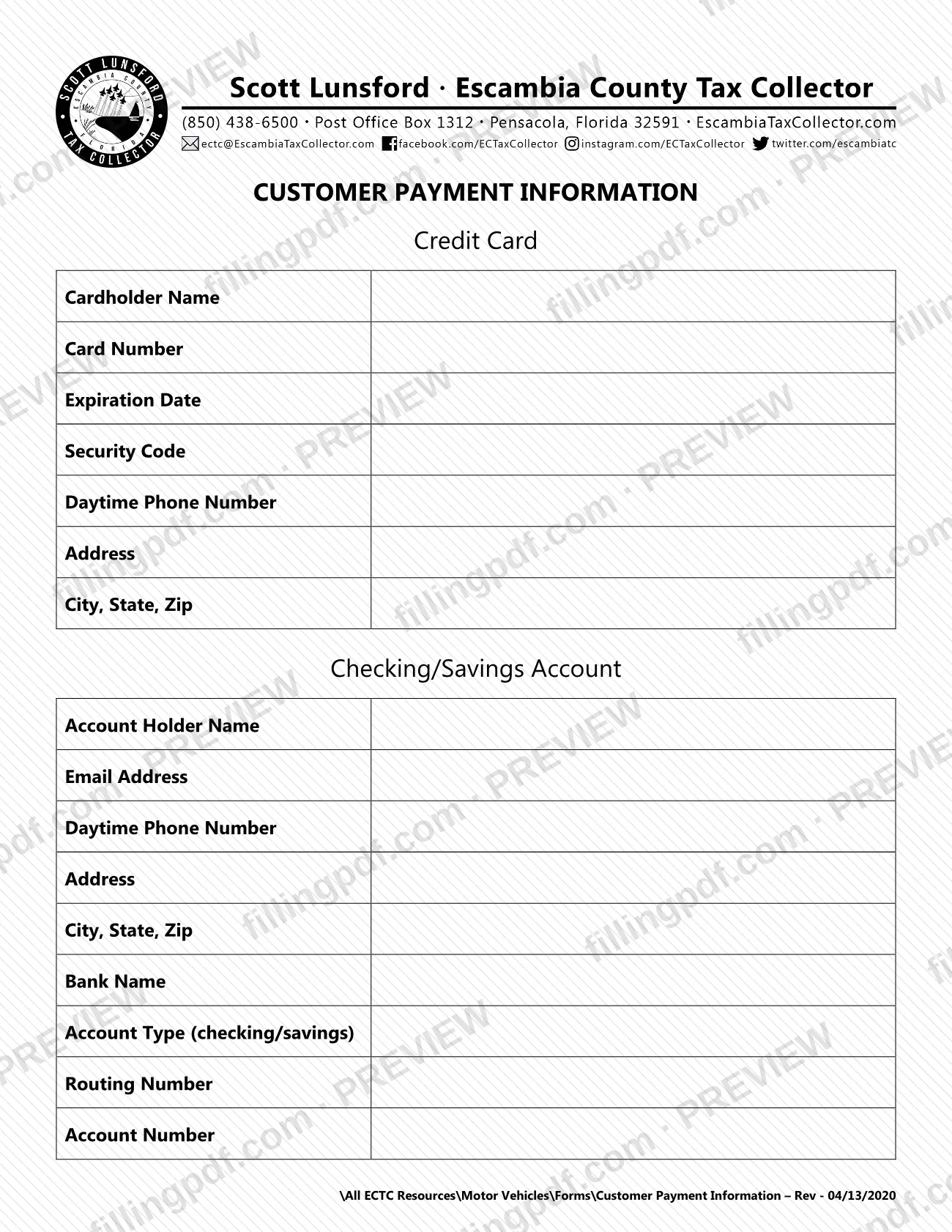
The Credit Card Payment by Mail Form is a one-page payment details form from the Escambia County Tax Collector; the title printed at the top of the PDF is Customer Payment Information. It has one block for a credit card and one block for a checking or savings account, so you can give the office the payment details for the method you choose. On this page you can fill out the form online on FillingPDF and download or print the completed PDF. The original PDF is published by the Escambia County Tax Collector at escambiataxcollector.com.
Last updated
What is Escambia County Credit Card Payment by Mail Form (PDF)?
The Credit Card Payment by Mail Form, printed on the PDF as Customer Payment Information, is the Escambia County Tax Collector form on which a customer writes the credit card or checking/savings account details to be used for a payment sent by mail.
The form has two blocks:
- Credit Card: Cardholder Name, Card Number, Expiration Date, Security Code, Daytime Phone Number, Address and City, State, Zip.
- Checking/Savings Account: Account Holder Name, Email Address, Daytime Phone Number, Address, City, State, Zip, Bank Name, Account Type (checking/savings), Routing Number and Account Number.
A RESET button is printed at the top of the PDF. The footer line gives the revision as Customer Payment Information – Rev - 04/13/2020 and places the file in the agency's Motor Vehicles forms folder.
The form is only a payment information sheet. It does not name the tax, fee or transaction being paid, and it prints no amount, signature line or mailing address, so it works as a companion to whatever payment you are making to the Escambia County Tax Collector.
Who needs to file Escambia County Credit Card Payment by Mail Form (PDF)?
Customers who are paying the Escambia County Tax Collector by mail, and who want to give a credit card or a checking or savings account as the payment method, use this form. The form's name, Credit Card Payment by Mail Form, describes that situation.
- Choose the Credit Card block if you are paying by card. The block asks for the cardholder's name, card number, expiration date and security code, plus a daytime phone number and the cardholder's address.
- Choose the Checking/Savings Account block if you are paying from a bank account. That block asks for the account holder's name, email address, daytime phone number and address, together with the bank name, account type, routing number and account number.
The form prints no eligibility rules and no exclusions. It also prints no signature line and says nothing about whether another person may complete it for you, so questions about who may provide payment details on your behalf go to the Escambia County Tax Collector.
When to file Escambia County Credit Card Payment by Mail Form (PDF)
The form has no due date of its own. It carries your payment details for a payment sent by mail, so it goes out at the time you send that payment, and the deadline that matters is the one that applies to the payment itself. The PDF prints no filing window, renewal cycle or processing time. For the due date of what you are paying, contact the Escambia County Tax Collector through escambiataxcollector.com.
How to fill out Escambia County Credit Card Payment by Mail Form (PDF)
Pick the payment method block
Decide whether you are paying by credit card or from a checking or savings account, and complete the Credit Card or Checking/Savings Account block that matches.
Enter the cardholder name
In the Credit Card block, type the Cardholder Name as it appears on the card.
Enter the card details
Fill in Card Number, Expiration Date and Security Code exactly as shown on the card.
Add cardholder phone and address
Enter a Daytime Phone Number, the Address and City, State, Zip for the cardholder.
Enter the account holder details
In the Checking/Savings Account block, type the Account Holder Name, Email Address, Daytime Phone Number, Address and City, State, Zip.
Enter the bank name and type
Type the Bank Name and the Account Type (checking/savings), writing checking or savings.
Enter routing and account numbers
Fill in the Routing Number and Account Number exactly as they appear for your account.
Review and download the completed PDF
Check each entry against your card or bank records, then download or print the completed PDF from FillingPDF. Send it with your payment as described under How to submit.
How to submit Escambia County Credit Card Payment by Mail Form (PDF)
The form itself names no channel or address. Its title, Credit Card Payment by Mail Form, indicates that it accompanies a payment sent by mail, but the PDF prints no mailing address, P.O. box, portal or phone number.
- Mail: send the completed form with your payment to the address the Escambia County Tax Collector gives for that payment. Confirm the address with the office before you mail the form.
- Agency website: the Escambia County Tax Collector publishes the PDF at https://escambiataxcollector.com/wp-content/uploads/2025/07/Customer-Payment-Information-Form.pdf and its other resources at escambiataxcollector.com.
Because the form holds card or bank account numbers, check that every entry is correct and complete before you print it. The form states no fee, no amount to enter and no status-check method. FillingPDF lets you fill out and download the PDF; submission follows the agency's channels above.
Common mistakes to avoid
- Filling in the Credit Card block without the Security Code or Expiration Date, both of which the form asks for.
- Leaving out the routing number, account number or Account Type (checking/savings) in the Checking/Savings Account block.
- Entering bank account details in the Credit Card block, or card details in the Checking/Savings Account block.
- Skipping the Daytime Phone Number, which both blocks print as a field.
- Leaving out the Email Address when you use the Checking/Savings Account block; only that block asks for it.
- Mailing the form without confirming the mailing address, since the PDF prints none.
- Using a different revision than the one printed on the PDF, Rev - 04/13/2020, without checking the agency's website for a current copy.
Frequently asked questions
What is the Credit Card Payment by Mail Form?
It is a one-page form from the Escambia County Tax Collector, printed as Customer Payment Information, where you write credit card or checking/savings account details for a payment sent by mail. It prints no amount and does not name what is being paid.
What information does the credit card section ask for?
Cardholder Name, Card Number, Expiration Date, Security Code, Daytime Phone Number, Address and City, State, Zip. The form asks for nothing else in that block.
What does the checking/savings section ask for?
Account Holder Name, Email Address, Daytime Phone Number, Address, City, State, Zip, Bank Name, Account Type (checking/savings), Routing Number and Account Number.
Where do I mail the Customer Payment Information form?
The PDF prints no mailing address, so confirm where to send it with the Escambia County Tax Collector, which publishes the form and its other resources at escambiataxcollector.com, before you mail it with your payment.
Can I fill out the Escambia County payment form online?
Yes. You can fill out the PDF online on FillingPDF and download or print it. FillingPDF is an independent service, not the Escambia County Tax Collector, and it does not send the form or your payment; you submit it through the agency's channels.
What revision of the form is this?
The footer prints Customer Payment Information – Rev - 04/13/2020. The PDF is hosted on the Escambia County Tax Collector's website, which is where to check for any newer copy.
Is there a deadline to send this form?
The form prints no deadline. It travels with the payment you mail, so the due date that applies to that payment is the one to meet; the Escambia County Tax Collector can confirm it.
Ready to fill out Escambia County Credit Card Payment by Mail Form (PDF)?
Fill out Escambia County Credit Card Payment by Mail Form (PDF) now