
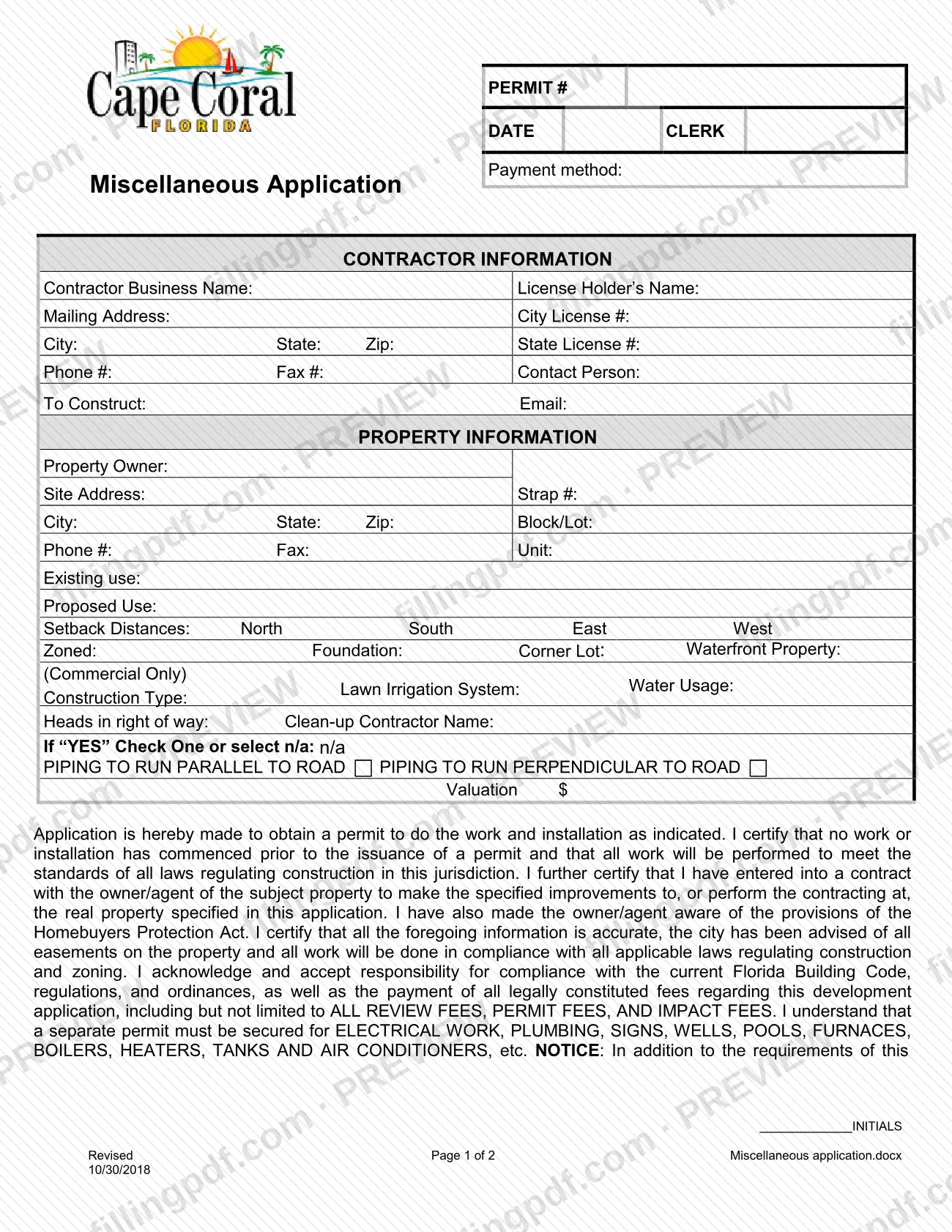
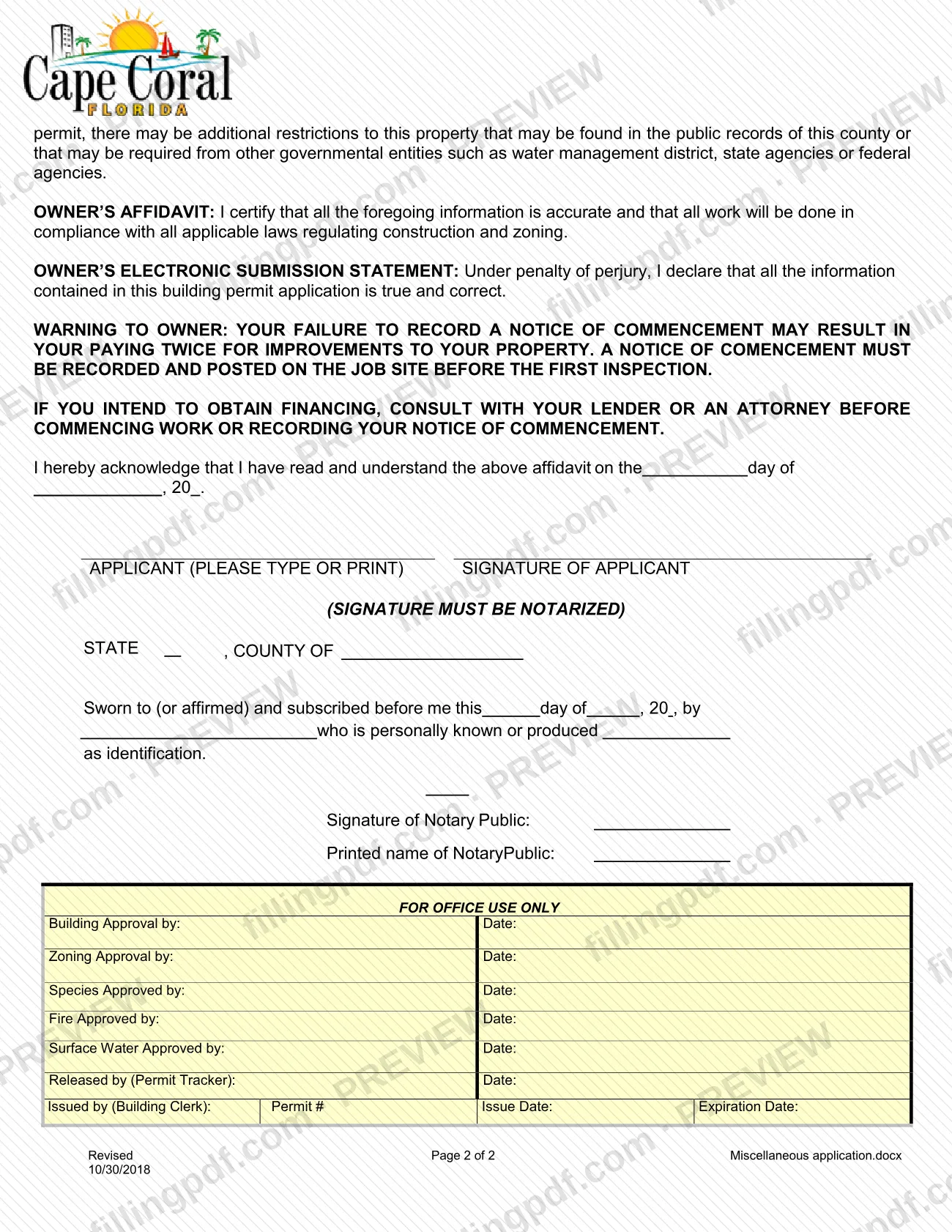
The Application - Miscellaneous (printed on the form as "Miscellaneous Application") is the permit application of the City of Cape Coral Building Division for work that does not use one of the division's other application forms. It is one of the Cape Coral permit applications listed in the city's Permit Document Center, where it appears for project types such as sheds, gazebos, generators and lawn irrigation. On this page you can fill out the form online on FillingPDF and download or print the completed PDF; the form and the city's guidelines are published by the City of Cape Coral.
Last updated
What is Application - Miscellaneous – Cape Coral, FL?
The Application - Miscellaneous is the City of Cape Coral Building Division form on which a contractor applies for a permit to do the work and installation described on the form, for the property and owner identified on it.
The two-page form collects contractor information (business name, license holder, City and State license numbers, contact details), property information (owner, site address, Strap #, Block/Lot, existing and proposed use, setback distances, zoning, foundation, corner lot and waterfront status), a lawn irrigation section, and the project valuation. It then carries the contractor's certification, an owner's affidavit, an owner's electronic submission statement, a warning about recording a notice of commencement, and a notary block.
By signing, the applicant certifies that no work has started before the permit is issued, that the work will meet the laws regulating construction, and that they accept responsibility for compliance with the current Florida Building Code and for payment of all legally constituted fees, including review fees, permit fees and impact fees. The form states that a separate permit must be secured for electrical work, plumbing, signs, wells, pools, furnaces, boilers, heaters, tanks and air conditioners.
The Permit Document Center lists this form alongside other applications, such as Application - Addition/Remodel, Application - Trade, Application - Pool, Application - Marine Improvement and Application - Enclosure/Fence, which are used for other project types. The final block, FOR OFFICE USE ONLY, is completed by the city.
Who needs to file Application - Miscellaneous – Cape Coral, FL?
The main users are contractors who apply for a City of Cape Coral permit for work that falls under the Application - Miscellaneous. The form is written from the contractor's side: the contractor certifies that a contract exists with the owner or agent of the property and that the owner has been made aware of the Homebuyers Protection Act provisions. The property owner also has a part: the owner's affidavit and the notarized signature block.
The city's Permit Document Center lists this application for many project types, including antenna/tower, captains walk, free-standing carport, concrete slab, miscellaneous demolition, fire alarm, fire line, fire sprinkler, fuel tank, garage door replacement, gazebo, generator/transfer switch, lawn irrigation, LP/natural gas system or tank, pergola, solar, shed, shutter/awning, skylight, tiki/chickee hut, walk-in cooler, window/door replacement and wood deck on land.
The form itself says a separate permit must be secured for electrical work, plumbing, signs, wells, pools, furnaces, boilers, heaters, tanks and air conditioners. Other project types, such as additions and remodels, fences and enclosures, pools, marine improvements and re-sod, are listed with different applications, so check the Permit Document Center category for your work before choosing this form.
When to file Application - Miscellaneous – Cape Coral, FL
File the Application - Miscellaneous before any work begins. The form has the applicant certify that no work or installation has commenced before the permit is issued, and the permit is issued by the Building Clerk after the approvals shown in the office-use block.
The form carries its own warning about timing for the notice of commencement: it must be recorded and posted on the job site before the first inspection, and the owner who intends to obtain financing is told to consult a lender or an attorney before starting work or recording it. The Permit Document Center says the Notice of Commencement applies when the value of the project is $2,500 or more for most of the project types that use this application, and $7,500 or more for air conditioning change-outs. The form prints no other deadline and no processing time.
Documents you need
- Notice of Commencement (Revised 8/18/2025): the Permit Document Center lists it with this application and says it applies when the value or cost of the project is $2,500 or more ($7,500 or more for air conditioning change-outs).
- Guideline for your project type, such as the residential or commercial guideline for a shed, gazebo, generator or lawn irrigation: the Permit Document Center lists the guideline with this application.
- Burrowing Owl/Gopher Tortoise Affidavit: listed with this application for project types such as shed, gazebo, pergola, concrete slab, wood deck on land, tiki/chickee hut, lawn irrigation and generator.
- Duct Certification: listed for air conditioning change-outs and described as mandatory when installing a new duct system or modifying an existing one.
- HVAC Data Sheet and Solar Data Sheet: listed for air conditioning change-out work.
- Window/Door/Shutter Worksheet: listed for shutter/awning and window/door replacement; Skylight Data Sheet is listed for skylights.
- Irrigation Worksheet - Residential 1 & 2 Family and the residential irrigation guidelines: listed for lawn irrigation.
- Summary Sheet - Pergola for pergolas, and Shed Placement Examples for sheds: listed with this application for those project types.
How to fill out Application - Miscellaneous – Cape Coral, FL
Check the top of page 1
The PERMIT # and DATE/CLERK entries at the top are for the Building Clerk, who assigns the permit number, so leave them to the city. Note the Payment method line next to them.
Complete Contractor Information
Enter the Contractor Business Name, License Holder's Name, mailing address, City, State, Zip, City License # and State License #. Add Phone #, Fax #, Contact Person and Email.
State the work in To Construct
In the To Construct line, describe the work or installation for which you are applying for the permit.
Enter the Property Information
Give the Property Owner, Site Address, City, State, Zip, Strap #, Block/Lot and Unit, plus the owner's phone and fax.
Describe use and site details
Enter Existing use and Proposed Use, the Setback Distances for North, South, East and West, and Zoned, Foundation, Corner Lot and Waterfront Property. Complete Construction Type, and the entry marked (Commercial Only) when it applies.
Complete the lawn irrigation entries
If the work involves irrigation, enter the Lawn Irrigation System, Water Usage and Heads in right of way, then the Clean-up Contractor Name. If you answer YES, check piping to run parallel or perpendicular to the road, or select n/a.
Enter the Valuation
Write the project value in the Valuation $ line.
Initial the contractor certification
Read the certification that begins "Application is hereby made to obtain a permit" and add your initials in the INITIALS box.
Read the owner's statements
Review the Owner's Affidavit, the Owner's Electronic Submission Statement and the warning about recording a notice of commencement before anyone signs.
Sign before a notary
Enter the day and year, print the applicant's name and sign. The signature must be notarized, so the notary block (state, county, date, identification and the notary's name and signature) is completed at that time.
Review and download the completed PDF
Leave the FOR OFFICE USE ONLY block empty and check every entry. Download or print the completed PDF from FillingPDF and submit it through the City of Cape Coral Building Division's channels.
How to submit Application - Miscellaneous – Cape Coral, FL
The form names no mailing address, online portal, e-mail address or appointment rule, so the channel is not printed on it. It is an application to the City of Cape Coral Building Division, and the city publishes it, with the guidelines for each project type, in its Permit Document Center on the city website.
What the form does show about the process:
- Payment: the top of page 1 has a Payment method line, and the signature block confirms that review fees, permit fees and impact fees apply. The form states no amounts; ask the Building Division for current fees.
- Signature: the applicant's signature must be notarized, so the notary block is completed when the application is signed.
- Approvals: the FOR OFFICE USE ONLY block records building, zoning, species, fire and surface water approvals, release by the Permit Tracker, and issue by the Building Clerk, who assigns the permit number and the issue and expiration dates.
Use the guideline the Permit Document Center lists for your project type to confirm what the division expects with the application. FillingPDF lets you fill out and download the PDF; submission follows the channels of the City of Cape Coral Building Division.
Common mistakes to avoid
- Starting work before the permit is issued; the form has you certify that no work or installation has commenced before issuance.
- Signing without a notary; the form states that the signature of the applicant must be notarized and includes a notary block.
- Using this application for work the form says needs its own permit: electrical work, plumbing, signs, wells, pools, furnaces, boilers, heaters, tanks and air conditioners.
- Failing to record and post a Notice of Commencement before the first inspection; the form warns the owner may end up paying twice for improvements.
- Leaving the Contractor Information block incomplete, such as the City License # or State License # lines.
- Omitting the setback distances (North, South, East, West) or the Strap # in the property block.
- Skipping the lawn irrigation entries (Heads in right of way, piping direction or n/a) when the project involves irrigation.
- Filling in the FOR OFFICE USE ONLY block or the Permit # line, which the city's staff complete.
Frequently asked questions
What is the Cape Coral Application - Miscellaneous used for?
It is the City of Cape Coral Building Division permit application for work listed in the Permit Document Center under this application, such as sheds, gazebos, generators, concrete slabs and lawn irrigation. Completing it asks the city for a permit, which the Building Clerk issues.
Do I need a separate permit for electrical or plumbing work?
The form says yes: a separate permit must be secured for electrical work, plumbing, signs, wells, pools, furnaces, boilers, heaters, tanks and air conditioners. Check the Permit Document Center category for your project to see which application it uses.
Does the signature on the Application - Miscellaneous need a notary?
Yes. The form states that the signature of the applicant must be notarized, and page 2 includes a notary block with state, county, date, identification and the notary's signature and printed name.
Do I need a Notice of Commencement?
The Permit Document Center lists the Notice of Commencement (Revised 8/18/2025) for most project types that use this application, applicable when the project value is $2,500 or more, or $7,500 or more for air conditioning change-outs. The form says it must be recorded and posted before the first inspection.
Are there fees for a Cape Coral miscellaneous permit?
Yes. In the form the applicant accepts payment of all legally constituted fees, including review fees, permit fees and impact fees. The form prints no amounts, so ask the City of Cape Coral Building Division for the current fees.
Can I fill out the Cape Coral permit application online?
You can fill out the PDF online on FillingPDF and download or print it. FillingPDF is independent of the City of Cape Coral and does not submit the application; you deliver it through the Building Division's channels.
Can I start work before the permit is issued?
No. By signing, the applicant certifies that no work or installation has commenced before the permit is issued. The Building Clerk issues the permit after the approvals recorded in the FOR OFFICE USE ONLY block.
Ready to fill out Application - Miscellaneous – Cape Coral, FL?
Fill out Application - Miscellaneous – Cape Coral, FL now