
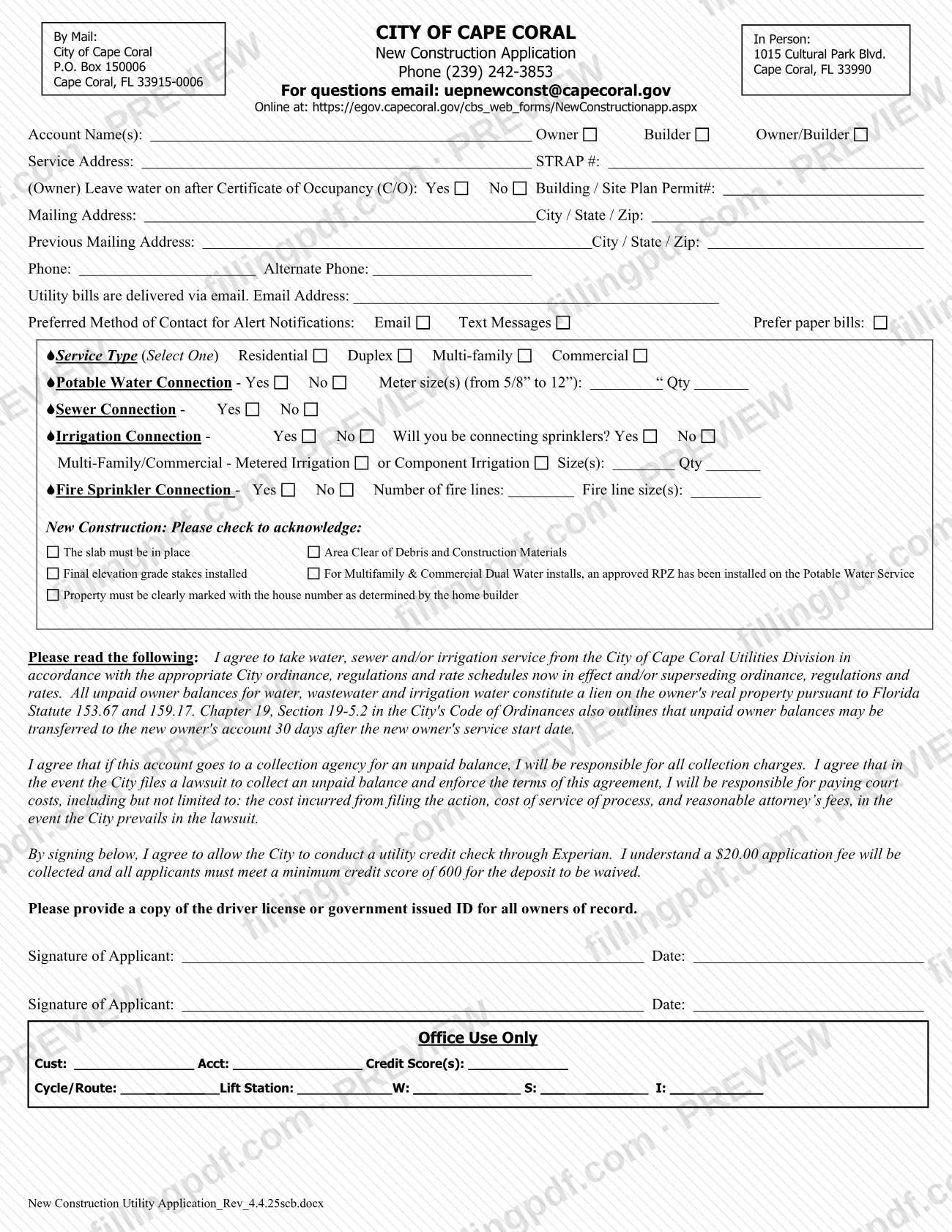
The Application - New Construction Utility Ext, which the city's file calls the New Construction Utility Application, is the City of Cape Coral form for starting utility service at a new construction site: potable water, sewer, irrigation and fire sprinkler connections. If you searched for a Cape Coral permit, note that this is a utility service application, not a building permit; it only asks for the project's Building / Site Plan Permit#. Owners, builders and owner/builders use it, and signing it authorizes a utility credit check. On this page you can fill out the form online on FillingPDF and download or print the completed PDF; the city publishes the original on its Common Forms page at capecoral.gov.
Last updated
What is Application - New Construction Utility Ext – Cape Coral, FL?
The Application - New Construction Utility Ext is the City of Cape Coral form used to request water, sewer, irrigation and fire sprinkler service for a new construction site, and to agree to the city's terms of utility service and to a credit check.
The form collects the account name, whether the applicant is the Owner, Builder or Owner/Builder, the service address, the STRAP # and the Building / Site Plan Permit#. It then asks which service type applies (Residential, Duplex, Multi-family or Commercial) and which connections are needed: potable water with meter sizes, sewer, irrigation, and fire sprinkler lines with their sizes.
By signing, the applicant agrees to take water, sewer and/or irrigation service from the City of Cape Coral Utilities Division under the city ordinance, regulations and rate schedules in effect. The agreement states that unpaid owner balances for water, wastewater and irrigation water constitute a lien on the owner's real property under Florida Statute 153.67 and 159.17, and that under Chapter 19, Section 19-5.2 of the city's Code of Ordinances unpaid owner balances may be transferred to a new owner's account 30 days after the new owner's service start date. It also makes the applicant responsible for collection charges and, if the city prevails in a lawsuit, court costs and reasonable attorney's fees.
The Common Forms page lists other documents separately, such as Application - Utility Extension, Application - Irrigation Service and Application - Utility Permit. This form is the one for new construction utility service. The printed revision is Rev_4.4.25.
Who needs to file Application - New Construction Utility Ext – Cape Coral, FL?
Owners, builders and owner/builders who need City of Cape Coral water, sewer, irrigation or fire sprinkler service at a new construction site use this application. The form's account line offers the options Owner, Builder and Owner/Builder, and the service type is one of Residential, Duplex, Multi-family or Commercial.
- Owners can mark whether to leave water on after the Certificate of Occupancy (C/O).
- Multifamily and commercial applicants answer the metered or component irrigation lines, and the acknowledgment about an approved RPZ on the potable water service applies to Multifamily and Commercial Dual Water installs.
- The form asks for a copy of the driver license or government-issued ID for all owners of record, and it has two Signature of Applicant lines.
This is not a building permit application. It records the Building / Site Plan Permit# but does not issue a permit. Other requests, such as an irrigation service application or a utility extension, have their own documents on the city's Common Forms page.
When to file Application - New Construction Utility Ext – Cape Coral, FL
Submit the application when you are requesting utility service for a new construction project and the site meets the conditions you acknowledge on the form. Those conditions are that the slab is in place, the area is clear of debris and construction materials, final elevation grade stakes are installed, an approved RPZ is on the potable water service for Multifamily and Commercial Dual Water installs, and the property is clearly marked with the house number set by the home builder. No separate due date is printed on the form. The credit check through Experian is authorized when you sign, so complete the signature lines only when you are ready to apply.
Documents you need
- A copy of the driver license or government-issued ID for all owners of record, which the form asks you to provide with the application.
How to fill out Application - New Construction Utility Ext – Cape Coral, FL
Enter account name and role
Write the Account Name(s) and check Owner, Builder or Owner/Builder to show who is applying.
Enter service address and identifiers
Fill in the Service Address, the STRAP # and the Building / Site Plan Permit#. If you are the owner, mark Yes or No for leaving water on after the Certificate of Occupancy (C/O).
Enter your mailing addresses
Complete the Mailing Address and City / State / Zip, then the Previous Mailing Address and its City / State / Zip.
Add phone, email and alerts
Enter Phone, Alternate Phone and Email Address, since the form states utility bills are delivered via email. Choose Email or Text Messages for alert notifications and check Prefer paper bills if it applies.
Select the service type
Under Service Type (Select One), check Residential, Duplex, Multi-family or Commercial.
Complete water and sewer lines
Mark Yes or No for Potable Water Connection and enter the meter size(s), from 5/8" to 12", with the quantity. Then mark Yes or No for Sewer Connection.
Complete the irrigation lines
Mark Yes or No for Irrigation Connection and for whether you will be connecting sprinklers. For Multi-Family/Commercial, enter the metered irrigation or component irrigation size(s) and quantity.
Complete the fire sprinkler lines
Mark Yes or No for Fire Sprinkler Connection, then enter the number of fire lines and the fire line size(s) if you answered Yes.
Check the new construction acknowledgments
Check each box that is true for the site: slab in place, area clear of debris and construction materials, final elevation grade stakes installed, an approved RPZ on the potable water service for Multifamily and Commercial Dual Water installs, and the house number clearly marked.
Read the agreement and sign
Read the paragraphs on service terms, liens, collection costs and the Experian credit check. Sign and date on the Signature of Applicant line, and use the second line if there is a second applicant. Leave the Office Use Only block blank.
Review and download the completed PDF
Check every entry against your permit and property records, then download or print the completed PDF from FillingPDF. Add a copy of the ID for all owners of record and submit through the channels described under How to submit.
How to submit Application - New Construction Utility Ext – Cape Coral, FL
The form lists mail, in-person delivery and an online address; the city's Common Forms page lists this application as accepted in person or via mail.
- By mail: City of Cape Coral, New Construction Application, P.O. Box 150006, Cape Coral, FL 33915-0006.
- In person: 1015 Cultural Park Blvd., Cape Coral, FL 33990.
- Online: the form prints https://egov.capecoral.gov/cbs_web_forms/NewConstructionapp.aspx. Because the Common Forms page names only in person and mail, confirm with the city before relying on the online option.
Include a copy of the driver license or government-issued ID for all owners of record. The form states that an application fee is collected; it does not say how it is paid, so ask the city for the current amount and payment method. Questions go to (239) 242-3853 or [email protected]. FillingPDF lets you fill out and download the PDF; submission follows the channels above.
Common mistakes to avoid
- Leaving out the copy of the driver license or government-issued ID; the form asks for it for all owners of record.
- Checking more than one box under Service Type, which says Select One (Residential, Duplex, Multi-family or Commercial).
- Applying before the slab is in place, the area is clear of debris and construction materials, and final elevation grade stakes are installed.
- Skipping the RPZ acknowledgment on a Multifamily or Commercial Dual Water install, which requires an approved RPZ on the Potable Water Service.
- Not marking the property with the house number set by the home builder, which the form lists among the acknowledgments.
- Leaving the email address blank even though the form says utility bills are delivered via email; mark Prefer paper bills if that applies.
- Expecting the deposit to be waived without meeting the minimum credit score of 600 stated in the credit check paragraph.
- Mailing the form to the 1015 Cultural Park Blvd. street address instead of P.O. Box 150006, which is the mail address printed on the form.
- Signing without reading the agreement on liens, collection charges and court costs, which the signature accepts.
Frequently asked questions
What is the Application - New Construction Utility Ext?
It is the City of Cape Coral form for requesting water, sewer, irrigation and fire sprinkler service at a new construction site. It also records your agreement to the city's utility terms and authorizes a credit check through Experian.
Is this a Cape Coral building permit application?
No. This is a utility service application, not a Cape Coral permit. It asks for the Building / Site Plan Permit# of your project but does not issue a permit. Permits are handled separately from this form.
Do I need to attach ID to the new construction utility application?
Yes. The form asks you to provide a copy of the driver license or government-issued ID for all owners of record. Include it with the application however you deliver it.
Where do I submit the Cape Coral new construction utility application?
By mail to P.O. Box 150006, Cape Coral, FL 33915-0006, or in person at 1015 Cultural Park Blvd., Cape Coral, FL 33990. The form also prints an online address, but the city's Common Forms page lists only in person or mail. Phone: (239) 242-3853.
Is there a fee or credit check with this application?
Yes. The form says the city runs a utility credit check through Experian and collects an application fee. It also says applicants must meet a minimum credit score of 600 for the deposit to be waived. Ask the city for the current fee amount.
What has to be ready at the site before I apply?
You acknowledge on the form that the slab is in place, the area is clear of debris and construction materials, final elevation grade stakes are installed, and the property is marked with the house number. Multifamily and Commercial Dual Water installs also need an approved RPZ on the potable water service.
What happens if the utility balance is not paid?
The agreement says unpaid owner balances are a lien on the owner's real property under Florida Statute 153.67 and 159.17. They may be transferred to the new owner's account 30 days after the new owner's service start date. Collection charges and court costs may also apply.
Can I fill out this form online on FillingPDF?
You can fill out the PDF online on FillingPDF and download or print it. FillingPDF is an independent service, not connected to the City of Cape Coral, and does not submit the form; you deliver it through the city's channels.
Ready to fill out Application - New Construction Utility Ext – Cape Coral, FL?
Fill out Application - New Construction Utility Ext – Cape Coral, FL now