
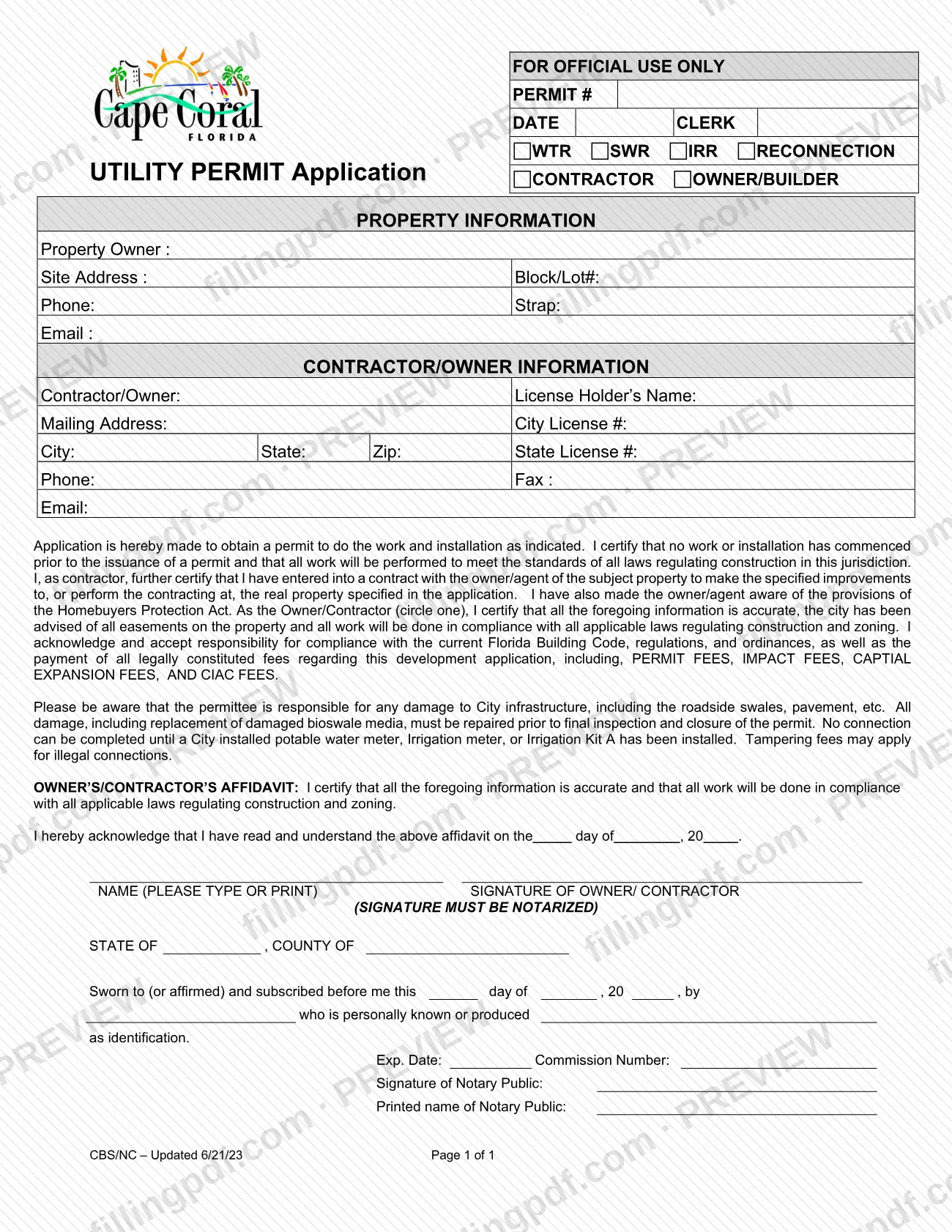
The Application - Utility Permit is the City of Cape Coral form a contractor or owner/builder completes to obtain a permit for utility work and installation at a property. It is one of the Cape Coral permit forms published in the city's Common Forms document center under Customer Billing Services. The form records the property, the contractor or owner, and a sworn affidavit that must be notarized. On this page you can fill out the form online on FillingPDF and download or print the completed PDF; the city publishes the original at the official URL.
Last updated
What is Application - Utility Permit – Cape Coral, FL?
The Application - Utility Permit (printed on the form as "UTILITY PERMIT Application") is a City of Cape Coral, Florida, one-page form on which a contractor or an owner/builder applies for a permit to do utility work and installation at a property.
At the top, the applicant marks the type of work with the options WTR, SWR, IRR or RECONNECTION, and whether the applicant is a CONTRACTOR or an OWNER/BUILDER. The form then collects the property information (owner, site address, Block/Lot#, Strap, phone and email) and the contractor or owner information, including the license holder's name, City License # and State License #.
By signing, the applicant certifies that no work or installation has started before the permit is issued, that the work will meet the laws regulating construction in the jurisdiction, and that the applicant accepts responsibility for compliance with the current Florida Building Code, regulations and ordinances and for payment of the fees it lists: permit fees, impact fees, capital expansion fees and CIAC fees. A contractor also certifies a contract with the owner/agent and that the owner/agent was made aware of the Homebuyers Protection Act. The affidavit must be notarized.
The form appears with the Expansion / New Construction / Irrigation documents on the city's Common Forms page, next to separate applications such as Application - Utility Extension, Application - Irrigation Service and Application - New Construction Utility Ext. This form is not a substitute for those. The block marked "FOR OFFICIAL USE ONLY" (permit number, date, clerk) is for the city.
Who needs to file Application - Utility Permit – Cape Coral, FL?
Contractors and owner/builders who need a permit for utility work or installation at a property in Cape Coral use this application. The form has a choice between CONTRACTOR and OWNER/BUILDER, and the certification is signed by the owner or the contractor (the form asks you to circle which).
- Contractors also certify that they have a contract with the owner/agent of the property for the specified improvements and that the owner/agent was made aware of the Homebuyers Protection Act. The form asks for the license holder's name, a City License # and a State License #.
- Owner/builders complete the same property and owner information and sign as the owner.
- Property owners are named in the Property Information section even when a contractor does the work.
The permittee is responsible for any damage to City infrastructure, including roadside swales and pavement. The form does not describe who may sign on someone else's behalf. The signature itself must be notarized.
When to file Application - Utility Permit – Cape Coral, FL
Submit the application before any work or installation begins. On the form you certify that no work or installation has commenced prior to the issuance of a permit, so the permit comes first.
The form also sets timing conditions that follow the permit: no connection can be completed until a City-installed potable water meter, irrigation meter or Irrigation Kit A has been installed, and any damage to City infrastructure, including replacement of damaged bioswale media, must be repaired before final inspection and closure of the permit. No separate due date is printed on the form.
How to fill out Application - Utility Permit – Cape Coral, FL
Mark the work type and applicant
At the top, mark the type of work with WTR, SWR, IRR or RECONNECTION, and mark CONTRACTOR or OWNER/BUILDER. Leave the FOR OFFICIAL USE ONLY block (PERMIT #, DATE, CLERK) blank.
Enter the property information
Under PROPERTY INFORMATION, enter the Property Owner, Site Address, Block/Lot#, Phone, Strap and Email.
Enter contractor or owner details
Under CONTRACTOR/OWNER INFORMATION, enter the Contractor/Owner, License Holder's Name, Mailing Address, City, State, Zip, Phone, Fax and Email. Add the City License # and State License # where they apply to you.
Read the certifications
Read the application certification, including the Florida Building Code and fee responsibilities, and the notice about damage to City infrastructure and meter requirements before you sign.
Circle Owner or Contractor
In the sentence that begins "As the Owner/Contractor (circle one)", circle the capacity in which you certify. A contractor's certification also covers the contract with the owner/agent and the Homebuyers Protection Act.
Complete the affidavit name and date
Print your name in the NAME (PLEASE TYPE OR PRINT) space and fill in the day, month and year in the acknowledgment line, "on the day of , 20 ".
Sign before a notary
Sign as owner or contractor in front of the notary; the form states the signature must be notarized. Do not sign ahead of time.
Have the notary complete their block
The notary fills in the state and county, the day, month and year, your name, how you were identified, the commission number, expiration date, signature and printed name.
Review and download the completed PDF
Check every entry against your license information and the property record, then download or print the completed PDF from FillingPDF and deliver it as described under How to submit.
How to submit Application - Utility Permit – Cape Coral, FL
The form prints no mailing address, portal or office hours, so it names no submission channel of its own. The City of Cape Coral publishes it on its Common Forms page for Customer Billing Services, under Expansion / New Construction / Irrigation: https://www.capecoral.gov/departments/financial_services/customer_billing_services/common_forms.php. On that page, some neighboring applications are marked "Accepted in person or via mail"; the Application - Utility Permit has no such note, so confirm the delivery method with the city before you send it.
Before delivering it, have the owner's or contractor's signature notarized: the form requires it, and the notary completes the state, county, date, identification, commission number and expiration lines. The form says permit fees, impact fees, capital expansion fees and CIAC fees apply and that the permittee pays them; it gives no amount or payment method, so ask the city. FillingPDF lets you fill out and download the PDF; submission follows the city's channels.
Common mistakes to avoid
- Starting work or installation before the permit is issued, when the form has you certify that no work has commenced before issuance.
- Signing the owner's/contractor's affidavit without a notary; the form states the signature must be notarized.
- Not circling whether the certifying party is the Owner or the Contractor in the certification paragraph.
- Writing in the FOR OFFICIAL USE ONLY block (permit number, date, clerk) instead of leaving it for the city.
- Leaving the notary section blank: state, county, date, identification, commission number and expiration date.
- Trying to complete a connection before a City-installed potable water meter, irrigation meter or Irrigation Kit A is in place.
- Closing the permit with damage to roadside swales, pavement or bioswale media unrepaired; repairs are required before final inspection.
- Using this form for a utility extension or irrigation service request, which have separate applications on the city's Common Forms page.
Frequently asked questions
What is the Cape Coral Application - Utility Permit?
It is a one-page City of Cape Coral application on which a contractor or owner/builder requests a permit for utility work and installation. The applicant marks WTR, SWR, IRR or RECONNECTION, gives property and contractor or owner details, and signs a notarized affidavit.
Does the Utility Permit Application have to be notarized?
Yes. The form states that the signature of the owner/contractor must be notarized, and it includes a notary block with state, county, date, identification, commission number and expiration date. Sign only in front of the notary.
Can I start utility work before the permit is issued?
No. By signing, you certify that no work or installation has commenced prior to the issuance of a permit. The form also says no connection can be completed until a City-installed potable water meter, irrigation meter or Irrigation Kit A has been installed.
Are there fees for a Cape Coral utility permit?
Yes, the form lists permit fees, impact fees, capital expansion fees and CIAC fees that the permittee accepts responsibility for paying, and it notes tampering fees may apply for illegal connections. The form gives no amounts or payment method, so ask the City of Cape Coral.
Who is responsible for damage to roadside swales or pavement?
The permittee. The form says the permittee is responsible for any damage to City infrastructure, including roadside swales and pavement. All damage, including replacement of damaged bioswale media, must be repaired before final inspection and closure of the permit.
Where do I send the Cape Coral Utility Permit Application?
The form prints no address or portal. The city lists it on its Common Forms page for Customer Billing Services, without the "Accepted in person or via mail" note shown on some other applications, so confirm the delivery method with the city.
Can I fill out the Cape Coral Utility Permit Application online?
You can fill out the PDF online on FillingPDF and download or print it. FillingPDF is independent of the City of Cape Coral and does not file or submit the form; you deliver the notarized original through the city's channels.
Is this the same as an Application - Utility Extension or Irrigation Service?
No. The city's Common Forms page lists Application - Utility Permit separately from Application - Utility Extension, Application - Irrigation Service and Application - New Construction Utility Ext. Use the application that matches the work you are requesting.
Ready to fill out Application - Utility Permit – Cape Coral, FL?
Fill out Application - Utility Permit – Cape Coral, FL now