
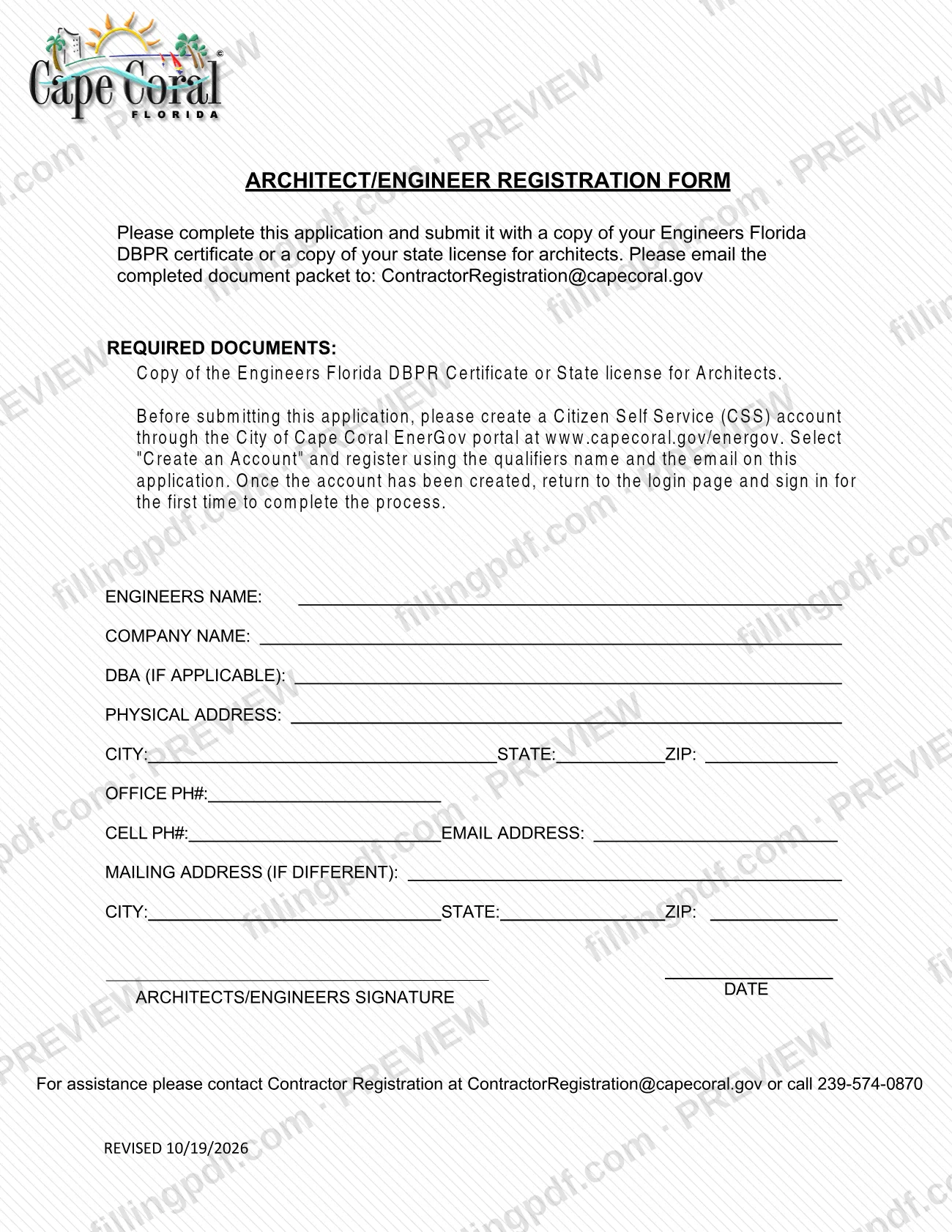
The Architect/Engineer Registration Form is the registration application of the City of Cape Coral Building Division for architects and engineers. It is published among the Contractor Registration documents in the city's Permit Document Center, one of the resources people use for a Cape Coral permit. You complete the form, sign it and email it with a copy of your Florida DBPR engineer certificate or architect state license, a State ID and a Digital Signature Affidavit. On this page you can fill out the form online on FillingPDF and download or print the completed PDF; the original PDF is published by the city.
Last updated
What is Architect/Engineer Registration Form – Cape Coral, FL?
The Architect/Engineer Registration Form is the one-page application that an architect or engineer completes to register with the City of Cape Coral Building Division, submitted by email together with proof of licensure, a State ID and a Digital Signature Affidavit.
The form collects the registrant's identifying and contact details: the engineer's name, company name, DBA (if applicable), physical address, office phone, office fax, cell phone, email address and a mailing address if it differs from the physical address. It ends with a signature and date line for the architect or engineer.
The form sits in the Contractor Registration folder of the city's Permit Document Center. That center organizes the city's public documents into categories such as Affidavits, Documents Required for Permits, Guidelines and Miscellaneous Documents. This form is a registration form, not a permit application: permit applications, such as Application - Miscellaneous or Application - Trade, are separate documents listed for each type of work.
The form names three required documents that travel with it: a copy of the engineer's Florida DBPR certificate or a copy of the state license for an architect, a State ID, and the Digital Signature Affidavit. The city's Contractor Registrations office handles questions about the form.
Who needs to file Architect/Engineer Registration Form – Cape Coral, FL?
Architects and engineers who need to register with the City of Cape Coral Building Division complete this form. The signature line is labeled for the architect or engineer, and the form asks for a company name, so it is meant for a licensed professional registering personally, with the firm's details.
The documents the form requires show who it is for:
- Engineers: a copy of the engineer's Florida DBPR certificate.
- Architects: a copy of the state license for an architect.
Every registrant also provides a State ID and a Digital Signature Affidavit. If you do a business under a different name, fill in the DBA line; if your mailing address is not your physical address, fill in the mailing address block.
The form does not describe any way for another person to sign for the architect or engineer, and it names no other group of users. For questions about whether you need to register, contact Contractor Registrations at [email protected] or 239-574-0870.
Documents you need
- Copy of the engineer's Florida DBPR certificate, required for engineers, or a copy of the state license for an architect, required for architects.
- A copy of your State ID, listed as a required document on the form.
- The Digital Signature Affidavit, listed as a required document on the form.
How to fill out Architect/Engineer Registration Form – Cape Coral, FL
Enter the engineer's name
In the ENGINEERS NAME field, type the name of the engineer or architect registering.
Enter company name and DBA
Write the company name in COMPANY NAME. Fill in DBA (IF APPLICABLE) only if you operate under a different business name.
Enter the physical address
Type the street address in PHYSICAL ADDRESS, then complete the CITY, STATE and ZIP fields that follow it.
Enter phone, fax and email
Fill in OFFICE PH#, OFFICE FAX#, CELL PH# and EMAIL ADDRESS so the Building Division can reach you.
Add a mailing address if different
Complete MAILING ADDRESS (IF DIFFERENT) with its own CITY, STATE and ZIP only if it is not the same as your physical address.
Gather the required documents
Prepare a copy of your Engineers Florida DBPR certificate or architect state license, your State ID and the Digital Signature Affidavit to send with the form.
Sign and date the form
Add the architect's or engineer's signature and the date in the signature block at the bottom.
Review and download the completed PDF
Check every entry, then download or print the completed PDF from FillingPDF and email it with the documents as described under How to submit.
How to submit Architect/Engineer Registration Form – Cape Coral, FL
The form is submitted by email; it prints no mailing address, portal or in-person option.
- Email: send the completed, signed form to [email protected].
- Attachments: include with the form a copy of your Engineers Florida DBPR certificate or a copy of your state license for architects, a State ID and the Digital Signature Affidavit. The form asks that all of these be submitted along with the application.
- Questions: contact Contractor Registrations at [email protected] or call 239-574-0870.
The form names no other channel. FillingPDF lets you fill out and download the PDF; submission follows the channels above.
Common mistakes to avoid
- Emailing the form without a copy of the Engineer's Florida DBPR certificate or, for an architect, a copy of the state license.
- Leaving out the State ID, which the form lists among the required documents.
- Omitting the Digital Signature Affidavit when submitting the form.
- Sending the form unsigned or without a date on the Architects/Engineers signature line.
- Skipping the mailing address block when your mailing address differs from the physical address.
- Leaving out the DBA line when you operate under a business name different from the company name.
- Emailing the package to an address other than [email protected], the one the form gives.
Frequently asked questions
What is the Cape Coral Architect/Engineer Registration Form?
It is the City of Cape Coral Building Division's registration form for architects and engineers. You fill in your name, company and contact details, sign it and email it with your license or certificate, a State ID and a Digital Signature Affidavit.
Where do I send the Architect/Engineer Registration Form?
Email it to [email protected]. The form gives no mailing address or in-person option. For help, contact Contractor Registrations at that same address or call 239-574-0870.
What documents do I need with the Architect/Engineer Registration Form?
Three: a copy of the engineer's Florida DBPR certificate or, for an architect, a copy of the state license; a State ID; and a Digital Signature Affidavit. The form says to submit them along with the completed application.
Can I fill out the Architect/Engineer Registration Form online?
You can fill out the PDF online on FillingPDF and download or print it. FillingPDF is independent of the City of Cape Coral and does not send the form; you email it to the Building Division yourself.
Do I have to sign the Architect/Engineer Registration Form?
Yes. The form ends with a signature and date line for the architect or engineer. It does not describe anyone else signing on the registrant's behalf.
Is this form the same as a Cape Coral building permit application?
No. This is a registration form for architects and engineers. Permit applications, such as Application - Miscellaneous or Application - Trade, are separate documents the Permit Document Center lists for each type of work.
Who do I contact with questions about this form?
Contact Contractor Registrations at [email protected] or call 239-574-0870. Both are printed at the bottom of the form for assistance.
Ready to fill out Architect/Engineer Registration Form – Cape Coral, FL?
Fill out Architect/Engineer Registration Form – Cape Coral, FL now