
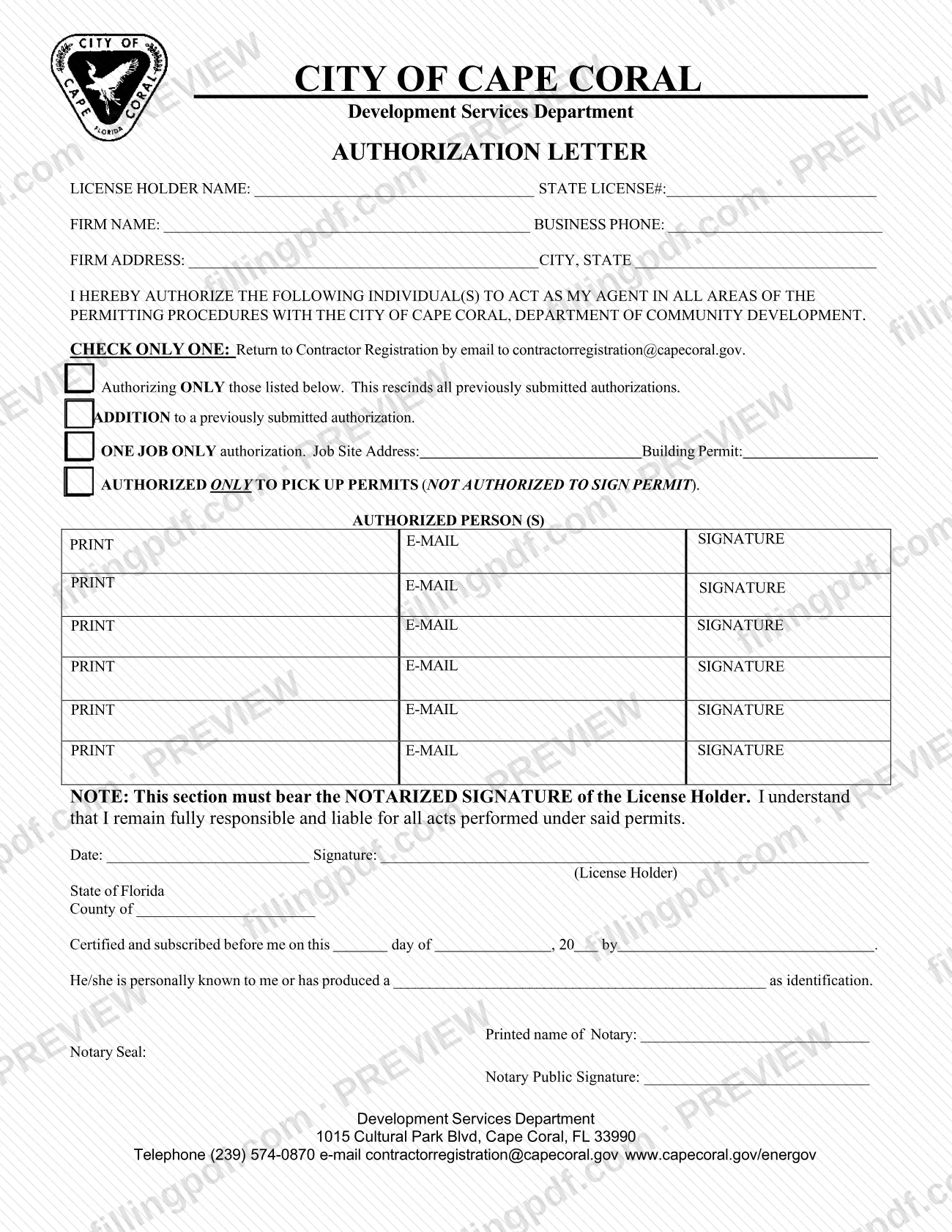
The Authorization Letter is the City of Cape Coral Development Services Department form that a state license holder uses to name the individuals who may act as an agent in permitting procedures. It is one of the documents behind a Cape Coral permit when someone other than the license holder will deal with the city. The letter must carry the license holder's notarized signature and is returned to Contractor Registration by email. On this page you can fill out the form online on FillingPDF and download or print the completed PDF; the city publishes the original at capecoral.gov.
Last updated
What is Authorization Letter – Cape Coral, FL?
The Authorization Letter is the City of Cape Coral Development Services Department form on which a state license holder names the individuals authorized to act as the license holder's agent in the permitting procedures with the City of Cape Coral.
The letter identifies the license holder (name and state license number) and the firm (name, business phone, address, city and state). It then lists the authorized persons, each with a printed name, an e-mail address and a signature line. The license holder chooses one of four scopes: authorizing only the people listed, which rescinds all previously submitted authorizations; adding people to an authorization already on file; authorizing for one job only, with the job site address and building permit; or authorizing people only to pick up permits.
The pick-up-only option states that the person is not authorized to sign a permit. The license holder's signature must be notarized, and the form states that the license holder remains fully responsible and liable for all acts performed under the permits.
The city lists the letter, described as authorizing individual(s) to act as agent, among the Miscellaneous Documents of its Permit Document Center. It is not a permit application and does not itself issue a permit.
Who needs to file Authorization Letter – Cape Coral, FL?
The license holder, meaning the person whose state license number appears on the form, completes and signs the letter when he or she wants one or more individuals to act as an agent in permitting with the City of Cape Coral.
How the letter is used depends on the box checked:
- Authorizing ONLY those listed: replaces every authorization previously submitted.
- ADDITION: adds people to an authorization already submitted.
- ONE JOB ONLY: limits the agent to a single job site and building permit.
- AUTHORIZED ONLY TO PICK UP PERMITS: the person may collect permits but may not sign one.
The authorized persons are listed on the form with their printed name, e-mail and signature, but the form does not make them the signer of the letter. Only the license holder signs in the notarized section, and a notary completes the notary block. The form allows up to six authorized persons on one page.
When to file Authorization Letter – Cape Coral, FL
Submit the letter whenever you, as license holder, want to authorize agents for permitting with the City of Cape Coral or change who is authorized. The form prints no deadline of its own.
Choose the box that fits the moment: use the first option to set a new list that cancels earlier authorizations, the ADDITION option to add a person without cancelling the existing list, the ONE JOB ONLY option for a single job site and building permit, or the pick-up-only option for someone who will only collect permits. Because the signature must be notarized, arrange the notary before you send it. The city's Permit Document Center lists this letter as revised 2/2026, so use the current version.
Documents you need
- Identification for the notary, unless the notary personally knows you: the form has a line for the identification you produced when the license holder's signature is notarized.
How to fill out Authorization Letter – Cape Coral, FL
Enter the license holder details
Fill in LICENSE HOLDER NAME and STATE LICENSE# at the top of the form.
Enter the firm information
Write the FIRM NAME, BUSINESS PHONE, FIRM ADDRESS and CITY, STATE.
Check one authorization option
Check only one box: authorizing ONLY those listed (rescinds earlier authorizations), ADDITION to a previously submitted authorization, ONE JOB ONLY, or authorized only to pick up permits.
Add job details if one job only
If you chose ONE JOB ONLY, enter the Job Site Address and the Building Permit number in the spaces beside that option.
List the authorized persons
On each row under AUTHORIZED PERSON(S), enter the person's printed name and e-mail address. Each person also signs on their line.
Date and sign as license holder
Enter the Date and sign above License Holder. Sign in front of the notary, because this section must bear your notarized signature.
Complete the notary block
Enter the county for State of Florida. The notary fills in the day, month, year and your name, marks whether you are personally known or enters the identification produced, then adds the printed name, seal and signature.
Review and download the PDF
Check that only one box is marked and every authorized person is listed. Then download or print the completed PDF from FillingPDF, have it notarized and send it as described under How to submit.
How to submit Authorization Letter – Cape Coral, FL
The form names one channel: return the completed letter to Contractor Registration by email at [email protected].
- Email: send the signed and notarized letter to [email protected].
- Questions: the form prints the Development Services Department contact details: 1015 Cultural Park Blvd, Cape Coral, FL 33990; telephone (239) 574-0870; www.capecoral.gov/energov.
Make sure the notary section is complete before sending, since the form says the license holder's section must bear a notarized signature. The form states no fee and no processing time. FillingPDF lets you fill out and download the PDF; submission follows the channels above.
Common mistakes to avoid
- Checking more than one authorization box; the form says CHECK ONLY ONE.
- Choosing the "Authorizing ONLY those listed" box to add one person, which rescinds all previously submitted authorizations; use ADDITION instead.
- Sending the letter without the license holder's notarized signature, which the form requires in that section.
- Checking the pick-up-only box for someone who must sign permits; that option states the person is not authorized to sign a permit.
- Choosing ONE JOB ONLY but leaving the Job Site Address and Building Permit blank.
- Listing an authorized person without a printed name, e-mail address or signature on the line provided.
- Leaving the State License # or the firm details blank in the header section.
- Returning the letter somewhere other than the Contractor Registration email printed on the form.
Frequently asked questions
What is the Cape Coral Authorization Letter used for?
It is the City of Cape Coral Development Services form on which a state license holder names individuals who may act as the license holder's agent in permitting procedures. The license holder chooses the scope and signs before a notary.
Does the Authorization Letter have to be notarized?
Yes. The form says the license holder section must bear the notarized signature of the license holder. It includes a State of Florida notary block with county, identification, notary name, seal and signature.
Which box do I check to add an agent without cancelling the others?
Check ADDITION to a previously submitted authorization. The first option, Authorizing ONLY those listed, rescinds all previously submitted authorizations, so use it only when you want the new list to replace the old one.
Can someone else pick up my Cape Coral permit for me?
Yes, if you list them and check AUTHORIZED ONLY TO PICK UP PERMITS. That option states the person is not authorized to sign a permit. For anyone who needs to act more broadly, use one of the other boxes.
Can I authorize an agent for a single job only?
Yes. Check ONE JOB ONLY and enter the Job Site Address and the Building Permit number on the form. The authorization is then limited to that job.
Where do I send the Authorization Letter?
The form says to return it to Contractor Registration by email at [email protected]. The Development Services Department telephone number printed on the form is (239) 574-0870.
Does the license holder stay responsible after authorizing an agent?
Yes. The form states that the license holder understands that he or she remains fully responsible and liable for all acts performed under the permits. Authorizing an agent does not transfer that responsibility.
Can I fill out the Cape Coral Authorization Letter online?
You can fill out the PDF online on FillingPDF and download or print it. FillingPDF is an independent service and does not send the letter to the city; you still need the notarization and the email submission.
Ready to fill out Authorization Letter – Cape Coral, FL?
Fill out Authorization Letter – Cape Coral, FL now