
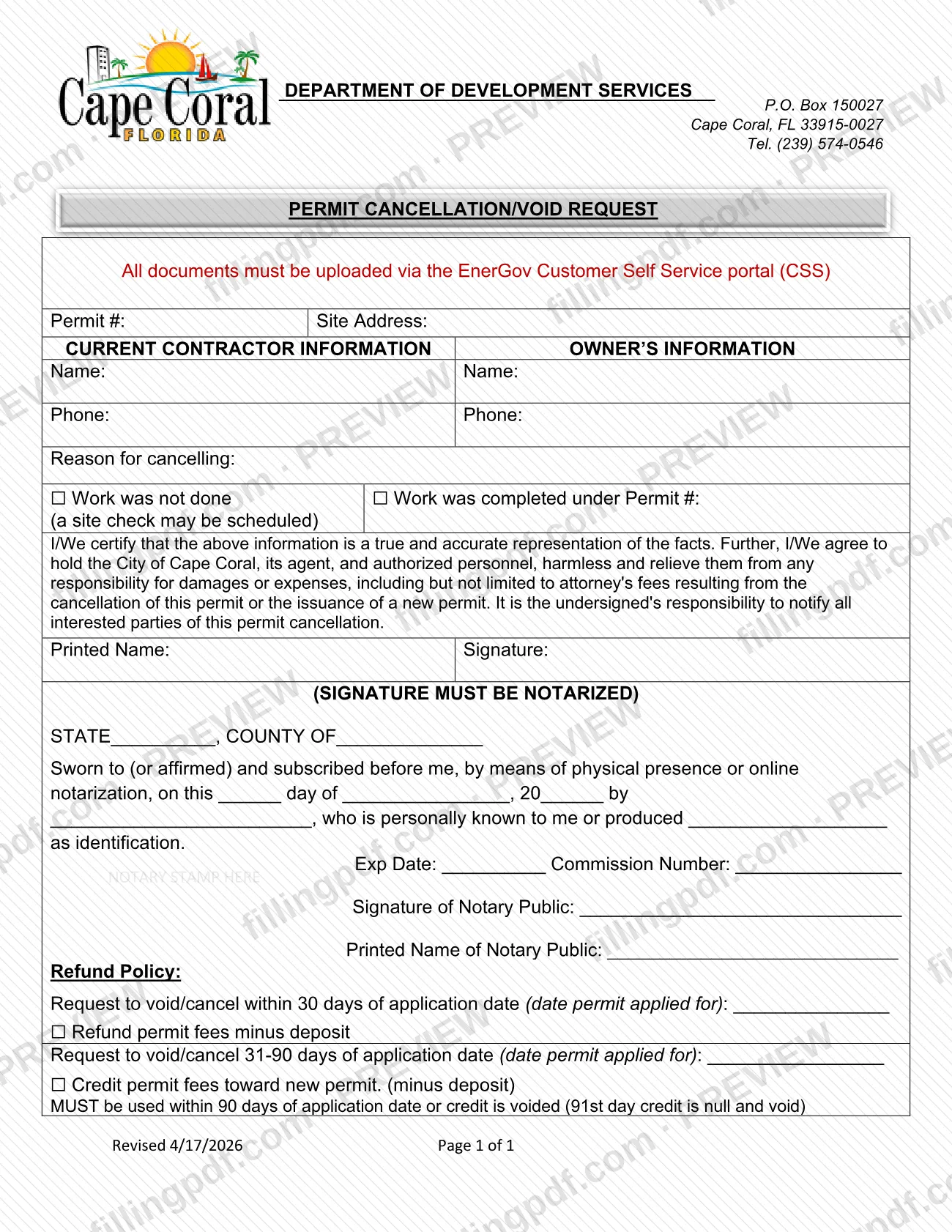
The Cancellation Form-Permit, printed on the page as the PERMIT CANCELLATION/VOID REQUEST, is the City of Cape Coral, Florida, form used to ask the city to cancel or void a permit. It is one of the Cape Coral permit forms in the city's Permit Document Center, and it is used by the contractor or owner on the permit. On FillingPDF you can fill out the form online and download or print the completed PDF. The city directs that all documents be uploaded through the EnerGov Customer Self Service portal (CSS), so the form is not delivered through this site.
Last updated
What is Cancellation Form-Permit – Cape Coral, FL?
The PERMIT CANCELLATION/VOID REQUEST is a one-page City of Cape Coral form, headed Department of Development Services, with which a permit holder asks the city to cancel or void a permit and, depending on timing, to refund or credit the permit fees.
The form identifies the permit by its permit number and site address and collects the name and phone number of the current contractor and of the owner. It then asks for the reason for cancelling. You mark one of two boxes: Work was not done (the form adds that a site check may be scheduled) or Work was completed under Permit #, followed by the number of the permit under which the work was done.
The signer certifies that the information is true and accurate and agrees to hold the City of Cape Coral, its agents and authorized personnel harmless from damages or expenses, including attorney's fees, that result from the cancellation or from the issuance of a new permit. The signature must be notarized, and the form includes a notary block.
A Refund Policy section at the bottom ties the money outcome to the date the permit was applied for: a refund of permit fees minus the deposit if the request is made within 30 days, or a credit toward a new permit (minus the deposit) if it is made 31 to 90 days after the application date. The printed revision is Revised 4/17/2026.
Who needs to file Cancellation Form-Permit – Cape Coral, FL?
The form is for the people named on it: the current contractor and the owner of a property with a Cape Coral permit that is no longer needed, or whose work was done under a different permit. The form has an information block for each of them, with a name and phone number.
Use it in one of the two situations the form lists:
- The work covered by the permit was not done.
- The work was completed under another permit, whose number you enter on the form.
The certification is written for "I/We," so the form allows for more than one person to sign. The printed name and signature must belong to the person or persons certifying the request, and that signature must be notarized. The form does not describe a representative signing for someone else, so ask the city at (239) 574-0546 if someone other than the contractor or owner will sign. The signer is also responsible for notifying all interested parties of the cancellation.
When to file Cancellation Form-Permit – Cape Coral, FL
Submit the request when you decide a permit will not be used, because the work was not done or was completed under another permit. The form prints no fixed deadline, but the Refund Policy makes timing matter, and it counts from the date the permit was applied for.
- Request within 30 days of the application date: the form offers a refund of permit fees minus the deposit.
- Request 31 to 90 days after the application date: the form offers a credit of permit fees toward a new permit, minus the deposit.
- A credit must be used within 90 days of the application date. On the 91st day the credit is null and void.
The form does not state what happens to requests made after day 90, and it gives no processing time. Questions can go to the department at (239) 574-0546.
How to fill out Cancellation Form-Permit – Cape Coral, FL
Enter permit number and site address
At the top, write the Permit # and the Site Address of the permit you want cancelled or voided.
Enter current contractor information
In the Current Contractor Information block, write the contractor's name and phone number.
Enter the owner's information
In the Owner's Information block, write the owner's name and phone number.
Mark the reason for cancelling
Check Work was not done (a site check may be scheduled) or Work was completed under Permit # and enter that permit number.
Read the certification
The certification says the information is true and accurate and that you hold the City of Cape Coral harmless. It also makes you responsible for notifying all interested parties.
Print your name and sign
Write your Printed Name and Signature. The form states the signature must be notarized, so sign before the notary.
Complete the notary block
The notary fills in the state, county, day, month and year, the signer's name, how the signer was identified, the expiration date, the commission number, the notary stamp, and the notary's signature and printed name.
Complete the Refund Policy section
Enter the date the permit was applied for and check the box for a refund (within 30 days) or a credit (31-90 days). The form does not say who fills this section, so ask the department at (239) 574-0546 if unsure.
Review and download the completed PDF
Check the permit number, address, reason box and notarization. Download or print the completed PDF from FillingPDF and upload it through the EnerGov Customer Self Service portal as described under How to submit.
How to submit Cancellation Form-Permit – Cape Coral, FL
The form states one channel: all documents must be uploaded through the EnerGov Customer Self Service portal (CSS). The form does not print the portal's web address, so use the CSS link on the City of Cape Coral website.
- Online upload (CSS): complete the form, have the signature notarized, and upload the signed and notarized request through the portal.
- Contact details on the form: Department of Development Services, P.O. Box 150027, Cape Coral, FL 33915-0027; telephone (239) 574-0546. The form prints these in its header, but it does not give them as a place to send the request.
Before you upload, check that the permit number and site address are filled in, that one reason box is marked, and that the notary block is complete. Ask the department about any fee or refund amount, since the form gives none. FillingPDF lets you fill out and download the PDF; submission follows the channels above.
Common mistakes to avoid
- Submitting the request without a notarized signature; the form states the signature must be notarized.
- Leaving the notary block incomplete: state, county, date, the signer's name, identification type, expiration date, commission number and stamp.
- Marking Work was completed under Permit # without entering that permit number.
- Sending the request outside the EnerGov Customer Self Service portal, when the form says all documents must be uploaded there.
- Expecting a refund when the request is made 31 to 90 days after the application date; the form offers only a credit toward a new permit, minus the deposit, in that window.
- Not using the credit within 90 days of the application date; on the 91st day it is null and void.
- Not notifying interested parties of the cancellation, which the form makes the signer's responsibility.
- Leaving the permit number or site address blank, so the city cannot identify the permit.
Frequently asked questions
How do I cancel a Cape Coral building permit?
Complete the Permit Cancellation/Void Request with the permit number, site address, contractor and owner information and the reason. Have the signature notarized, then upload the form through the EnerGov Customer Self Service portal, as the form directs.
Does the Cape Coral permit cancellation form have to be notarized?
Yes. The form states the signature must be notarized and includes a notary block. The notary section says the statement was sworn to or affirmed and subscribed before the notary, by physical presence or online notarization.
Can I get a refund when I cancel a Cape Coral permit?
It depends on timing. A request within 30 days of the application date is offered a refund of permit fees minus the deposit. The form gives no amounts, so contact the Department of Development Services at (239) 574-0546 for them.
What happens if I cancel 31 to 90 days after applying for the permit?
The form offers a credit of permit fees toward a new permit, minus the deposit, instead of a refund. The credit must be used within 90 days of the application date; on the 91st day it is null and void.
Where do I send the Cape Coral permit cancellation request?
The form says all documents must be uploaded through the EnerGov Customer Self Service portal (CSS). The P.O. Box printed in its header is the department's contact address and is not given as a delivery point for the request.
What reasons can I give for cancelling a permit?
The form lists two: the work was not done, in which case a site check may be scheduled, or the work was completed under another permit, whose permit number you enter on the form.
Can I fill out the Cape Coral permit cancellation form online?
You can fill out the PDF online on FillingPDF and download or print it. FillingPDF is an independent service and does not submit the request to the city; you still upload the notarized form through the city's portal.
Ready to fill out Cancellation Form-Permit – Cape Coral, FL?
Fill out Cancellation Form-Permit – Cape Coral, FL now