
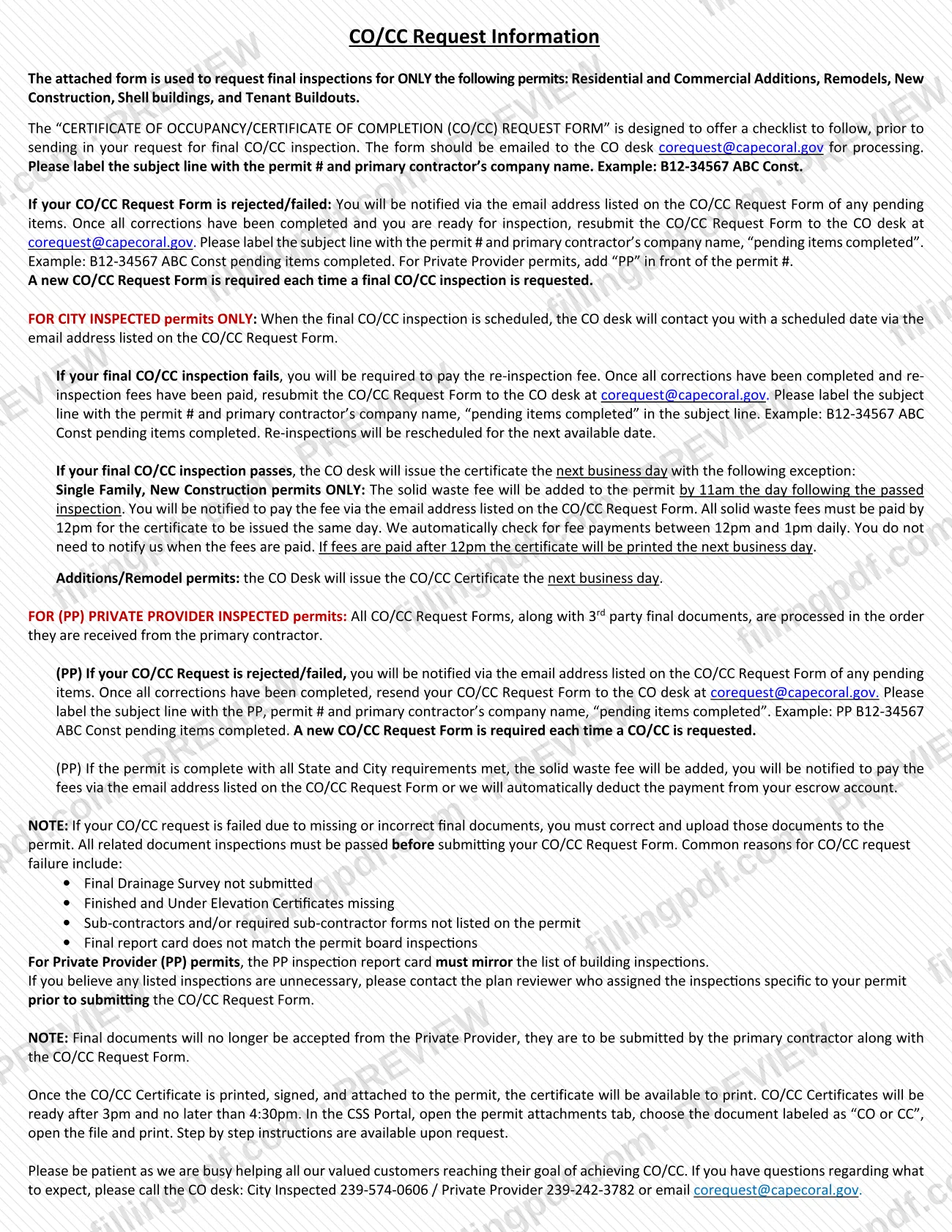
The Certificate of Occupancy/Certificate of Completion Request Form (CO/CC Request Form) is the checklist the City of Cape Coral Building Division uses to start the final inspection and certificate for a building permit. It is one of the Cape Coral permit documents listed in the city's Permit Document Center, and it covers additions, remodels, new construction, shell buildings and tenant buildouts. On this page you can fill out the form online on FillingPDF and download or print the completed PDF; the form is published by the city, and the request is emailed to the CO desk.
Last updated
What is Certificate of Occupancy/Certificate of Completion Request Form – Cape Coral, FL?
The Certificate of Occupancy/Certificate of Completion Request Form is the City of Cape Coral Building Division form used to request the final inspection, and the resulting Certificate of Occupancy or Certificate of Completion (CO/CC), for a building permit.
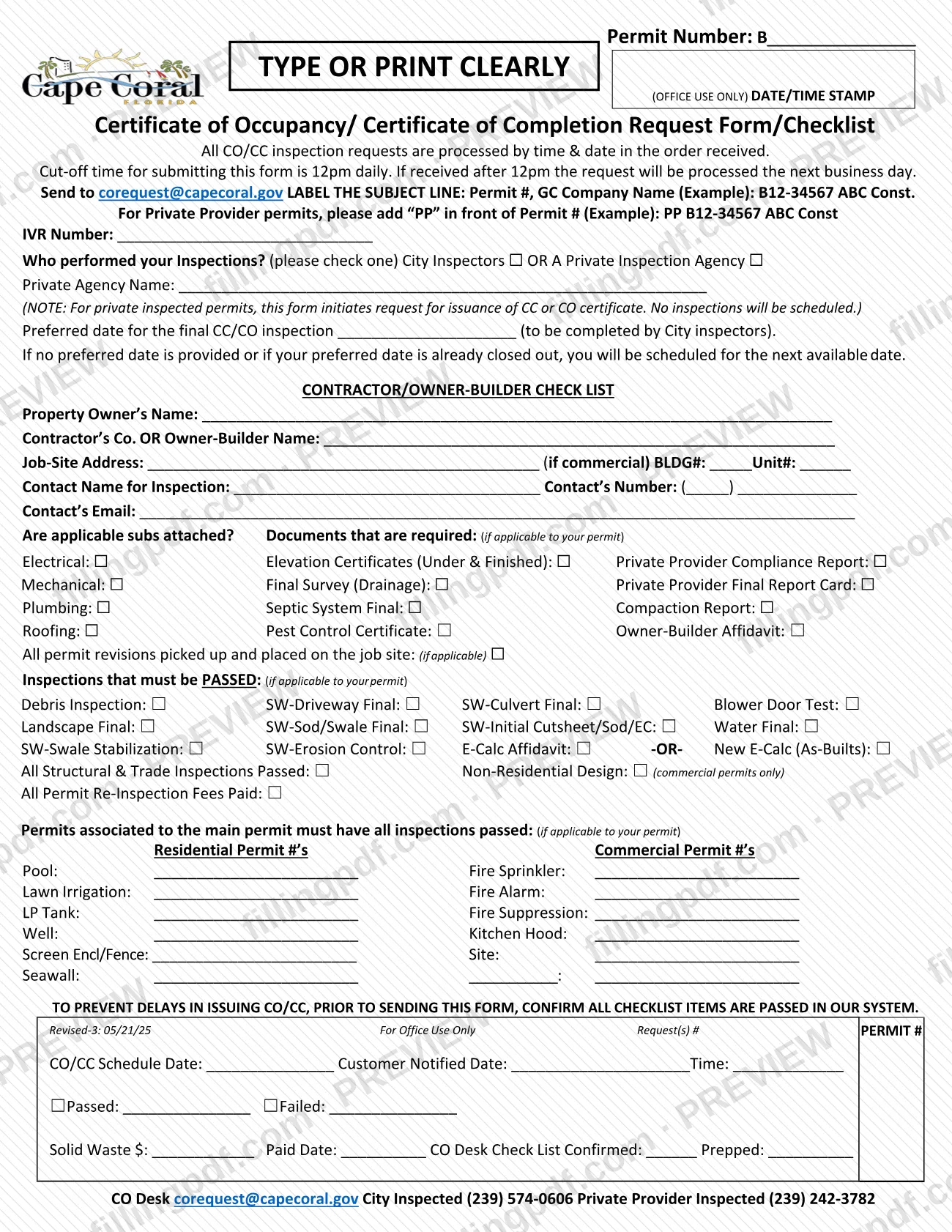
The form is also a checklist. Before you send it, you confirm that the subcontractor forms and final documents are attached to the permit, that the listed inspections have passed, that any associated permits have all inspections passed, and that re-inspection fees are paid. The city says all checklist items must show as passed in its system before the form is sent, to prevent delays.
It applies only to these permit types: residential and commercial additions, remodels, new construction, shell buildings and tenant buildouts. It works differently by inspection type. On a City inspected permit, the form requests a final inspection date. On a Private Provider (PP) inspected permit, it starts the request to issue the certificate and no inspections are scheduled.
A new form is required each time a final CO/CC inspection or certificate is requested. The bottom of the form is an Office Use Only block for the CO desk (schedule date, passed or failed, solid waste fee), which you do not complete.
Who needs to file Certificate of Occupancy/Certificate of Completion Request Form – Cape Coral, FL?
The primary contractor, or the owner-builder, on a permit for a residential or commercial addition, remodel, new construction, shell building or tenant buildout uses this form to request the final CO/CC inspection and certificate.
- City inspected permits: the form requests a final inspection, and you may enter a preferred date.
- Private Provider (PP) inspected permits: the form initiates issuance of the CC or CO certificate. The primary contractor submits the final documents with the form; the city no longer accepts final documents from the Private Provider.
Do not use this form for other permit types: the city states it is for ONLY the permits listed above. If you think a listed inspection is unnecessary for your permit, contact the plan reviewer who assigned the inspections before you submit the form.
When to file Certificate of Occupancy/Certificate of Completion Request Form – Cape Coral, FL
Send the form when the work is finished and every checklist item shows as passed in the city's system. Sending it earlier risks a rejection.
The daily cut-off for submitting the form is 12pm. A request received after 12pm is processed the next business day, and requests are processed in the order received by time and date.
A new form is required each time a final CO/CC inspection or certificate is requested, including after a rejection or failed inspection. In that case, once the pending items are corrected (and re-inspection fees paid, on a failed City inspection), resubmit the form with "pending items completed" in the subject line.
After a passed City inspection, the CO desk issues the certificate the next business day. For Single Family New Construction permits only, the solid waste fee is added to the permit by 11am the day after the passed inspection. If it is paid by 12pm, the certificate is issued that day; otherwise it is printed the next business day.
Documents you need
- Subcontractor forms for Electrical, Mechanical, Plumbing and Roofing, attached to the permit if those trades apply to your permit.
- Elevation Certificates (Under & Finished), if applicable to your permit; missing certificates are a common reason for failure.
- Final Survey (Drainage), if applicable; a missing Final Drainage Survey is a listed reason for failure.
- Septic System Final and Pest Control Certificate, if applicable to your permit.
- Compaction Report and Owner-Builder Affidavit, if applicable to your permit.
- For Private Provider permits: the Private Provider Compliance Report and the Private Provider Final Report Card, which must mirror the list of building inspections.
- Any corrected or missing final documents, uploaded to the permit before you resubmit after a failed request.
- Permit numbers of associated permits (for example pool, lawn irrigation, fire sprinkler, site), each with all inspections passed, if they apply.
How to fill out Certificate of Occupancy/Certificate of Completion Request Form – Cape Coral, FL
Enter the permit number
At the top, complete Permit Number: B________ with the permit you are closing out. Type or print clearly.
Say who performed inspections
Check City Inspectors or A Private Inspection Agency, and enter the Private Agency Name if applicable. Enter the IVR Number in its field.
Add a preferred inspection date
For City inspected permits, enter the preferred date for the final CC/CO inspection. If you give none, or the date is closed out, you are scheduled for the next available date.
Enter owner and contractor details
Complete Property Owner's Name, Contractor's Co. OR Owner-Builder Name and Job-Site Address. For commercial permits add the BLDG# and Unit#.
Add the inspection contact
Enter the Contact Name for Inspection, Contact's Number and Contact's Email. The CO desk uses this email for notices, so check it carefully.
Check attached subs and documents
Mark each applicable trade (Electrical, Mechanical, Plumbing, Roofing) and each required document, such as Elevation Certificates, Final Survey (Drainage), Septic System Final, Pest Control Certificate, the Private Provider reports, Compaction Report or Owner-Builder Affidavit. Mark the revisions box if permit revisions were picked up and placed on the job site.
Confirm passed inspections
Check each inspection that applies and has passed, such as Debris Inspection, the SW (sidewalk/site work) finals, Landscape Final, Blower Door Test, Water Final and E-Calc items. Check All Structural & Trade Inspections Passed, Non-Residential Design (commercial only) and All Permit Re-Inspection Fees Paid.
List associated permit numbers
Write the permit number for each associated permit, in the Residential column (Pool, Lawn Irrigation, LP Tank, Well, Screen Encl/Fence, Seawall) or the Commercial column (Fire Sprinkler, Fire Alarm, Fire Suppression, Kitchen Hood, Site). Each must have all inspections passed.
Leave the office block blank
Do not complete the Office Use Only date/time stamp or the block at the bottom of the form; the CO desk uses them.
Review and download the completed PDF
Confirm all checklist items are passed in the city's system, then download or print the completed PDF from FillingPDF. Email it as described under How to submit.
How to submit Certificate of Occupancy/Certificate of Completion Request Form – Cape Coral, FL
Email is the only channel the form gives: send the completed form to the CO desk at [email protected].
- Subject line: enter the permit number and the primary contractor's company name, for example B12-34567 ABC Const. For Private Provider permits, add "PP" in front of the permit number, for example PP B12-34567 ABC Const.
- Resubmission: after a rejection or failed inspection, use the same subject line plus "pending items completed".
- Final documents: upload corrected or missing final documents to the permit before you submit the form.
- Notices: the CO desk contacts you at the email address listed on the form, about pending items, a scheduled inspection date and the solid waste fee.
- Fees: a re-inspection fee applies after a failed City inspection, and a solid waste fee applies on certain permits. The city's form gives no amounts, so ask the CO desk. Private Provider permits may have the payment deducted from an escrow account.
- Getting the certificate: after it is printed, signed and attached, open the permit's attachments tab in the CSS Portal, choose the document labeled "CO or CC" and print it. Certificates are ready after 3pm and no later than 4:30pm.
Questions go to the CO desk: City Inspected 239-574-0606, Private Provider 239-242-3782. FillingPDF lets you fill out and download the PDF; submission follows the channels above.
Common mistakes to avoid
- Using the form for a permit type it does not cover; it is only for additions, remodels, new construction, shell buildings and tenant buildouts.
- Sending the form before every checklist item shows as passed in the city's system.
- Submitting after the 12pm cut-off and expecting same-day processing; late requests are processed the next business day.
- Leaving the permit number and primary contractor's company name out of the subject line, or omitting "PP" on Private Provider permits.
- Reusing an earlier form instead of sending a new one each time a CO/CC is requested.
- Omitting the Final Drainage Survey or the Finished and Under Elevation Certificates.
- Listing sub-contractors or required sub-contractor forms that are not on the permit.
- Submitting a final report card that does not match the permit board inspections, or a PP report card that does not mirror the building inspections.
- Expecting the Private Provider to send final documents; the primary contractor must submit them with the form.
- Resubmitting after a failed inspection before the re-inspection fees are paid.
Frequently asked questions
What is the Cape Coral CO/CC Request Form used for?
It requests the final inspection and the Certificate of Occupancy or Certificate of Completion for a City of Cape Coral building permit. It doubles as a checklist you complete before sending the request to the CO desk.
Which permits can I use the CO/CC Request Form for?
Only residential and commercial additions, remodels, new construction, shell buildings and tenant buildouts. The city states the form is for those permits only, and for no other permit type.
Where do I send the Cape Coral CO/CC Request Form?
Email it to the CO desk at [email protected]. Put the permit number and the primary contractor's company name in the subject line, for example B12-34567 ABC Const, and add "PP" in front of the permit number for Private Provider permits.
What is the cut-off time to submit the CO/CC request?
12pm daily. Requests are processed in the order received, and a form received after 12pm is processed the next business day.
What happens if my CO/CC request or final inspection fails?
The CO desk notifies you by the email on the form of pending items. Correct them, pay re-inspection fees if a City inspection failed, and resubmit a new form with "pending items completed" in the subject line.
How do I get my certificate after the inspection passes?
After the certificate is printed, signed and attached, print it from the CSS Portal: open the permit attachments tab and the document labeled "CO or CC". Certificates are ready after 3pm and no later than 4:30pm.
Is there a fee when I request a CO/CC?
A re-inspection fee applies after a failed City inspection, and a solid waste fee is added on certain permits. The form gives no amounts, so ask the CO desk at 239-574-0606 (City Inspected) or 239-242-3782 (Private Provider).
Can I fill out the CO/CC Request Form online?
Yes. You can fill out the fillable PDF online on FillingPDF and download or print it. FillingPDF is an independent service and does not send the form to the city; you email it to [email protected] yourself.
Ready to fill out Certificate of Occupancy/Certificate of Completion Request Form – Cape Coral, FL?
Fill out Certificate of Occupancy/Certificate of Completion Request Form – Cape Coral, FL now