
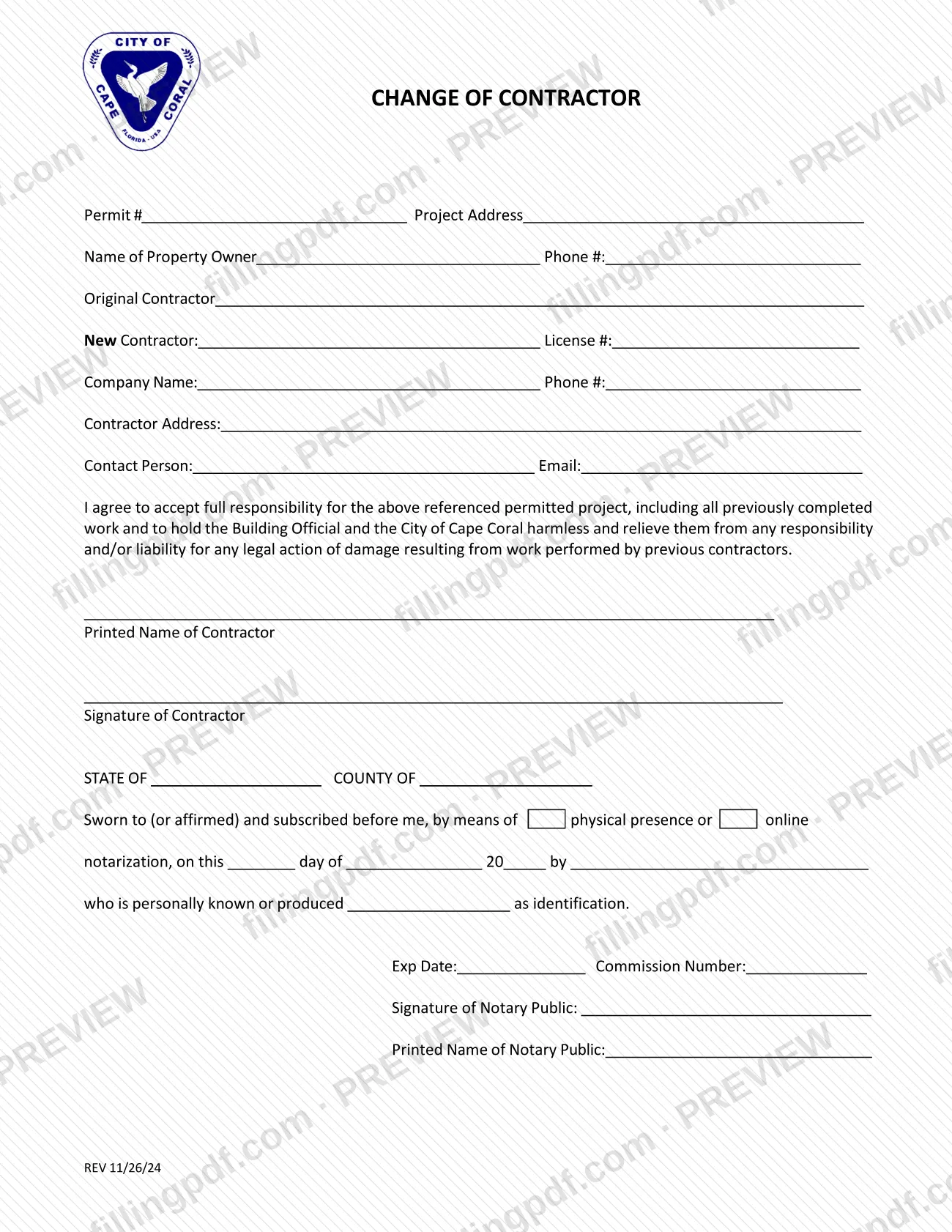
The Change of Contractor Form is the City of Cape Coral Building Division document used when a different contractor takes over a project that already has a permit. The new contractor identifies the permit, the project address, the original contractor and their own license, then signs an agreement accepting responsibility for the project, including work already done. It is one of the documents the city lists for a Cape Coral permit. On this page you can fill out the form online on FillingPDF and download or print the completed PDF; the official PDF is published by the City of Cape Coral.
Last updated
What is Change of Contractor Form – Cape Coral, FL?
The Change of Contractor Form is a City of Cape Coral Building Division form on which a new contractor takes over a permitted project from the original contractor and agrees to accept full responsibility for it.
The form is tied to an existing permit: it opens with the Permit #, the Project Address, the Name of Property Owner and the owner's phone number, followed by the Original Contractor. The new contractor then gives a company name, License #, phone number, contractor address, contact person and email.
The core of the form is a short agreement. By signing it, the contractor accepts full responsibility for the permitted project, including all previously completed work, and agrees to hold the Building Official and the City of Cape Coral harmless and relieve them from responsibility or liability for any legal action or damage resulting from work performed by previous contractors.
The contractor's signature is sworn before a notary public. The bottom of the page has a notary block with State and County, a statement that the signature was sworn to or affirmed by means of physical presence or online notarization, and spaces for the notary's expiration date, commission number, signature and printed name.
The city's Permit Document Center lists this form separately from other permit paperwork such as the Revision Form, the SubContractor Form and the Change of Qualifier Guideline, and it lists a companion document called Change of Contractor Permit Documents Required.
Who needs to file Change of Contractor Form – Cape Coral, FL?
The contractor who is replacing the original contractor on a permitted project in the City of Cape Coral completes and signs this form. The signature block is for the contractor, and the contractor's printed name and signature appear under the agreement.
The form also records the property owner's name and phone number and names the original contractor, but the agreement itself is made by the new contractor.
A notary public must complete the notary block at the bottom of the form; the notary's name, commission number and expiration date are entered by the notary, not by the contractor.
The form does not say who else may sign for a contractor. For other contractor-related changes, the city's Permit Document Center lists separate documents, such as the Change of Qualifier Guideline, the SubContractor Form and Update License Holder Contact Information; this form covers only the replacement of the contractor on a permit.
When to file Change of Contractor Form – Cape Coral, FL
Use this form when the contractor on a project that already holds a Cape Coral permit changes and a new contractor takes over the work. Because the form asks for the existing Permit # and the original contractor, it applies only after a permit has been issued for the project.
No separate due date is printed on the form. The agreement covers all work completed before the change as well as the work that follows, so the new contractor should have the permit details, the project address and their own license number at hand before signing in front of a notary.
The city's Permit Document Center also lists a document called Change of Contractor Permit Documents Required; check it for anything else the Building Division wants with a contractor change.
How to fill out Change of Contractor Form – Cape Coral, FL
Enter the permit and project details
At the top, write the Permit # of the existing permit and the Project Address.
Add the property owner
Enter the Name of Property Owner and the owner's Phone #.
Name the original contractor
On the Original Contractor line, enter the contractor being replaced.
Enter the new contractor's license and company
Under New Contractor, fill in the License # and the Company Name with the company Phone #.
Add address and contact person
Enter the Contractor Address, the Contact Person and the contact's Email.
Read the responsibility agreement
The paragraph states that the contractor accepts full responsibility for the permitted project, including all previously completed work, and holds the Building Official and the City of Cape Coral harmless for work by previous contractors.
Print and sign as the contractor
Enter the Printed Name of Contractor, then sign on the Signature of Contractor line in front of the notary.
Have the notary complete the block
The notary fills in State, County, the date, the name of the signer, how the signer is identified, the Exp Date, Commission Number, and signs and prints their name.
Review and download the completed PDF
Check the permit number, address and license number, then download or print the completed PDF from FillingPDF and deliver it as described under How to submit.
How to submit Change of Contractor Form – Cape Coral, FL
The form prints no mailing address, portal, fee or appointment rule of its own, so deliver it through the City of Cape Coral Building Division, the issuer of the form.
- Where to get it: the city publishes the form in the Permit Document Center on the City of Cape Coral website, in its Documents/Reports category.
- What to check first: the same Permit Document Center lists Change of Contractor Permit Documents Required. Review it, and contact the Building Division for the current way to deliver the signed form and for any fee.
- What to include: the completed form with the contractor's signature and the notary block filled in by the notary.
FillingPDF lets you fill out and download the PDF; submission follows the Building Division's channels.
Common mistakes to avoid
- Signing the contractor line without a notary: the form includes a sworn notary block with State, County and a notarization statement.
- Leaving out the Permit # or the Project Address, which tie the change to a specific permitted project.
- Leaving the new contractor's License # blank.
- Filling in the notary's expiration date, commission number, signature or printed name yourself instead of leaving them to the notary.
- Signing without reading the agreement: it makes the new contractor responsible for all previously completed work and releases the city from liability for work by previous contractors.
- Submitting only this form without checking the city's Change of Contractor Permit Documents Required for anything else the Building Division wants.
- Skipping the Printed Name of Contractor line above the signature.
Frequently asked questions
What is the Cape Coral Change of Contractor Form?
It is a City of Cape Coral Building Division form on which a new contractor takes over a permitted project. The contractor lists the permit, project address, owner, original contractor and their own license, and signs an agreement accepting responsibility for the project.
When do I use the Change of Contractor Form for a Cape Coral permit?
Use it when a project that already has a permit changes hands from the original contractor to a new one. The form asks for the existing Permit #, so it applies after the permit exists. It prints no separate deadline.
Who signs the Change of Contractor Form?
The new contractor signs on the Signature of Contractor line and prints their name above it. The signature is sworn before a notary public, who completes the notary block at the bottom of the form.
Does the Change of Contractor Form have to be notarized?
The form includes a notary block stating the signature is sworn to or affirmed before the notary by means of physical presence or online notarization. The notary enters the expiration date, commission number, signature and printed name.
What does the new contractor take responsibility for?
By signing, the contractor accepts full responsibility for the permitted project, including all previously completed work. The contractor also agrees to hold the Building Official and the City of Cape Coral harmless for any legal action or damage resulting from previous contractors' work.
Where do I submit the Cape Coral Change of Contractor Form?
The form prints no address or portal. It is published by the City of Cape Coral Building Division in its Permit Document Center, so contact the Building Division for the current delivery method and check the listed Change of Contractor Permit Documents Required.
Can I fill out the Change of Contractor Form online on FillingPDF?
You can fill out the PDF online on FillingPDF and download or print it. FillingPDF is an independent service, is not connected to the City of Cape Coral and does not file the form; you deliver it through the Building Division's channels.
Ready to fill out Change of Contractor Form – Cape Coral, FL?
Fill out Change of Contractor Form – Cape Coral, FL now