
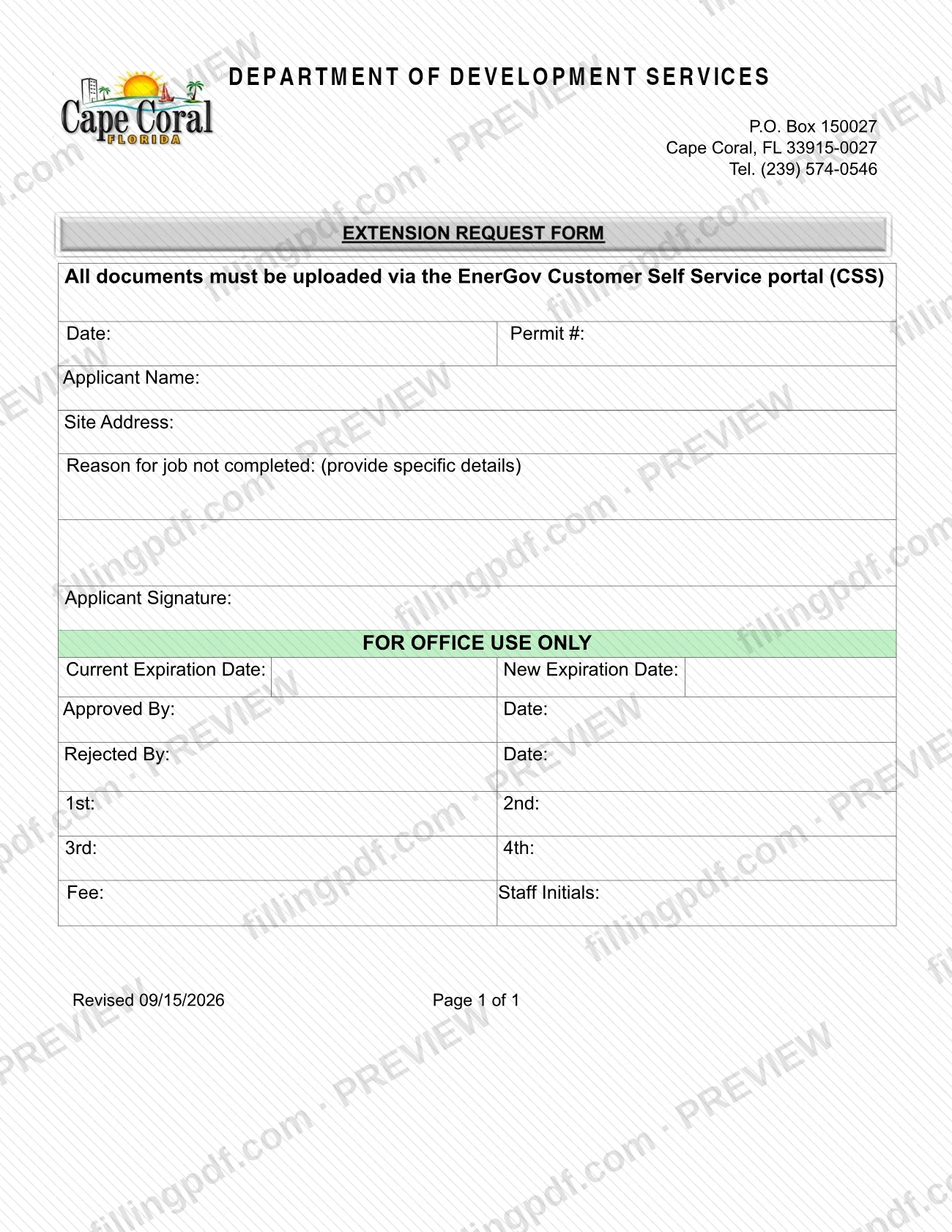
The Extension Request is the City of Cape Coral form used to ask the Building Division for more time when the job under a permit is not completed. It is one of the documents in the city's Permit Document Center that go with a Cape Coral permit, and it records the permit number, the site address, the applicant's reason and the permit's current and new expiration dates. On this page you can fill out the Extension Request online on FillingPDF and download or print the completed PDF; the form itself says all documents must be uploaded via the EnerGov Customer Self Service portal (CSS).
Last updated
What is Extension Request – Cape Coral, FL?
The Extension Request is a one-page City of Cape Coral form on which a permit applicant asks for more time to finish a job that has not been completed under a permit. It identifies the permit, the site and the reason for the delay, and city staff then record the permit's current and new expiration dates.
The applicant completes the top of the page: Date, Permit #, Applicant Name, Site Address, Reason for job not completed (the form asks you to provide specific details) and Applicant Signature. The block marked FOR OFFICE USE ONLY belongs to staff. It holds Current Expiration Date, New Expiration Date, Approved By and Rejected By (each with a date), lines labeled 1st, 2nd, 3rd and 4th, Fee and Staff Initials.
The header names the Department of Development Services, P.O. Box 150027, Cape Coral, FL 33915-0027, Tel. (239) 574-0546, and states that all documents must be uploaded via the EnerGov Customer Self Service portal (CSS).
The city lists the Extension Request under Miscellaneous Documents in its Permit Document Center, next to other permit paperwork such as the Cancellation Form-Permit, the Revision Form and the Early Start Request. Permit applications are separate documents in that center; this form does not apply for a permit.
Who needs to file Extension Request – Cape Coral, FL?
Applicants who hold a permit from the City of Cape Coral and whose job is not completed use this form to request an extension. The form asks for the permit number, the site address and the specific reason the job is not completed, so it applies to a particular permit and a particular site.
- The applicant signs the form on the Applicant Signature line. The form prints no separate line for a representative or agent, so ask the department at (239) 574-0546 if someone else will act for you.
- City staff, not the applicant, complete the FOR OFFICE USE ONLY block.
The form is not a permit application and does not start a new permit. The city's Permit Document Center lists separate application forms for each type of work.
When to file Extension Request – Cape Coral, FL
Use the Extension Request when the job under your permit is not completed and you need the permit's expiration date moved. The form records the permit's current expiration date and a new expiration date, which staff enter, and it asks why the job is not completed.
No separate deadline, filing window or processing time is printed on the form, so confirm timing for your permit with the Department of Development Services at (239) 574-0546. Enter the date you complete the form on the Date line at the top.
How to fill out Extension Request – Cape Coral, FL
Enter the date
On the Date line at the top, write the date you complete the request.
Enter the permit number
Write the number of the permit you want extended on the Permit # line.
Enter the applicant name
On Applicant Name, enter the name of the applicant on the permit.
Enter the site address
On Site Address, enter the address where the permitted job is located.
Explain why the job is incomplete
Under Reason for job not completed, give specific details, as the form instructs, rather than a general statement.
Sign as the applicant
Sign on the Applicant Signature line.
Leave the office-use block empty
Do not write in FOR OFFICE USE ONLY. Staff enter the current and new expiration dates, the approval or rejection, the Fee and their initials.
Review and download the PDF
Check the permit number, address and reason, then download or print the completed PDF from FillingPDF and upload it through the CSS portal as described under How to submit.
How to submit Extension Request – Cape Coral, FL
The form names one channel: upload through the EnerGov Customer Self Service portal (CSS).
- CSS upload: the form states that all documents must be uploaded via the EnerGov Customer Self Service portal (CSS). Upload the completed, signed Extension Request there, with the permit number you entered on the form.
- Questions: the form header lists the Department of Development Services, P.O. Box 150027, Cape Coral, FL 33915-0027, and Tel. (239) 574-0546.
The office-use block includes a Fee line, but the form prints no amount and no payment method. Ask the department for current fee details before you submit. FillingPDF lets you fill out and download the PDF; submission follows the city's channel described above.
Common mistakes to avoid
- Sending the form some other way when it states that all documents must be uploaded via the EnerGov Customer Self Service portal (CSS).
- Writing a vague answer on Reason for job not completed; the form asks you to provide specific details.
- Leaving Permit # or Site Address blank, which leaves staff unable to tie the request to a permit.
- Submitting the form without the Applicant Signature.
- Filling in the FOR OFFICE USE ONLY block (expiration dates, Approved By, Rejected By, Fee, Staff Initials); staff complete it.
- Using the Extension Request to apply for a new permit; the city publishes separate application forms for that.
Frequently asked questions
How do I request an extension on a Cape Coral permit?
Complete the City of Cape Coral Extension Request with your permit number, site address and the specific reason the job is not completed, sign it, and upload it. The form states that all documents must be uploaded via the EnerGov Customer Self Service portal (CSS).
What is the Extension Request form used for?
It asks the City of Cape Coral for more time on a permit when the job is not completed. You provide the permit number, site address and reason; staff record the current and new expiration dates and mark the request approved or rejected.
Where do I submit the Cape Coral Extension Request?
Upload it through the EnerGov Customer Self Service portal (CSS), which is the only channel the form names. The header also lists the Department of Development Services, P.O. Box 150027, Cape Coral, FL 33915-0027, and Tel. (239) 574-0546 for questions.
Can I fill out the Extension Request online?
Yes. You can fill out the PDF online on FillingPDF and download or print it. FillingPDF is an independent service and does not submit the form to the city; you upload it through the city's CSS portal.
What should I write under Reason for job not completed?
Give specific details explaining why the work under the permit is not finished. The form says to provide specific details, so a short, concrete explanation fits better than a general statement.
Is there a fee for the Extension Request?
The FOR OFFICE USE ONLY block includes a Fee line, but the form prints no amount or payment method. Call the Department of Development Services at (239) 574-0546 for the current fee and how to pay it.
Who fills in the expiration dates and approval lines?
City staff do. The FOR OFFICE USE ONLY block holds Current Expiration Date, New Expiration Date, Approved By, Rejected By, Fee and Staff Initials. Applicants complete only the top section and sign it.
Ready to fill out Extension Request – Cape Coral, FL?
Fill out Extension Request – Cape Coral, FL now