
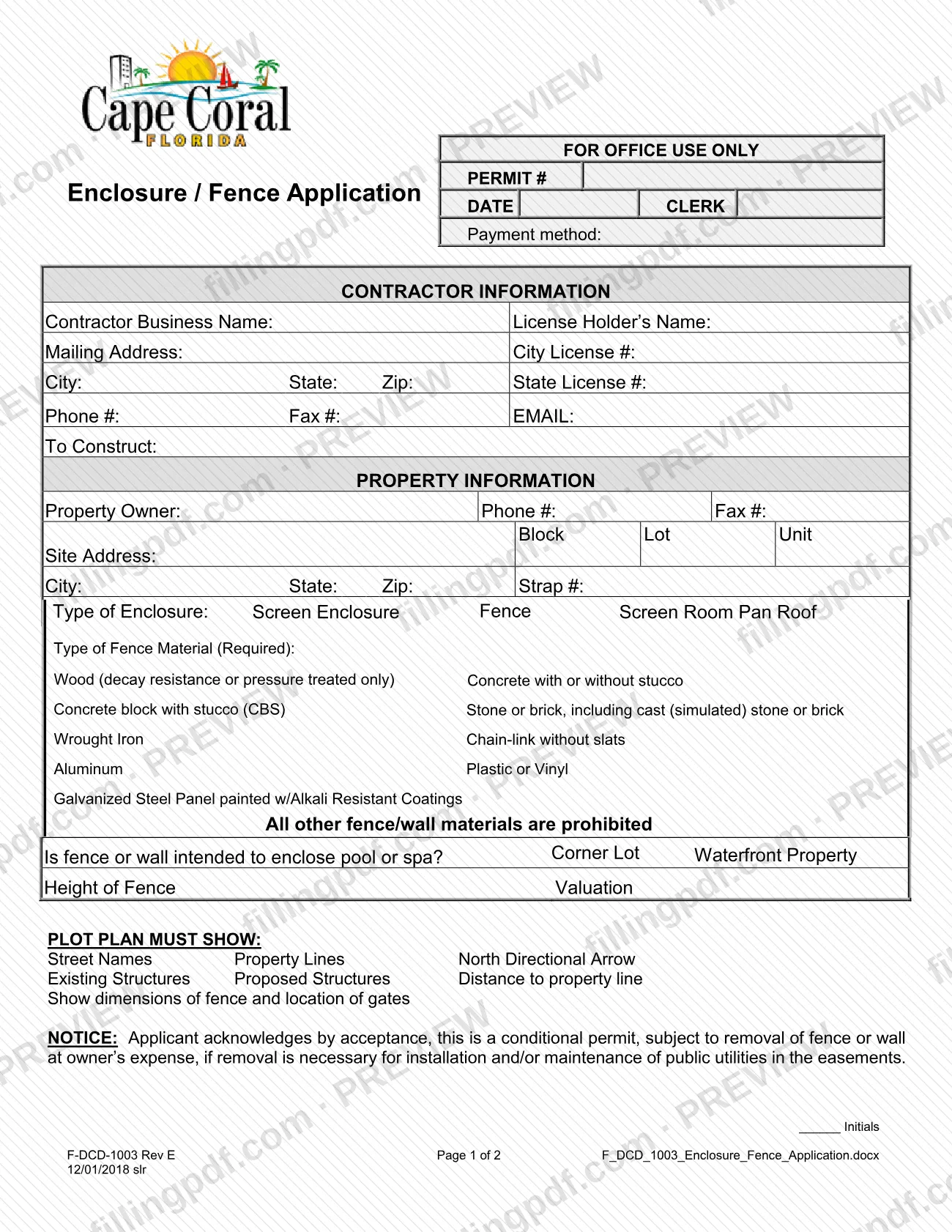
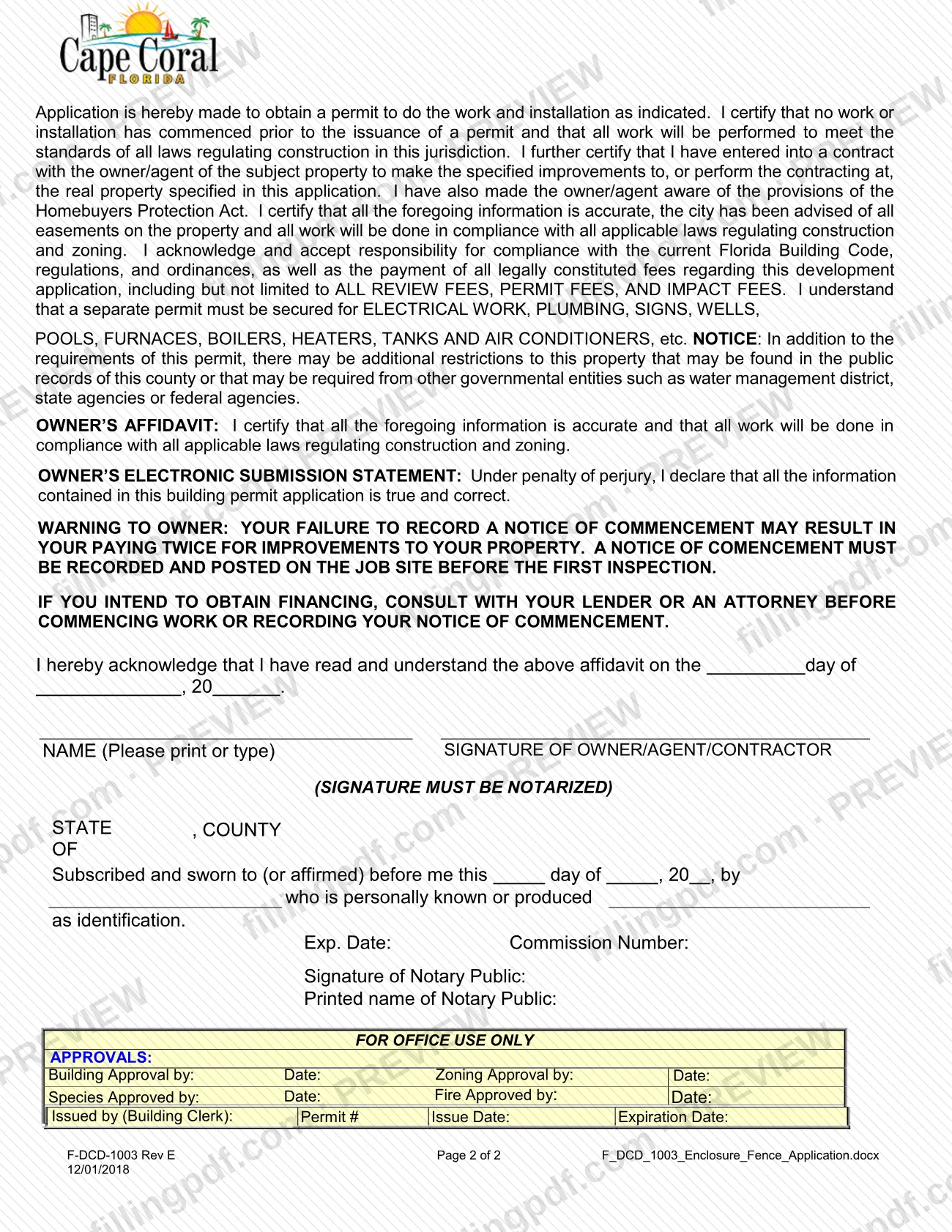
Form F-DCD-1003, the Enclosure / Fence Application, is the City of Cape Coral Building Division form for requesting a Cape Coral fence permit or a permit for a screen enclosure, screen room or pan roof. It is one of the Cape Coral permit forms in the city's Permit Document Center, where it is listed under both Fence and Screen Enclosure. It is signed by the owner, agent or contractor, the signature must be notarized, and a plot plan goes with it. On this page you can fill out the form online on FillingPDF and download or print the completed PDF; the original is published by the city.
Last updated
What is F-DCD-1003?
Form F-DCD-1003, the Enclosure / Fence Application, is the City of Cape Coral Building Division application used to request a permit for a fence or a screen enclosure, screen room or pan roof on a property in Cape Coral, Florida. The city's Permit Document Center lists it as "Application - Enclosure/Fence".
The form has two pages. Page 1 collects contractor information, property information, the type of enclosure (Screen Enclosure, Fence, Screen Room or Pan Roof), the fence material, the fence height, the valuation and a plot plan checklist. Page 2 holds the applicant's certification, the owner's affidavit, the owner's electronic submission statement, a warning about the Notice of Commencement and a notary block.
By accepting the permit, the applicant acknowledges that it is conditional: the fence or wall must be removed at the owner's expense if removal is necessary to install or maintain public utilities in the easements.
The form does not cover other trades. It states that a separate permit must be secured for electrical work, plumbing, signs, wells, pools, furnaces, boilers, heaters, tanks and air conditioners. The "For Office Use Only" blocks, which record the permit number, payment method, approvals and issue and expiration dates, are completed by the city.
Who needs to file F-DCD-1003?
Anyone who wants a permit to build a fence, screen enclosure, screen room or pan roof in Cape Coral uses this application. The form is written for a licensed contractor doing the work: it asks for the contractor's business name, license holder's name, city license number and state license number. It also names the property owner, and the signature line reads "Owner/Agent/Contractor", so the owner, the owner's agent or the contractor may sign.
Conditions printed on the form:
- A fence is a choice among listed materials; the form states that all other fence and wall materials are prohibited.
- You answer whether the fence or wall is meant to enclose a pool or spa, and whether the property is a corner lot or waterfront.
- The contractor certifies that a contract with the owner or agent exists and that the owner or agent has been made aware of the Homebuyers Protection Act.
This application does not replace permits for electrical work, plumbing, signs, wells, pools, furnaces, boilers, heaters, tanks or air conditioners, which need their own permit. The Permit Document Center also lists separate guidelines for a pool barrier fence and for a fence or enclosure with a pool under construction (Prepaid Application Guidelines).
When to file F-DCD-1003
File the application before any work starts. In the certification, the applicant states that no work or installation has begun before the permit is issued.
Two timing points come from the form's own warning: a Notice of Commencement must be recorded and posted on the job site before the first inspection, and anyone planning to obtain financing is told to consult a lender or an attorney before starting work or recording the notice. The city's Permit Document Center lists the Notice of Commencement for fence and screen enclosure permits as applicable if the value or cost of the project is $2,500 or more.
The form prints no filing deadline or validity period of its own. The permit's issue date and expiration date are entered by the city in the office-use block.
Documents you need
- A plot plan showing street names, property lines, a north directional arrow, existing structures, proposed structures, the distance to the property line, the dimensions of the fence and the location of gates.
- A notarized signature of the owner, agent or contractor on the application, completed in the notary block on page 2.
- A Notice of Commencement, recorded and posted on the job site before the first inspection; the Permit Document Center lists it for fence and screen enclosure permits as applicable if the project value or cost is $2,500 or more.
- Burrowing Owl/Gopher Tortoise Affidavit, which the Permit Document Center lists among the documents for fence and screen enclosure permits; check the city guidelines for when it applies.
- Prepaid Application Guidelines, which the Document Center lists for a fence or enclosure with a pool under construction.
How to fill out F-DCD-1003
Enter the contractor information
Under CONTRACTOR INFORMATION, enter the business name, license holder's name, mailing address, city, state and ZIP, phone, fax, email, City License # and State License #.
Describe the work in To Construct
On the To Construct line, state what will be built, such as the fence or enclosure.
Enter owner and site details
Under PROPERTY INFORMATION, enter the property owner, phone and fax, then the Block, Lot, Unit, site address, city, state, ZIP and Strap #.
Select the type of enclosure
Mark Screen Enclosure, Fence, Screen Room or Pan Roof, whichever matches the work.
Choose the fence material
If you are building a fence, mark the Type of Fence Material (Required) from the printed list. The form says all other fence and wall materials are prohibited.
Answer the site questions
Indicate whether the fence or wall is intended to enclose a pool or spa and whether the property is a Corner Lot or Waterfront Property. Then enter the Height of Fence and the Valuation.
Prepare the plot plan
Attach a plot plan showing street names, property lines, a north directional arrow, existing and proposed structures, the distance to the property line, the fence dimensions and the gate locations.
Initial the conditional permit notice
Write your initials on the line after the NOTICE that the permit is conditional and the fence or wall may have to be removed at the owner's expense for public utility work in easements.
Complete the affidavit and signature
On page 2, enter the date, print your name and sign as owner, agent or contractor. The signature must be notarized.
Have the notary complete the block
The notary fills in the state, county, date, the name of the person who signed, how identity was shown, the commission number and expiration date, signature and printed name.
Leave office-use areas blank
Do not complete the FOR OFFICE USE ONLY blocks for permit number, payment method, approvals, issue date or expiration date.
Review and download the completed PDF
Check the material, height, valuation and plot plan against the work you plan. Download or print the completed PDF from FillingPDF, get it notarized and submit it as described under How to submit.
How to submit F-DCD-1003
The form names no mailing address, portal or appointment rule: the application is made to the City of Cape Coral Building Division, which issues the permit, and the city's Permit Document Center is where the form and its related guidelines are published (Permit Document Center).
Before you submit, make sure the package is complete:
- Signature: the signature of the owner, agent or contractor must be notarized, and the notary block on page 2 must be completed.
- Initials: initial the notice that the permit is conditional.
- Plot plan: the form lists what the plot plan must show.
- Fees: the applicant accepts responsibility for all review fees, permit fees and impact fees. The form has a payment method line in the office-use area, but it states no amounts. Ask the Building Division for current fees.
Leave the "For Office Use Only" blocks blank; the Building Clerk records the permit number, approvals and issue and expiration dates. FillingPDF lets you fill out and download the PDF; submission follows the city's channels.
Common mistakes to avoid
- Submitting the application without a notarized signature; the form states that the signature must be notarized.
- Leaving the Type of Fence Material line blank; the form marks it Required, and all materials not listed are prohibited.
- Choosing a fence material that is not on the list, such as one outside wood (decay resistant or pressure treated only), concrete, block, stone or brick, wrought iron, chain-link without slats, aluminum, plastic or vinyl, or painted galvanized steel.
- Attaching a plot plan that omits required items: street names, property lines, north arrow, existing and proposed structures, distance to the property line, fence dimensions or gate locations.
- Forgetting to initial the notice that the permit is conditional and the fence may have to be removed at the owner's expense for utility work in easements.
- Starting work before the permit is issued, although the certification states that no work has commenced.
- Not recording and posting the Notice of Commencement before the first inspection, which the form warns could mean paying twice for improvements.
- Expecting this application to cover electrical work, plumbing, signs, wells, pools, furnaces, boilers, heaters, tanks or air conditioners, which need separate permits.
- Filling in the For Office Use Only blocks, which the city completes.
Frequently asked questions
What is Form F-DCD-1003 used for?
Form F-DCD-1003 is the City of Cape Coral Building Division application for a permit to build a fence, screen enclosure, screen room or pan roof. The city lists it as Application - Enclosure/Fence in its Permit Document Center.
Where do I find the Cape Coral fence permit application?
The Cape Coral fence permit application is Form F-DCD-1003. The city's Permit Document Center lists it as Application - Enclosure/Fence under Fence and under Screen Enclosure, next to residential and commercial guidelines and fence regulations.
Which fence materials does the form allow?
Treated or decay-resistant wood, concrete with or without stucco, concrete block with stucco, stone or brick (including simulated), wrought iron, chain-link without slats, aluminum, plastic or vinyl, and galvanized steel panel with alkali-resistant coatings. The form prohibits all other fence and wall materials.
Does the signature on the application have to be notarized?
Yes. The form says the signature of the owner, agent or contractor must be notarized, and page 2 includes a notary block for the state, county, date, identification, commission number and notary signature.
What must the plot plan show?
Street names, property lines, a north directional arrow, existing structures, proposed structures and the distance to the property line. It must also show the dimensions of the fence and the location of gates.
Can the city make me remove my fence after it is built?
Yes, in one case. The form says the permit is conditional: the fence or wall must be removed at the owner's expense if removal is necessary for installing or maintaining public utilities in the easements. You initial that notice on page 1.
Do I need a Notice of Commencement for a fence?
The form warns that a Notice of Commencement must be recorded and posted on the job site before the first inspection. The city's Permit Document Center lists it for fence permits as applicable if the project value or cost is $2,500 or more.
Does this application also cover electrical work or a pool?
No. The form says a separate permit must be secured for electrical work, plumbing, signs, wells, pools, furnaces, boilers, heaters, tanks and air conditioners. Fence or enclosure work for a pool follows the city's own guidelines.
Can I fill out Form F-DCD-1003 online on FillingPDF?
Yes. You can fill out the fillable PDF online on FillingPDF and download or print it. FillingPDF is independent of the City of Cape Coral and does not submit the application; you send it through the city's channels.
Ready to fill out F-DCD-1003?
Fill out F-DCD-1003 now