
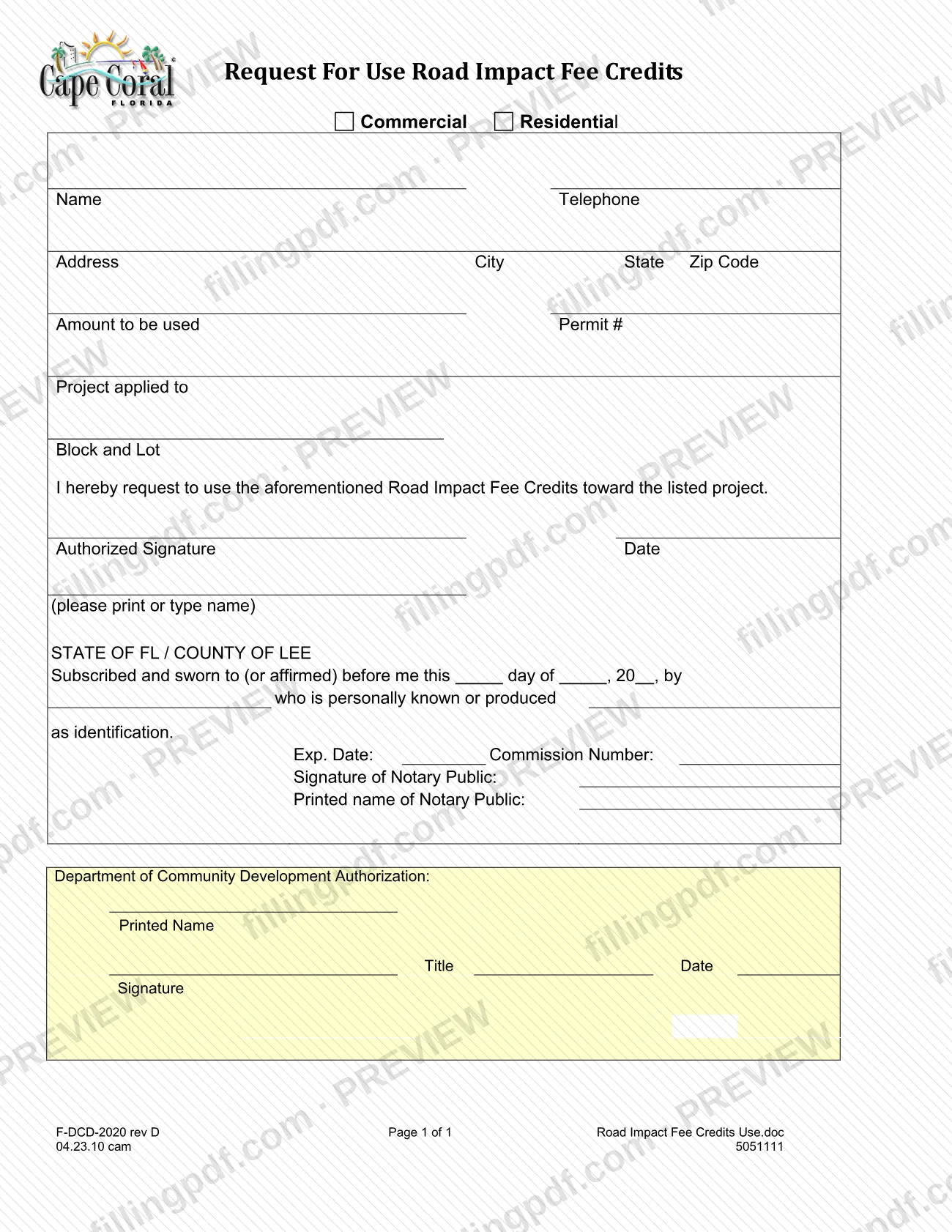
The Road Impact Fee Credits Use Form (Form F-DCD-2020), printed on the page as "Request For Use Road Impact Fee Credits", is the City of Cape Coral Building Division document on which a person asks to use road impact fee credits toward a listed project. It serves commercial and residential projects and asks for the amount to be used, the permit number, the project and its block and lot, with a signature sworn before a notary. It is one of the Cape Coral permit documents the city lists in its Permit Document Center. On FillingPDF you can fill out the form online and download or print the completed PDF; the original is published by the city.
Last updated
What is F-DCD-2020?
The Road Impact Fee Credits Use Form (Form F-DCD-2020), printed as "Request For Use Road Impact Fee Credits", is the City of Cape Coral form on which an applicant asks to use road impact fee credits toward a listed commercial or residential project.
The form is one page. At the top you mark Commercial or Residential, then give your name, telephone and address, the Amount to be used, the Permit #, the Project applied to and the Block and Lot. A printed statement then reads: "I hereby request to use the aforementioned Road Impact Fee Credits toward the listed project." The applicant signs on the Authorized Signature line and prints or types the name.
Below the signature is a notary block headed STATE OF FL / COUNTY OF LEE, which records that the signature was subscribed and sworn to (or affirmed) before the notary, who was either personally acquainted with the signer or was shown identification. The last block, Department of Community Development Authorization, has lines for a printed name, title, date and signature.
The City of Cape Coral lists the form in its Permit Document Center under Miscellaneous Documents, as "Road Impact Fee Credits Use Form", with the revision date 4/26/2010. The form's footer shows F-DCD-2020 rev D. The same list shows a separate document, the Transfer Request Road Impact Fee Credits Form, which is a different form from this one.
Who needs to file F-DCD-2020?
People who hold road impact fee credits in the City of Cape Coral and want to use them toward a specific project complete this form. It covers both kinds of project: you mark Commercial or Residential at the top.
The form asks for the name, telephone and address of the person making the request, the amount to be used, the permit number, the project and its block and lot. The request is signed on the Authorized Signature line, with the name printed or typed, and the signature is sworn or affirmed before a notary public in the State of FL, County of Lee block.
Do not confuse this form with the Transfer Request Road Impact Fee Credits Form, which the city's Permit Document Center lists as a separate document. This form is a request to use credits toward a listed project.
The form does not say who may sign for a company or for another person, or what proof of authority is needed. Ask the Building Division before anyone other than the credit holder signs.
When to file F-DCD-2020
Complete the form when you want to use road impact fee credits toward a particular project, because it asks for that project, its permit number, its block and lot and the amount of credits to be used. Have the permit number ready first.
The form prints no due date, filing window or expiration period, and it gives no processing time. Because the signature must be subscribed and sworn (or affirmed) before a notary public, plan to sign it at the notary's office or in the notary's presence rather than ahead of time. For timing questions tied to your permit or your credits, ask the City of Cape Coral Building Division.
Documents you need
- Identification for the notary, if the notary does not know you personally: the form records whether you are "personally known or produced" identification, so bring it to the notarization.
How to fill out F-DCD-2020
Mark Commercial or Residential
At the top of the form, check the box for Commercial or Residential, matching the project the credits will be used toward.
Enter your name and telephone
Write the name of the person making the request in the Name field and a contact number in the Telephone field.
Enter your address
Complete Address, City, State and Zip Code for the person making the request.
Enter the amount and permit number
In Amount to be used, write the amount of road impact fee credits you are requesting. In Permit #, enter the number of the permit for the project.
Identify the project
In Project applied to, describe the project the credits go toward, then enter its Block and Lot.
Sign and print your name
Sign on the Authorized Signature line, enter the Date and print or type your name beneath it. Sign in front of the notary, because the signature is sworn or affirmed.
Have the notary complete the notary block
The notary fills in the day, month and year, your name, whether you are personally known or produced identification, the expiration date, commission number, signature and printed name.
Leave the city's authorization block blank
The Department of Community Development Authorization lines (printed name, title, date, signature) are for the department, so do not complete them.
Review and download the completed PDF
Check the permit number, block and lot and amount against your permit records, then download or print the completed PDF from FillingPDF and take it to the notary before delivering it to the city.
How to submit F-DCD-2020
Form F-DCD-2020 names no mailing address, online portal or appointment rule, so the document itself prints no submission channel.
- Where the form is published: the City of Cape Coral lists it in its Permit Document Center, under Miscellaneous Documents, as "Road Impact Fee Credits Use Form".
- What the package contains: the completed form with the applicant's signature sworn or affirmed before a notary, and the separate Department of Community Development Authorization block, which has its own printed name, title, date and signature lines.
- How to deliver it: ask the City of Cape Coral Building Division how and where it wants the signed and notarized form delivered, and whether it should go with the permit named on the form.
The form mentions no fee. FillingPDF lets you fill out and download the PDF; submission follows the channels the city gives you.
Common mistakes to avoid
- Leaving both the Commercial and Residential boxes unmarked at the top of the form.
- Signing before you are in front of the notary; the block states the signature is subscribed and sworn to (or affirmed) before the notary.
- Leaving out the Permit #, the Project applied to, or the Block and Lot, which the form asks for to identify where the credits go.
- Skipping the printed or typed name under the Authorized Signature line; the form says to print or type it.
- Filling in the notary's signature, printed name, commission number or expiration date yourself; those lines belong to the notary.
- Filling in the Department of Community Development Authorization block, which is labeled as the department's authorization, not the applicant's.
- Using this form when you need the separate Transfer Request Road Impact Fee Credits Form the city lists next to it.
Frequently asked questions
What is the Road Impact Fee Credits Use Form?
It is Form F-DCD-2020 of the City of Cape Coral, printed as "Request For Use Road Impact Fee Credits". You use it to state that you want road impact fee credits applied to a listed project, giving the amount, the permit number, the project and its block and lot.
Does the Road Impact Fee Credits Use Form have to be notarized?
The form contains a notary block for the State of FL, County of Lee, reading "Subscribed and sworn to (or affirmed) before me", with lines for the notary's signature, printed name, commission number and expiration date. Sign it in front of the notary, not before.
Can I fill out Form F-DCD-2020 online?
You can fill out the PDF online on FillingPDF and download or print it. FillingPDF is an independent service and does not file the form with the City of Cape Coral; delivery follows the channels the Building Division gives you.
What do I need ready before I start the form?
Have the amount of credits to be used, the permit number, a description of the project, and its block and lot. Bring identification to the notary if the notary does not know you personally, since the form records how the signer was identified.
Who fills in the Department of Community Development Authorization?
The form labels that block as the Department of Community Development's authorization, with lines for printed name, title, date and signature, separate from your signature and the notary block. Leave it blank and ask the Building Division how the department completes it.
Where do I find this form on the Cape Coral website?
The City of Cape Coral lists it in the Permit Document Center under Miscellaneous Documents as "Road Impact Fee Credits Use Form", with the revision date 4/26/2010. The printed form shows F-DCD-2020 rev D.
Is there a different form to transfer road impact fee credits?
Yes. The city's Permit Document Center lists a separate Transfer Request Road Impact Fee Credits Form next to this one. Form F-DCD-2020 is the request to use credits toward a listed project, so check with the Building Division which one fits your situation.
Ready to fill out F-DCD-2020?
Fill out F-DCD-2020 now