
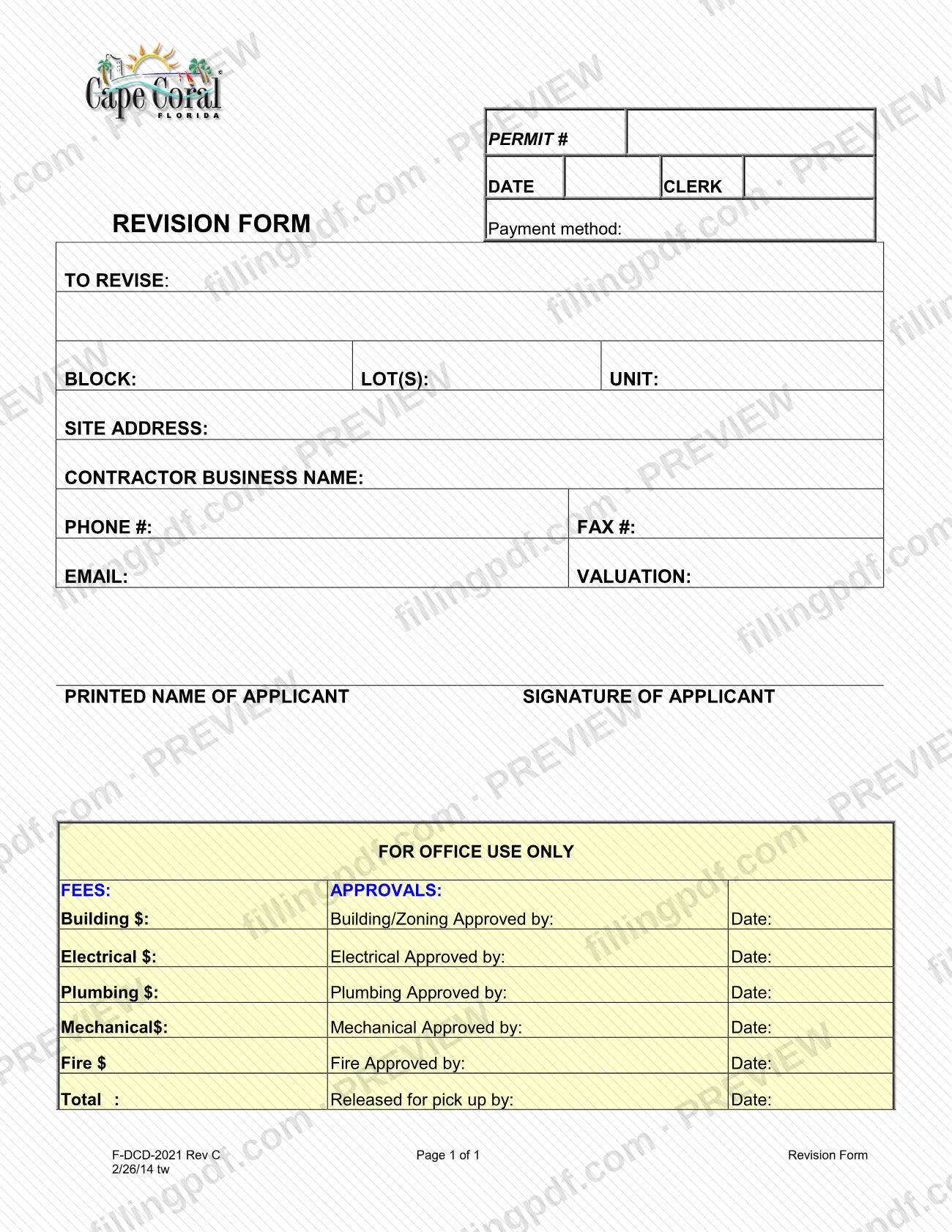
The Revision Form (F-DCD-2021, Rev C) is a City of Cape Coral form used to revise a Cape Coral permit, which the form identifies by its permit number. It collects the block, lot and unit, the site address, the contractor's business name and contact details, the valuation and the applicant's printed name and signature. On FillingPDF you can fill out the form online and download or print the completed PDF; the original is published by the City of Cape Coral.
Last updated
What is F-DCD-2021?
The Revision Form is a one-page City of Cape Coral, Florida form on which an applicant identifies a permit and the property it covers so that the permit can be revised. It is numbered F-DCD-2021 (Rev C) and printed as Page 1 of 1.
The top of the form carries the PERMIT #, a DATE, a CLERK line and a Payment method line, followed by the TO REVISE entry. Below it the form asks for the BLOCK, LOT(S) and UNIT, the SITE ADDRESS, the CONTRACTOR BUSINESS NAME, PHONE #, FAX #, EMAIL and VALUATION. It closes with the PRINTED NAME OF APPLICANT and SIGNATURE OF APPLICANT.
A block marked FOR OFFICE USE ONLY is completed by the City, not by the applicant. It lists fee lines for Building, Electrical, Plumbing, Mechanical and Fire with a Total, and approval lines (each with an approver and a date) for Building/Zoning, Electrical, Plumbing, Mechanical and Fire. It ends with a Released for pick up by line.
The City publishes the form among the documents of its Development Services Land Development Division. The form itself prints no fee amounts, so ask the City for current figures.
Who needs to file F-DCD-2021?
The form is built for an applicant or contractor who has a City of Cape Coral permit and needs it revised. It asks for the permit number, the property location (block, lot(s), unit and site address), the contractor's business name and contact details, and the applicant's printed name and signature, so the person who holds or manages the permit is the one who completes it.
The FOR OFFICE USE ONLY block, with the fee lines, the department approvals and the release for pick up, is reserved for City staff. Applicants leave it blank.
The form does not say who else may sign for an applicant. For questions about a specific permit type or its submittal requirements, the City's Land Development Division page lists (239) 573-3167 and [email protected] for assistance.
When to file F-DCD-2021
The form is used when an existing permit needs to be revised: it is tied to a PERMIT # and to a TO REVISE entry, so it is completed at the time you ask the City to change that permit. No separate due date is printed on it. The form has no stated validity period or renewal cycle.
The office-use block shows that the City records fees, department approvals and a release for pick up on the form. The form does not give a processing time; contact the City for timing.
How to fill out F-DCD-2021
Enter the permit number and date
Write the number of the permit being revised on the PERMIT # line and the date on the DATE line. The CLERK line is part of the same header; leave it for City staff unless the City tells you otherwise.
Note the payment method
Complete the Payment method line at the top of the form if you are paying a fee with the revision. The fee amounts themselves are filled in by the City in the office-use block.
Complete the TO REVISE entry
Under TO REVISE:, state what is being revised, as the line asks.
Identify the lot
Enter the BLOCK, the LOT(S) and the UNIT of the property.
Enter the site address
Write the full address of the property on the SITE ADDRESS line.
Add contractor details
Enter the CONTRACTOR BUSINESS NAME, then the PHONE #, FAX # and EMAIL.
Enter the valuation
Write the amount on the VALUATION line next to the email field.
Print your name and sign
Enter the PRINTED NAME OF APPLICANT and sign on the SIGNATURE OF APPLICANT line.
Leave the office-use block blank
Do not fill in the FOR OFFICE USE ONLY block: the fee lines, department approvals and the Released for pick up by line are completed by the City.
Review and download the completed PDF
Check the permit number, the property details and the signature, then download or print the completed PDF from FillingPDF and deliver it as described under How to submit.
How to submit F-DCD-2021
The Revision Form prints no mailing address, portal, e-mail address or appointment rule, so confirm the delivery method with the City of Cape Coral before you send it.
- Questions and guidance: the City's Land Development Division page lists (239) 573-3167 and [email protected] for assistance with the permits and forms it handles.
- Payment: the form has a Payment method line, and the office-use block records fees by department (Building, Electrical, Plumbing, Mechanical, Fire). Amounts are set by the City and are not printed on the form.
- After review: City staff complete the approvals and the Released for pick up by line.
Sign the form and print the applicant's name before delivering it. FillingPDF lets you fill out and download the PDF; submission follows the City's channels, not this site.
Common mistakes to avoid
- Leaving the PERMIT # blank or writing the wrong number, so the revision cannot be tied to the right permit.
- Skipping the BLOCK, LOT(S), UNIT or SITE ADDRESS lines; the form uses them to identify the property.
- Printing the applicant's name but not signing in the SIGNATURE OF APPLICANT space, or the reverse.
- Writing in the FOR OFFICE USE ONLY block (fees, approvals, release for pick up); City staff complete it.
- Omitting the contractor's phone, fax or email, which the form asks for under the contractor business name.
- Leaving the VALUATION line empty when the revision affects the valuation.
- Assuming the form names a delivery address; it prints none, so confirm how to submit it with the City.
Frequently asked questions
What is the Cape Coral Revision Form?
It is City of Cape Coral form F-DCD-2021 (Rev C), a one-page form used to revise a permit. It identifies the permit number, the property, the contractor and the applicant, and it includes an office-use block for fees and department approvals.
Can I fill out the Cape Coral Revision Form online?
Yes. You can fill out the PDF online on FillingPDF and download or print it. FillingPDF is an independent service and does not submit the form to the City; delivery follows the City of Cape Coral's own channels.
Is this the form for a new Cape Coral permit?
No. This form is titled Revision Form and carries a PERMIT # line and a TO REVISE entry, so it changes an existing Cape Coral permit. The City's Land Development Division page links guidelines and forms for other permit types.
Where do I submit the Revision Form?
The form prints no address or portal. The City's Land Development Division page lists (239) 573-3167 and [email protected] for assistance, so ask them how and where to deliver it.
Who signs the Cape Coral Revision Form?
The applicant signs on the SIGNATURE OF APPLICANT line and prints their name on the line beside it. The form does not state whether someone else may sign for the applicant, so ask the City if another person will sign.
Is there a fee for a permit revision in Cape Coral?
The form has a Payment method line and office-use fee lines for Building, Electrical, Plumbing, Mechanical and Fire, so fees may be recorded by the City. The form prints no amounts; ask the City for the current figures.
What does the office-use section of the form mean?
It is the part City staff complete. It records fees for Building, Electrical, Plumbing, Mechanical and Fire, approvals with the approver's name and date for Building/Zoning and each trade, and who released the revision for pick up.
Ready to fill out F-DCD-2021?
Fill out F-DCD-2021 now