
Inspection Info & Permit-Related Contacts is the City of Cape Coral Building Division sheet that explains how to request, change and check inspections through the EnerGov online system and lists phone numbers for the Development Services Division. It is one of the documents people use when a Cape Coral permit needs inspections. The sheet covers scheduling cutoffs, cancellations, status checks and a contact directory for inspections, plan review and floodplain review. On this page you can fill out the PDF online on FillingPDF and download or print it; the city publishes the original at capecoral.gov.
Last updated
What is Inspection Info & Permit-Related Contacts – Cape Coral, FL?
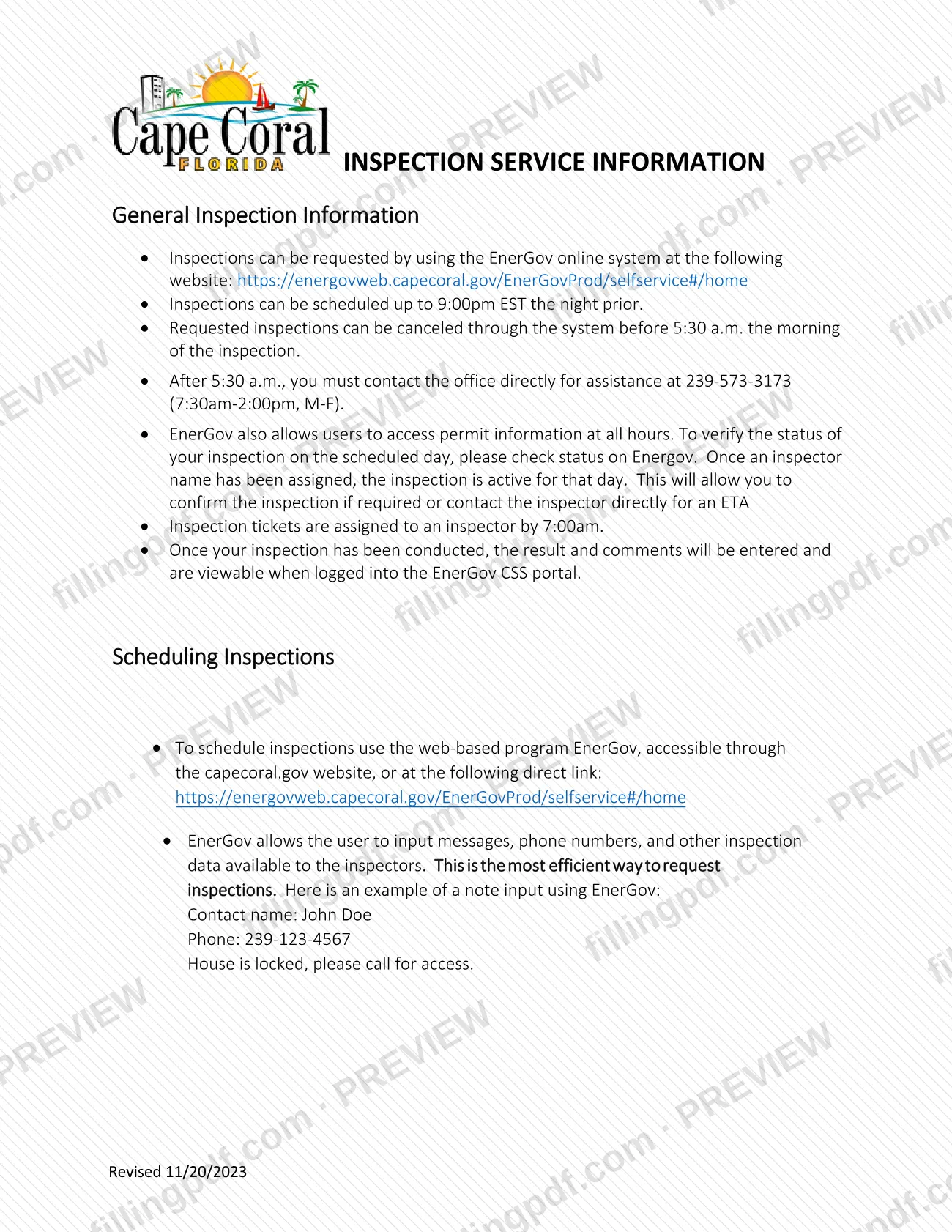
Inspection Info & Permit-Related Contacts is the City of Cape Coral Building Division information sheet, titled "Inspection Service Information" on the PDF, that tells permit holders how to schedule and manage inspections in EnerGov and whom to call for permit-related questions.
It is a reference document, not an application. The first part, General Inspection Information, states the rules for inspections: requests are made in the EnerGov online system, can be scheduled up to 9:00pm EST the night prior, and can be canceled in the system before 5:30 a.m. on the day of the inspection. Inspection tickets are assigned to an inspector by 7:00am, and results and comments are entered afterward and are viewable in the EnerGov CSS portal.
The second part, Scheduling Inspections, explains that EnerGov lets you enter messages, phone numbers and other data for the inspectors, and gives a sample note with a contact name, a phone number and an access instruction.
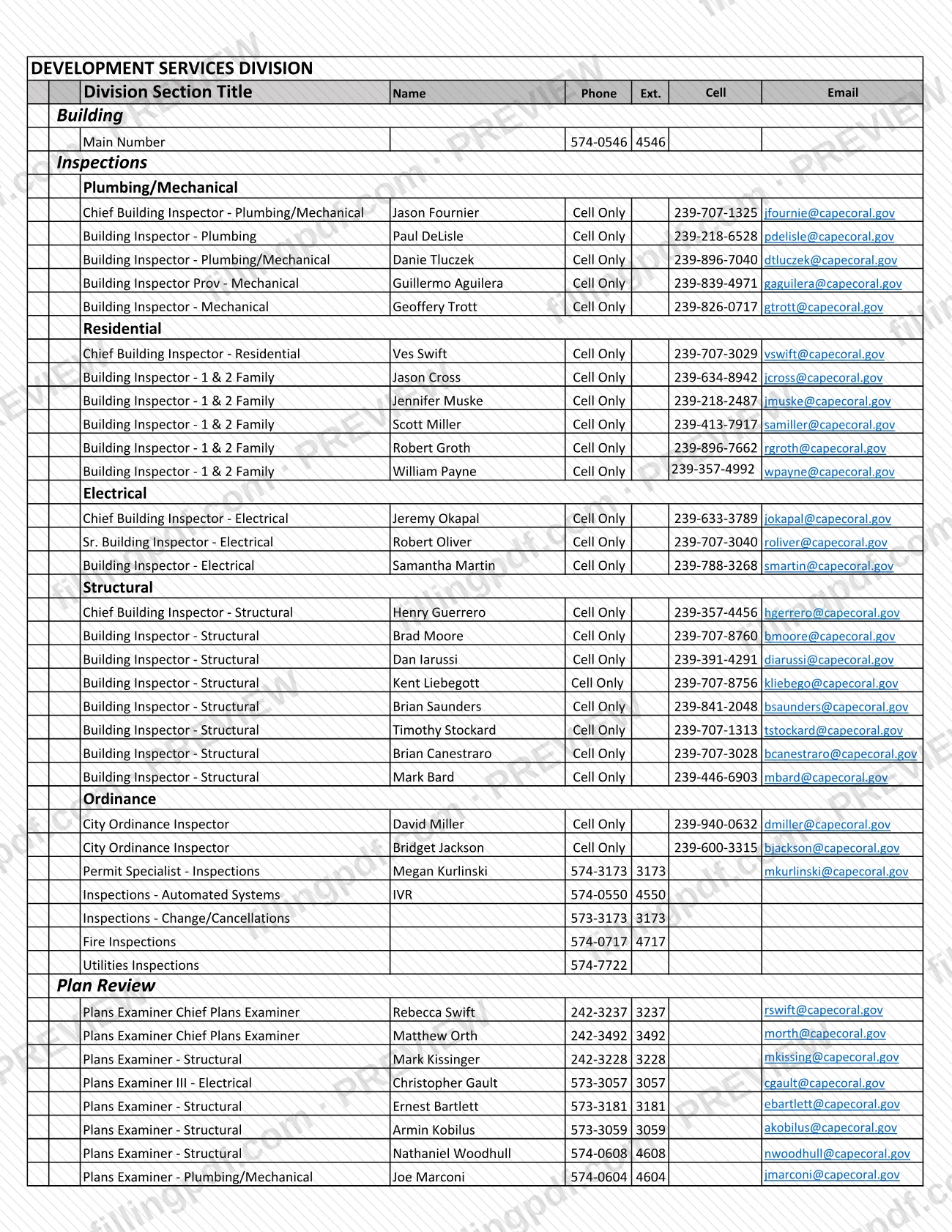
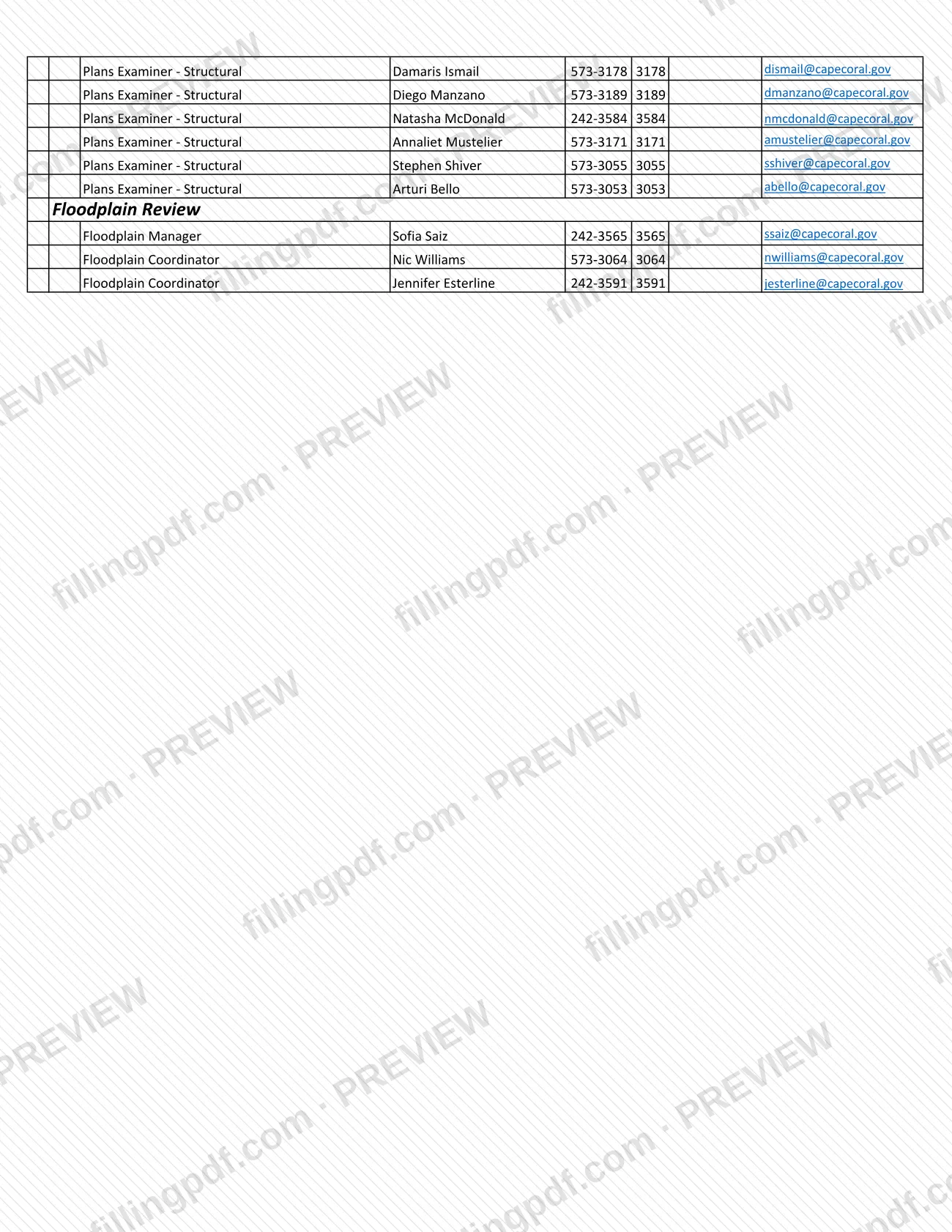
The last part is the Development Services Division directory. It groups contacts under Building (main number and inspections), Plumbing/Mechanical, Residential, Electrical, Structural, Ordinance, Plan Review and Floodplain Review, plus lines for automated systems, changes and cancellations, fire inspections and utilities inspections. The PDF carries the revision date 11/20/2023.
Who needs to file Inspection Info & Permit-Related Contacts – Cape Coral, FL?
The sheet is for people who have a permit with the City of Cape Coral and need to request, cancel or follow an inspection. That includes owners, contractors and other users who work in the EnerGov online system.
Other readers use the directory part:
- People with questions on a plan under review can find the plans examiners listed by specialty, such as structural, electrical and plumbing/mechanical.
- People with floodplain questions can find the Floodplain Manager and Floodplain Coordinators.
- People needing fire or utilities inspections can find the separate numbers for those inspections.
- People dealing with an ordinance matter can find the City Ordinance Inspectors.
The sheet does not set eligibility rules and does not say who may act for a permit holder. It lists inspectors by trade and states that most inspector lines are cell phone only, so use the listed number rather than the main office line when you need a particular inspector.
When to file Inspection Info & Permit-Related Contacts – Cape Coral, FL
Use this sheet whenever work under a Cape Coral permit is ready for inspection. Inspections can be scheduled up to 9:00pm EST the night before the inspection day.
A requested inspection can be canceled through EnerGov before 5:30 a.m. on the morning of the inspection. After 5:30 a.m., you must contact the office directly at 239-573-3173 (7:30am-2:00pm, M-F). Inspection tickets are assigned to an inspector by 7:00am; once an inspector name appears in EnerGov, the inspection is active for that day. After the inspection, the result and comments are entered and can be viewed when you are logged into the EnerGov CSS portal. The sheet sets no other deadlines.
How to fill out Inspection Info & Permit-Related Contacts – Cape Coral, FL
Open the EnerGov online system
Go to https://energovweb.capecoral.gov/EnerGovProd/selfservice#/home or reach it through capecoral.gov. This is where inspections are requested.
Request the inspection by the cutoff
Schedule the inspection up to 9:00pm EST the night prior. Inspection tickets are assigned to an inspector by 7:00am on the day.
Add a note for the inspector
Enter a contact name, a phone number and any access instruction, such as a locked house, in the EnerGov message field, following the sample on the sheet.
Cancel or change before 5:30 a.m.
Cancel a requested inspection through EnerGov before 5:30 a.m. on the inspection day. After that, call 239-573-3173 (7:30am-2:00pm, M-F).
Check the status on inspection day
Look in EnerGov for an assigned inspector name, which means the inspection is active. You can then confirm the inspection or call the inspector for an ETA.
Find the right contact in the directory
Use the Development Services Division directory by section: Building, Plumbing/Mechanical, Residential, Electrical, Structural, Ordinance, Plan Review and Floodplain Review. Inspectors are listed by trade with cell numbers.
Review results after the inspection
Log in to the EnerGov CSS portal to read the result and comments entered after your inspection.
Review and download the PDF
Check the details you entered, then download or print the PDF from FillingPDF to keep the scheduling rules and phone numbers at hand.
How to submit Inspection Info & Permit-Related Contacts – Cape Coral, FL
Inspections are requested online in EnerGov; the office handles changes by phone after the morning cutoff. The sheet is information only and is not filed with the city.
- EnerGov online: request inspections at https://energovweb.capecoral.gov/EnerGovProd/selfservice#/home, also reachable through capecoral.gov. The sheet calls this the most efficient way to request inspections. Use the notes field for a contact name, phone number and access instructions.
- Changes after 5:30 a.m.: call 239-573-3173 (7:30am-2:00pm, M-F). The directory also lists Inspections - Change/Cancellations at 573-3173.
- Other lines in the directory: Building main number 574-0546 (ext. 4546); Inspections - Automated Systems IVR 574-0550 (ext. 4550); Fire Inspections 574-0717 (ext. 4717); Utilities Inspections 574-7722.
The Development Services page lists office hours of Mon - Fri: 7:30 a.m. - 4:00 p.m. FillingPDF lets you fill out and download the PDF; any inspection request follows the channels above.
Common mistakes to avoid
- Trying to schedule an inspection for the next day after 9:00pm EST the night before, when that is the latest time the sheet allows.
- Waiting until after 5:30 a.m. on inspection day to cancel in EnerGov; after that time you must contact the office directly.
- Calling the office about a change or cancellation outside 7:30am-2:00pm, Monday to Friday, the hours the sheet gives for that number.
- Leaving out access details when the site is locked; the sample EnerGov note shows a contact name, phone number and an access instruction.
- Skipping the status check in EnerGov on the inspection day; an inspection is active only once an inspector name has been assigned.
- Looking for inspection results by phone instead of logging into the EnerGov CSS portal, where results and comments are entered.
- Calling the main office line for an inspector listed as Cell Only instead of using the cell number in the directory.
Frequently asked questions
How do I schedule a Cape Coral building inspection?
Request it in the EnerGov online system at https://energovweb.capecoral.gov/EnerGovProd/selfservice#/home. Inspections can be scheduled up to 9:00pm EST the night prior, and you can add a contact name, phone number and access notes for the inspector.
What is the deadline to cancel a Cape Coral inspection?
Cancel through EnerGov before 5:30 a.m. on the morning of the inspection. After 5:30 a.m., you must contact the office directly at 239-573-3173, available 7:30am-2:00pm, Monday through Friday.
How do I know my Cape Coral inspection is happening today?
Check the status in EnerGov on the scheduled day. Once an inspector name has been assigned, the inspection is active for that day. Tickets are assigned by 7:00am, and you can then confirm it or contact the inspector for an ETA.
Where do I see my Cape Coral inspection results?
Log in to the EnerGov CSS portal. After the inspection, the result and comments are entered and are viewable there. EnerGov also lets you view permit information at all hours.
Is this sheet an application for a Cape Coral permit?
No. It is an information sheet from the Building Division on inspection scheduling and staff contacts. It does not apply for a permit; it supports inspections and questions on a permit.
Who do I call about plan review or floodplain questions in Cape Coral?
The directory lists plans examiners by specialty, with phone numbers and email addresses, and a Floodplain Manager and two Floodplain Coordinators. Fire inspections are at 574-0717 (ext. 4717) and utilities inspections at 574-7722.
Can I fill out the Cape Coral inspection information sheet online?
You can fill out the PDF online on FillingPDF and download or print it. FillingPDF is an independent service, not connected to the City of Cape Coral, and does not schedule inspections or file anything with the city.
Ready to fill out Inspection Info & Permit-Related Contacts – Cape Coral, FL?
Fill out Inspection Info & Permit-Related Contacts – Cape Coral, FL now