
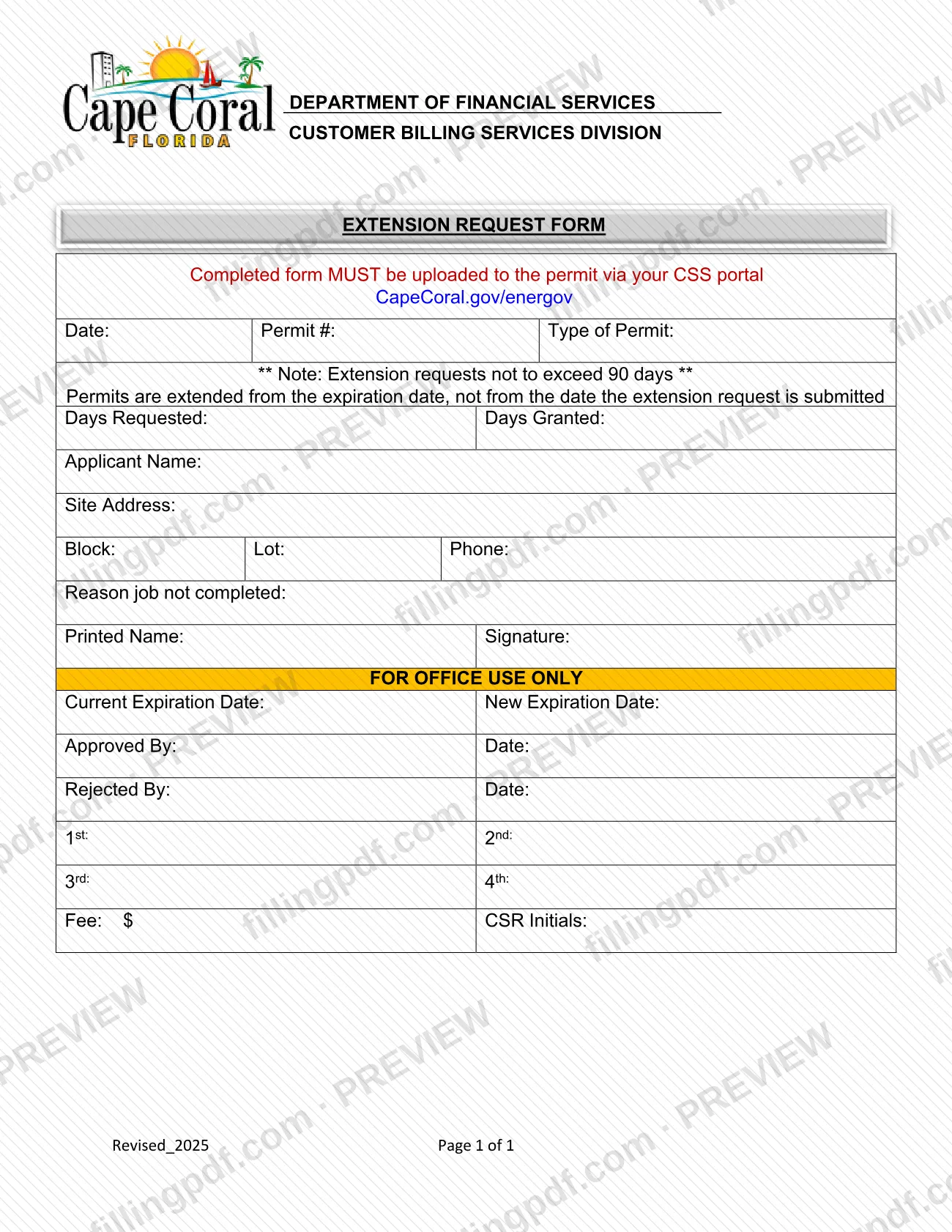
The Permit Extension Request, printed on the form as the Extension Request Form, is the City of Cape Coral form used to ask for more time on a Cape Coral permit when the job has not been completed. It is for the person who holds the permit and needs the expiration date pushed back by no more than 90 days. On this page you can fill out the form online on FillingPDF and download or print the completed PDF; the city publishes the original at capecoral.gov, and the finished form is uploaded to the permit through the city's CSS portal.
Last updated
What is Permit Extension Request – Cape Coral, FL?
The Permit Extension Request, printed on the form as the Extension Request Form, is the City of Cape Coral form used to ask for more time on a permit when the permitted job has not been completed. It is a one-page form.
The form is headed Department of Financial Services, Customer Billing Services Division, and the revision printed on it is Revised_2025. It carries two rules in plain print. Extension requests may not exceed 90 days, and permits are extended from the expiration date, not from the date the extension request is submitted.
The applicant's part asks for the date, the permit number, the type of permit, the days requested, the applicant name, the site address with block and lot, a phone number, and the reason the job was not completed, followed by a printed name and signature. A separate block marked FOR OFFICE USE ONLY records the current and new expiration dates, who approved or rejected the request and when, a count of extensions (1st through 4th), a fee line and the initials of the customer service representative (CSR). The applicant does not complete that block.
The city lists the form as Permit Extension Request in the Expansion / New Construction / Irrigation category of its Common Forms page. It only extends an existing permit. The applications for permits themselves, such as Application - Utility Permit, are separate documents on the same page.
Who needs to file Permit Extension Request – Cape Coral, FL?
The holder or applicant of a City of Cape Coral permit whose job is not finished and who wants more time files this request. The form identifies the request by permit number and type of permit, and asks for the applicant's name, the site address (block and lot) and a phone number, so it is completed by the person the permit was issued to or the applicant of record.
Conditions printed on the form:
- The extension may not exceed 90 days, so the number you enter under Days Requested must stay within that limit.
- The extension runs from the permit's expiration date, not from the day you submit the request.
- You must state the reason the job was not completed.
- The applicant signs the form and also prints their name.
The form says nothing about who may sign for someone else, so check with the city before another person signs for the permit holder. Do not use this form to apply for a new permit; the city lists separate applications for that.
When to file Permit Extension Request – Cape Coral, FL
You complete the request when a permitted job will not be finished and the permit needs more time. The form sets no filing deadline of its own, but it states that the extension is counted from the permit's expiration date, not from the date you submit the request, so a late submission does not move the new date. The form also says requests may not exceed 90 days.
The office-use block has lines for 1st, 2nd, 3rd and 4th, which show that the city tracks successive extensions on one permit; the form does not explain how many are allowed. The form gives no processing time. For questions about timing, use the city's CSS portal at CapeCoral.gov/energov.
How to fill out Permit Extension Request – Cape Coral, FL
Enter the date and permit details
At the top, write the date, the Permit #, and the Type of Permit exactly as they appear on your permit.
State the days requested
Under Days Requested, enter the number of days you want. It must not exceed 90, and the time is counted from the permit's expiration date.
Enter the applicant name
Write the Applicant Name of the permit holder or applicant of record.
Enter the site address
Write the Site Address, then the Block and Lot, and a contact Phone number.
Explain why the job is incomplete
In Reason job not completed, state briefly why the work was not finished within the permit period.
Print your name and sign
Enter your Printed Name and sign in the Signature space.
Leave the office-use block empty
Do not write in FOR OFFICE USE ONLY. The city records the expiration dates, approval or rejection, fee and CSR initials there.
Review, download and upload
Check every field, then download or print the completed PDF from FillingPDF and upload it to your permit in the CSS portal as described under How to submit.
How to submit Permit Extension Request – Cape Coral, FL
The form names one channel: the city's CSS portal. The printed instruction reads that the completed form MUST be uploaded to the permit via your CSS portal at CapeCoral.gov/energov.
- Online upload: complete and sign the form, then upload it to the permit record in the CSS portal at CapeCoral.gov/energov. Upload it to the permit it concerns, using the permit number you entered on the form.
- Other channels: the form prints no mailing address, counter or e-mail option.
Before you upload, check that the permit number, type of permit, days requested (not more than 90), site address, reason and signature are filled in, and leave the FOR OFFICE USE ONLY block empty. The block contains a Fee line; the form prints no amount, so ask the City of Cape Coral for any fee that applies. FillingPDF lets you fill out and download the PDF; submission follows the city's portal channel above.
Common mistakes to avoid
- Requesting more than 90 days; the form states that extension requests may not exceed 90 days.
- Assuming the extension starts on the day you submit; permits are extended from the expiration date, not from the submission date.
- Not uploading the completed form to the permit through the CSS portal at CapeCoral.gov/energov, the only channel the form names.
- Leaving the Permit # or Type of Permit blank, so the form cannot be matched to the permit.
- Skipping the reason job not completed.
- Printing the name but not signing, or signing without a printed name; the form asks for both.
- Filling in the FOR OFFICE USE ONLY block (expiration dates, approval, fee, CSR initials), which is for the city.
Frequently asked questions
How do I extend a Cape Coral permit?
Complete the city's Extension Request Form and upload it to the permit through your CSS portal at CapeCoral.gov/energov. The form asks for the permit number, type of permit, days requested, site address, reason the job is not completed, and your signature.
How long can a permit extension be in Cape Coral?
No more than 90 days. The form states that extension requests may not exceed 90 days, so the number you write under Days Requested should stay within that limit.
When does the extension period start?
It starts from the permit's expiration date, not from the day you submit the request. The form prints this rule directly under the 90-day note, so submitting later does not add time.
Where do I submit the Permit Extension Request?
Upload the completed form to your permit via the CSS portal at CapeCoral.gov/energov. The form says it MUST be uploaded there and prints no mailing address or other channel.
Can I fill out the Cape Coral extension request online?
Yes. You can fill out the PDF online on FillingPDF and download or print it. FillingPDF is independent of the city and does not submit the form; you upload it to your permit through the CSS portal.
Is there a fee for a permit extension?
The office-use block of the form has a Fee line, filled in by the city, but the form prints no amount. Contact the City of Cape Coral or check the CSS portal for the current fee, if any applies to your permit.
Do I fill in the office-use section?
No. The FOR OFFICE USE ONLY block holds the current and new expiration dates, approval or rejection, extension count, fee and CSR initials. The city completes it; you complete only the applicant section above it.
Is this form used to apply for a new Cape Coral building permit?
No. It only requests more time on an existing permit. The city's Common Forms page lists separate applications, such as Application - Utility Permit, for new permits.
Ready to fill out Permit Extension Request – Cape Coral, FL?
Fill out Permit Extension Request – Cape Coral, FL now