
The Request to Master Residential Pool Plans is a City of Cape Coral Building Division form that a pool contractor completes when asking the city to master a residential pool plan. It is one of the documents in the city's Permit Document Center, which lists the paperwork for each type of Cape Coral permit, and it appears there among the Pool guidelines, last revised 3/19/2021. On this page you can fill out the form online on FillingPDF and download or print the completed PDF; the official PDF and the Building Division's guidelines are published by the city.
Last updated
What is Request to Master Residential Pool Plans – Cape Coral, FL?
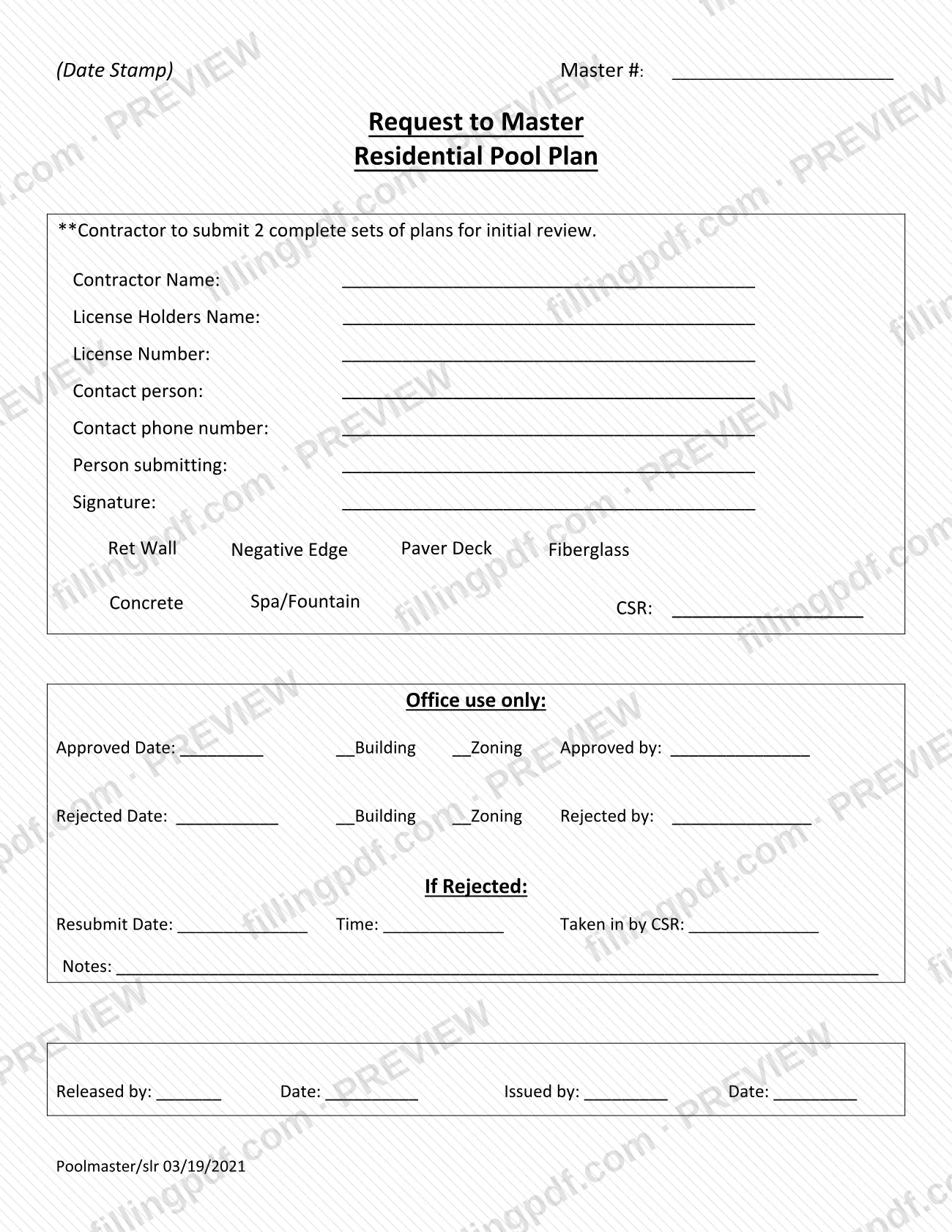
The Request to Master Residential Pool Plans is a cover sheet from the City of Cape Coral Building Division that a pool contractor completes when asking the city to master a residential pool plan, submitted with two complete sets of plans for initial review.
The form is titled "Request to Master Residential Pool Plan" on its face and carries a Master # line and a date-stamp area for the city's use. The contractor section asks for the contractor name, the license holder's name, the license number, a contact person with a phone number, the person submitting and a signature. A row of options lets the contractor mark what the plans cover: Ret Wall, Negative Edge, Paver Deck, Fiberglass, Concrete, or Spa/Fountain.
The lower half is an "Office use only" block. City staff record an approval or rejection date, whether Building or Zoning acted, who approved or rejected it, a resubmit date and time with the staff member who took it in, notes, and the release and issue entries.
The Permit Document Center also lists the Pool Master Requests Guideline, the Pool Master Requests Guideline (In Ground) and Master Pool Site-Specific Document Requirements among its pool documents. This form is the request itself, not those guidelines. It is also separate from the Master SFR Cover Sheet listed in the same center.
Who needs to file Request to Master Residential Pool Plans – Cape Coral, FL?
Pool contractors who want the City of Cape Coral Building Division to master a residential pool plan use this form. The form is written for the contractor: it asks for the contractor name, the license holder's name and license number, a contact person and the person submitting.
- The license holder's name and license number identify who stands behind the plans.
- The person submitting signs the form, so it can be someone other than the license holder, provided the form names them in the "Person submitting" line.
- The "Office use only" block is for city staff. Applicants do not complete it.
The title says "Residential Pool Plan", so the form is not the one for other plan types. The Permit Document Center lists a separate Master SFR Cover Sheet, and commercial pool work has its own Pool Guideline - Commercial. Check the Building Division's Pool Master Requests Guideline if you are unsure the form fits your project.
When to file Request to Master Residential Pool Plans – Cape Coral, FL
Submit the form when the contractor is ready to hand in plans for initial review: the form says the contractor submits 2 complete sets of plans, and it travels with them. It prints no separate due date or validity period.
If the city rejects the request, the office-use block has a "Resubmit Date" and "Time" line and a "Taken in by CSR" line, so the resubmittal is recorded on the same sheet. For timing rules beyond that, see the Pool Master Requests Guideline in the City of Cape Coral Permit Document Center.
Documents you need
- 2 complete sets of plans for initial review: the form states that the contractor submits them with the request.
How to fill out Request to Master Residential Pool Plans – Cape Coral, FL
Leave the Master # and date stamp
The Master # line and the (Date Stamp) area at the top are filled by the city. Leave them blank.
Enter contractor and license holder
Write the Contractor Name and the License Holders Name on their lines, then the License Number.
Add a contact person and phone
Enter the Contact person and the Contact phone number the Building Division should use about the request.
Name the person submitting
Write the name of the person delivering the request on the Person submitting line.
Mark the plan options
In the option row, mark what applies to the plans: Ret Wall, Negative Edge, Paver Deck, Fiberglass, Concrete, or Spa/Fountain.
Check the CSR line
A CSR line follows the option row, and the office-use block has a Taken in by CSR line too. Confirm with the Building Division who completes it before writing in it.
Sign the request
Sign on the Signature line. The form has no separate date line for the applicant.
Leave the Office use only block
Do not write in the approved, rejected, resubmit, notes, released or issued lines. City staff complete them.
Review and download the PDF
Check names, license number and the options marked, then download or print the completed PDF from FillingPDF. Prepare the 2 complete sets of plans to go with it, as described under How to submit.
How to submit Request to Master Residential Pool Plans – Cape Coral, FL
The form names one requirement and no channel: the contractor submits 2 complete sets of plans for initial review. It prints no mailing address, portal or appointment rule, so follow the City of Cape Coral Building Division's current intake instructions.
- Where to check: the Pool section of the Permit Document Center lists the Pool Master Requests Guideline and Pool Master Requests Guideline (In Ground), the companion documents for this request.
- What goes in: the completed, signed form with 2 complete sets of plans.
- After review: city staff complete the office-use block. A rejected request is resubmitted, and the resubmit date, time and the staff member who took it in are recorded on the form.
FillingPDF lets you fill out and download the PDF; submission follows the channels above.
Common mistakes to avoid
- Submitting fewer than 2 complete sets of plans; the form says the contractor submits 2 complete sets for initial review.
- Leaving the license holder's name or license number blank, since both lines are printed in the contractor section.
- Sending the form without a signature on the Signature line.
- Writing in the Master # line, the date-stamp area or the Office use only block, which are for city staff.
- Leaving the plan options (Ret Wall, Negative Edge, Paver Deck, Fiberglass, Concrete, Spa/Fountain) unmarked so the plans are not described.
- Using a different cover sheet, such as the Master SFR Cover Sheet, for pool plans; this form is the one titled for residential pool plans.
Frequently asked questions
What is the Request to Master Residential Pool Plans?
It is a City of Cape Coral Building Division cover sheet that a pool contractor completes when asking the city to master a residential pool plan. It goes in with 2 complete sets of plans for initial review and has an office-use block where city staff record approval or rejection.
How many sets of plans do I submit with the form?
Two complete sets. The form states that the contractor submits 2 complete sets of plans for initial review. The form itself lists no other attachment, so check the Pool Master Requests Guideline for anything beyond the plans.
Where do I find Cape Coral permit documents for pools?
The City of Cape Coral Permit Document Center lists them. Its Pool section includes this request, the In-Ground Pool Guidelines, the Pool Master Requests Guideline and Application - Pool, among others. The form lists no address or portal of its own.
Can I fill out this form online?
Yes. You can fill out the PDF online on FillingPDF and download or print it. FillingPDF is an independent service, not the City of Cape Coral, and it does not submit the form; you deliver it with your plans through the Building Division's channels.
Who fills out the Office use only section?
City staff do. That block records approval or rejection dates, whether Building or Zoning acted, who acted, resubmit date and time, notes, and release and issue entries. The contractor completes only the top section and the signature.
What happens if my pool master request is rejected?
The office-use block has a Rejected Date, a Rejected by line, and Resubmit Date, Time and Taken in by CSR lines, so a rejected request is recorded and resubmitted on the same form. The resubmit procedure is in the city's Resubmit Procedure document.
What is the revision date of this form?
The form is marked Poolmaster/slr 03/19/2021, and the Permit Document Center lists it as revised 3/19/2021. Download the current PDF from the city's link to confirm you have the latest version.
Ready to fill out Request to Master Residential Pool Plans – Cape Coral, FL?
Fill out Request to Master Residential Pool Plans – Cape Coral, FL now