
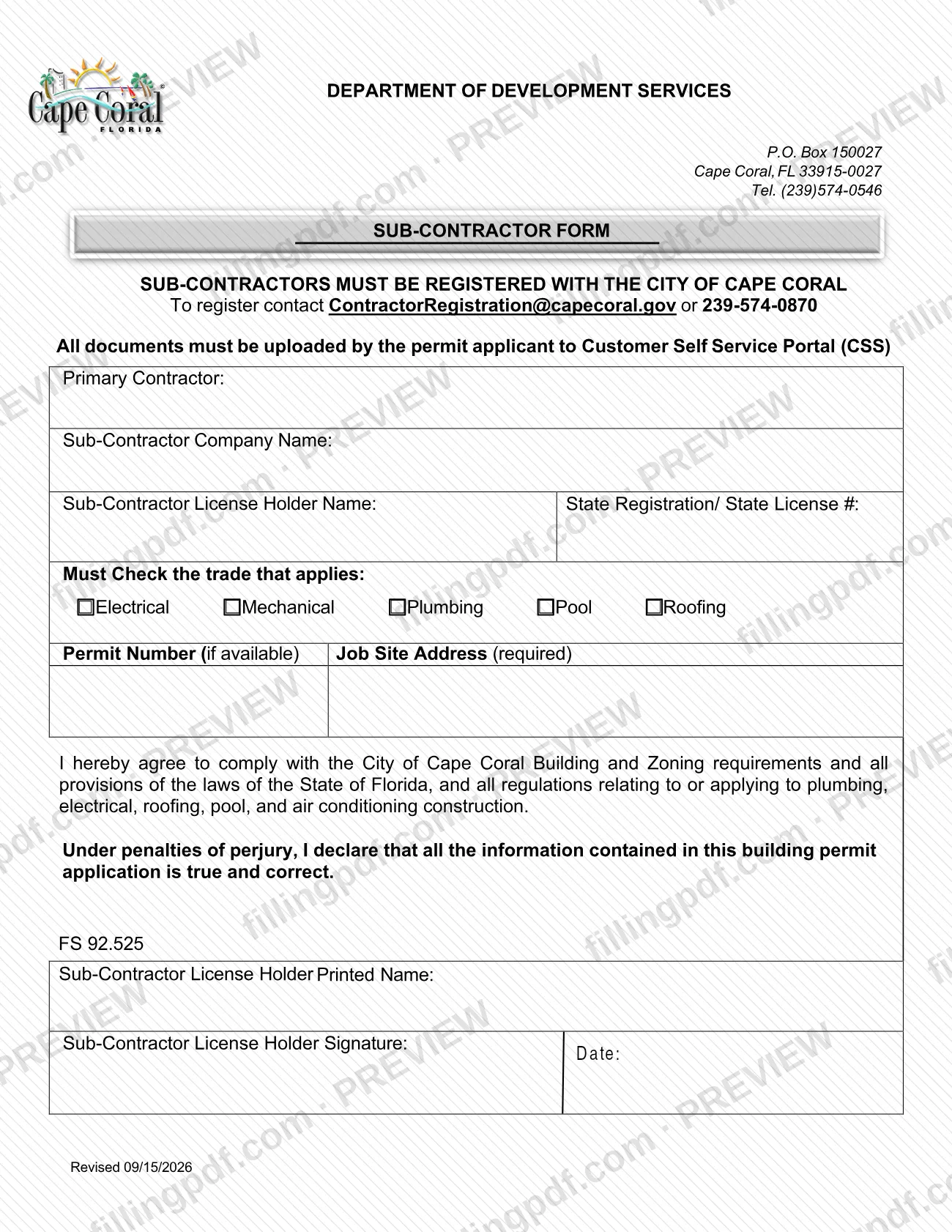
The SubContractor Form is a City of Cape Coral document on which a sub-contractor identifies its company, its license holder and the trade it will perform on a job site. It is one of the Cape Coral permit documents listed in the city's Permit Document Center, and the form states that sub-contractors must be registered with the City of Cape Coral. On FillingPDF you can fill out the form online and download or print the completed PDF; the permit applicant then uploads it to the city's Customer Self Service Portal (CSS), and the city publishes the original PDF at its website.
Last updated
What is SubContractor Form – Cape Coral, FL?
The SubContractor Form is a City of Cape Coral permitting form on which a registered sub-contractor names the primary contractor, identifies its company and license holder, checks its trade, lists the job site and agrees to follow city and Florida requirements.
The printed header belongs to the Department of Development Services (P.O. Box 150027, Cape Coral, FL 33915-0027, Tel. (239)574-0546), and the form is issued by the City of Cape Coral Building Division's permitting side. It is titled "SUB-CONTRACTOR FORM" and carries the revision note "Revised 09/15/2026".
The form collects:
- the primary contractor and the sub-contractor company name;
- the sub-contractor license holder's name and State Registration/State License #;
- the trade that applies: Electrical, Mechanical, Plumbing, Pool or Roofing;
- the permit number, if available, and the job site address, which is required.
Two statements are printed above the signature block. In the first, the license holder agrees to comply with the City of Cape Coral Building and Zoning requirements, the laws of the State of Florida and all regulations relating to plumbing, electrical, roofing, pool and air conditioning construction. In the second, the signer declares under penalties of perjury, citing FS 92.525, that the information is true and correct.
The city's Permit Document Center lists this form under Miscellaneous Documents, separate from the permit applications, guidelines and affidavits it also publishes. It is not a permit application and does not register a sub-contractor: registration is done beforehand by contacting the city.
Who needs to file SubContractor Form – Cape Coral, FL?
Sub-contractors working under a primary contractor on a Cape Coral permit in one of the five trades printed on the form (electrical, mechanical, plumbing, pool or roofing) use this form. The sub-contractor license holder fills in the company details, prints their name, signs and dates it.
The form states that sub-contractors must be registered with the City of Cape Coral. A sub-contractor who is not yet registered contacts [email protected] or 239-574-0870 to register.
The permit applicant also has a role: the form says all documents must be uploaded by the permit applicant to the Customer Self Service Portal (CSS). If you are the sub-contractor but not the permit applicant, give the signed form to the applicant for upload.
The form lists only the five trades above, so work in another trade is not covered by a check box on it. It prints no rules on representatives signing for the license holder; the declaration is signed by the sub-contractor license holder.
When to file SubContractor Form – Cape Coral, FL
The SubContractor Form accompanies a permit, so it is provided when the permit applicant uploads the permit's documents to the Customer Self Service Portal (CSS). It prints no deadline of its own.
Because the permit number line reads "if available", the form can be completed even when no permit number has been issued yet. The job site address is required either way, and the registration of the sub-contractor with the City of Cape Coral comes first, since the form states that sub-contractors must be registered. Check the revision date, printed as "Revised 09/15/2026", against the version the city currently publishes.
How to fill out SubContractor Form – Cape Coral, FL
Confirm the sub-contractor is registered
The form states that sub-contractors must be registered with the City of Cape Coral. If not registered, contact [email protected] or 239-574-0870 first.
Enter the primary contractor
Write the name of the primary contractor on the Primary Contractor line.
Enter the sub-contractor company name
On the Sub-Contractor Company Name line, write the company that will perform the work.
Enter license holder and license number
Write the Sub-Contractor License Holder Name, then the State Registration/State License # in the field beside it.
Check the trade that applies
Check one of Electrical, Mechanical, Plumbing, Pool or Roofing. The form says you must check the trade that applies.
Enter permit number and job site
Enter the Permit Number if it is available. Enter the Job Site Address, which the form marks as required.
Read the agreement and declaration
Read the statement agreeing to comply with the City of Cape Coral Building and Zoning requirements and Florida law, and the declaration under penalties of perjury (FS 92.525), before signing.
Print name, sign and date
The Sub-Contractor License Holder prints their name, signs and enters the date.
Review and download the completed PDF
Check the trade, job site address and license number, then download or print the completed PDF from FillingPDF and give it to the permit applicant for upload to the Customer Self Service Portal (CSS).
How to submit SubContractor Form – Cape Coral, FL
The form is submitted by upload: the permit applicant uploads it to the city's Customer Self Service Portal (CSS).
- Online upload (CSS): the form states that all documents must be uploaded by the permit applicant to the Customer Self Service Portal (CSS). The form does not print a portal address, so use the link the City of Cape Coral gives you for the permit.
- Registration questions: sub-contractors who need to register with the city contact [email protected] or 239-574-0870 before the form is used.
- Department contact: the header lists the Department of Development Services, P.O. Box 150027, Cape Coral, FL 33915-0027, Tel. (239)574-0546. The form names that address as a header, not as a place to send the signed form.
The form mentions no fee. FillingPDF lets you fill out and download the PDF; submission follows the channels above.
Common mistakes to avoid
- Using a sub-contractor who is not registered with the City of Cape Coral; the form states that sub-contractors must be registered.
- Leaving the trade unchecked; the form says you must check the trade that applies (Electrical, Mechanical, Plumbing, Pool or Roofing).
- Leaving the Job Site Address blank, although the form marks it as required.
- Printing the license holder's name but not signing and dating the form under the penalties-of-perjury declaration.
- Having someone other than the Sub-Contractor License Holder sign the declaration.
- Leaving out the State Registration/State License # next to the license holder's name.
- Emailing or mailing the signed form instead of having the permit applicant upload it to the Customer Self Service Portal (CSS).
Frequently asked questions
What is the Cape Coral SubContractor Form?
It is a City of Cape Coral form on which a registered sub-contractor names the primary contractor, its company, license holder, license number, trade and job site, and signs an agreement and a declaration under penalties of perjury (FS 92.525).
Where does the SubContractor Form fit in a Cape Coral permit?
The city lists it in its Permit Document Center under Miscellaneous Documents. It asks for the permit number if available and the job site address, and the permit applicant uploads it to the Customer Self Service Portal (CSS) with the permit's other documents.
Does a sub-contractor have to be registered with Cape Coral?
Yes. The form states that sub-contractors must be registered with the City of Cape Coral. To register, contact [email protected] or call 239-574-0870.
Who uploads the SubContractor Form?
The permit applicant. The form says all documents must be uploaded by the permit applicant to the Customer Self Service Portal (CSS), so a sub-contractor who is not the applicant passes the signed form to the applicant.
Which trades can I check on the SubContractor Form?
Electrical, Mechanical, Plumbing, Pool and Roofing. The form says you must check the trade that applies, and it prints no check box for any other trade.
Do I need a permit number to complete the form?
No. The Permit Number line reads "if available". The Job Site Address, however, is marked as required, so complete it in every case.
Who signs the SubContractor Form?
The Sub-Contractor License Holder prints their name, signs and dates the form. The signature comes under the statement that the information is true and correct under penalties of perjury (FS 92.525).
Can I fill out the SubContractor Form online?
Yes. You can fill out the PDF online on FillingPDF and download or print it. FillingPDF is independent of the City of Cape Coral and does not submit the form; the permit applicant uploads it to the city's CSS portal.
Ready to fill out SubContractor Form – Cape Coral, FL?
Fill out SubContractor Form – Cape Coral, FL now