
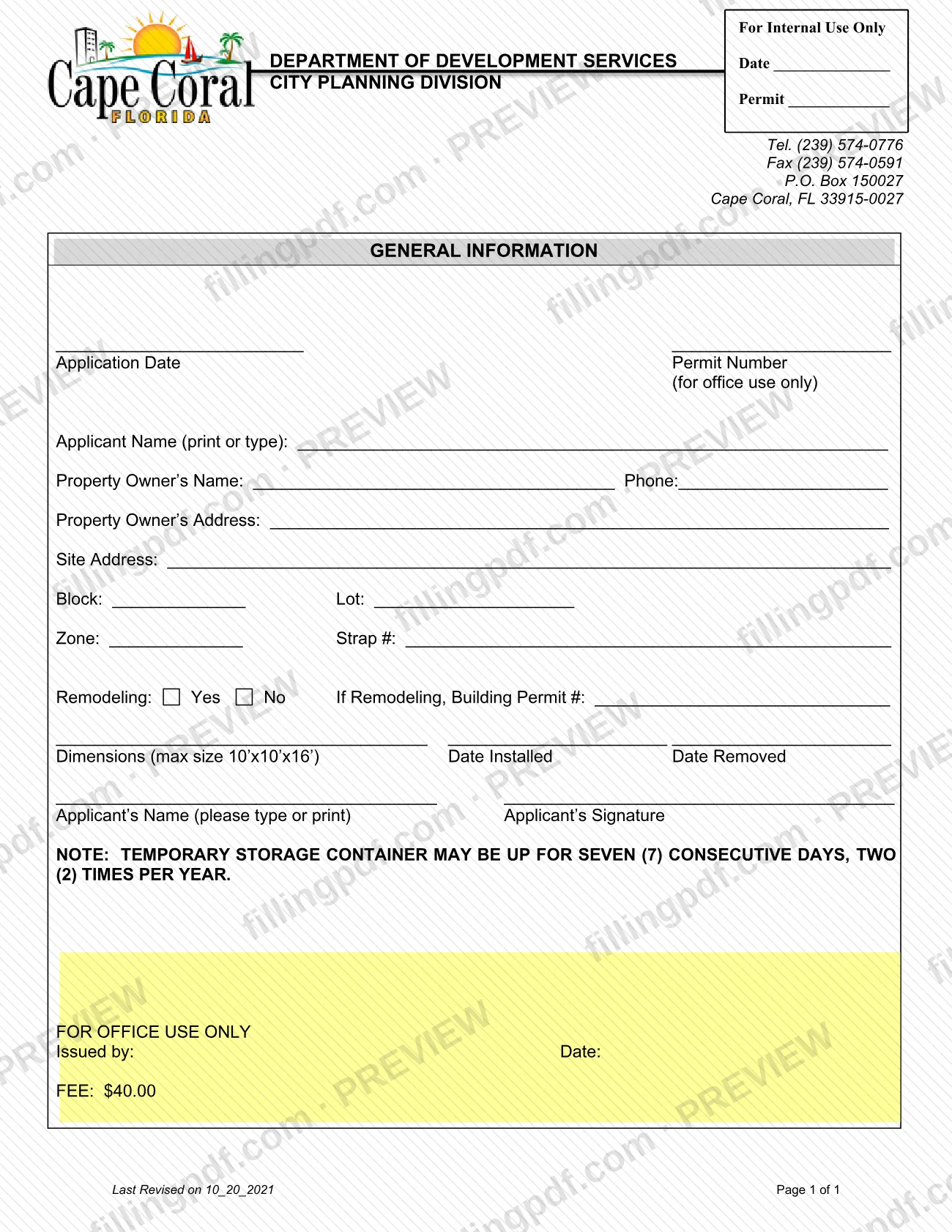
The Temporary Storage Container Application is the City of Cape Coral form for a temporary storage container, often called a POD, placed on a property. It is issued through the City Planning Division of the Department of Development Services and is one of the Cape Coral permit forms in the Planning Division's document center. The form records the owner, the site, the container's dimensions and the dates it is installed and removed. On this page you can fill out the form online on FillingPDF and download or print the completed PDF; the city publishes the original at capecoral.gov.
Last updated
What is Temporary Storage Container Application – Cape Coral, FL?
The Temporary Storage Container Application is the one-page City of Cape Coral form used to apply for a temporary storage container (POD) at a property in the city. The City Planning Division, part of the Department of Development Services, issues it.
The form asks for general information about the applicant and the property: the applicant's name, the property owner's name, phone and address, the site address, the block, lot, zone and strap number. It also asks whether the property is being remodeled and, if so, for the building permit number. Two entries describe the container itself: its dimensions, with a printed maximum size of 10'x10'x16', and the dates it is installed and removed.
A note printed on the form sets the time limit: a temporary storage container may be up for seven (7) consecutive days, two (2) times per year. The application date, permit number, "Issued by" line, date and fee line are reserved for city staff.
The Planning Division publishes the form among its applications and documents, which it has updated for the new Land Development Code. This application covers only the temporary container; it is not a building permit, although the form asks for a building permit number when the property is under remodeling.
Who needs to file Temporary Storage Container Application – Cape Coral, FL?
Anyone who wants to place a temporary storage container (POD) at a property in the City of Cape Coral uses this application. The form has separate places for the applicant and the property owner, so the person who applies need not be the owner; the owner's name, phone and address are still required entries.
Property that is being remodeled is covered by the same form. The form asks you to mark Yes or No for remodeling and, if Yes, to give the building permit number for that work.
The form's note limits what the permit supports: seven consecutive days, two times per year, and a container no larger than 10'x10'x16'. A container that would be larger or stay longer does not fit this application as printed; contact the City Planning Division at (239) 574-0776 or [email protected] to ask what applies. The form does not describe representatives signing for an owner; the applicant signs under the applicant's printed name.
When to file Temporary Storage Container Application – Cape Coral, FL
The form prints no filing deadline of its own. It records the Date Installed and Date Removed of the container, so complete and submit it for the dates you plan to use the container.
The note on the form limits each use to seven (7) consecutive days and allows two (2) uses per year, so plan the install and removal dates inside that window. Once the Planning Division receives an application, its page says the application is reviewed for completeness and invoiced. The page gives no processing time for this form.
How to fill out Temporary Storage Container Application – Cape Coral, FL
Enter the applicant's name
Under General Information, print or type the Applicant Name. Leave the Application Date and Permit Number blank; they are for office use only.
Enter the property owner's details
Write the Property Owner's Name, Phone and Property Owner's Address, even if you are not the owner.
Give the site location
Enter the Site Address, then the Block, Lot, Zone and Strap # for the property where the container will be placed.
Answer the remodeling question
Mark Yes or No for Remodeling. If Yes, enter the Building Permit # for the remodeling work.
Enter the container dimensions
Write the container's dimensions under Dimensions. The form prints a maximum size of 10'x10'x16'.
Enter the install and removal dates
Enter the Date Installed and Date Removed. The note on the form allows seven (7) consecutive days, two (2) times per year.
Print your name and sign
Print the Applicant's Name and add the Applicant's Signature. Leave the For Office Use Only block (Issued by, Date, Fee) untouched.
Review and download the completed PDF
Check the site details, dimensions and dates. Download or print the completed PDF from FillingPDF and submit it through the channels under How to submit.
How to submit Temporary Storage Container Application – Cape Coral, FL
The City Planning Division's page encourages applicants to submit online through the CSS online portal; questions go to [email protected]. The form itself also prints the Division's contact details.
- Online: use the CSS online portal named on the Planning Division's applications and documents page.
- Email for help: [email protected], if you need assistance with your application.
- Division contact printed on the form: Department of Development Services, City Planning Division, Tel. (239) 574-0776, Fax (239) 574-0591, P.O. Box 150027, Cape Coral, FL 33915-0027.
Once the application is received, the Division reviews it for completeness and invoices it. The form shows a fee line in the office-use area; ask the Division for the current amount. The city says it will never request payment by electronic funds transfer (EFT), wire transfer or third-party payment apps such as Venmo, Cash App, PayPal or Zelle. Leave the application date, permit number, "Issued by" and date lines blank. FillingPDF lets you fill out and download the PDF; submission follows the channels above.
Common mistakes to avoid
- Proposing a container larger than the printed maximum size of 10'x10'x16' in the Dimensions entry.
- Planning a container stay longer than seven (7) consecutive days; the form's note sets that limit.
- Applying for more than two (2) uses in a year; the note allows two times per year.
- Marking Yes for Remodeling but leaving the Building Permit # blank.
- Writing in the office-use items: Application Date, Permit Number, Issued by, Date and Fee.
- Leaving the Applicant's Signature blank or not printing the Applicant's Name beside it.
- Paying by wire, EFT or an app such as Venmo, Cash App, PayPal or Zelle; the city says it never requests payment that way.
- Leaving out the property owner's phone or address when the applicant is not the owner.
Frequently asked questions
What is the Cape Coral Temporary Storage Container Application?
It is a City of Cape Coral Planning Division form for placing a temporary storage container (POD) on a property. It records the owner, site, container dimensions and install and removal dates, with a note limiting use to seven consecutive days, two times per year.
How long can a storage container stay up in Cape Coral?
The form's note says a temporary storage container may be up for seven (7) consecutive days, two (2) times per year. The printed maximum size is 10'x10'x16'. For longer stays or larger containers, ask the City Planning Division at (239) 574-0776.
Can I fill out the Cape Coral storage container application online?
Yes. You can complete the PDF on FillingPDF and download or print it. FillingPDF is independent of the city and does not file it; you submit the application through the City Planning Division's channels, which encourage the CSS online portal.
Is there a fee for the temporary storage container application?
The form shows a fee line in the office-use area, and the Planning Division says it reviews applications for completeness and then invoices them. Ask the Division for the current amount at (239) 574-0776 or [email protected].
How do I pay the Cape Coral Planning Division?
Pay only as the invoice instructs. The city says it will never request payment by electronic funds transfer (EFT), wire transfer or third-party payment apps such as Venmo, Cash App, PayPal or Zelle. Questions go to [email protected].
Where do I submit the temporary storage container application?
The City Planning Division encourages online submission through the CSS online portal. For help, email [email protected]. The form prints the Division's Tel. (239) 574-0776, Fax (239) 574-0591 and P.O. Box 150027, Cape Coral, FL 33915-0027.
What do I enter for Remodeling on the form?
Mark Yes or No. If you mark Yes, enter the Building Permit # for the remodeling work in the space on the same line. If the property is not being remodeled, mark No and leave the permit number blank.
Does a Cape Coral permit for a container also cover a building permit?
No. This form covers only the temporary storage container. It asks for a Building Permit # when remodeling is under way, but that permit is a separate matter; contact the City of Cape Coral for building permit questions.
Ready to fill out Temporary Storage Container Application – Cape Coral, FL?
Fill out Temporary Storage Container Application – Cape Coral, FL now