
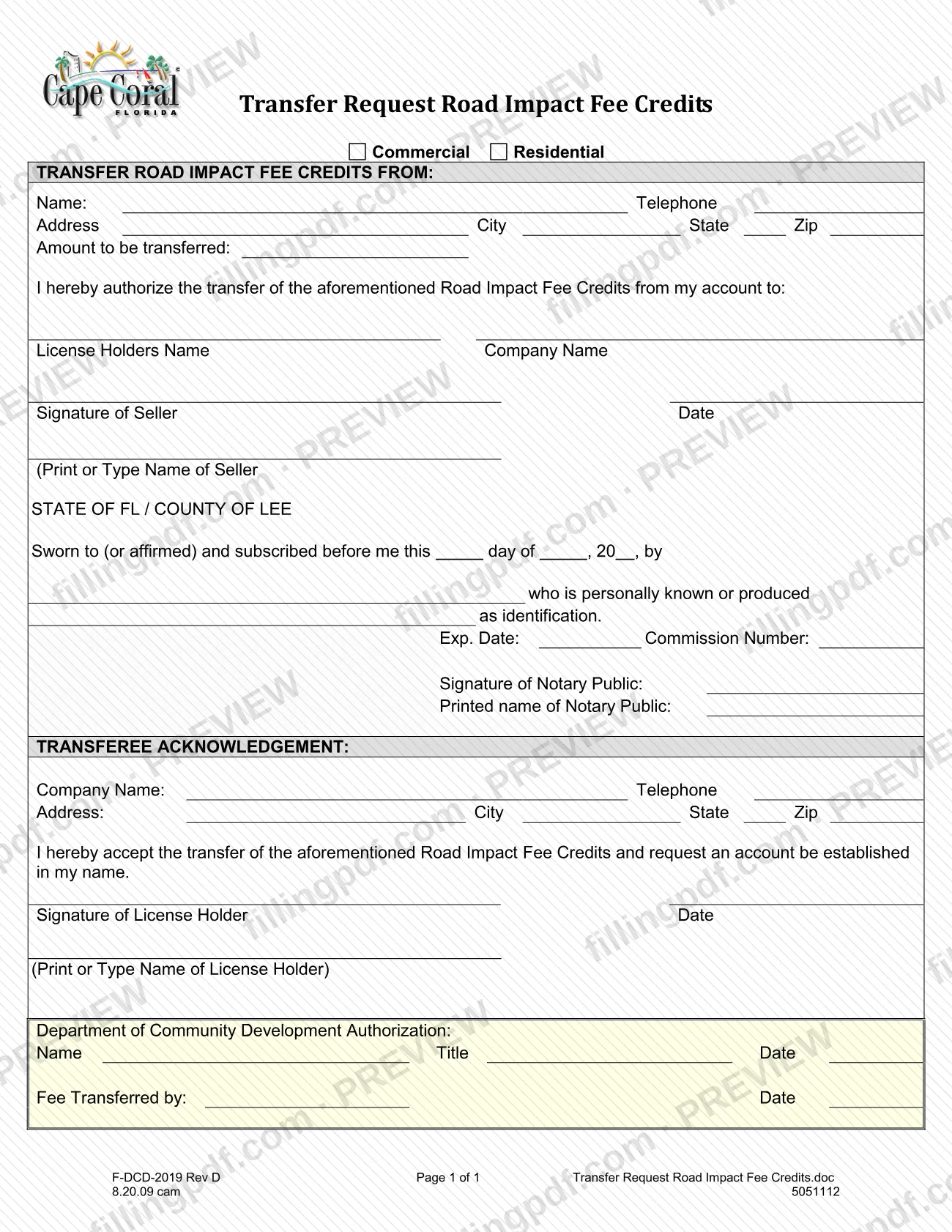
The Transfer Request Road Impact Fee Credits Form is the City of Cape Coral form that records the transfer of Road Impact Fee Credits from a seller's account to another license holder. It is one of the Cape Coral permit documents listed under Miscellaneous Documents in the city's Permit Document Center. A seller authorizes the transfer before a notary, and the receiving license holder accepts it and asks for an account in their name. On this page you can fill out the form online on FillingPDF and download or print the completed PDF; the city publishes the original at capecoral.gov.
Last updated
What is F-DCD-2019?
The Transfer Request Road Impact Fee Credits Form is the City of Cape Coral form used to authorize the transfer of Road Impact Fee Credits from a seller's account to a license holder, who accepts them and asks for an account in their own name.
The form is a single page with four blocks. The first identifies the account the credits come from, marked Commercial or Residential, with the seller's name, telephone, address and the amount to be transferred. The seller then authorizes the transfer to a named license holder and company, signs, and has the signature sworn before a notary public in the State of Florida, County of Lee. The second block is the Transferee Acknowledgement, where the receiving license holder gives company details, accepts the transfer and asks that an account be established in their name. The last block, Department of Community Development Authorization, and the line Fee Transferred by are completed by the city.
The city lists this form with other Miscellaneous Documents in its Permit Document Center. A separate document, the Road Impact Fee Credits Use Form, appears in the same list; this form is the one for transferring credits from one holder to another. The form is numbered F-DCD-2019 and marked Rev D.
Who needs to file F-DCD-2019?
The main group is the holder of Road Impact Fee Credits in a City of Cape Coral account who wants to transfer them to someone else. On the form this person is the seller. The seller identifies whether the credits sit in a Commercial or Residential account, states the amount to be transferred, names the receiving license holder and company, signs, and has the signature notarized.
The second group is the receiving license holder. The Transferee Acknowledgement is completed by the license holder who accepts the credits and asks the city to establish an account in their name. It requires the company name, telephone, address, the license holder's signature, date and printed name.
City staff complete the remaining block, the Department of Community Development Authorization (name, title, date), and the line showing who transferred the fee and when. Neither the seller nor the transferee fills those in.
The form prints no eligibility rules and no exclusions, and it does not say whether someone may sign for the seller or the license holder. Ask the City of Cape Coral Building Division before having a representative sign.
When to file F-DCD-2019
Use the form when a holder of Road Impact Fee Credits decides to transfer them to another license holder. The form prints no deadline, filing window or expiration date.
Plan the signing in order. The seller's signature is sworn to and subscribed before a notary public, and the notary block records the date, so the seller should sign at the notary appointment rather than beforehand. The transferee then signs the acknowledgement, which also asks the city to set up an account in the transferee's name. The Department of Community Development authorization comes last and is entered by the city after it has the completed form.
Documents you need
- Identification for the notary, if the notary does not know the seller personally; the notary block records whether the signer is personally known or produced identification.
How to fill out F-DCD-2019
Mark Commercial or Residential
Under TRANSFER ROAD IMPACT FEE CREDITS FROM, check Commercial or Residential to show which account the credits come from.
Enter the seller's details
Fill in the seller's Name, Telephone, Address, City, State and Zip.
Enter the amount to be transferred
Write the amount of Road Impact Fee Credits to be transferred on the Amount to be transferred line.
Name the receiving license holder
In the authorization sentence, enter the License Holders Name and Company Name of the person receiving the credits.
Sign, date and print the seller's name
The seller signs the Signature of Seller line, enters the Date and prints or types the seller's name. Do this at the notary appointment, because the signature is sworn before the notary.
Leave the notary block to the notary
The notary completes the day, month and year, the name of the signer, whether the signer is personally known or produced identification, the expiration date, commission number, signature and printed name.
Complete the Transferee Acknowledgement
The receiving license holder enters Company Name, Telephone, Address, City, State and Zip, accepting the transfer and requesting an account in their name.
Sign the acknowledgement
The license holder signs and dates the Signature of License Holder line and prints or types their name.
Leave the city's block blank
Do not fill in the Department of Community Development Authorization (Name, Title, Date) or the Fee Transferred by line; these are for city use.
Review and download the PDF
Check that every line is complete and the names match on both sides. Download or print the completed PDF from FillingPDF, then ask the City of Cape Coral Building Division how to submit it as described under How to submit.
How to submit F-DCD-2019
The form itself names no mailing address, portal, email or appointment rule. It shows only the end of the process: a Department of Community Development Authorization block (name, title, date) and a Fee Transferred by line, both completed by the city, not by you.
- Before you send it: complete the seller and transferee sections, and have the seller's signature sworn before a notary public.
- Where to ask: the City of Cape Coral Building Division publishes the form in its Permit Document Center. Ask it how it accepts the signed, notarized form.
FillingPDF lets you fill out and download the PDF; submission follows the city's channels.
Common mistakes to avoid
- Signing the seller line before meeting the notary, when the form states the signature is sworn to (or affirmed) and subscribed before the notary.
- Leaving both the Commercial and Residential boxes unchecked, so the account the credits come from is unclear.
- Omitting the amount to be transferred or the name of the receiving license holder and company.
- Submitting the form without the Transferee Acknowledgement signed and dated by the license holder, who must accept the transfer and request the new account.
- Writing in the Department of Community Development Authorization block or the Fee Transferred by line, which the city completes.
- Confusing this form with the Road Impact Fee Credits Use Form, which the city lists as a separate document.
- Leaving the printed name lines blank under the seller and license holder signatures.
Frequently asked questions
What is the Transfer Request Road Impact Fee Credits Form?
It is a City of Cape Coral form that authorizes moving Road Impact Fee Credits from a seller's account to a license holder. The seller signs before a notary, and the receiving license holder accepts the transfer and asks for an account in their name.
Is this form a Cape Coral permit application?
No. It transfers road impact fee credits and is listed under Miscellaneous Documents in the city's Permit Document Center. Cape Coral permit applications, such as Application - Addition/Remodel, are separate documents in the same center.
Does the seller's signature have to be notarized?
Yes, the form includes a notary block for the State of FL, County of Lee, stating the document is sworn to (or affirmed) and subscribed before the notary. The notary also records whether the signer is personally known or produced identification.
Who fills in the Department of Community Development Authorization block?
The city does. That block asks for a name, title and date, and a Fee Transferred by line with a date follows it. The seller and the receiving license holder leave both blank.
What is the difference between this form and the Road Impact Fee Credits Use Form?
This form transfers credits from one holder to another license holder. The city lists the Road Impact Fee Credits Use Form (revised 4/26/2010) as a separate document in the same Miscellaneous Documents group.
Can I fill out the Transfer Request Road Impact Fee Credits Form online?
You can fill out the PDF online on FillingPDF and download or print it. FillingPDF is an independent service and does not file the form with the city or notarize it; the seller still signs before a notary.
Who signs the Transferee Acknowledgement?
The receiving license holder signs and dates it and prints their name. By signing, the license holder accepts the transfer of the credits and requests that an account be established in their name.
Ready to fill out F-DCD-2019?
Fill out F-DCD-2019 now