
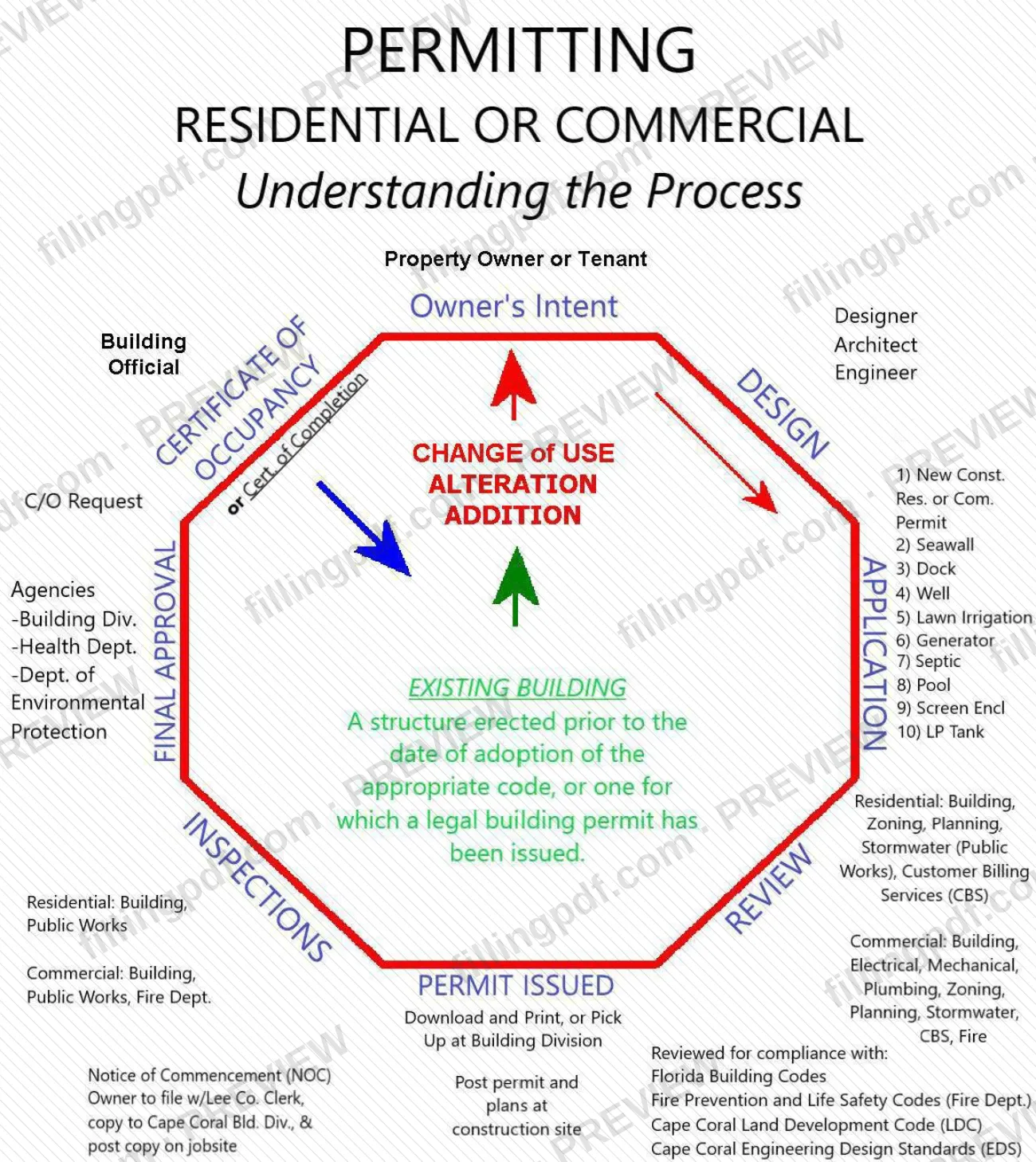
Understanding the Permitting Process is a one-page flowchart from the City of Cape Coral Building Division, one of the Cape Coral permit resources listed on the city's Building & Other Common Permits page. It follows a residential or commercial project from the owner's intent through the permit request, review by city agencies and permit issuance. It helps property owners, tenants and their designers, architects or engineers see which agencies review a project. On FillingPDF you can fill out the form online and download or print the completed PDF; the city publishes the original at capecoral.gov.
Last updated
What is Understanding the Permitting Process – Cape Coral, FL?
Understanding the Permitting Process is a flowchart published by the City of Cape Coral Building Division that shows how a residential or commercial permit moves from the owner's intent, through review by city agencies, to an issued permit.\n\nThe chart starts with the property owner or tenant and the owner's intent, with a designer, architect or engineer and the Building Official involved. It sorts projects into change of use, alteration and addition, and it lists permit types that include new construction (residential or commercial), seawall, dock, well, lawn irrigation, generator and septic. A C/O (certificate of occupancy) request also appears on the chart. It defines an existing building as a structure erected before the date the appropriate code was adopted, or one for which a legal building permit has been issued.\n\nThe chart then separates the departments that review residential and commercial work, and it states that a permit is reviewed for compliance with the Florida Building Codes, the Fire Prevention and Life Safety Codes (Fire Dept.), the Cape Coral Land Development Code (LDC) and the Cape Coral Engineering Design Standards (EDS).\n\nIt ends with the issued permit and the Notice of Commencement (NOC). The page prints no form number, and its lines do not request personal data: it explains the process rather than starting an application.
Who needs to file Understanding the Permitting Process – Cape Coral, FL?
Property owners and tenants in Cape Coral who plan construction work, an alteration, an addition or a change of use use this chart to understand the route a permit takes. The chart places the owner's intent first and shows designers, architects and engineers working alongside the Building Official.\n\n- Residential projects: the chart lists Building, Zoning, Planning, Stormwater (Public Works) and Customer Billing Services (CBS) among the reviewing departments.\n- Commercial projects: the chart lists Building, Electrical, Mechanical, Plumbing, Zoning, Planning and Stormwater, together with Public Works and the Fire Dept.\n- Owners of specific structures: the chart names seawall, dock, well, lawn irrigation, generator and septic work among the permit types.\n\nThe chart is not an application and does not replace one. Applicants for other common permits, such as a Boat/RV Permit to Park, a Garage Sale Permit, Temporary Storage (POD) or an Outdoor Dog Dining Permit, are directed by the city's permit page to separate instructions.
When to file Understanding the Permitting Process – Cape Coral, FL
The chart begins with the owner's intent, so you read it before you decide on a project and again when you are ready to request a permit. It sets no deadline of its own and is not submitted to the city.\n\nOn the chart, the Notice of Commencement (NOC) belongs to the permit-issued stage: the owner files it with the Lee County Clerk, gives a copy to the Cape Coral Building Division and posts a copy on the jobsite. The permit and plans are posted at the construction site. The chart prints no time limits for these actions, so ask the Building Division about timing before you start work.
Documents you need
- Notice of Commencement (NOC): the owner files it with the Lee County Clerk and gives a copy to the Cape Coral Building Division, as shown at the permit-issued stage of the chart.
How to fill out Understanding the Permitting Process – Cape Coral, FL
Start with the owner's intent
Begin at the top of the chart, where the property owner or tenant states the owner's intent. Decide whether the project is residential or commercial.
Involve a designer if needed
The chart shows a designer, architect or engineer and the Building Official next to the owner's intent. Note who prepares the project.
Classify the work
Identify the project as a change of use, an alteration or an addition. Check whether the structure counts as an existing building under the chart's definition.
Pick the permit type
Find the permit on the chart's list: new construction (residential or commercial), seawall, dock, well, lawn irrigation, generator or septic. A C/O request is shown separately.
Identify the reviewing departments
For residential work, the chart lists Building, Zoning, Planning, Stormwater (Public Works) and Customer Billing Services (CBS). For commercial work, it adds Electrical, Mechanical, Plumbing, Public Works and the Fire Dept.
Check the codes applied
Permits are reviewed against the Florida Building Codes, the Fire Prevention and Life Safety Codes (Fire Dept.), the Cape Coral Land Development Code (LDC) and the Cape Coral Engineering Design Standards (EDS).
Get the issued permit
At the permit-issued stage, the chart says to download and print the permit or pick it up at the Building Division.
Handle the Notice of Commencement
The owner files the Notice of Commencement with the Lee County Clerk, sends a copy to the Cape Coral Building Division and posts a copy on the jobsite.
Post the permit and plans
Post the permit and plans at the construction site, as the chart directs.
Review and download the PDF
Check your notes against the chart, then download or print the completed PDF from FillingPDF. Request the permit through the city's channels described under How to submit.
How to submit Understanding the Permitting Process – Cape Coral, FL
This chart is not filed with the city. The permit it describes is requested through the Building Division's channels:
- Online: the city's Online Building Permit Services page lets you apply for select permit types, pay for permits, check the status of permits and plans, and schedule inspections. The city also publishes Electronic Submittal Requirements for documents sent electronically.
- EnerGov Customer Self-Service (CSS): the city's permit page sends applicants for a Boat/RV Permit to Park and for Temporary Storage (POD) to EnerGov CSS.
- Permit issued: the chart shows that an issued permit is downloaded and printed, or picked up at the Building Division.
The chart prints no mailing address or phone number. Check the city's Building & Other Common Permits page for current contact details. FillingPDF lets you fill out and download the PDF; submission follows the channels above.
Common mistakes to avoid
- Treating the flowchart as the permit application; it shows the process and agencies, not the lines of an application.
- Not filing the Notice of Commencement with the Lee County Clerk; the chart says the owner files it.
- Not giving a copy of the Notice of Commencement to the Cape Coral Building Division.
- Not posting a copy of the Notice of Commencement on the jobsite.
- Not posting the permit and plans at the construction site once the permit is issued.
- Assuming residential and commercial projects go through the same reviewing departments; the chart lists different ones, and the Fire Dept. appears on the commercial side.
- Assuming a structure is an existing building only because it is old; the chart defines it as built before the code was adopted or having a legal building permit.
Frequently asked questions
What is Understanding the Permitting Process in Cape Coral?
It is a flowchart from the City of Cape Coral Building Division that shows how a residential or commercial permit goes from the owner's intent through agency review to an issued permit. It also lists the codes the permit is reviewed against.
Is this document a Cape Coral permit application?
No. It is a process chart that shows the stages, permit types and reviewing departments. To apply, use the city's Online Building Permit Services, which let you apply for select permit types, pay for permits, check status and schedule inspections.
Which departments review a Cape Coral building permit?
For residential work the chart lists Building, Zoning, Planning, Stormwater (Public Works) and Customer Billing Services (CBS). For commercial work it lists Building, Electrical, Mechanical, Plumbing, Zoning, Planning and Stormwater, plus Public Works and the Fire Dept.
What codes does a Cape Coral permit get reviewed against?
The chart names the Florida Building Codes, the Fire Prevention and Life Safety Codes (Fire Dept.), the Cape Coral Land Development Code (LDC) and the Cape Coral Engineering Design Standards (EDS).
Do I need a Notice of Commencement in Cape Coral?
The chart shows it at the permit-issued stage: the owner files the Notice of Commencement with the Lee County Clerk, gives a copy to the Cape Coral Building Division and posts a copy on the jobsite.
Can I get the issued permit online?
The chart says the issued permit can be downloaded and printed, or picked up at the Building Division. After issuance, the permit and plans are posted at the construction site.
Where do I apply for a boat/RV or temporary storage permit in Cape Coral?
The city's permit page says to apply through EnerGov Customer Self-Service (CSS). For the Boat/RV Permit to Park, click Apply, then All, then RV/Boat Permit. Temporary Storage (POD) is also applied for through EnerGov CSS.
Can I fill out Understanding the Permitting Process on FillingPDF?
You can fill out the PDF online on FillingPDF and download or print it. FillingPDF is an independent service, is not connected to the City of Cape Coral and does not apply for or issue permits.
Ready to fill out Understanding the Permitting Process – Cape Coral, FL?
Fill out Understanding the Permitting Process – Cape Coral, FL now