
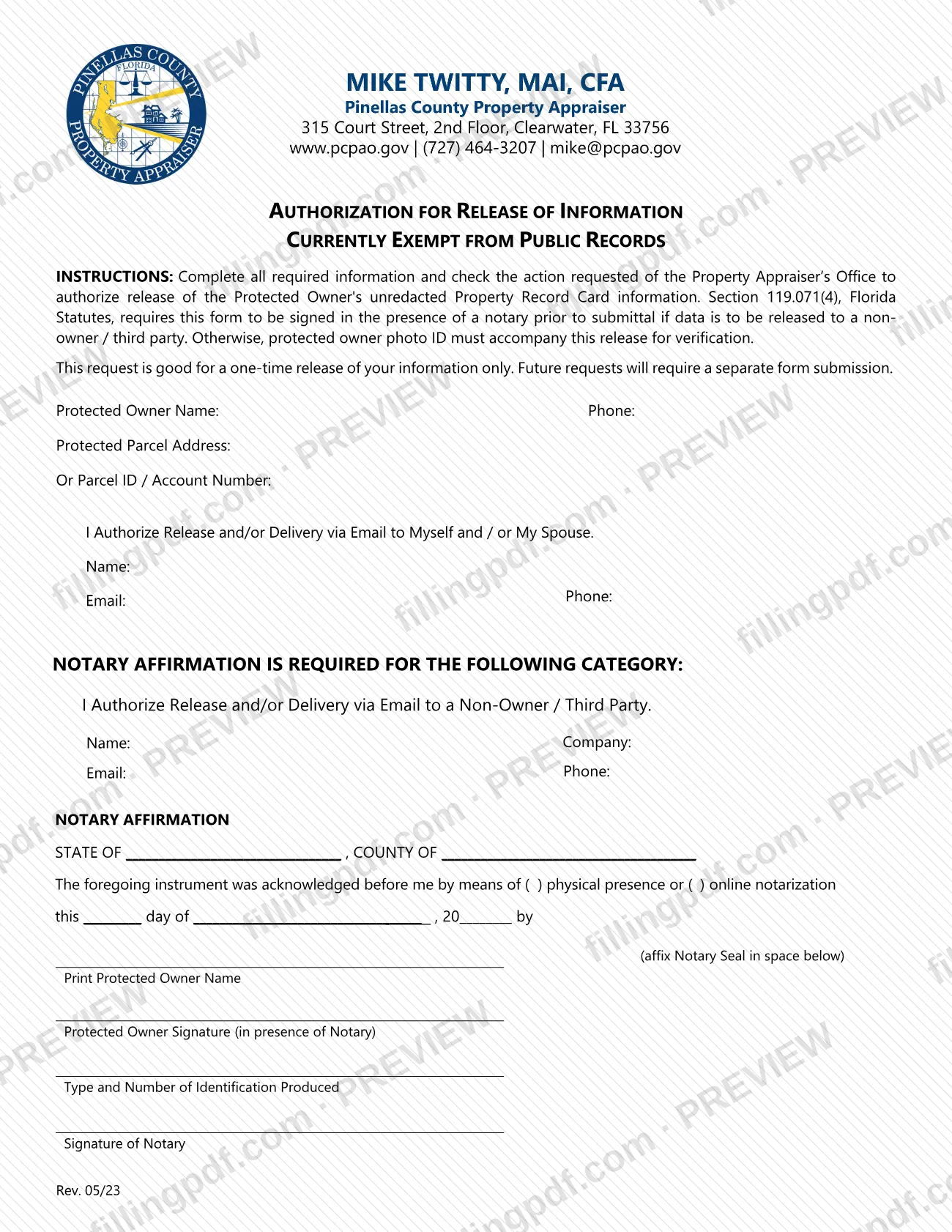
The Property Owner Authorization to Release Information is the Pinellas County Property Appraiser form on which an owner whose information is currently exempt from public records authorizes release of the unredacted Property Record Card. It is one of the Pinellas County property tax forms issued by the Property Appraiser's Office, and each signed form covers a single release. On this page you can fill out the form online on FillingPDF and download or print the completed PDF; the original is published by the Pinellas County Property Appraiser at pcpao.gov.
Last updated
What is Property Owner Authorization to Release Information – Pinellas County, FL?
The Property Owner Authorization to Release Information, printed on the form as Authorization for Release of Information – Currently Exempt From Public Records, is the Pinellas County Property Appraiser form on which a protected owner authorizes release of their unredacted Property Record Card information.
The form is for owners whose information is currently exempt from public records. The owner is called the Protected Owner on the form and is identified by name, phone, parcel address or Parcel ID / Account Number. The owner then checks the action requested of the Property Appraiser's Office:
- release and/or delivery via email to the owner and/or the owner's spouse; or
- release and/or delivery via email to a non-owner / third party, which requires a notary affirmation.
The instructions printed on the form say the request is good for a one-time release only. Future requests require a separate form submission. The form cites Section 119.071(4), Florida Statutes, as the reason a release to a non-owner or third party must be signed in the presence of a notary before it is submitted. The revision printed on the form is Rev. 05/23.
Who needs to file Property Owner Authorization to Release Information – Pinellas County, FL?
The main group is protected owners: owners of a parcel whose Property Record Card information is currently exempt from public records and who want that information released unredacted.
- Owner or spouse as recipient. A protected owner who wants the information released or emailed to themselves or their spouse checks the first option. Because no notary is required for this category, the form says the protected owner's photo ID must accompany the release for verification.
- Non-owner / third party as recipient. A protected owner who wants the information released or emailed to someone else, such as a person or a company, checks the second option. The form says the owner's signature must be made in the presence of a notary before the form is submitted.
The Protected Owner signs the form in both cases; the signature line is labeled as the protected owner's. The form names no one who may sign for the owner. Each form covers one release, so an owner who needs information released again completes a new form.
When to file Property Owner Authorization to Release Information – Pinellas County, FL
Complete this form when you, as a protected owner, want the Property Appraiser's Office to release your unredacted Property Record Card information. The form sets no calendar deadline or annual cycle.
Timing depends on the recipient. If the information goes to a non-owner or third party, the form must be signed in front of a notary before it is submitted, so arrange the notary first. If it goes to you or your spouse, your photo ID must accompany the form.
The authorization is good for a one-time release only. Future requests need a separate form submission.
Documents you need
- Photo ID of the protected owner, which must accompany the form for verification when the form is not signed before a notary (the release to yourself and/or your spouse).
- For a release to a non-owner / third party: the owner's signature in the presence of a notary. The notary records the type and number of the identification produced and affixes the notary seal on the form.
How to fill out Property Owner Authorization to Release Information – Pinellas County, FL
Identify the protected owner
Enter the Protected Owner Name and Phone at the top of the form.
Identify the parcel
Enter the Protected Parcel Address, or the Parcel ID / Account Number on the line below it.
Choose who receives the information
Check one action: I Authorize Release and/or Delivery via Email to Myself and / or My Spouse, or I Authorize Release and/or Delivery via Email to a Non-Owner / Third Party.
Complete the recipient details
For yourself or your spouse, enter the Name, Email and Phone. For a third party, enter the Name, Company, Email and Phone.
Prepare the notary section if needed
A third-party release needs the notary affirmation. Leave the notary block for the notary to complete: state, county, physical presence or online notarization, and the date.
Print the owner's name
In the notary block, write the Print Protected Owner Name so it matches the name at the top of the form.
Sign in front of the notary
For a third-party release, sign the Protected Owner Signature line only when the notary is present. The notary then records the type and number of identification produced, signs and affixes the seal.
Add photo ID if no notary
If the release is only to you and/or your spouse, plan to include your photo ID with the form for verification.
Review and download the completed PDF
Check the parcel details, the box you selected and the recipient information, then download or print the completed PDF from FillingPDF and submit it as described under How to submit.
How to submit Property Owner Authorization to Release Information – Pinellas County, FL
The form is addressed to the Property Appraiser's Office and is submitted after it is completed and, where required, notarized. It prints no mailing address, email address, portal or fax number, so confirm how the office accepts it with the Pinellas County Property Appraiser at the agency's website, pcpao.gov, where the form is published.
What goes with the form depends on the category you checked:
- Release to yourself and/or your spouse: include a copy of the protected owner's photo ID, which the form requires for verification.
- Release to a non-owner / third party: sign the form in the presence of a notary and have the notary complete the NOTARY AFFIRMATION block, including the seal, before you submit it.
Submit a separate form for each additional release, because this one covers a single release. FillingPDF lets you fill out and download the PDF; submission follows the agency's channels.
Common mistakes to avoid
- Submitting a release to a non-owner or third party without signing it before a notary; the form cites Section 119.071(4), Florida Statutes, for that requirement.
- Sending the form without the protected owner's photo ID when no notary is involved; the form says the ID must accompany the release.
- Signing the Protected Owner Signature line before meeting the notary, when the form requires the signature to be made in the notary's presence.
- Reusing one signed form for a later request; the authorization is good for a one-time release only.
- Leaving both the Protected Parcel Address and the Parcel ID / Account Number blank, so the parcel is not identified.
- Checking the third-party option but leaving the recipient's name, company, email or phone incomplete.
- Leaving the notary block incomplete: state, county, physical presence or online notarization, the date, the identification produced and the notary seal.
Frequently asked questions
What is the Property Owner Authorization to Release Information?
It is a Pinellas County Property Appraiser form on which a protected owner authorizes release of unredacted Property Record Card information that is currently exempt from public records. The owner chooses whether it goes to themselves or their spouse, or to a non-owner or third party.
Does this form have to be notarized?
Only for a release to a non-owner / third party. The form says Section 119.071(4), Florida Statutes, requires the signature to be made in the presence of a notary before submittal in that case. Otherwise the protected owner's photo ID must accompany the release.
Can I authorize release to my spouse?
Yes. The first option on the form authorizes release and/or delivery via email to yourself and/or your spouse. No notary affirmation is required for that category, but the protected owner's photo ID must accompany the release for verification.
Is the authorization good for more than one release?
No. The form states it is good for a one-time release of your information only. Future requests require a separate form submission, so complete a new form each time you want information released.
Who signs the form?
The Protected Owner signs. For a release to a non-owner or third party, the owner signs in the presence of the notary, who then completes the notary affirmation with the identification produced and the seal. The form names no one who may sign on the owner's behalf.
Where do I send the Pinellas County release of information form?
The form is addressed to the Property Appraiser's Office but prints no address or portal. Confirm how to submit it with the Pinellas County Property Appraiser at pcpao.gov, where the form is published, and include the photo ID or the notarized signature the form requires.
Can I fill out this form online on FillingPDF?
You can fill out the PDF online on FillingPDF and download or print it. FillingPDF is an independent service, is not affiliated with the Pinellas County Property Appraiser and does not submit the form or arrange the notarization.
Ready to fill out Property Owner Authorization to Release Information – Pinellas County, FL?
Fill out Property Owner Authorization to Release Information – Pinellas County, FL now