
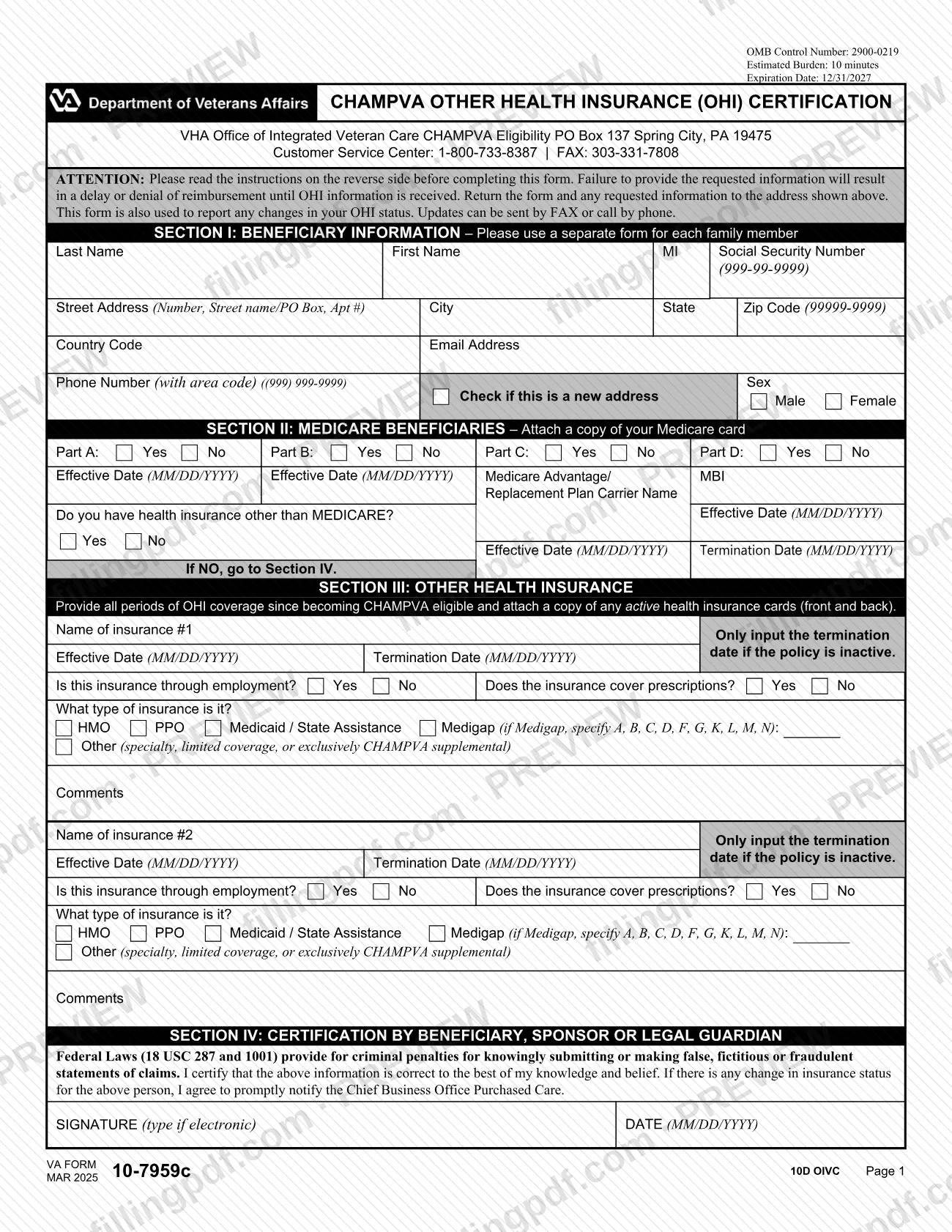
Form 10-7959c is the CHAMPVA Other Health Insurance (OHI) Certification, the form the VA Veterans Health Administration (VHA) uses to learn about any health insurance a CHAMPVA beneficiary has besides CHAMPVA, including Medicare. Beneficiaries use it when VA asks for their OHI information and again whenever that coverage changes. On FillingPDF you can fill out the form online and download or print the completed PDF; the VA publishes the original at va.gov, and the completed form goes to VA through the channels described below.
Last updated
What is 10-7959c?
VA Form 10-7959c, CHAMPVA Other Health Insurance (OHI) Certification, is the Department of Veterans Affairs form on which a CHAMPVA beneficiary lists Medicare and any other health insurance, with effective and termination dates, so that VA knows which plans pay before CHAMPVA.
The form is issued by the VHA Office of Integrated Veteran Care and belongs to the Civilian Health and Medical Program of the Department of Veterans Affairs (CHAMPVA). It has four sections: beneficiary information, Medicare, other health insurance (two policies per page) and a certification signed by the beneficiary, sponsor or legal guardian.
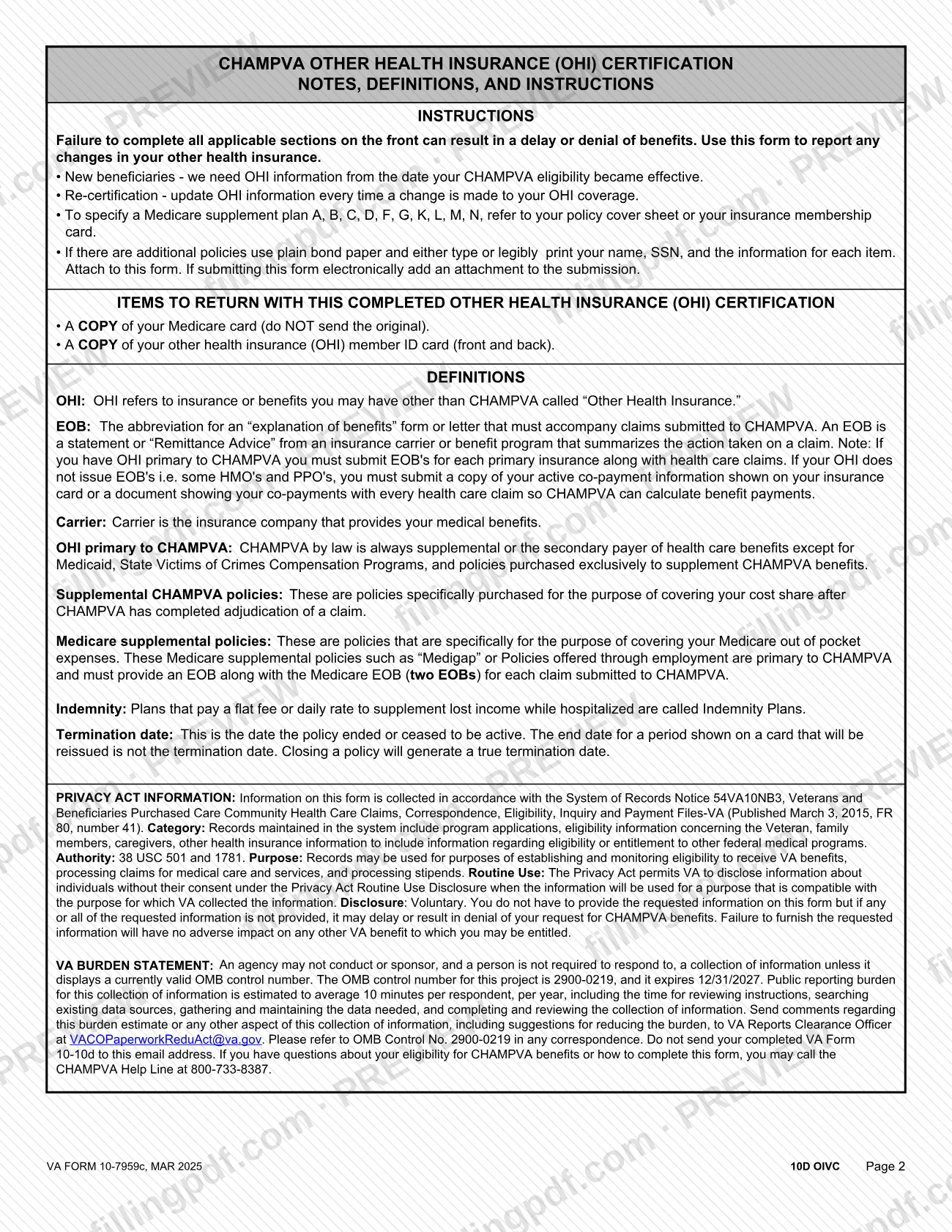
VA explains the terms it uses. OHI means insurance or benefits other than CHAMPVA. By law CHAMPVA is the secondary payer, except for Medicaid, State Victims of Crimes Compensation Programs and policies bought exclusively to supplement CHAMPVA. Medicare supplemental ("Medigap") policies and policies offered through employment are primary to CHAMPVA.
The form is not the application for CHAMPVA. That is VA Form 10-10d, Application for CHAMPVA Benefits, which must be submitted first if you have not yet applied. VA also offers a Spanish version, Formulario VA 10-7959c.
Who needs to file 10-7959c?
Two groups use Form 10-7959c, according to the VA's page for the form:
- People who recently applied for CHAMPVA benefits and were asked for their other non-VA health insurance information.
- People already enrolled in CHAMPVA who need to report updates to their other non-VA health insurance, such as Medicare.
New beneficiaries must give OHI information from the date their CHAMPVA eligibility became effective. Enrolled beneficiaries update their information every time their OHI coverage changes.
Complete a separate form for each family member. The certification in Section IV is signed by the beneficiary, the sponsor or a legal guardian.
If you have not applied for CHAMPVA yet, do not start with this form: submit VA Form 10-10d first. VA says you can give your other health insurance information while applying for CHAMPVA online.
When to file 10-7959c
Submit Form 10-7959c when VA asks for your other health insurance information after you apply for CHAMPVA, and again whenever your OHI changes. The instructions say to update the information every time a change is made to your OHI coverage, and the form also serves to report changes in your OHI status. New beneficiaries list coverage from the date their CHAMPVA eligibility became effective. The form prints no calendar deadline, but it warns that missing information delays or denies reimbursement until the OHI information is received. Enter a termination date only when a policy is inactive; a card's end date does not count if the card will be reissued.
Documents you need
- A copy of your Medicare card, if you are a Medicare beneficiary (Section II). Do not send the original.
- A copy of the member ID card, front and back, for each other health insurance policy that is active (Section III).
- Additional policies, if you have more than the two listed on the form: a sheet of plain bond paper, typed or legibly printed, with your name, SSN and the information for each item, attached to the form.
- A separate completed form for each family member, because Section I allows one beneficiary per form.
- When submitting the form electronically, the cards and any extra sheet added as an attachment to the submission.
How to fill out 10-7959c
Enter the beneficiary's identity
In Section I, enter the beneficiary's last name, first name, middle initial and Social Security Number (999-99-9999). Use a separate form for each family member.
Add address and contact details
Enter the street address, city, state, ZIP code (99999-9999), country code, email address and phone number with area code. Check Check if this is a new address if it has changed, and mark Male or Female.
Answer the Medicare questions
In Section II, mark Yes or No for Part A, Part B, Part C and Part D and enter each Effective Date as MM/DD/YYYY. For Part C, give the Medicare Advantage/Replacement Plan Carrier Name, and enter the MBI where the form asks.
Say whether you have other insurance
Mark Yes or No to Do you have health insurance other than MEDICARE? and give its effective date. If you mark No, go to Section IV.
Describe your first other policy
In Section III, enter the Name of insurance #1 and its Effective Date. Enter a Termination Date (MM/DD/YYYY) only if the policy is inactive.
Complete the policy details
Mark whether the insurance is through employment and whether it covers prescriptions. Choose the type: HMO, PPO, Medicaid / State Assistance, Medigap (with the plan letter) or Other, and add any Comments.
Add a second policy
Repeat the same entries for Name of insurance #2. For more policies, attach a plain bond paper sheet with your name, SSN and the same information for each item.
Sign and date the certification
In Section IV, the beneficiary, sponsor or legal guardian signs (type the signature if the form is completed electronically) and enters the DATE as MM/DD/YYYY.
Review and download the PDF
Check every section, then download or print the completed PDF from FillingPDF. Gather copies of your Medicare card and other insurance cards, front and back, and send them as described under How to submit.
How to submit 10-7959c
You can send Form 10-7959c by mail, by fax or online, and VA also accepts updates by phone.
- Mail: VHA Office of Integrated Veteran Care, CHAMPVA Eligibility, PO Box 137, Spring City, PA 19475. Include copies of your cards, as listed under required documents.
- Fax: 303-331-7808. The form says updates to your OHI status can be sent by fax.
- Phone: the CHAMPVA Customer Service Center at 1-800-733-8387; the form says updates can be given by phone.
- Online: VA's page says that if you applied for CHAMPVA online you should use VA's online tool to submit this form; if you applied by mail, download the PDF and mail it. The tool is at https://www.va.gov/family-and-caregiver-benefits/health-and-disability/champva/submit-other-insurance-form-10-7959c/introduction.
If you send the form electronically, add the supporting documents as an attachment. FillingPDF lets you fill out and download the PDF; submission follows the channels above.
Common mistakes to avoid
- Listing several family members on one form; Section I says to use a separate form for each family member.
- Mailing your original Medicare card; the instructions say to send a copy and not the original.
- Copying only the front of an insurance card; the instructions ask for the front and back of the member ID card.
- Entering a termination date for a policy that is still active; the date goes in only if the policy is inactive.
- Using the end date printed on a card that will be reissued as the termination date; a true termination date comes from closing the policy.
- Leaving applicable sections blank, which VA says can delay or deny benefits or reimbursement until the OHI information is received.
- Checking Medigap without writing the plan letter (A, B, C, D, F, G, K, L, M or N) from your policy cover sheet or membership card.
- Submitting without a signature and date in Section IV; the form says to type the signature if completing it electronically.
- Sending this form before applying for CHAMPVA; VA says to submit VA Form 10-10d first.
Frequently asked questions
What is VA Form 10-7959c used for?
VA Form 10-7959c is the CHAMPVA Other Health Insurance (OHI) Certification. CHAMPVA beneficiaries use it to report Medicare and any other health insurance, with effective and termination dates, and to report later changes in that coverage.
Who has to complete form 10-7959c?
People who recently applied for CHAMPVA and were asked for their other non-VA insurance information, and enrolled beneficiaries who need to report updates such as Medicare. Each family member needs a separate form. If you have not applied for CHAMPVA, submit VA Form 10-10d first.
Where do I mail or fax the CHAMPVA OHI form?
Mail it to VHA Office of Integrated Veteran Care, CHAMPVA Eligibility, PO Box 137, Spring City, PA 19475, or fax it to 303-331-7808. The form says status updates can also be given by phone at 1-800-733-8387.
Can I submit Form 10-7959c online?
Yes, if you applied for CHAMPVA online. VA says to use its online tool for this form in that case. If you applied by mail, download the PDF and mail it. Online submissions need the supporting documents attached.
What do I need to send with Form 10-7959c?
Send a copy, never the original, of your Medicare card if you have Medicare, and a copy of the front and back of your other health insurance member ID card. Extra policies go on plain bond paper with your name and SSN.
When do I update my other health insurance with CHAMPVA?
Every time your OHI coverage changes. New beneficiaries report coverage from the date their CHAMPVA eligibility became effective. The form prints no calendar deadline, but incomplete OHI information can delay or deny reimbursement.
What is a termination date on the OHI form?
It is the date a policy ended or stopped being active. Enter it only if the policy is inactive. The end date on a card that will be reissued is not a termination date; closing the policy generates a true one.
Who signs the CHAMPVA Other Health Insurance Certification?
The beneficiary, the sponsor or a legal guardian signs Section IV and dates it MM/DD/YYYY. By signing, the person certifies the information is correct and agrees to promptly report changes in insurance status. The signature may be typed if the form is completed electronically.
Can I fill out Form 10-7959c online on FillingPDF?
You can fill out the PDF online on FillingPDF and download or print it. FillingPDF is an independent service and does not submit the form to VA; you send it by mail, fax or VA's online tool.
Ready to fill out 10-7959c?
Fill out 10-7959c now